


 Video Converter Ultimate
 Perekam Layar
 Perbaikan Video
 Unduhan Aman
Mengapa Video Twitter Tidak Bersuara? Mari Perbaiki Ini
Twitter berfungsi sebagai salah satu platform jejaring sosial online paling terkenal saat ini. Platform ini khususnya menjadi pusat bagi orang-orang untuk tetap mendapat informasi tentang berita harian dan berkomunikasi melalui pertukaran tweet. Namun, tantangan umum muncul ketika mencoba menonton video, tetapi muncul masalah video Twitter tidak ada suara. Demikian pula, masalah dapat terjadi saat mengeklik gambar atau GIF, yang mengakibatkan gambar tidak termuat. Gangguan ini bisa sangat merepotkan dan cenderung sering muncul di beberapa platform yang paling sering digunakan. Menanggapi kekhawatiran ini, kami menyajikan panduan lengkap yang dirancang untuk membantu Anda mengatasi masalah ketika video Twitter tidak mengeluarkan suara.

Bagian 1. Mengapa Video Tidak Bersuara di Twitter
Video di Twitter mungkin tidak bersuara karena berbagai alasan, sering kali berasal dari masalah teknis atau pengaturan terkait pengguna. Oleh karena itu, bagian ini akan membantu Anda mengidentifikasi alasannya dan nantinya mendapatkan informasi yang baik tentang solusi terbaik untuk digunakan.
Alasan 1. Masalah Aplikasi atau Browser Twitter
Masalah audio di video Twitter mungkin berasal dari kendala dalam browser atau aplikasi Twitter yang digunakan. Adanya versi software yang ketinggalan jaman atau tidak kompatibel dapat menyebabkan gangguan pada pemutaran audio.
Alasan 2. Masalah Jaringan
Kinerja jaringan memainkan peran penting dalam mempengaruhi pengalaman pemutaran video Twitter. Jika tidak ada suara, kualitas jaringan yang tidak memadai dapat mengakibatkan pemutaran video terdistorsi, yang tidak hanya memengaruhi aspek visual tetapi juga aspek pendengaran konten.
Alasan 3. Video dengan File Audio Rusak
Berikutnya adalah kemungkinan kerusakan file. Jika file video rusak, hal ini dapat menyebabkan hilangnya data audio di dalam video. Hal ini memengaruhi pengalaman pemutaran konten video secara keseluruhan.
Alasan 4. Video dan Audio Tidak Sinkron
Selain kerusakan file video, alasan lain yang mungkin menyebabkan tidak adanya suara video adalah konflik pada pengaturan waktunya. Masalah ini biasanya muncul karena proses perekaman atau pengeditan video yang tidak tepat, sehingga menyebabkan ketidaksesuaian yang jelas antara komponen visual dan audio. Audio yang tidak sinkron dengan video adalah kejadian umum, dan hal ini menjadi terlihat ketika terjadi gangguan pada koordinasi waktu antara kedua elemen media tersebut.
Alasan 5. Cache di Twitter
Ke depannya, berikut cookie dan cachenya. Kurangnya pengalaman audio dengan video Twitter mungkin disebabkan oleh potensi konflik yang timbul dari cookie atau cache yang disimpan oleh browser atau aplikasi Twitter.
Bagian 2. Cara Memperbaiki Tidak Ada Suara di Video Twitter
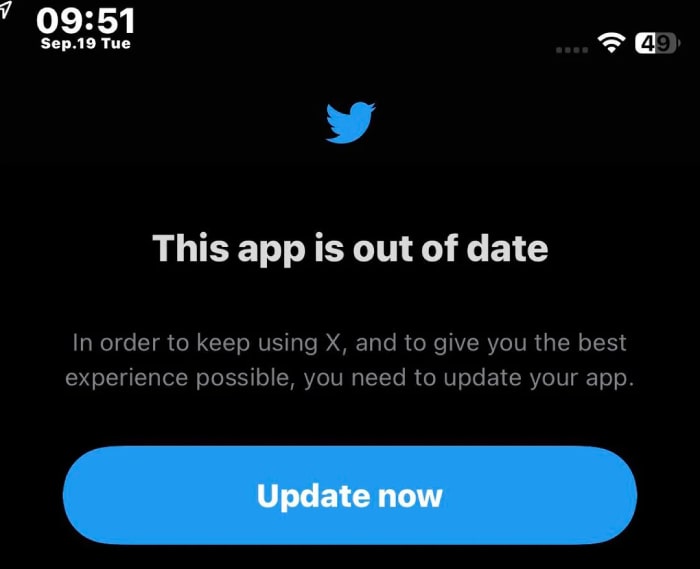
Solusi 1. Perbarui Aplikasi Twitter
Pastikan pembaruan rutin dilakukan pada aplikasi Twitter. Hal ini penting ketika mengalami masalah suara saat memutar video Twitter, yang mungkin disebabkan oleh konflik atau ekstensi yang memengaruhi pemutaran audio dalam browser atau aplikasi Anda. Pecahkan masalah potensi konflik ini dan verifikasi bahwa browser dan aplikasi Anda beroperasi pada versi terbaru. Dengan demikian, Anda dapat secara efektif mengatasi dan mengatasi masalah kompatibilitas apa pun yang mungkin timbul jika Anda selalu memperbarui aplikasi atau perangkat lunak. Hal ini tidak hanya akan meningkatkan kinerja sistem secara keseluruhan tetapi juga memainkan peran penting dalam menjaga pengalaman pemutaran audio yang lancar, terutama saat mengakses konten multimedia.
Solusi 2. Miliki Jaringan Internet yang Kuat
Selalu periksa keandalan koneksi internet Anda setiap kali Anda mengakses video di Twitter. Jaringan yang kuat dapat menghindari kemungkinan masalah audio pada konten video Anda. Oleh karena itu, penting untuk selalu memeriksa tes kecepatan dan mengistirahatkan router sesuai kebutuhan.
Solusi 3. Perbaiki File yang Rusak
Solusi terbaik untuk memperbaiki file yang rusak adalah menggunakan alat perbaikan seperti Video Repair yang dipilih oleh FVC. Perangkat lunak ini mampu mengatasi berbagai tantangan pemutaran video, karena fungsinya mencakup perbaikan video Twitter yang tidak bersuara. Selain itu, alat ini menunjukkan kemampuan beradaptasi dengan memperbaiki video definisi tinggi secara mulus, bahkan yang beresolusi hingga 16K, sehingga keluaran yang diperbaiki tetap mempertahankan kualitas aslinya tanpa kompromi. Hal ini membuat FVC Video Repair menjadi alat yang sangat penting, bukan hanya untuk memperbaiki masalah pemutaran umum, tetapi juga untuk menangani berbagai sumber video dan menjaga kualitas video tetap optimal selama proses perbaikan. Dengan demikian, ini adalah solusi praktis jika Anda mencari alat untuk menyelamatkan kenangan berharga atau konten penting Anda dari masalah kerusakan video. Bagaimana cara Anda memperbaiki video yang rusak dengan FVC? Lihat langkah-langkahnya di bawah ini.
Free DownloadUntuk Windows 7 atau yang lebih baruSecure Download
Free DownloadUntuk MacOS 10.7 atau yang lebih baruSecure Download
Langkah 1. Jalankan perangkat lunak setelah proses instalasi selesai.
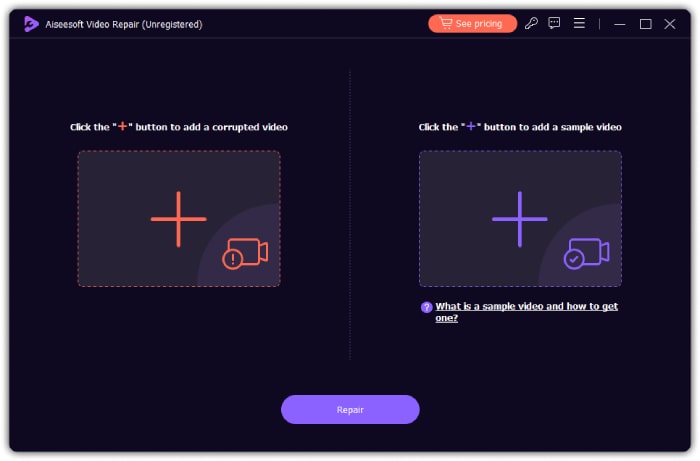
Langkah 2. Klik tombol Add berwarna merah untuk mengunggah video yang rusak dan tombol Add berwarna biru untuk mengunggah video sampel.
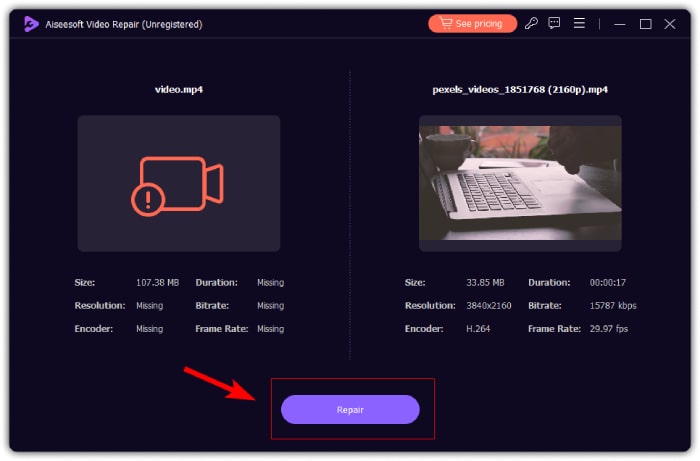
Langkah 3. Setelah terunggah, klik tombol Repair untuk memulai proses perbaikan. Setelah proses selesai, alat ini akan memungkinkan Anda memperbaiki video lain, mengekspor hasilnya, dan mempratinjau video.
Solusi 4. Sinkronkan Video dan Audio
Untuk video Anda yang tidak selaras dengan audionya, fitur Sync Audio dari Video Converter Ultimate adalah alat terbaik untuk digunakan. Alat ini menyederhanakan proses mencapai keselarasan audio-video yang sempurna. Selain itu, alat ini memberi Anda kemampuan untuk meningkatkan konten dengan menyesuaikan waktu elemen audio secara mudah, sehingga memberikan sentuhan akhir yang rapi dan profesional pada hasil Anda. Untungnya, alat ini memiliki langkah-langkah yang sangat mudah diikuti, yang tercantum di bawah ini.
Unduh GratisUntuk Windows 7 atau yang lebih baruUnduhan Aman
Unduh GratisUntuk MacOS 10.7 atau yang lebih baruUnduhan Aman
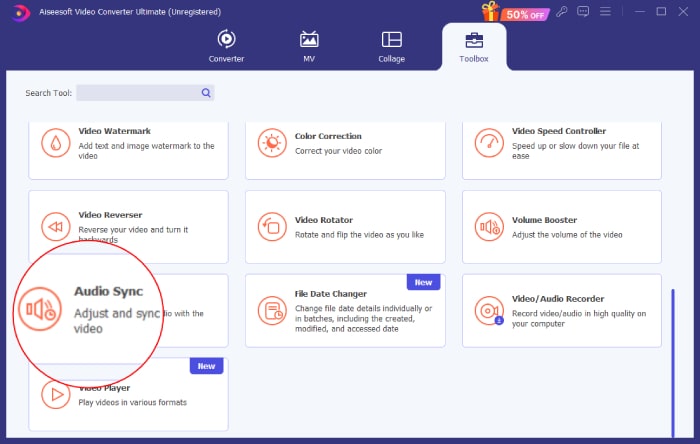
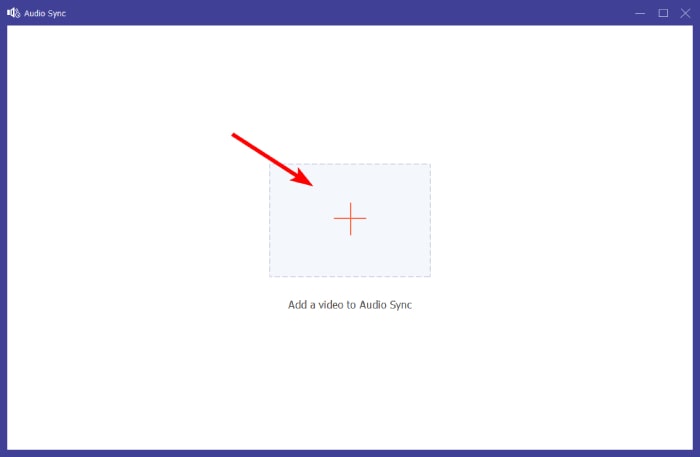
Langkah 1. Menggunakan PC Anda, jalankan perangkat lunak lalu buka menu tab Toolbox. Gulir ke bawah hingga Anda menemukan alat Sync Audio dan klik.
Langkah 2. Klik tombol Plus pada jendela berikutnya untuk mengunggah video Twitter yang tidak ada suaranya.
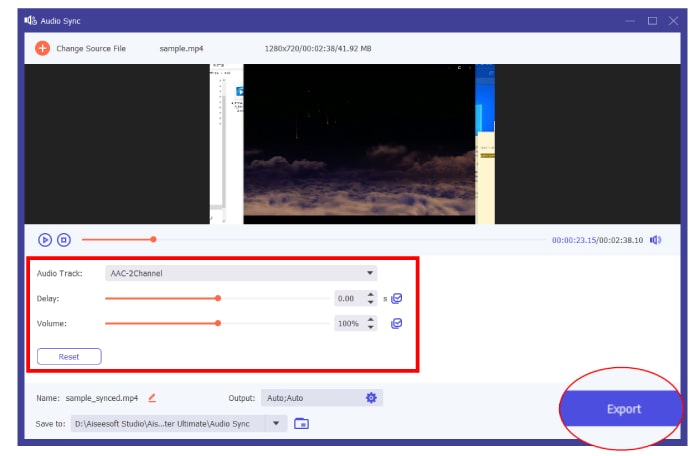
Langkah 3. Setelah itu, mulailah menyesuaikan preset untuk mendapatkan keselarasan terbaik, lalu klik tombol Export setelah selesai.
Solusi 5. Hapus Cache
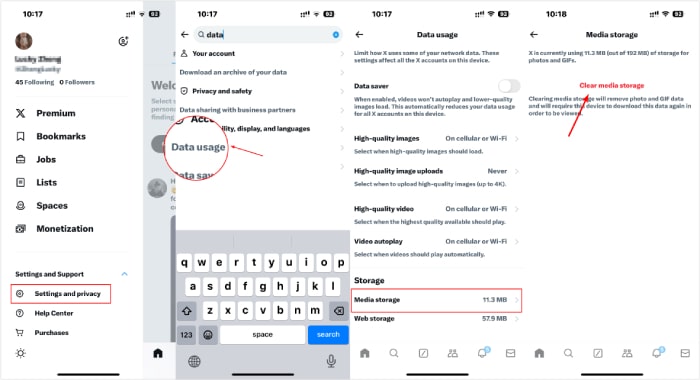
Terakhir, luangkan waktu untuk menghapus cache aplikasi. Untuk menghapus cookie, navigasikan ke pengaturan browser Anda dan lakukan pencarian cookie tertentu yang ingin Anda hapus. Setelah Anda berhasil menghapus cookie, verifikasi apakah audio video Twitter Anda berfungsi di perangkat Anda.
Bagian 3. FAQ tentang Video Twitter
Mengapa video di Twitter tidak bersuara?
Video di Twitter mungkin tidak bersuara karena beberapa faktor, seperti masalah aplikasi, masalah jaringan, masalah file video, dan banyak lagi.
Mengapa video Twitter tidak dapat diputar?
Salah satu alasan umum mengapa video tidak diputar di Twitter adalah koneksi internet yang buruk.
Bisakah saya mematikan suara video di Twitter?
Ya, Anda dapat mematikan suara video di Twitter. Untuk melakukannya, cukup ketuk ikon speaker yang terletak di pojok kanan bawah video untuk menonaktifkan atau mengaktifkan suara.
Kesimpulan
Sebagai penutup, jika Anda mengalami masalah tidak ada suara pada video Twitter, ada berbagai faktor yang perlu Anda pertimbangkan untuk mengidentifikasi dan menerapkan solusi yang paling tepat untuk mengatasinya. Jika Anda menduga bahwa file video-lah yang bermasalah, maka Anda dapat memperbaikinya menggunakan FVC Video Repair dan FVC Video Converter Ultimate.
-
 Cara Menggunakan FFmpeg untuk Memperbaiki Video yang Rusak | Panduan 2025
 Pelajari cara menggunakan FFmpeg untuk memperbaiki video yang rusak dengan mudah dan temukan semua fitur utamanya, kelebihan dan kekurangannya, serta perbedaannya dari alat perbaikan video lainnya.
-
 5 Metode untuk Memperbaiki File MOV yang Rusak
 Temukan solusi efektif untuk perbaikan MOV. Pelajari cara memperbaiki file MOV Anda yang rusak dengan mudah untuk memastikan streaming video tanpa gangguan dan aman.
-
 3 Cara Mengubah Ukuran Gambar untuk Twitter Tanpa Kehilangan Kualitas
 Untuk mengubah ukuran gambar untuk Twitter, Anda harus memiliki pengubah ukuran foto di tangan Anda. Tidak punya? Kemudian pilih pada daftar.
