


 Video Converter Ultimate
 Perekam Layar
 Perbaikan Video
 Unduhan Aman
[Memperbaiki] Panduan Cepat dan Manual untuk Memperbaiki Kode Kesalahan 102630
Pernah mengalami pusing karena kode error 102630 saat ingin menikmati konten video favorit? Kami paham; rasanya seperti harus memecahkan teka-teki rumit tepat di tengah waktu hiburan. Namun, jangan khawatir – kami siap membantu! Dalam panduan lengkap ini, kami tidak hanya akan memberikan solusi sederhana dan efektif untuk mengatasi jenis error video ini, tetapi juga memandu Anda lewat proses pemecahan masalah langkah demi langkah agar perbaikannya lancar tanpa repot. Jadi, jika Anda sudah lelah garuk-garuk kepala karena gangguan digital ini dan selalu ketinggalan acara favorit, lanjutkan membaca untuk menemukan solusi yang dapat menenangkan pikiran Anda. Mari kita mulai dan ucapkan selamat tinggal pada semua masalah video bersama!

Bagian 1. Apa itu Kode Kesalahan 102630
Error code 102630 merupakan error yang biasa muncul saat menonton atau streaming online sehingga mengganggu penonton. Berikut kemungkinan penyebab munculnya video error ini:
Masalah Konektivitas Jaringan.
Kode kesalahan 102630 mungkin menandakan adanya masalah pada koneksi jaringan perangkat. Hal ini dapat disebabkan oleh masalah pada penyedia layanan internet, sinyal Wi-Fi yang lemah atau tidak stabil, atau masalah pada perangkat keras jaringan.
Server atau Layanan Tidak Tersedia.
Kesalahan mungkin muncul ketika server atau layanan yang Anda coba akses sedang tidak aktif atau sedang menjalani pemeliharaan. Biasanya, masalah ini teratasi dengan sendirinya setelah server atau layanan kembali online.
Malfungsi Perangkat Lunak atau Sistem.
Penyebab potensial terletak pada perangkat lunak atau sistem itu sendiri, di mana bug, gangguan, atau masalah kompatibilitas dapat memicu kode kesalahan 102630. Hal ini dapat disebabkan oleh konfigurasi yang tidak tepat atau file yang rusak.
Pengaturan Firewall atau Keamanan.
Kode kesalahan 102630 mungkin disebabkan oleh firewall atau pengaturan keamanan yang menghalangi koneksi ke server atau layanan. Hal ini mungkin disebabkan oleh konfigurasi keamanan yang terlalu ketat atau konflik dengan perangkat lunak atau pengaturan lain.
Timeout atau Kegagalan Permintaan.
Gangguan komunikasi antara klien dan server, yang terlihat sebagai batas waktu habis atau kegagalan permintaan, dapat menyebabkan kode kesalahan 102630. Hal ini dapat dipengaruhi oleh faktor-faktor seperti kecepatan jaringan yang lambat, kemacetan, atau masalah dengan respons server.
Disclaimer: Penting untuk disadari bahwa ini hanyalah kemungkinan umum, dan penyebab spesifik dari kode error 102630 dapat berbeda-beda tergantung pada karakteristik khusus perangkat lunak atau sistem yang digunakan. Mengidentifikasi akar masalah sering kali memerlukan pendekatan yang terarah dan mempertimbangkan konteks spesifik saat error tersebut muncul.
Bagian 2. Cara Cepat Memperbaiki Kode Kesalahan 102630
Memperbaiki video rusak yang tidak dapat diputar karena berbagai faktor, seperti kode error video 102630 dan lainnya, dapat ditangani secara efisien dengan alat Video Repair. Alat terbaik untuk ini adalah FVC Video Repair. Alat ini memanfaatkan algoritma AI terbaru untuk proses pemulihan yang sepenuhnya otomatis, memastikan resolusi tinggi, frame rate, dan bitrate tetap terjaga pada format seperti MP4, MOV, dan 3GP. Dengan antarmuka yang ramah pengguna, tingkat keberhasilan perbaikan yang tinggi, dan fitur pratinjau untuk konfirmasi setelah perbaikan, alat ini hanya memerlukan sedikit usaha. Untuk menggunakannya, ikuti langkah-langkah berikut:
Langkah 1. Pertama, di situs resmi mereka, klik tombol unduh gratis.
Free DownloadUntuk Windows 7 atau yang lebih baruSecure Download
Free DownloadUntuk MacOS 10.7 atau yang lebih baruSecure Download
Langkah 2. Sekarang, jalankan alat tersebut dengan mengklik tombol Plus Merah untuk menambahkan video yang berisi kode error 102630, dan tambahkan video sampel dengan mengklik tombol Plus Biru.
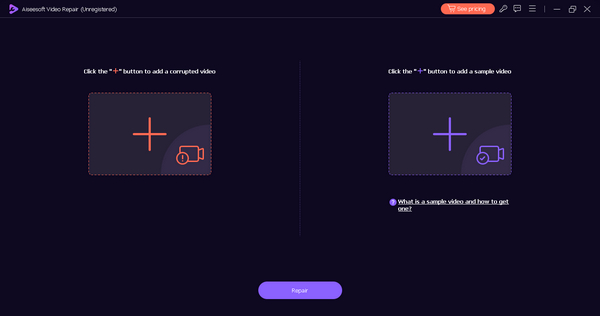
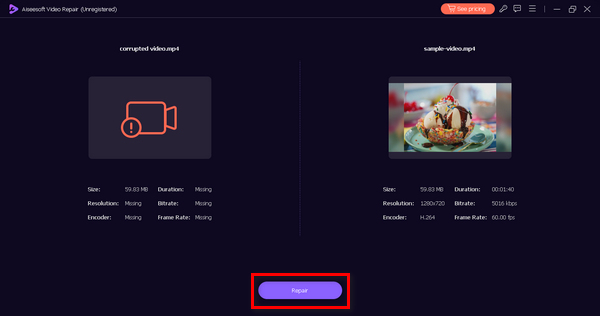
Langkah 3. Untuk memulai proses perbaikan, klik tombol Repair.
Langkah 4. Terakhir, klik tombol Preview untuk memeriksa apakah kode error 102630 sudah berhasil diatasi. Jika sudah sesuai, Anda dapat menyimpan file tersebut.
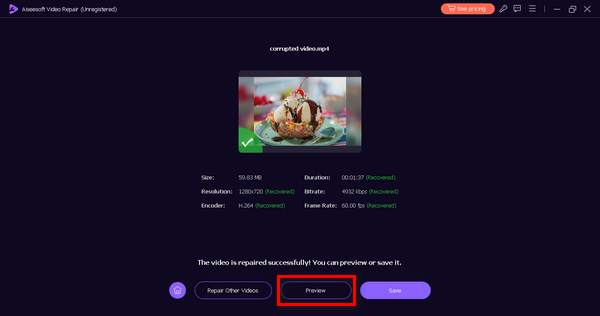
Perbaikan Video FVC memang merupakan alat serbaguna yang melayani segala jenis masalah dan masalah video. Dan dengan antarmuka yang mudah diikuti, semua orang dapat menggunakannya tanpa perlu merasa bingung dan stres.
Bagian 3. Metode Manual untuk Memperbaiki Kode Kesalahan 102630
Berikut cara manual yang bisa Anda lakukan untuk memperbaiki kode error 102630:
Metode 1: Memeriksa Koneksi Internet
Koneksi internet yang stabil penting untuk streaming video. Kode error 102630 dapat terjadi jika koneksi lemah atau tidak stabil. Dengan memeriksa dan memastikan koneksi internet yang kuat, Anda mengurangi kemungkinan gangguan selama pemutaran, sehingga secara efektif mengatasi kesalahan tersebut.
Untuk mengatasinya, Anda harus menggunakan alat uji kecepatan (speed test) online untuk memeriksa koneksi internet Anda. Jika lambat, coba mulai ulang router atau sambungan internet Anda. Langkah sederhana ini sering kali dapat membuat semuanya berjalan lebih baik. Anda juga bisa beralih ke jaringan lain jika memungkinkan untuk meningkatkan pengalaman streaming Anda. Koneksi yang stabil dan kuat sangat penting untuk menghindari gangguan saat pemutaran dan mengatasi masalah seperti kode error 224002, 102630, dan lainnya. Namun, jika koneksi internet Anda sudah kuat dan kode error ini masih muncul, lanjutkan ke metode 2.
Metode 2: Memperbarui Peramban Web
Memperbarui browser web Anda sangatlah penting, karena versi yang lebih baru sering kali menyertakan perbaikan bug dan peningkatan. Pembaruan ini meningkatkan kompatibilitas browser dengan berbagai situs web dan layanan streaming, mengurangi kemungkinan terjadinya kesalahan seperti kode kesalahan 102630.
Untuk memperbarui browser Chrome web Anda, ikuti langkah-langkah di bawah ini:
Langkah 1. Di Chrome Anda, klik tombol Customize Control di pojok kanan atas.
Langkah 2. Lanjutkan ke menu Help.
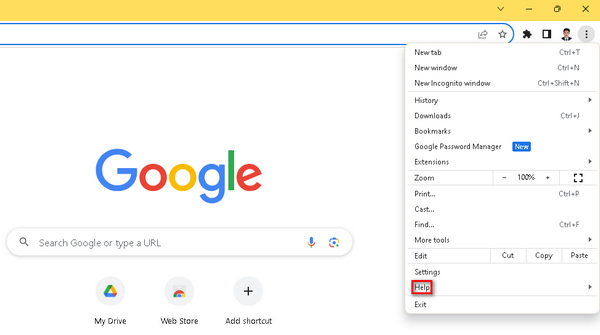
Langkah 3. Setelah itu, pilih About Google Chrome. Sekarang, Anda akan melihat opsi Update Google Chrome jika ada versi baru yang tersedia, dan Anda perlu mengkliknya. Ikuti petunjuk di layar. Jika tidak ada, Anda akan melihat tombol Relaunch.
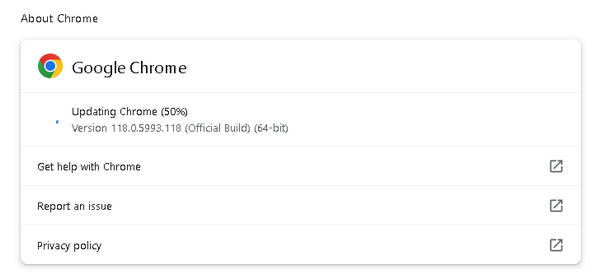
Menggunakan browser yang sudah usang dapat menimbulkan masalah kompatibilitas yang bisa diatasi dengan melakukan pembaruan. Selain itu, ini juga merupakan solusi universal untuk mengatasi masalah video yang tidak dapat diputar di Chrome. Itulah mengapa penting untuk memperbaruinya setiap kali tersedia pembaruan.
Metode 3: Mematikan Ekstensi dan Add-on Browser
Ekstensi dan add-on browser terkadang dapat merusak fungsi normal situs web dan layanan, termasuk streaming video. Konflik antara ekstensi ini dan platform streaming dapat memicu kode kesalahan 102630. Dengan mematikan atau menonaktifkan ekstensi dan add-on browser, Anda menghilangkan potensi sumber gangguan, mendorong pemutaran video lebih lancar, dan menyelesaikan kesalahan.
Langkah-langkah Menghapus Ekstensi di Chrome:
Langkah 1. Buka Chrome Anda.
Langkah 2. Klik tombol Customize Control dan cari Extensions.
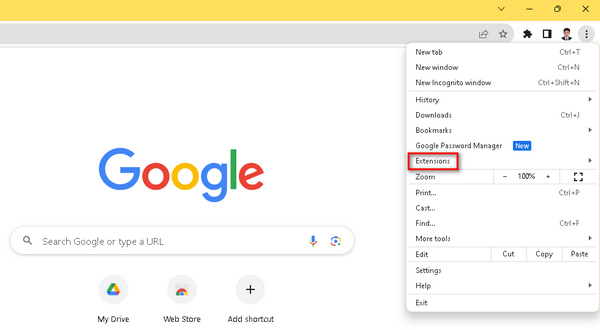
Langkah 3. Di sana Anda dapat menemukan daftar ekstensi dan add-on yang bisa Anda hapus dengan bebas.
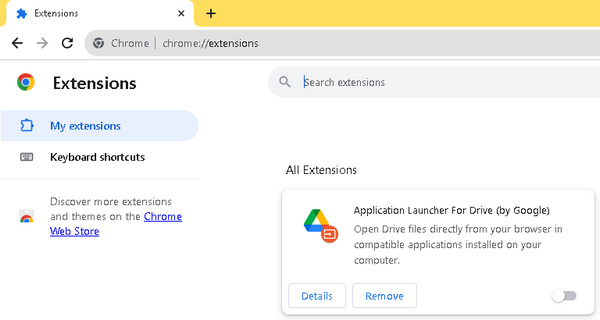
Ekstensi pihak ketiga yang tidak diperlukan berpotensi bentrok dengan pemutar video sehingga menyebabkan gangguan selama pemutaran. Saat menangani kode kesalahan video seperti kode kesalahan 102630, penting untuk dipahami bahwa ekstensi ini dapat menyebabkan gangguan. Untuk meningkatkan pengalaman streaming Anda, Anda tidak hanya harus memperbarui browser Anda, tetapi juga penting untuk menghapus ekstensi apa pun yang tidak diperlukan.
Bagian 4. FAQ tentang Kode Kesalahan 102630
Apa kode kesalahan 102630 di iview?
Kode kesalahan 102630 di iview biasanya menunjukkan masalah pemutaran video. Error ini mungkin muncul karena berbagai faktor, seperti koneksi internet yang tidak stabil, masalah server, atau masalah kompatibilitas. Untuk mengatasinya, pertimbangkan untuk memeriksa koneksi internet Anda, memperbarui browser Anda, dan memastikan kompatibilitas dengan persyaratan tampilan.
Mengapa saya terus mendapatkan kesalahan pemutaran video?
Kesalahan pemutaran video terus-menerus dapat disebabkan oleh beberapa masalah. Penyebab umumnya termasuk koneksi internet yang tidak stabil, versi browser yang ketinggalan jaman, format video yang tidak kompatibel, atau konflik dengan ekstensi browser. Untuk mengatasinya, coba langkah pemecahan masalah seperti memeriksa koneksi internet, memperbarui browser, dan mematikan ekstensi browser yang tidak diperlukan.
Apa kode kesalahan 102630 di YouTube?
Kode kesalahan 102630 di YouTube adalah kesalahan pemutaran yang mungkin terjadi karena masalah jaringan, masalah browser, atau konflik dengan ekstensi. Untuk mengatasinya, periksa koneksi internet Anda, perbarui browser Anda, dan pertimbangkan untuk menonaktifkan atau memperbarui ekstensi browser. Selain itu, memastikan perangkat Anda memenuhi persyaratan sistem YouTube dapat membantu mencegah kesalahan ini.
Kesimpulan
Kode error 102630 menjadi lebih mudah dipahami dengan panduan ini. Dari solusi otomatis seperti alat FVC Video Repair hingga metode manual, pengguna mendapatkan strategi yang menyeluruh. Dilengkapi dengan wawasan dan langkah pemecahan masalah yang strategis, panduan ini memberdayakan pengguna untuk menikmati hiburan digital tanpa gangguan.
-
 Perbaiki Error 0xc00d36c4 dengan 3 Metode Terbukti Ini [2024]
 Mengalami kode kesalahan video 0xc00d36c4 saat memutar video? Ikuti panduan kami untuk langkah cepat mengatasinya dan nikmati pemutaran video tanpa gangguan.
-
 Cara Cepat Memperbaiki Kode Error Video 224002 Secara Efektif
 Apakah Anda kesulitan menemukan solusi terbaik untuk memperbaiki kode kesalahan 224002 dengan cepat? Pelajari di artikel ini dan perbaiki sendiri dengan mudah.
-
 Perbaiki Kesalahan Video 0xc00d36e5 dengan Cepat dan Efektif
 Berjuang dengan kesalahan 0xc00d36e5 saat mencoba memutar video? Pelajari metode sederhana namun efektif untuk memperbaiki kesalahan ini demi pengalaman pemutaran video yang lancar.
