


 Video Converter Ultimate
 Perekam Layar
 Perbaikan Video
 Unduhan Aman
3 Perekam Panggilan Facebook Terbaik - Cara Merekam Panggilan Video Facebook
Bagaimana cara merekam panggilan video Facebook untuk mengabadikan momen berharga antara Anda dan teman serta keluarga? Setelah Facebook melengkapi fitur panggilan video, makin banyak pengguna yang memilih menghubungi orang lain melalui panggilan Facebook daripada panggilan telepon biasa. Namun, sebagai fungsi komunikasi tambahan dari sebuah platform media sosial, fitur ini tidak memiliki fungsi perekaman seperti panggilan telepon. Aplikasi mandiri turunannya—Facebook Messenger—juga tidak memiliki perekam bawaan. Dalam hal ini, Anda dapat mempelajari 3 perekam panggilan Facebook yang mudah digunakan untuk komputer, perangkat iOS, dan ponsel Android beserta panduan terperinci dalam artikel ini.

Bagian 1: Perekam Panggilan Facebook Online Terbaik untuk Windows/Mac
Tanpa mengunduh perangkat lunak pihak ketiga, Anda dapat menggunakan FVC Free Screen Recorder untuk merekam panggilan video Facebook secara online dan gratis. Ini adalah perekam panggilan Facebook yang ramah pengguna dengan antarmuka ringkas serta berbagai fitur yang Anda butuhkan.
- 1. Rekam panggilan Facebook dan video online gratis dengan langkah-langkah sederhana.
- 2. Rekaman audio dan video tanpa kehilangan untuk menjaga video berkualitas tinggi.
- 3. Tidak ada tanda air untuk melindungi kepemilikan Anda.
- 4. Rekaman akan disimpan secara otomatis di perpustakaan media, dan Anda dapat memilih untuk menghapus, mengunduh, dan membagikannya di SNS dengan bebas.
Langkah 1: Buka situs web FVC Free Screen Recorder di browser apa pun. Klik tombol Start Recording untuk memasang peluncur dalam beberapa detik, lalu klik lagi tombol Start Recording untuk menjalankan perekam.

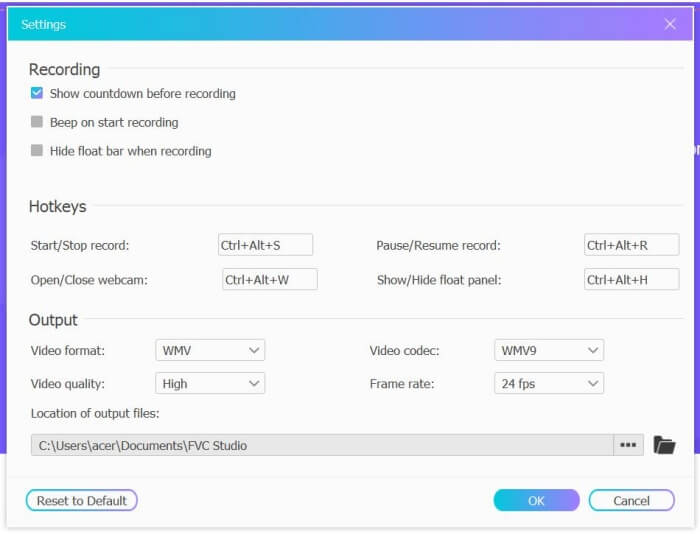
Langkah 2: Klik menu Recording Area untuk memilih layar penuh atau bebas memilih area tertentu. Lalu nyalakan suara Microphone dan Speaker. Untuk menyesuaikan pengaturan video, Anda dapat mengeklik ikon Setting. Anda bisa memilih format MP4, kualitas High, dan 24 fps untuk menjaga kualitas rekaman tetap tinggi. Kemudian klik tombol REC untuk mulai merekam panggilan Facebook.
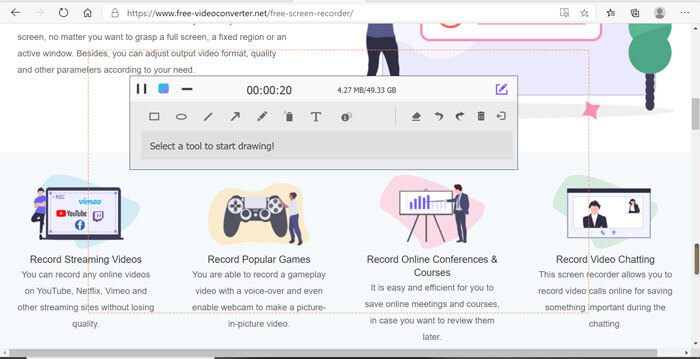
Langkah 3: Akan muncul sebuah kotak alat dengan berbagai alat pengeditan. Anda dapat menambahkan bentuk, teks, dan garis sesuai kebutuhan. Lalu klik ikon Stop untuk menyimpan rekaman Anda ke cloud. Anda dapat mengklik tombol kanan mouse untuk memilih mengunduhnya ke komputer Anda.
Menggunakan perekam panggilan video Facebook online gratis ini adalah cara terbaik bagi pengguna komputer untuk merekam panggilan video Facebook online. Dengan menyesuaikan pengaturan perekaman terlebih dahulu, dapat menyimpan panggilan Facebook dalam format MP4 dengan ukuran kecil dan kualitas tinggi. Jika Anda terbiasa melakukan panggilan Facebook di ponsel, silakan lanjutkan membaca artikel ini.
Bagian 2: Cara Merekam Panggilan Facebook untuk iOS melalui Perekam Default
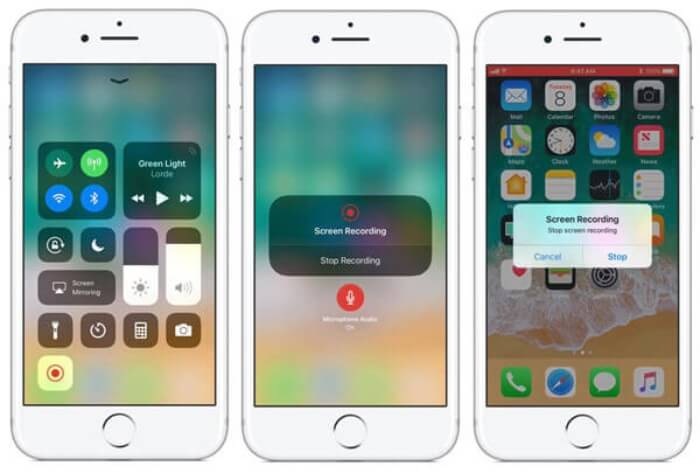
iOS 11 yang diperbarui atau versi yang lebih tinggi memiliki perekam default baru di iPhone dan iPad Anda yang merupakan pilihan terbaik untuk merekam panggilan video Facebook tanpa mengunduh aplikasi apa pun. Di sini Anda dapat mempelajari cara menambahkan perekam panggilan Facebook ke pintasan di pusat kendali dan cara menggunakannya.
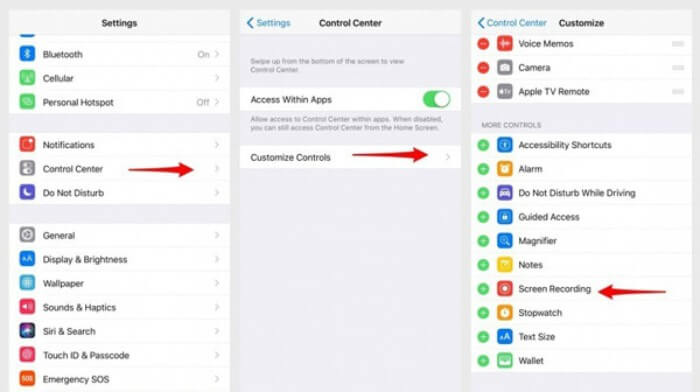
Langkah 1: Ketuk aplikasi Settings di iPhone/iPad Anda dan gulir ke bawah untuk memilih opsi Control Center. Lalu ketuk tab Customize Controls dan temukan fungsi Screen Recording. Ketuk ikon Plus untuk menambahkan fitur ini ke Control Center.
Langkah 2: Usap turun dari bagian atas layar ponsel untuk membuka Control Center dan Anda akan menemukan aplikasi perekam di bagian bawah. Ketuk ikon Screen Recording untuk memulai perekaman, dan Anda bisa memilih merekam video atau hanya merekam trek audio. Jika ingin menghentikannya, ketuk Status Bar merah di bagian atas dan ketuk opsi Stop pada jendela pop-up.
Bagian 3: Perekam Messenger Facebook yang Mudah untuk Android
Beberapa ponsel Android tidak memiliki perekam bawaan, dan ada terlalu banyak perekam panggilan video Facebook untuk dipilih Android. Dengan demikian, Anda dapat mempelajari salah satu perekam terbaik untuk ponsel Android dengan langkah-langkah terperinci di bagian berikut.
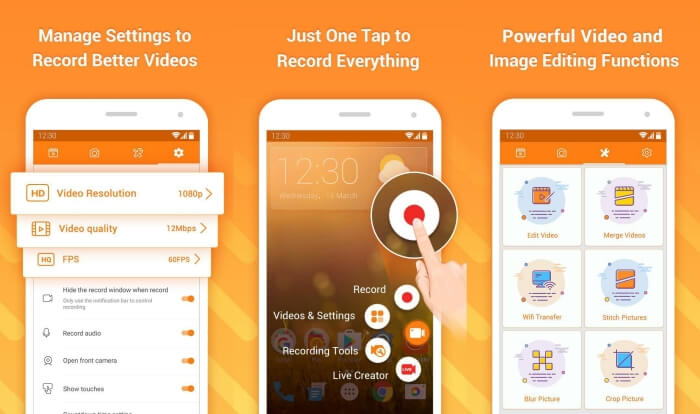
DU Recorder adalah perekam panggilan Facebook yang mudah digunakan untuk Android dan terkenal karena perekamannya yang lancar. Tanpa root, semua orang dapat menggunakannya untuk merekam panggilan Facebook Messenger hanya dengan satu ketukan.
Langkah 1: Jalankan perekam dan akan terlihat empat menu, yaitu rekaman, tangkapan layar, alat pengeditan, dan pengaturan. Pertama, ketuk menu Settings untuk menyesuaikan parameter video. Untuk menjaga kualitas tinggi, Anda dapat memilih resolusi 1080p dan frame rate 30 fps.
Langkah 2: Jangan tutup perekam dan langsung jalankan Facebook Messenger. Maka Anda akan melihat ikon perekam. Ketuk ikon tersebut dan pilih ikon Recording untuk mulai merekam layar dan suara. Anda dapat mengetuknya lagi untuk menghentikan perekaman. Lalu Anda bisa mengetuk ikon Editing untuk memotong rekaman dan menambahkan musik ke dalamnya.
Mungkin Anda juga tertarik:
Bagian 4: FAQ Perekam Panggilan Facebook
1. Dosis Facebook memiliki perekam default untuk merekam panggilan video di PC?
Tidak. Dengan demikian, Anda harus mengandalkan perekam panggilan Facebook profesional lainnya. Jika Anda tidak ingin mengunduh perangkat lunak lain yang akan menempati ruang penyimpanan di komputer Anda, FVC Free Screen Recorder adalah pilihan terbaik Anda.
2. Bagaimana cara memulai obrolan dengan teman di Aplikasi Facebook Messager?
Pertama, buka Facebook Messenger di ponsel Anda, lalu pilih kotak obrolan teman yang ingin Anda hubungi Facebook. Dan sekarang Anda dapat melihat ikon Video, sehingga Anda dapat mengkliknya untuk memulai panggilan video.
3. Format apa yang harus saya pilih untuk menyimpan rekaman saat menggunakan perekam Facebook Messenger?
Baik Anda menggunakan perekam panggilan Facebook di komputer atau ponsel, format terbaik untuk menyimpan panggilan video Facebook adalah MP4. Ini dapat menghemat lebih banyak ruang penyimpanan dan kompatibel dengan semua perangkat.
Kesimpulan
Artikel di atas telah memperkenalkan 3 perekam panggilan video Facebook. Untuk iPhone, iPad, dan beberapa ponsel Android, Anda dapat dengan mudah menggunakan perekam bawaan di ponsel Anda. Jika tidak, Anda dapat memilih perekam apa pun termasuk DU Recorder di Google Play. Untuk PC, FVC Free Screen Recorder adalah pilihan terbaik Anda untuk merekam panggilan Facebook. Jika Anda menemui masalah lain saat menggunakan perekam panggilan Facebook, silakan tinggalkan komentar Anda di bawah.
-
 Ulasan Snagit 2021 - Pro, Kontra, dan Alternatif Terbaik
 Apa alternatif terbaik untuk Snagit? Apakah ada alat penangkap layar seperti Snagit? Posting ini akan mengulas Snagit dan membagikan alternatif terbaik untuk Snagit untuk menangkap layar.
-
 6 Perekam WAV Terbaik yang Tidak Boleh Anda Lewatkan di Desktop dan Online
 Perangkat lunak perekaman WAV terbaik yang kami bagikan dalam artikel ini memiliki berbagai fitur berguna, yang membantu Anda menangkap audio dan suara seperti profesional.
-
 4 Perekam Suara AIFF Gratis Terbaik yang Menghasilkan Audio Berkualitas Tinggi
 Artikel ini membahas tentang AIFF dan beberapa alat paling populer yang dapat Anda gunakan untuk menghasilkan format AIFF berkualitas tinggi.
