


 Video Converter Ultimate
 Perekam Layar
 Perbaikan Video
Jadilah Kritik yang Luas dalam Mengatasi Ketidaksinkronan [Audio & Video]
Besok kamu ada proyek presentasi online untuk kelas. Kamu sedang mencari aplikasi atau perangkat lunak terbaik yang bisa kamu gunakan untuk merekam video agar bisa membuat laporan yang harus dikumpulkan besok. Namun alih-alih menemukan solusi, kekacauan dan masalah mulai bikin kamu overthinking karena audio dan video tidak sinkron. Kamu tidak perlu khawatir dengan situasi ini karena ini hari keberuntunganmu; artikel ini membahas semua yang perlu kamu pelajari untuk mengatasi masalah tersebut.

Bagian 1. Mengapa Audio Tidak Disinkronkan dengan Video?
Audio dan video dapat tidak sinkron karena beberapa alasan, termasuk berikut ini: Siaran atau sambungan antara dekoder kabel/satelit Anda dapat menjadi masalah saat menonton program TV. Pemutar DVD atau Blu-ray DiscTM yang tidak dapat diandalkan atau disk itu sendiri mungkin menjadi penyebabnya jika Anda memiliki salah satu perangkat ini yang terhubung ke TV Anda. Jika sistem home theater Anda terhubung ke TV melalui kabel optik, Anda mungkin melihat jeda audio yang perlu diperbaiki secara manual. Di sisi lain, pengaturan TV Anda bisa jadi penyebabnya.
Bagian 2. 3 Alat Terbaik yang Terbukti: Cara Menyinkronkan Audio dan Video
1. Gunakan Video Converter Ultimate
Ada banyak cara dan perangkat lunak yang tersedia secara online yang dapat membantu mengatasi masalah yang diberikan, dan ini adalah salah satu alat terbaik yang kami sarankan untuk digunakan. Unduh FVC Video Converter Ultimate di komputer Anda, perangkat lunak dengan berbagai fitur untuk menyempurnakan klip video. Salah satu fitur yang ditawarkan dapat memperbaiki masalah sinkronisasi audio dan video klip video di Windows 10 - misalnya - dengan menyesuaikan penundaannya. Ikuti langkah-langkah di bawah ini untuk mengetahui cara menggunakan perangkat lunak:
Langkah 1: Untuk mengunduh perangkat lunak ke desktop, klik tombol Free Download. Lalu instal perangkat lunak dan sesuaikan pengaturan instalasi sesuai keinginan. Jika semuanya sudah benar, jalankan perangkat lunak setelah proses instalasi selesai.
Unduh GratisUntuk Windows 7 atau yang lebih baruUnduhan Aman
Unduh GratisUntuk MacOS 10.7 atau yang lebih baruUnduhan Aman
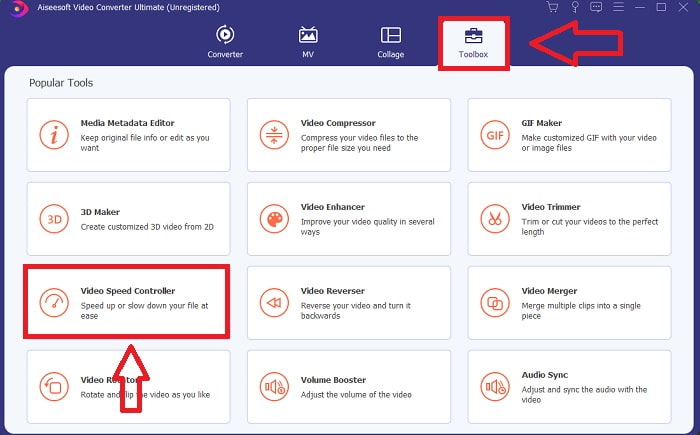
Langkah 2: Pada antarmuka utama, klik fitur Toolbox dan lanjutkan ke Audio Sync.
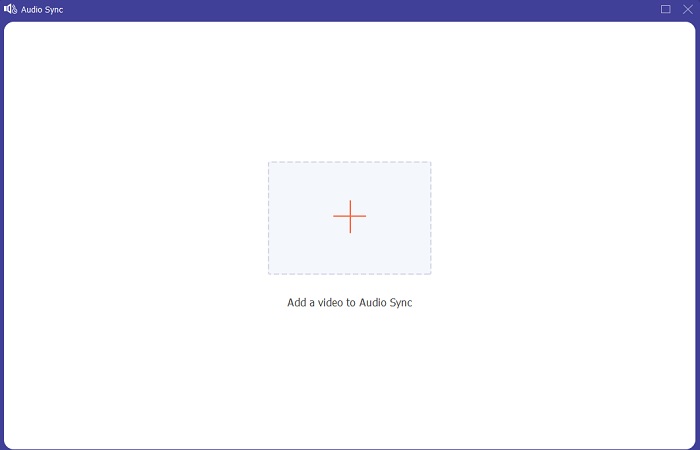
Langkah 3: Tambahkan file apa pun sesuai preferensi Anda dengan mengklik tombol +, lalu lanjutkan mengedit klip video tersebut.
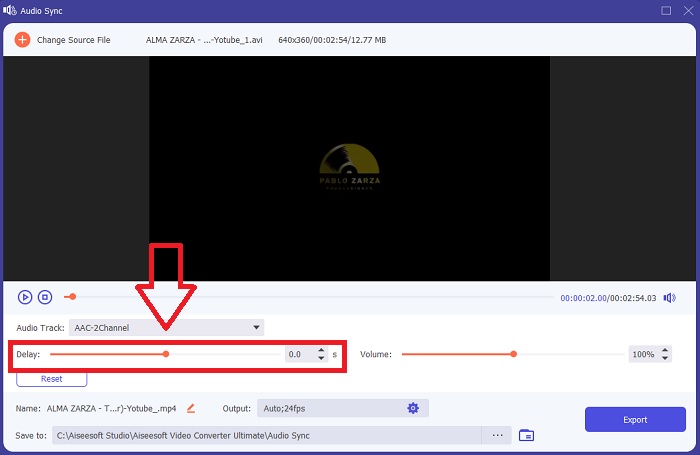
Langkah 4: Sesuaikan slider audio untuk menyinkronkannya dengan klip video. Kamu juga dapat mengubah perangkat keluaran dan menyesuaikan volume klip video.
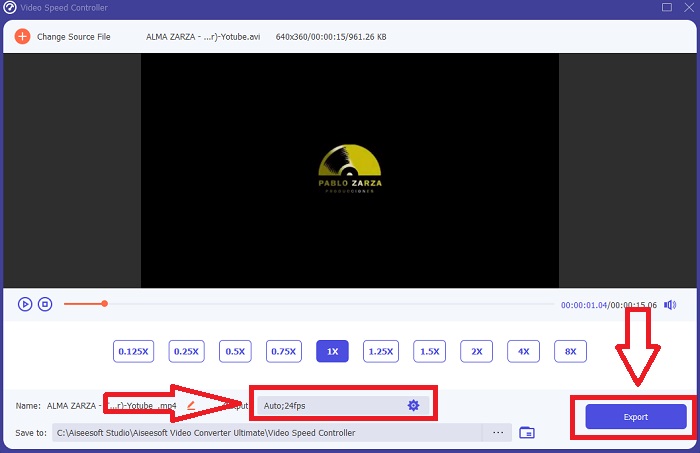
Langkah 5: Jika kamu sudah selesai mengedit sinkronisasi klip video, klik Export dan pilih lokasi penyimpanan file.
2. Gunakan Pemutar Media VLC
VLC media player adalah aplikasi yang tersedia di setiap sistem operasi: Windows, Mac, iPhone, dan Android. Meskipun bisa diakses di setiap perangkat, masing-masing memiliki cara yang berbeda untuk memperbaiki delay audio dan menyinkronkan audio dengan klip video. Pemutar media ini memang umum dikenal kerap bermasalah pada sistem operasinya, tetapi kamu juga bisa menggunakan pemutar ini untuk memperbaiki ketidaksinkronan audio dan video secara permanen.
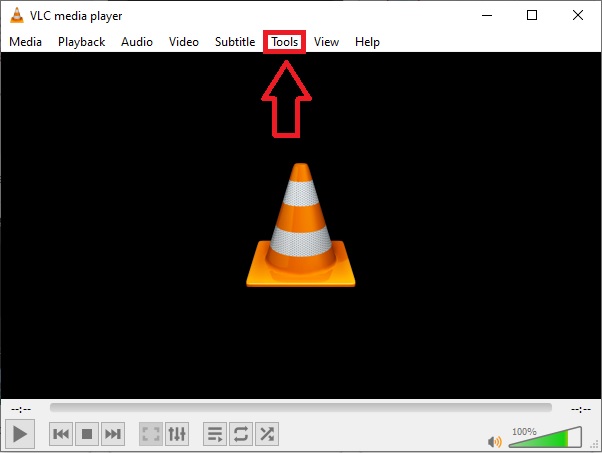
Langkah 1: Buka VLC media player di Windows, lalu klik tab Tools. Setelah mengklik tab Tools, klik Preference.
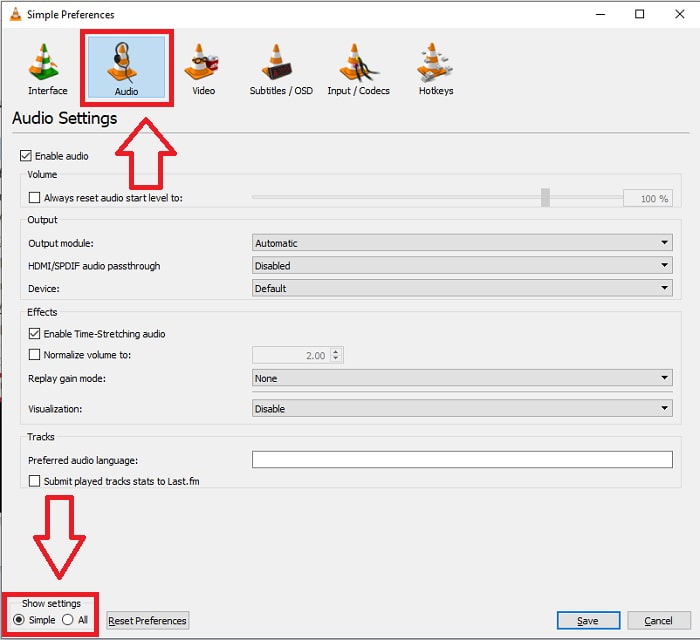
Langkah 2: Antarmuka lain akan muncul di layar. Lanjutkan proses dengan mengklik tab Audio. Di pojok kiri bawah, pilih All untuk mengakses pengaturan lanjutan.
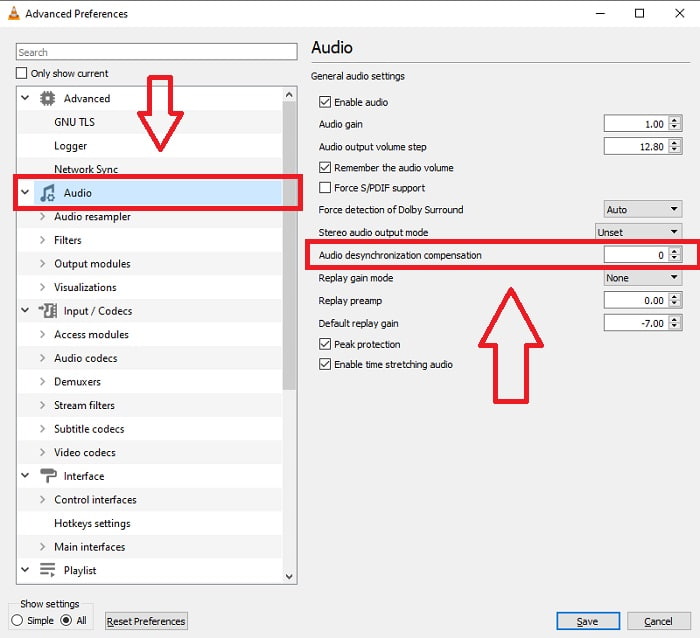
Langkah 3: Pengaturan lanjutan akan menampilkan semua opsi. Lanjutkan dengan mencari Audio di tab pengaturan lanjutan. Setelah kamu mengkliknya, kamu akan melihat pengaturan audio umum dan dapat menyesuaikan Audio Desynchronization Compensation. Jika audio terlambat dibandingkan video, ubah nilainya menjadi nilai positif untuk mengompensasi. Nilai negatif digunakan jika audio lebih dulu diputar daripada video. Masalah VLC tidak sinkron akan teratasi secara permanen dengan proses ini.
Terkait:
Cara Mengatasi VLC Player Tidak Bisa Memutar MKV
Cara Mengatasi VLC Tidak Bisa Memutar DVD
3. Gunakan Premiere Pro
Dalam pembuatan video berdefinisi tinggi dengan kualitas siaran, Premiere Pro adalah alat pilihan. Perangkat lunak ini bisa digunakan untuk mengimpor berbagai jenis media, termasuk video dan audio. Setelah itu, media tersebut dapat diedit dan diekspor ke format yang dibutuhkan untuk distribusi. Berbagai video dan gambar diam dapat digabung dan diedit menggunakan Premiere Pro untuk membuat video. Video bisa diberi judul, filter, dan efek lainnya. Perangkat lunak ini sangat membantu ketika audio dan video tidak sinkron, terutama bagi pengguna desktop atau laptop. Berikut langkah-langkah untuk menjalankan prosedurnya dengan benar.
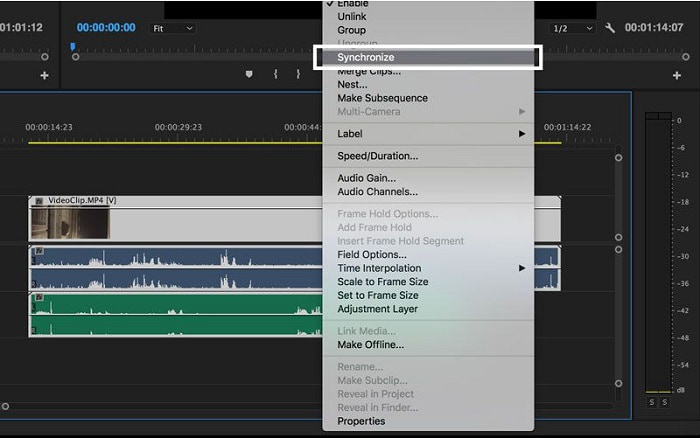
Langkah 1: Pastikan kamu menempatkan file audio dan video dalam layer di timeline, seperti yang ditunjukkan pada ilustrasi.
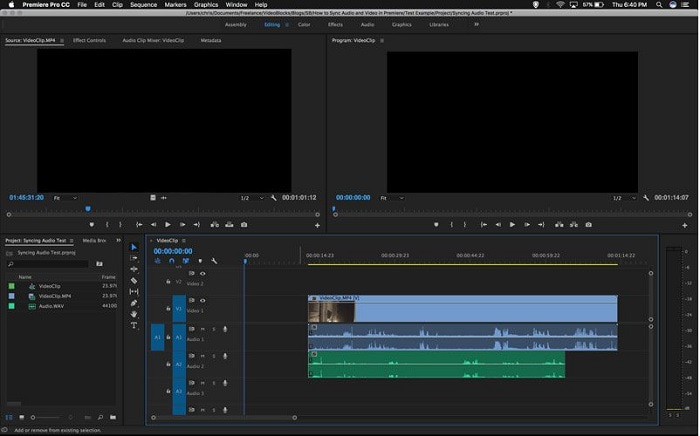
Langkah 2: Klik kanan untuk memilih kedua track audio dan video. Akan muncul sebuah dropbox. Pilih Synchronize dari menu drop-down yang muncul.
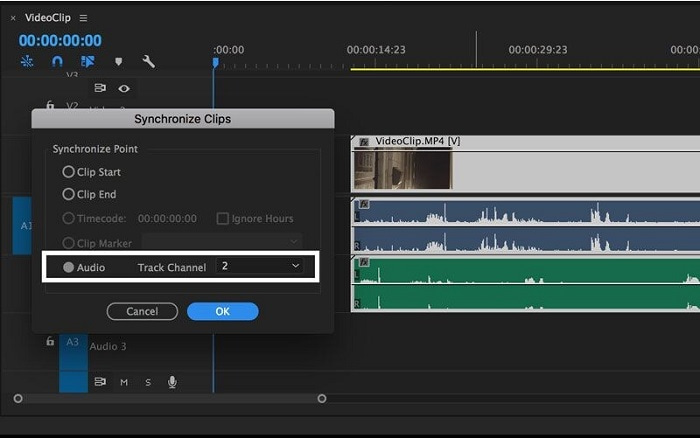
Langkah 3: Sekarang pilih Audio sebagai titik sinkronisasi. Pilih track yang ingin kamu sinkronkan. Terakhir, hapus scratch track dan pilih opsi Link untuk menautkan klip.
Bagian 3. FAQ tentang Audio dan Video Tidak Sinkron
Jika saya mengubah laju sampel, apakah kualitas audio akan menurun?
Jika Anda hanya ingin mendengarkan audio di klip video Anda dan tidak membuat perubahan apa pun, Anda harus mengubah laju sampel untuk mengikutinya. Anda hanya dapat menyinkronkan audio video dengan menyesuaikan penundaan audio klip video di FVC Video Converter Ultimate. Anda tidak akan lagi khawatir tentang penurunan kualitas audio saat menyesuaikan laju sampel. Dengan software ini, Anda tidak akan khawatir dengan audio yang tidak sinkron dalam video. Perangkat lunak ini berisi fitur yang dapat menyelesaikan masalah yang diberikan; itu juga memiliki fitur lain yang dapat bermanfaat bagi setiap pengguna dan digunakan dengan nyaman.
Apa itu Kompensasi Desinkronisasi Audio?
Setel penundaan waktu kompensasi desinkronisasi audio positif atau negatif dalam milidetik di Preferensi VLC dengan mengeklik Audio, lalu mencentang kotak Opsi lanjutan.
Apa alasan lain mengapa video dan audio tidak sinkron?
Alasan lain video dan audio tidak sinkron adalah karena output video yang tidak didukung yang tidak dapat digunakan oleh perangkat audio, dan sebaliknya.
Kesimpulan
Sebagai penutup, delay antara audio dan video bisa menjadi situasi sulit yang banyak dialami orang di dunia online. Terutama sejak masa pandemi, gawai dan kebutuhan online semakin populer, tetapi bagaimana kamu bisa berfungsi dengan baik atau mengerjakan tugas dengan benar jika ada hambatan seperti masalah cara menyinkronkan audio dan video ketika terjadi delay. Singkatnya, semua cara dan alternatif untuk menjawab berbagai kekhawatiran sudah disajikan di artikel ini. Kami merekomendasikan penggunaan Video Converter Ultimate untuk mengatasi situasi-situasi yang tidak perlu seperti ini di masa mendatang.
-
 5 Pemutar Video Gerak Lambat Teratas di Komputer (Windows/Mac/Linux)
 Gerakan lambat adalah fitur yang sangat berguna dalam banyak situasi. Untuk menonton video dengan kecepatan lambat untuk mengetahui informasi lebih detail dalam bidikan sekilas, Anda dapat mempelajari 5 pemutar video gerakan lambat teratas di artikel ini.
-
 [2 Solusi Terbaik] Cara Memutar Film AVI di iPhone/iPad Dengan Mudah
 Tidak dapat memutar film AVI di iPhone/iPad dan tidak ingin mengunduh pemutar video pihak ketiga? Anda dapat mempelajari 2 cara efisien untuk mengonversi video AVI agar dapat diputar di iPhone.
-
 Bisakah Wii/Wii U Memutar DVD tanpa Homebrew? 2 Solusi untuk Anda
 Saat Anda memasukkan disk DVD ke Wii, Anda akan menemukan Wii tidak dapat membaca dan memutar DVD karena penguncian regional. Pada artikel ini, Anda akan mempelajari cara memutar DVD di Wii/Wii U dengan mudah tanpa peretasan Homebrew.
