


 Video Converter Ultimate
 Perekam Layar
 Perbaikan Video
Cara Mengonversi 3GP ke WMV Secara Profesional [Online & Offline]
3GP adalah format seluler populer yang mentransfer data melalui ponsel tanpa banyak menghabiskan bandwidth sekaligus menghemat ruang. Selain itu, format ini sudah menjadi standar untuk merekam video pada ponsel generasi ke-3, namun tenang saja, Anda tetap bisa memutar videonya di ponsel generasi ke-2 maupun ke-4. Meskipun sangat baik di ponsel, format ini pada dasarnya terbatas pada smartphone. Jadi, tidak mengherankan jika file .3gp tidak terlalu bagus saat diputar di desktop. Meski begitu, Anda dapat mempelajari cara mengonversi 3GP ke format yang memiliki dukungan jauh lebih luas di desktop, seperti WMV. Ingin tahu cara mengonversi 3GP ke WMV secara profesional? Kalau begitu, mari kita simak bersama dan jangan buang waktu lagi.

Bagian 1. Apa itu 3GP
Ini adalah format berbasis ISO yang menyimpan aliran media seperti H.263 atau H.264 untuk video dan AMR atau AAC untuk audio, sempurna untuk kompresi lossy. Selain itu, format generasi ke-3 ini ramah penyimpanan untuk menyimpan data pada drive portabel di ponsel kita, bahkan di iOS. Meskipun 3GP masih tersedia, tingkat keberhasilan format ini mulai turun, dan karena alasan itu, 3GPP bergabung dan menjadi versi yang lebih baik.
Bagian 2. Apa itu WMV
Ini adalah format multimedia berpemilik yang dikembangkan oleh Windows untuk streaming video online. Tidak seperti format lain, seperti 3GP, WMV menggunakan encoder multifold untuk membuat file lebih terkompresi. Karena kemampuan untuk menggunakan banyak encoder, berbagi video dalam format ini lebih mudah diakses. Namun, ada kelemahan menggunakan banyak encoder, terutama dalam mengedit dan memutar, karena tidak semua pemutar media dan editor mendukung berbagai codec. Meskipun formatnya menggunakan kompresor, kualitas media tidak akan diubah atau dikurangi.
Bagian 3. Cara Profesional untuk Mengonversi 3GP ke WMV dengan Video Converter Ultimate
Ingin mendapatkan pengonversi 3GP ke WMV profesional yang bisa diunduh gratis di platform Anda? FVC Video Converter Ultimate menawarkan proses konversi tingkat ahli tanpa perlu banyak usaha. Konverter ini membawa Anda ke level konversi yang berbeda, yang tidak dapat diberikan oleh konverter lain baik online maupun offline. Selain itu, alat ultimate ini mendukung lebih dari 200 format media yang bisa Anda pilih, tidak seperti alat lainnya.
Selama Anda memiliki konverter ini, selalu harapkan output profesional pada format media yang Anda konversi. Ingin menggunakan konverter profesional untuk mengonversi file 3GP Anda? Jika demikian, Anda dapat mengikuti langkah-langkah di bawah ini untuk berhasil mengonversi dengan alat pamungkas.
Langkah-langkah Cara Mengonversi File 3GP ke WMV dengan FVC Video Converter Ultimate
Langkah 1. Di bawah ini disajikan tombol unduhan; silakan pilih sesuai dengan platform yang Anda gunakan. Misalnya, klik tombol unduh Windows jika Anda pengguna Windows. Namun jika Anda pengguna Mac, klik yang satunya lagi. Setelah proses pengunduhan selesai, instal konverter lalu jalankan dengan mengklik Start Now. Yang lebih penting, setelah peluncuran pertama, Anda perlu membiasakan diri dengan antarmukanya sebelum melanjutkan ke langkah berikutnya.
Unduh GratisUntuk Windows 7 atau yang lebih baruUnduhan Aman
Unduh GratisUntuk MacOS 10.7 atau yang lebih baruUnduhan Aman
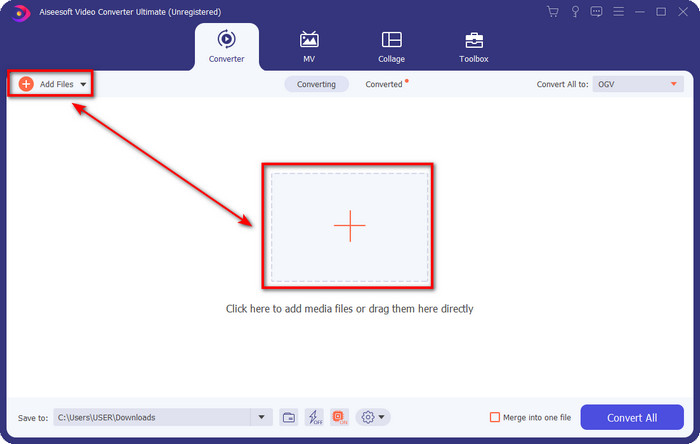
Langkah 2. Anda akan melihat Add Files di bagian kiri atas antarmuka; klik itu, dan sebuah folder akan muncul. Cari file .3gp di drive komputer Anda, lalu unggah dengan menekan Open.
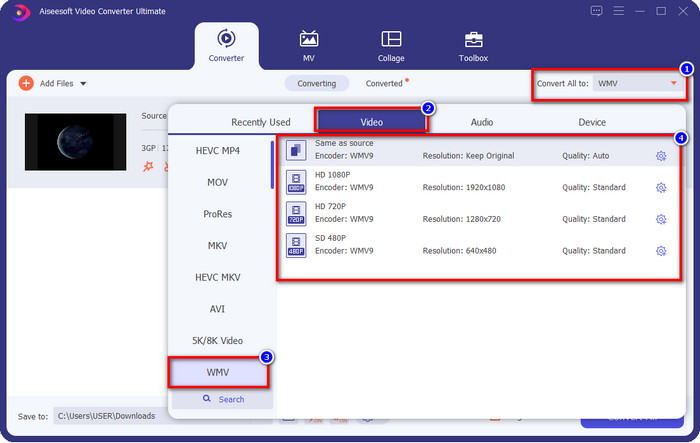
Langkah 3. Klik Convert All to untuk memilih format WMV yang Anda inginkan atau WMV sebagai output akhir.
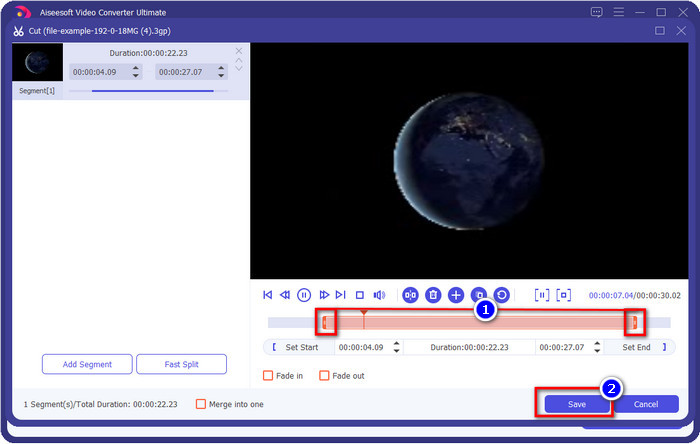
Opsional. Sebelum kita mengonversi file 3GP ke WMV, mari bahas sedikit fitur lain yang ditawarkan alat ini. Perlu memotong video? Tidak masalah. Tekan tombol scissor, geser slide bar di kedua sisi jika Anda mau, lalu tekan Save untuk menerapkan pemotongan yang sudah Anda buat.
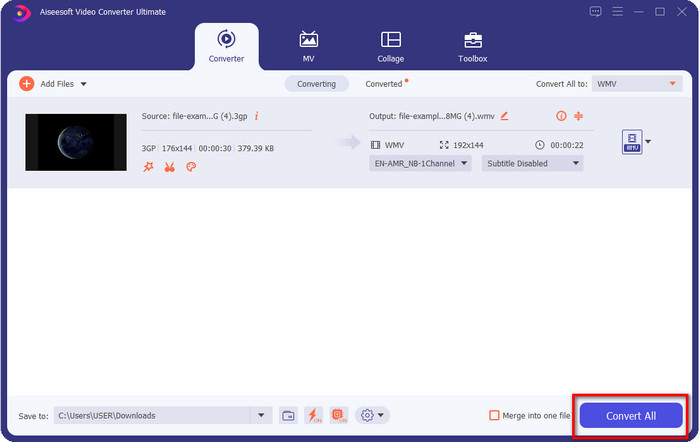
Langkah 4. Mulai proses konversi dengan mengklik tombol Convert All. Proses konversi akan selesai dalam waktu singkat, dan voila, file WMV akan tersimpan di drive komputer Anda.
Bagian 4. Cara Online untuk Mengonversi MXF ke WMV dengan Video Converter Online Gratis
Produk FVC lainnya namun dalam bentuk solusi online adalah FVC Free Video Converter Online. Konverter profesional berbasis web ini menyediakan antarmuka yang rapi dan bersih dibandingkan konverter web lainnya. Selain itu, Anda tidak perlu mengunduh konverternya ke perangkat sebelum menggunakannya; Anda cukup membuka browser dan menjalankan konverternya. Meskipun konverter web ini bagus, masih ada banyak keahlian yang belum bisa diberikannya. Namun demikian, ini adalah pilihan tepat jika Anda ingin mengonversi 3GP ke WMV secara online; salin langkah-langkah di bawah ini untuk menggunakan alat ini.
Langkah-langkah Cara Mengonversi 3GP ke WMV Online Gratis dengan FVC Free Video Converter Online
Langkah 1. Klik tautan ini untuk membuka konverter online.
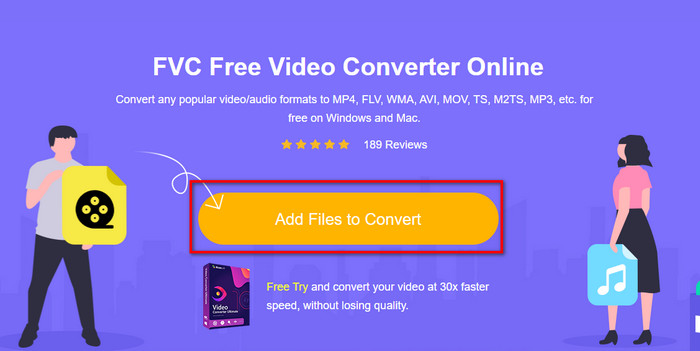
Langkah 2. Setelah mengkliknya, tekan Add Files to Convert untuk meluncurkan konverter. Jika ini pertama kalinya Anda menggunakan konverter ini, Anda perlu menginstal launchernya dengan mengklik Add Files to Convert, namun ukurannya tidak sebesar alat ultimate. Cari file 3gp yang ingin Anda konversi lalu tekan Open.
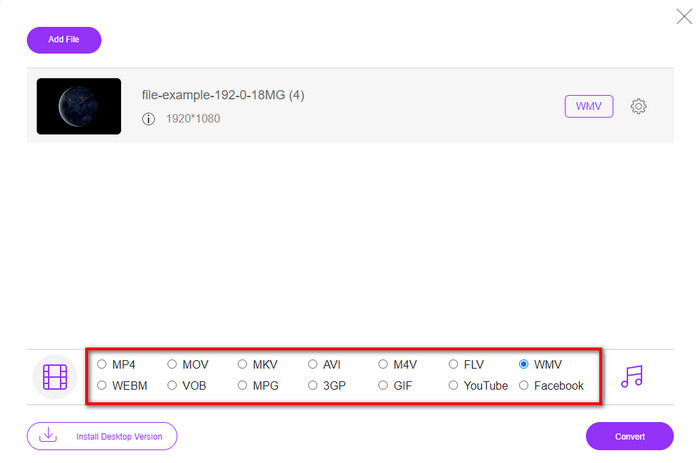
Langkah 3. Setelah mengunggah file 3GP, sekarang saatnya memilih format yang ditampilkan di bawah atau klik WMV.
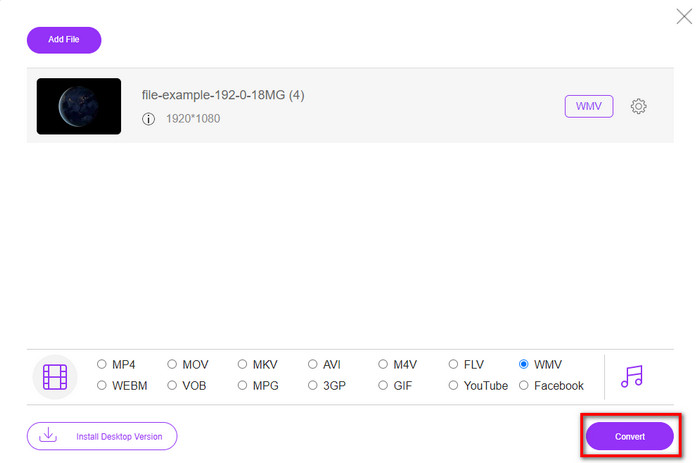
Langkah 4. Sudah memilih format? Jika ya, klik Convert untuk memulai proses konversi file.
Bagian 5. FAQ tentang Konversi 3GP ke WMV
Apakah ide yang bagus untuk menggunakan konverter 3GP ke WMV secara online?
Jika Anda tidak ingin mengunduh konverter di perangkat Anda, sangat ideal untuk menggunakan konverter online. Tapi ingat, tidak semua konverter online atau offline aman digunakan. Sebagian besar waktu, mereka memiliki virus jika Anda menginstalnya atau tidak melakukan tugas secara efektif. Tetapi jika Anda menginginkan jaminan pada konversi Anda, kami sarankan menggunakan produk konverter FVC karena ini adalah 101% bebas malware dan menjamin proses konversi Anda sukses.
Apakah mungkin untuk menggabungkan beberapa video 3GP?
Ya, dengan bantuan alat penggabung FVC, Anda dapat menggabungkan beberapa video yang berformat 3GP. Jadi sekarang, jika Anda ingin tahu cara menggabungkan beberapa video 3GP Anda, Anda harus membaca artikel ini untuk mengetahui caranya.
Apakah video 3GP memiliki kualitas yang baik?
3GP memiliki kualitas yang baik, tetapi tidak dapat menyimpan kualitas definisi tinggi sehingga diharapkan kualitas video 3GP rendah.
Kesimpulan
Sebagai penutup, konverter yang dicantumkan dalam artikel ini dipilih secara selektif dengan mengikuti standar tertentu untuk menghasilkan output profesional. Selain itu, kami juga telah menggunakan alat-alat ini sendiri agar hanya menyajikan fakta mengenai karakteristiknya. Lebih jauh lagi, jika Anda tidak ingin mengunduh konverter ke desktop demi menghemat ruang namun tetap ingin hasil yang profesional, kami sangat merekomendasikan Anda menggunakan FVC Free Video Converter Online. Namun jika Anda ingin mentranskode 3GP Anda dengan cara yang jauh lebih profesional, kami sangat menyarankan menggunakan FVC Video Converter Ultimate. Masih belum puas dengan penjelasan yang kami berikan? Kalau begitu, Anda harus mencobanya sendiri untuk merasakan pengalaman konversi tingkat ahli yang ditawarkan alat ini dan mempelajari cara mengonversi 3GP ke WMV.
-
 4 Cara Paling Efektif Mengonversi Format 3GP ke AVI [2025]
 Dapatkah saya mengonversi file 3GP ke AVI? Nah, Anda dapat mengonversinya dengan mudah jika Anda mencoba alat yang tersedia saat kami mengumpulkan semua solusi yang mungkin untuk masalah konversi 3GP ke AVI Anda.
-
 Konverter 3GP ke FLV Terbaik untuk Digunakan dalam Mengonversi 3GP ke FLV [2025]
 Pernahkah Anda mencoba mengonversi 3GP ke FLV, tetapi Anda tidak tahu jenis konverter yang akan Anda gunakan? Baca artikel ini untuk mempelajari semua detail tentang mengonversi 3GP ke FLV.
-
 2 Cara Terbaik untuk Mengonversi 3GP yang Tidak Didukung ke DivX [2025]
 Banyak pengguna bertanya bagaimana mengkonversi 3GP ke DivX. Jadi sekarang, kami menyediakan artikel untuk membantu Anda mengonversi file .3gp tanpa kerumitan.
