


 Video Converter Ultimate
 Perekam Layar
 Perbaikan Video
Pahami Konverter yang Siap Digunakan untuk Mengonversi DivX ke AVI
DivX dan AVI bukanlah pesaing satu sama lain, meskipun keduanya sama‑sama sering dikaitkan dengan berkas video, keduanya memiliki banyak perbedaan. Misalnya, DivX digunakan untuk mengompres kontainer video berdurasi panjang dan mengecilkan ukurannya sedapat mungkin tanpa mengurangi kualitas video itu sendiri. Sementara itu, AVI adalah salah satu contoh kontainer video yang dapat Anda gunakan untuk menyimpan video berkualitas tinggi, namun dengan ukuran file yang lebih besar. Sekarang kita sudah punya sedikit gambaran tentang keduanya. Selanjutnya mari kita bahas lebih dalam untuk lebih memahami keduanya dan pelajari cara mengonversi DivX ke AVI secara gratis dengan terus membaca artikel ini.
Bagian 1. DivX vs AVI
Seperti yang dikatakan sebelumnya, DivX dan AVI sebenarnya bukan pesaing mereka sendiri karena mereka dapat digunakan baik dalam satu file atau lainnya. Selain itu, DivX adalah kompresor file yang dikembangkan oleh DivX, Inc. sendiri. Kompresor ini adalah hak milik dan dikatakan sebagai generasi berikutnya dari persewaan video DVD. Tapi sekarang DivX telah dimatikan karena upaya yang gagal untuk mengganti DVD. Namun sekarang, Anda masih dapat mengakses alat dan menontonnya di beberapa pemutar media lama yang mendukung jenis kompresi yang disediakan DivX.
AVI adalah format berkas media yang digunakan untuk menampung berkas video dan audio dengan berbagai codec. Format ini dikembangkan oleh Microsoft untuk digunakan sebagai pemutar berbagai aliran video maupun audio. Pada akhir tahun 1992, AVI diciptakan untuk memberikan dukungan video dan audio futuristik yang hanya digunakan pada sistem operasi Windows. Namun sekarang Anda dapat menggunakan AVI di Mac atau Linux bahkan di ponsel Anda juga. Selain itu, masih ada satu hal dari format AVI yang belum banyak mengalami peningkatan, yaitu kompresi dan ukuran berkasnya.
DivX
Kompresor digunakan untuk mengecilkan ukuran file container tanpa menyentuh kualitasnya.
Ini adalah kompresor milik DivX Inc.
Dikatakan sebagai versi DVD yang lebih baik tetapi gagal dalam usahanya.
Sebagian besar pemutar media baru saat ini tidak mendukung DivX.
AVI
Dikenal sebagai salah satu wadah video dan audio yang merevolusi di era modern ini.
Format ini didukung di sebagian besar platform dan perangkat lunak.
Ini tidak memiliki kompresi yang tepat didukung karena lossless.
Dan sekarang setelah kita mengetahui perbedaan antara keduanya sekarang adalah waktu yang tepat untuk mengetahui konverter DivX ke AVI secara online dan offline yang dapat Anda gunakan untuk menonton file DivX.
Bagian 2. 4 Pengonversi Terbaik dan Pelajari Cara Mengonversi DivX ke AVI
Teratas 1. FVC Video Converter Ultimate
Jika mengonversi DivX menjadi masalah bagi Anda, maka FVC Video Converter Ultimate bisa menjadi solusinya. Berbeda dengan konverter lain, perangkat lunak ini telah terus disempurnakan selama bertahun‑tahun hingga menjadi salah satu konverter yang fenomenal. Selain menjadi salah satu yang terbaik, proses konversinya juga yang tercepat yang akan Anda rasakan karena didukung oleh akselerasi perangkat keras dan konversi berkecepatan tinggi. Dan berkat fitur bawaannya, alat ini dengan mudah menempati posisi teratas. Meskipun berbayar, Anda tidak perlu mengeluarkan biaya besar untuk menggunakannya. Jadi, jika Anda ingin mempelajari cara mengonversi DivX ke AVI di Mac atau PC, ikuti langkah‑langkah di bawah ini sambil kita mencobanya sendiri.
Langkah 1. Pertama‑tama, sebelum Anda dapat menggunakan alat ini, Anda harus mengunduhnya dulu ke drive Anda. Lalu instal, lakukan pengaturan awal, dan klik Start Now untuk melanjutkan.
Unduh GratisUntuk Windows 7 atau yang lebih baruUnduhan Aman
Unduh GratisUntuk MacOS 10.7 atau yang lebih baruUnduhan Aman
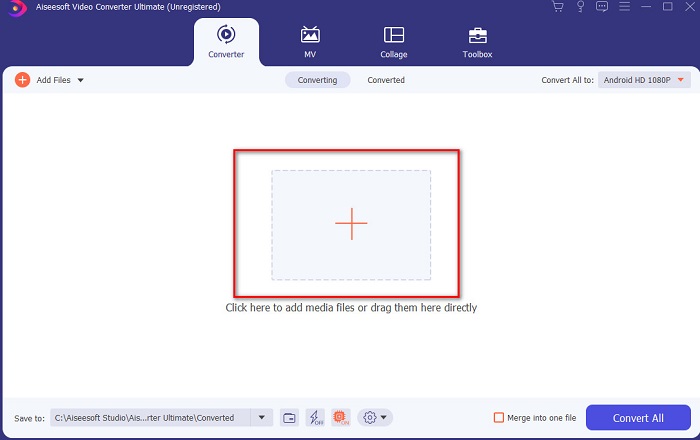
Langkah 2. Luncurkan alatnya untuk melanjutkan, lalu antarmuka seperti ini akan muncul. Di bagian tengah, klik tombol + dan cari berkas DivX yang ingin Anda masukkan, lalu klik Open.
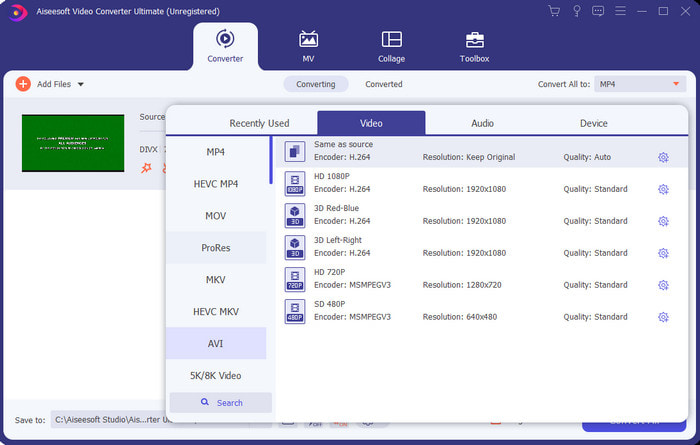
Langkah 3. Untuk mengubah DivX ke AVI, klik Convert All to lalu cari format AVI dan klik.
Langkah 4. Untuk memulai proses konversi, klik Convert All dan tunggu hingga proses selesai.
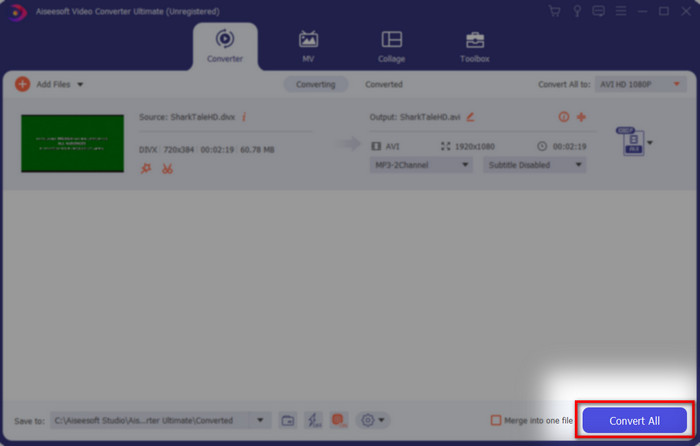
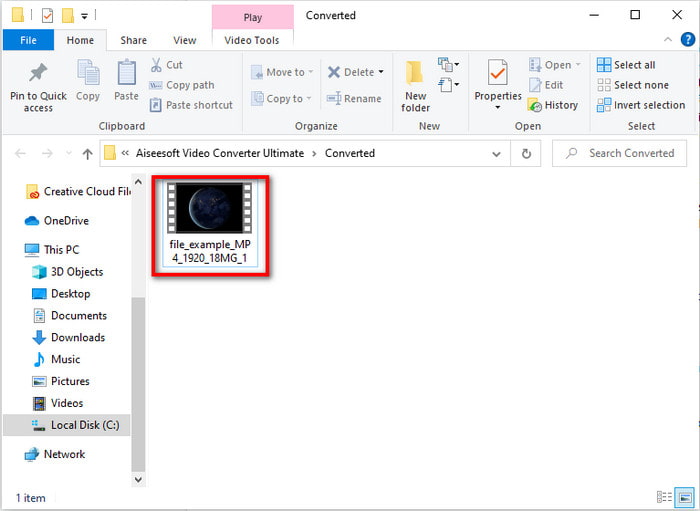
Langkah 5. Tunggu hingga proses konversi selesai. Setelah selesai, sebuah folder akan muncul di layar Anda berisi berkas yang sudah dikonversi, klik untuk menontonnya dan nikmati.
2. Konverter Video Freemake Teratas
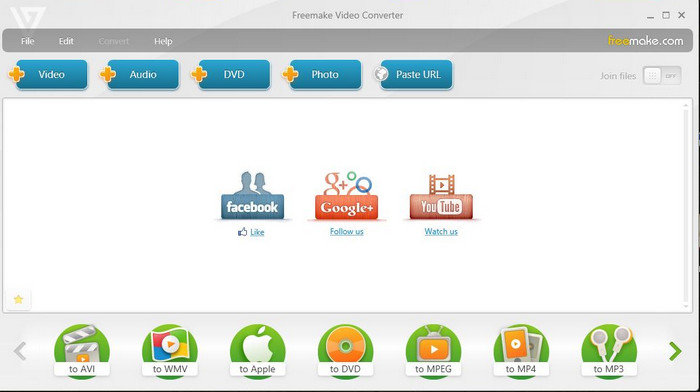
Perangkat lunak lain yang dapat diunduh dan bisa Anda gunakan untuk mengonversi format adalah Freemake Video Converter. Alat ini sudah membantu banyak pengguna untuk mengonversi berkas media apa pun ke format baru. Selain itu, alat ini juga banyak dianggap sebagai salah satu perangkat lunak terbaik yang bisa Anda unduh dan andalkan. Walaupun alat ini bagus, masih ada beberapa format yang tidak didukung dan proses konversinya sangat lambat. Sebab, alat ini tidak memiliki akselerasi perangkat keras seperti FVC Video Converter Ultimate. Jadi, jika Anda ingin mengonversi DivX ke AVI secara gratis, inilah perangkat lunak yang bisa Anda jadikan pilihan.
Pro
- Gratis untuk mengunduh perangkat lunak apa pun.
- Penampilan bijaksana itu sederhana.
Kontra
- Tidak memiliki akselerasi perangkat keras.
- Beberapa format tidak didukung di sini.
Top 3. Konverter Video Gratis FVC
Bagaimana jika Anda ingin mengonversi berkas media ke format baru tetapi tidak ingin mengunduh apa pun? Maka FVC Free Video Converter siap membantu Anda. Berbeda dengan dua alat yang disebutkan di atas, alat ini dapat diakses tanpa perlu diunduh. Meskipun perangkat lunak ini dapat diakses secara gratis, masih ada beberapa format yang tidak didukung. Selain itu, pilihan format yang bisa dikonversi juga terbatas. Namun, proses konversinya jauh lebih cepat jika dibandingkan dengan Freemake Video Converter. Jadi, jika Anda ingin tahu cara mengonversi DivX ke AVI secara online, ikuti langkah‑langkah di bawah ini.
Langkah 1. Buka situs utama FVC Free Video Converter dengan mengklik tautan ini.
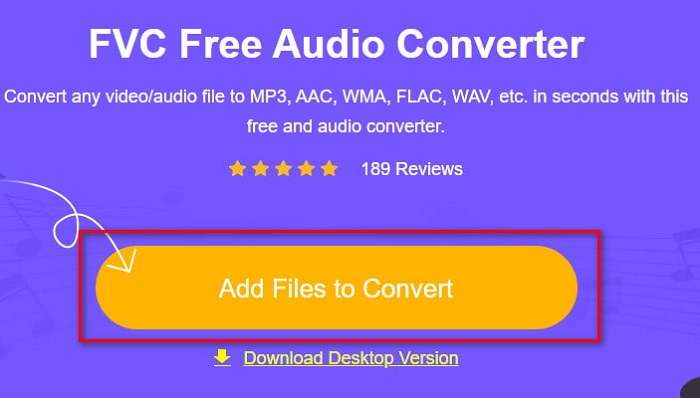
Langkah 2. Tekan Add Files to Convert untuk mengunduh peluncurnya jika ini pertama kali Anda menggunakannya. Jika peluncur sudah terpasang, klik lagi Add Files to Convert lalu cari berkas di folder, klik dan tekan Open.
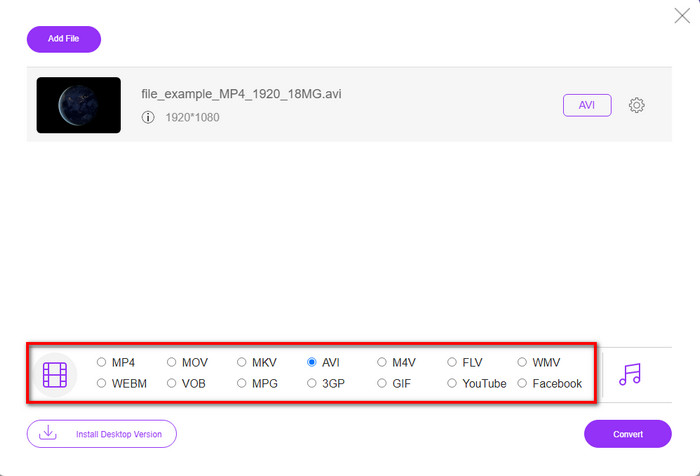
Langkah 3. Pilih format AVI pada opsi yang terdaftar di bawah ini atau format lain apa pun yang Anda inginkan.
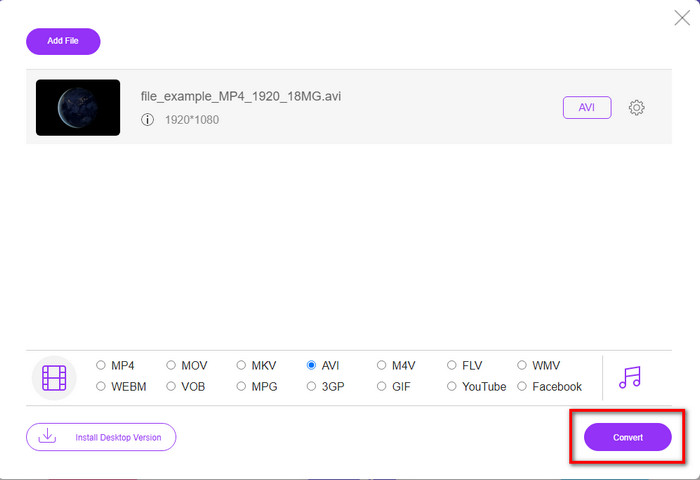
Langkah 4. Jika Anda sudah selesai memilih format, sekarang saatnya menyimpannya ke drive Anda dengan mengklik Convert.
Langkah 5. Jika proses sudah berjalan, tunggu hingga folder berkas muncul di layar Anda. Buka berkas tersebut dengan mengkliknya dan tonton berkas media yang telah dikonversi.
Top 4. Konversi Online.com
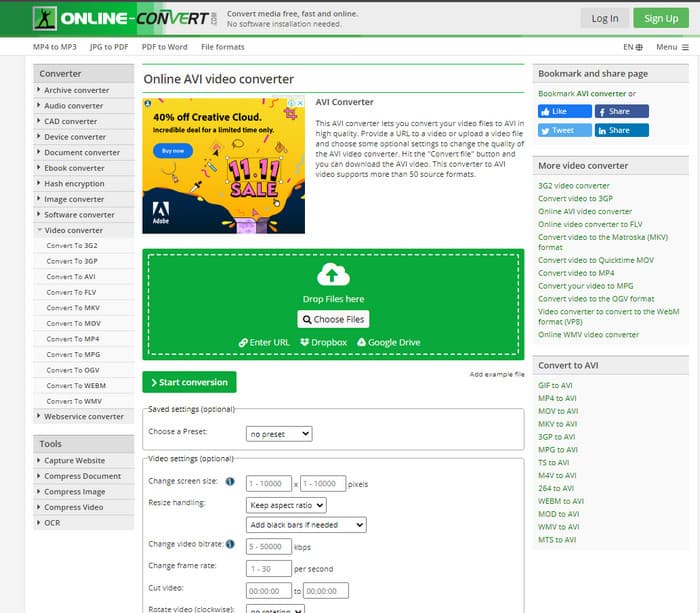
Alat daring lain yang dapat Anda gunakan untuk mengonversi berkas media apa pun adalah Online-Convert.com. Sama seperti beberapa alat daring lainnya, konverter ini hanya mendukung sedikit format. Namun, ia memiliki penyesuaian video bawaan yang dapat Anda gunakan, tetapi cukup sulit dikelola terutama jika Anda tidak memahaminya. Selain itu, proses mengunggah dan mengunduh berkas di sini sangat lambat dibandingkan dengan FVC Free Video Converter.
Pro
- Gratis untuk diakses di web.
- Antarmuka alat ini sangat bagus dan memiliki sedikit atau tanpa iklan.
- Proses konversi akan tergantung pada konektivitas internet.
Kontra
- Tidak dapat diakses tanpa internet.
- Proses impor dan ekspor akan memakan banyak waktu dibandingkan dengan alat lainnya.
Bagian 3. Manakah yang Terbaik untuk Mengkonversi DivX ke AVI?
| Fitur | FVC Video Converter Ultimate | Pengonversi Video Freemake | Pengonversi Video Gratis FVC | Konversi Online.com |
| Konversi Video dan Audio |  | | | |
| Konversi Batch | |  | | |
| Akselerasi perangkat keras | | | | |
| Alat Berbasis Program | Alat Berbasis Desktop | Alat Berbasis Desktop | Alat Berbasis Web | Alat Berbasis Web |
| Konektifitas jaringan | Tidak Diperlukan | Tidak Diperlukan | Yg dibutuhkan | Yg dibutuhkan |
Bagian 4. FAQ tentang DivX to AVI Converters
Mana yang lebih baik? DivX dan XviD?
DivX adalah codec berpemilik yang terkenal untuk file wadah video dan audio dan juga mengkhususkan diri dalam menyalin file pada disk sambil mengompresinya tanpa kehilangan kualitasnya. Sementara XviD adalah versi tiruan dari DivX dan agak jauh lebih baik daripada DivX. Juga, ini non-eksklusif yang berarti siapa pun dapat menggunakan ini kapan pun atau apa pun yang Anda inginkan.
Apa itu codec?
Codec digunakan untuk mengompresi file dan mendistribusikan file audio dan video apa pun lebih cepat dalam ukuran file yang lebih kecil. Juga, ini digunakan untuk mendekompresi file yang terikat dengan codec tersebut untuk membuka file terkompresi yang Anda buat tanpa merusak kredibilitasnya.
Untuk memiliki ukuran file yang lebih kecil, apakah ideal untuk mengompres atau mengonversi?
Jika Anda ingin mempertahankan kualitas video sekaligus memperkecil ukurannya, maka idealnya Anda mengompresnya dengan bantuan tautan ini. Namun jika Anda ingin cara yang lebih mudah, maka sebaiknya pertimbangkan untuk mengonversi video ke MP4 dengan membaca artikel ini agar mendapat gambaran bagaimana cara melakukannya.
Kesimpulan
Menjelang akhir artikel ini, sekarang kita lebih mudah memahami apa itu DivX dan juga apa itu AVI. Selain itu, kami telah memperkenalkan 4 alat bermanfaat yang dapat Anda gunakan untuk memutar berkas DivX dengan mengonversinya ke format AVI. Jadi sekarang, jika Anda ingin merasakan kesuksesan 100% maka gunakan FVC Video Converter Ultimate untuk menjamin keberhasilan.
Unduh GratisUntuk Windows 7 atau yang lebih baruUnduhan Aman
Unduh GratisUntuk MacOS 10.7 atau yang lebih baruUnduhan Aman
-
 [Gratis & Daring] 7 Cara Mengonversi MTS ke AVI di Komputer Mac/Windows
 Bagaimana cara mengubah MTS ke AVI dengan mudah? Dalam panduan ini, Anda akan menemukan 7 cara gratis dan mudah untuk mengonversi file MTS ke AVI di Windows atau Mac tanpa kehilangan kualitas.
-
 Tutorial untuk Mengkonversi File MP4 ke AVI dengan 7 Pengonversi Video Gratis
 Ingin mendapatkan semua cara gratis untuk mengonversi video AVI ke MP4? Anda tidak boleh melewatkan artikel ini. Berikut 7 cara mengonversi file AVI ke MP4 secara gratis di Windows, Mac, iPhone, Android, dan online.
-
 3 Metode Mudah untuk Mengonversi FLV ke AVI di Desktop dan Online
 Berikut adalah tiga metode untuk membantu Anda secara efisien mengonversi file video FLV ke format AVI di Windows dan Mac, sehingga Anda dapat menontonnya dengan kualitas tinggi.
