


 Video Converter Ultimate
 Perekam Layar
 Perbaikan Video
 Unduhan Aman
Cara Mengonversi MPG ke 3GP Menggunakan Pengonversi Teratas
Apakah Anda sedang mencari cara untuk mengonversi file MPG menjadi file 3GP di Windows dan Mac? Jangan khawatir lagi karena kami punya solusinya untuk Anda. Artikel ini akan memberi tahu Anda cara dengan mudah mengonversi file MPG ke file 3GP dan mengunduh gratis konverter MPG ke 3GP secara online maupun offline. Jadi duduk santai dan rileks, karena Anda akan mempelajari banyak hal dengan membaca artikel ini sampai selesai.

Bagian 1. Mengapa Mengkonversi MPG ke Format File 3GP
Seharusnya Anda ingin memutar file MPG di perangkat seluler generasi ketiga Anda. Namun, perangkat seluler generasi ketiga tidak mendukung format file MPG. Jadi, agar Anda dapat memutar file MPG di perangkat 3G, Anda harus mengonversinya ke format file yang didukung perangkat 3G. Dalam hal ini, Anda harus mengonversi file MPG Anda ke format file 3GP.
Bagian 2. Dengan Mudah Mengkonversi File MPG Anda ke 3GP Menggunakan FVC Video Converter Ultimate
FVC Video Converter Ultimate adalah salah satu konverter offline berkinerja terbaik yang dapat Anda temukan di web. Konverter ini tersedia di semua platform lintas media, termasuk Windows dan Mac. Ini juga mendukung lebih dari 1000+ format seperti MPG, 3GP, AVI, MP4, MOV, WMA, MP3, dan banyak lagi. Selain itu, jika Anda mencari konverter yang dapat melakukan konversi batch, alat ini cocok untuk Anda karena konverter ini dapat menggabungkan beberapa format file menjadi satu. Baca deskripsi di bawah ini untuk mengetahui lebih lanjut tentang apa yang dapat dilakukan konverter ini.

FVC Video Converter Ultimate
5.689.200+ Unduhan- Tersedia di semua platform media yang dikenal, termasuk Windows dan Mac.
- Ini memiliki fitur luar biasa untuk dicoba, seperti mengedit, meningkatkan, dan mengompresi file Anda.
- Ini memiliki pembuat GIF dan 3D yang dapat membuat output seperti profesional.
- Ini memiliki proses konversi yang sangat cepat untuk mengonversi file Anda dengan cepat.
- Ini mendukung hampir semua format file, termasuk MPG, 3GP, MOV, AVI, MP4, TS, M4V, dll.
Unduh GratisUntuk Windows 7 atau yang lebih baruUnduhan Aman
Unduh GratisUntuk MacOS 10.7 atau yang lebih baruUnduhan Aman
Berikut adalah langkah-langkah mengonversi MPG ke 3GP menggunakan FVC Video Converter Ultimate:
Langkah 1. Pertama, unduh konverternya dengan mengeklik tombol Download di bawah ini untuk Windows atau Mac.
Unduh GratisUntuk Windows 7 atau yang lebih baruUnduhan Aman
Unduh GratisUntuk MacOS 10.7 atau yang lebih baruUnduhan Aman
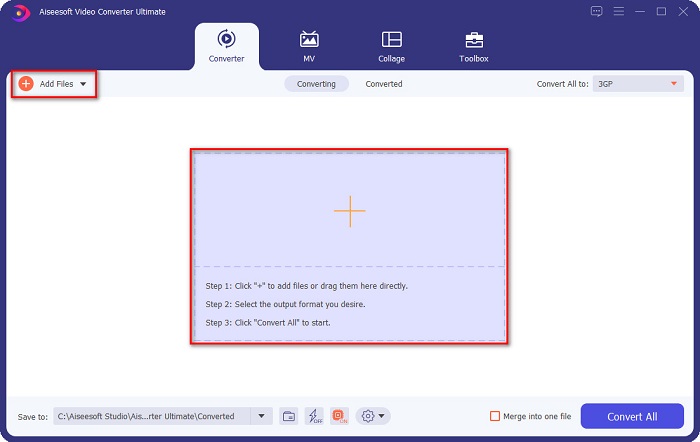
Langkah 2. Pada antarmuka pertama di layar Anda, klik tombol Add Files atau tombol tanda + untuk mengunggah file MPG Anda ke dalam antrean.
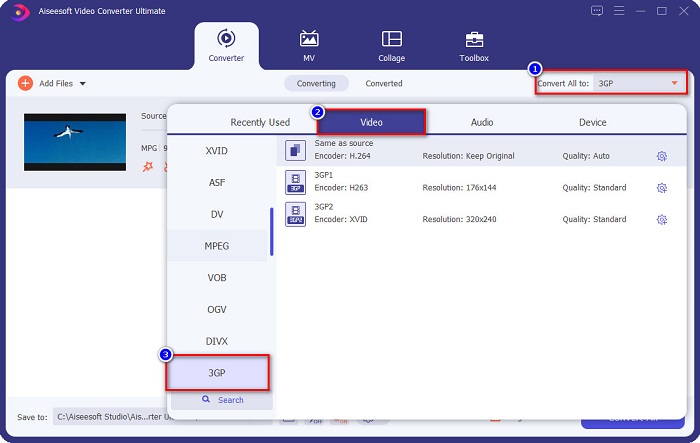
Langkah 3. Setelah mengunggah file Anda, klik tombol Convert All to dan pilih file 3GP sebagai format keluaran Anda.
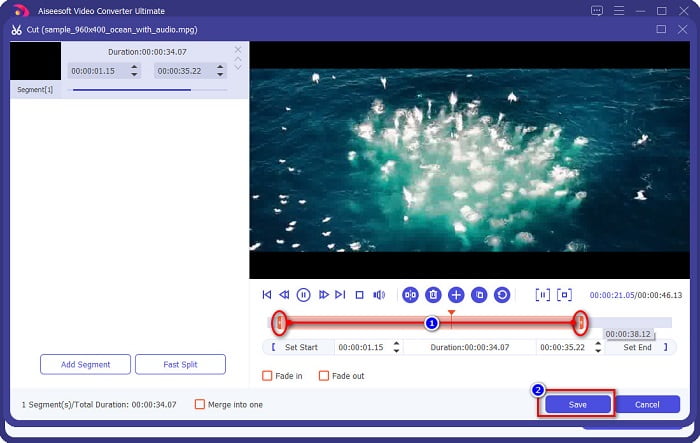
Opsional. Jika Anda ingin memotong durasi file video Anda, klik tombol gunting. Lalu atur kontrol play-in dan play-out ke durasi video yang Anda inginkan, kemudian klik Save. Namun jika Anda tidak ingin memotong video, lanjutkan ke langkah berikutnya.
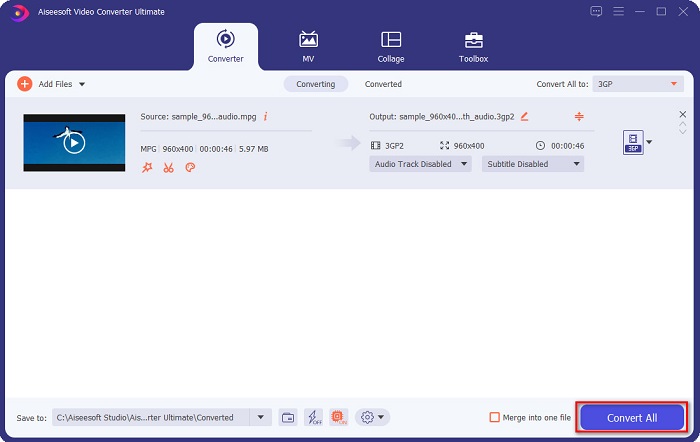
Langkah 4. Terakhir, klik tombol Convert All untuk mengonversi file MPG Anda ke format file 3GP. Tunggu beberapa detik, dan selesai! File MPG Anda sekarang telah dikonversi menjadi file 3GP.
Bagian 3. Konverter MPG ke 3GP Fantastis Online yang Harus Anda Coba
Dalam hal mengonversi, alat online lebih nyaman karena Anda tidak perlu mengunduh apa pun. Dan jika Anda mencari konverter online yang dapat mengkonversi MPG ke 3GP online dan dapat diakses, kami memiliki solusi terbaik untuk Anda.
Pengonversi Video Online Gratis FVC
FVC Free Online Video Converter adalah konverter online yang dapat mengonversi file MPG ke 3GP. Konverter ini memungkinkan Anda mengonversi berbagai format seperti MPG, 3GP, FLV, WMA, WMV, MP4, dan banyak lagi. Konverter ini juga memiliki antarmuka yang mudah digunakan, yang bermanfaat bagi pengguna pemula. Selain itu, alat ini unik dibandingkan konverter online lainnya karena tidak berisi iklan mengganggu yang bisa membuat Anda kesal.
Ikuti langkah-langkah sederhana di bawah ini untuk mengonversi menggunakan FVC Free Online Video Converter.
Langkah 1. Cari FVC Free Online Video Converter di peramban web Anda, atau klik tautan ini untuk langsung menuju halaman web mereka.
Langkah 2. Selanjutnya, klik tombol Add Files pada antarmuka pertama perangkat lunak. Lalu file komputer Anda akan muncul, di mana Anda akan memilih file MPG yang ingin Anda konversi.
Unduh Versi Desktop untuk mengonversi file secara batch.
Langkah 3. Setelah mengunggah file MPG Anda, pilih format file keluaran yang Anda inginkan di bagian bawah antarmuka kedua perangkat lunak. Klik format file 3GP.
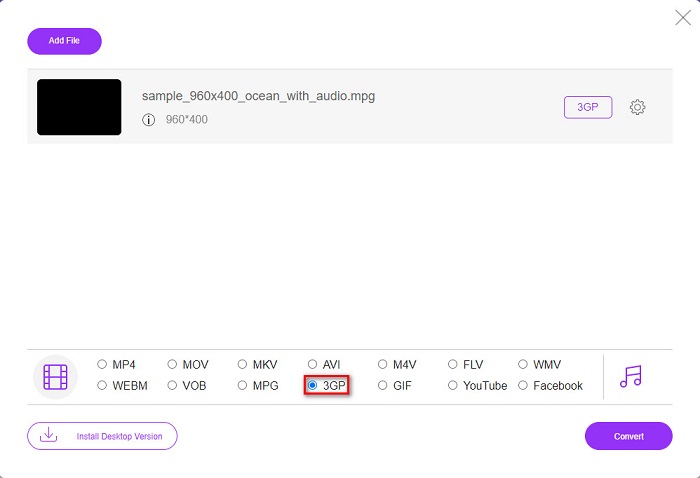
Jika Anda ingin mengubah resolusi video dari file Anda, klik tombol Gear, di mana Anda dapat menyesuaikan resolusi video, bitrate video dan audio, dan lainnya. Namun jika Anda tidak ingin melakukannya, lanjutkan ke langkah berikutnya.
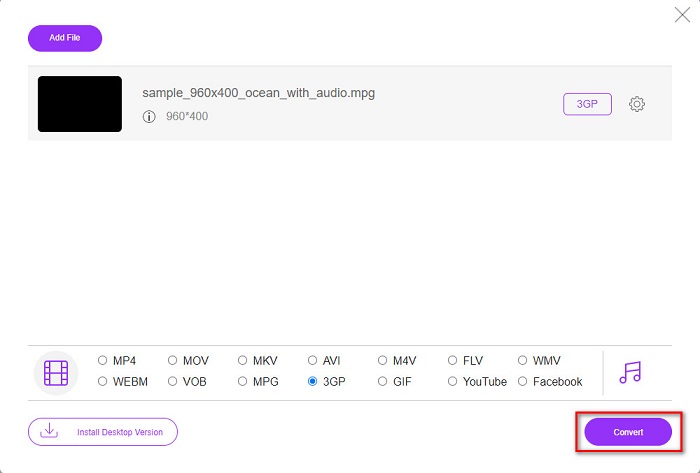
Langkah 4. Untuk mulai mengonversi MPG ke 3GP, klik tombol Convert.
DokumenPal
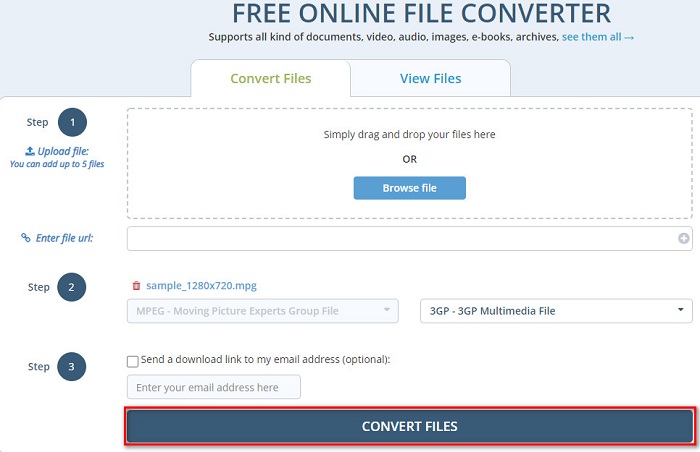
Konverter lain yang patut Anda coba adalah DocsPal. Ini adalah konverter file online gratis yang dapat mengonversi hampir semua format file umum. Alat ini juga ramah bagi pemula karena memiliki antarmuka yang sederhana. Namun, alat ini bergantung pada internet; oleh karena itu, Anda bisa mengalami proses konversi yang lambat ketika koneksi internet Anda lambat.
Langkah-langkah mengonversi MPG ke 3GP menggunakan DocsPal:
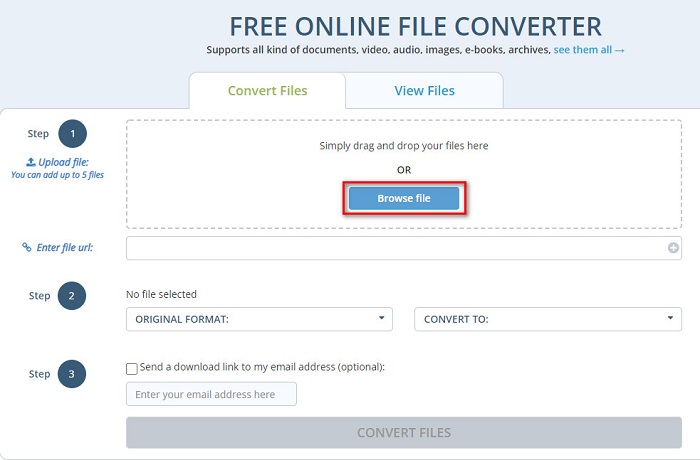
Langkah 1. Cari DocsPal di peramban Anda, lalu Anda akan diarahkan ke halaman web mereka. Pada antarmuka pertama perangkat lunak, klik tombol Browse Files, dan pilih file MPG Anda untuk diunggah.
Langkah 2. Klik tombol drop-down untuk memilih format keluaran file Anda.
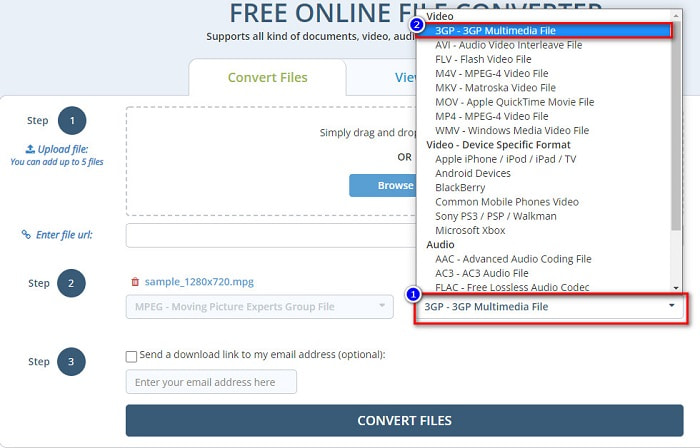
Langkah 3. Terakhir, klik tombol Convert Files untuk mengonversi file MPG Anda ke format file 3GP.
Menggunakan konverter yang mudah digunakan ini dapat dengan mudah mengonversi MPG ke format file 3GP. Jadi, apa yang Anda tunggu? Cobalah sekarang secara gratis!
Bagian 4. Lebih Banyak Pengetahuan tentang MPG dan 3GP
Format file MPG adalah salah satu format file yang paling umum didistribusikan di internet. Banyak orang menggunakannya karena memungkinkan Anda melakukan streaming dan mengunduh lebih cepat daripada format lainnya. Ini menggunakan kompresor MPEG-1 dan MPEG-2 untuk streaming dan mengunduh dengan cepat. Selain itu, dapat menyimpan video, audio, dan metadata ke dalam satu file. Hampir semua pemutar media dapat memutar file jenis ini.
Sebaliknya, file 3GP adalah format file yang didukung oleh perangkat generasi ketiga. Ini berisi codec H.263 dan H.264 yang dibuat untuk kompresi data lossy. Selain itu, jenis file ini memiliki ukuran file yang lebih kecil dibandingkan dengan format file lainnya.
MPG vs. 3GP
Dibuat oleh Moving Picture Experts Group (MPEG), MPG adalah format video digital umum untuk menyimpan info video, audio, dan metadata. Ini sangat berguna saat membuat film untuk dibagikan di Internet. File-file dalam MPG biasanya berisi kompresi video/audio MPEG-1 atau MPEG-2.
Proyek Kemitraan Generasi ke-3 (3GPP) menghasilkan format 3GP/3GPP sebagai format wadah multimedia. Ini sebenarnya didasarkan pada format file media ISO. Kami sering menggunakannya untuk menyimpan streaming video/audio yang dikirimkan antara ponsel 3G dan online.
Bagian 5. FAQ tentang Konversi MPG ke 3GP
Bisakah Anda mengompres file MPG?
Tentu saja. Ada banyak alat yang dapat membantu Anda mengompres format file MPG Anda. Baca artikel ini untuk mengetahui delapan kompresor terbaik yang bisa digunakan.
Apakah mengonversi MPG ke 3GP merusak kualitas video?
Tidak. Mengonversi file MPG ke file 3GP tidak akan merusak kualitas video Anda. Namun, Anda mungkin memiliki ukuran file yang lebih kecil saat mengonversi ke file 3GP.
Apakah pemutar QuickTime mendukung MPG?
Ya. Pemutar QuickTime mendukung format file MPG. Oleh karena itu, Anda dapat memutar file MPG di QuickTime player tanpa menggunakan alat lain.
Kesimpulan
Artikel ini telah menunjukkan kepada Anda cara terbaik untuk mengonversi MPG ke 3GP secara gratis. Sekarang terserah Anda pada konverter apa yang akan Anda gunakan. Tetapi jika Anda ingin mengonversi dengan kecepatan tertinggi dan memiliki fitur unik untuk digunakan, FVC Video Converter Ultimate adalah alat yang cocok untuk Anda. Namun, masih ragu? Cobalah sekarang, nikmati penggunaan fitur khusus dan uniknya.
-
 Cara Mengkonversi MPG ke FLV Tanpa Kehilangan Kualitas [Terbukti]
 Anda harus menonton film favorit Anda di pemutar media ini, tetapi tidak mendukung MPG. Cobalah untuk mengonversi file MPG Anda ke FLV menggunakan konverter yang diperkenalkan artikel ini.
-
 2 Pengonversi MPG Utama untuk Mengonversi MPG ke WMV Gratis
 Apakah Anda ingin mengonversi MPG ke WMV gratis? Dalam hal ini, Anda beruntung karena kami menemukan bahwa ada dua alat yang dapat Anda gunakan untuk mengonversi file MPG Anda.
-
 3 Cara Terbaik untuk Mengonversi MPG ke MP4 dengan Cepat
 Ingin mengonversi format file MPG ke MP4? Pada artikel ini, kami mencantumkan konverter MPG terbaik dan tercepat untuk Anda!

