


 Video Converter Ultimate
 Perekam Layar
 Perbaikan Video
 Unduhan Aman
2 Metode Terbaik untuk Mengonversi OGV ke M4V di Mac dan Windows
Apakah Anda belum tahu cara mengonversi OGV ke M4V? Kalau begitu, buka panduan ini, dan Anda akan menemukan berbagai informasi penting lain yang Anda perlukan. Artikel ini akan memberikan prosedur tanpa ribet untuk mengonversi OGV ke M4V di Mac dan Windows. Tertarik mempelajari metode ini? Bacalah seluruh artikel ini!

Bagian 1: Pengantar OGV dan M4V
| Nama | OGV | M4V |
| Nama file | File Video OGG Vorbis | Video PEG-4 |
| Ekstensi File | .ogv | .m4v |
| Dikembangkan oleh | Xiph.org | Perusahaan Apple. |
| Keterangan | Microsoft Media Player terutama bertanggung jawab atas file OGV. File video OGG memiliki ekstensi nama file "OGV". Selama pemutaran media, file OGV mungkin berisi beberapa aliran video, audio, teks, data teks presentasi, dan metadata. Theora sering digunakan untuk menyandikan video yang disimpan sebagai file OGV. Video berkualitas tinggi dapat disimpan dengan bitrate rendah berkat codec Theora. Ini adalah metode kompresi video lossy open-source. Dalam file OGV, Anda juga dapat mengintegrasikan codec video Daala, Tarkin, dan Dirac. Stream audio OGV dapat dikodekan dengan FLAC, Opus, Vorbis, atau Speex. File OGV dapat dilihat dan diputar di pemutar video seperti VLC dan lainnya. | Apple mengembangkan format video M4V. Ini adalah metode untuk menyimpan video dan mirip dengan format MP4. Namun, kali ini perlindungan salinan DRM mungkin untuk file M4V, yang membuat perbedaan. Apple menggunakan standar pengkodean M4V di iTunes Store-nya. Perlindungan salinan FairPlay Apple membantu mencegah penyalinan file M4V yang tidak diinginkan. QuickTime mengacu pada video M4V dengan FairPlay DRM sebagai 'AVC0 Media.' |
| Detail Teknis | Superset yang kompatibel mundur membuat format kompresi video Theora secara fundamental kompatibel dengan format kompresi video VP3. VP3 dan Theora dapat digabungkan tanpa kompresi ulang karena Theora merupakan superset dari VP3. | File M4V dapat dilindungi menggunakan perlindungan salinan FairPlay Apple untuk mencegah replikasi yang tidak sah. Hanya komputer yang disetujui (melalui iTunes) dengan akun yang digunakan untuk membeli video yang dapat memutar file M4V yang dilindungi FairPlay. |
| Program Terkait | FFmpeg.dll Pemain MP VLC Media Player | Apple iTunes Pemutar QuickTime Apple VLC Media Player Pemutar Zoom Pemutar Media Klasik K-Pemutar Multimedia Pemain asli |
| Jenis MIME | video/ogg | video/x-m4v |
Bagian 2: Cara Mengonversi OGV ke M4V Menggunakan Alat Online
Untuk mengonversi OGV ke format file M4V dengan mudah, Anda hanya memerlukan konverter yang andal. Jadi, pada bagian ini, kami akan menunjukkan cara mengonversi OGV ke M4V menggunakan FVC Free Video Converter Online. Dengan alat ini, Anda dapat mengonversi berbagai file, seperti MP4, MOV, VOB, MOV, AVI, FLV, dan lainnya. Alat ini juga mendukung konversi batch sehingga Anda dapat mengonversi banyak file tanpa kehilangan kualitas. Selain itu, hanya dengan beberapa klik, Anda sudah bisa mengonversi file karena antarmukanya intuitif. Dengan semua langkah dasar ini, dapat disimpulkan bahwa konverter video ini cocok untuk pemula. Anda juga dapat menyesuaikan resolusi hingga 1920x1080. Anda pun bisa mengubah bitrate hingga 20000 kbps. Terakhir, Anda bisa mengubah frame rate hingga 60fps. Lebih lanjut, Anda juga dapat mengedit audio dengan masuk ke pengaturan audio. Anda dapat menyesuaikan bitrate dan sample rate audio. Alat ini juga mendukung format audio seperti FLAC, MP3, AC3, AAC, dan lainnya.
Fitur
◆ Mengonversi berbagai format video, seperti OGV, M4V, MP4, AVI, FLV, MKV, dan lainnya.
◆ Menawarkan konversi batch.
◆ Edit bitrate, frame rate, dan resolusi video.
◆ Ini mendukung format audio seperti MP3, AC3, AAC, FLAC, WAV, dll.
◆ Edit laju bit dan laju sampel audio.
Konversikan file OGV Anda ke format M4V menggunakan FVC Free Video Converter Online. Ikuti prosedur sederhana di bawah ini.
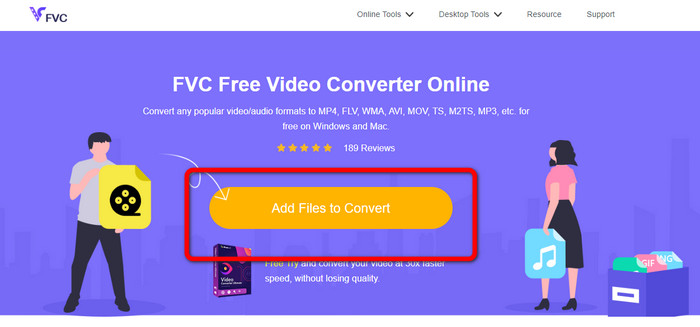
Langkah 1: Buka situs web FVC Free Video Converter Online. Lalu, untuk mengunggah file video OGV, klik tombol Add Files to Convert. Folder Anda akan muncul di layar, lalu pilih video yang ingin Anda konversi.
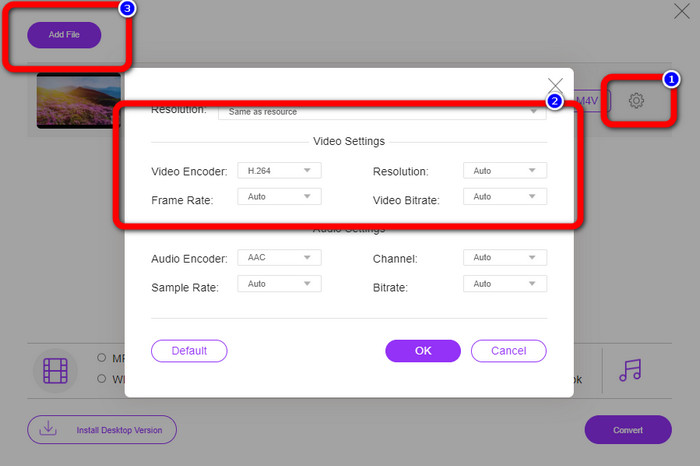
Langkah 2: Setelah mengunggah file video OGV, Anda dapat mengubah bitrate, frame rate, dan resolusi dengan mengklik ikon Setting. Lalu, klik OK. Selain itu, jika ingin menambahkan lebih banyak file, Anda dapat menekan tombol Add File di bagian kiri atas antarmuka.
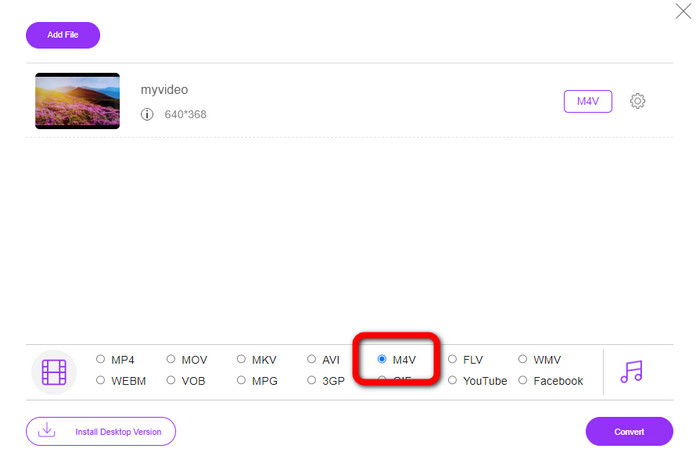
Langkah 3: Setelah melakukan beberapa perubahan pada file video OGV Anda, pilih format file M4V dari opsi format di bagian bawah antarmuka. Lalu, simpan video Anda di lokasi folder yang diinginkan.
Bagian 3: Panduan Mudah untuk Mengonversi OGV ke M4V Offline
Dalam hal aplikasi offline, Anda dapat menggunakan Video Converter Ultimate untuk mengonversi OGV ke M4V di Mac dan Windows. Alat ini adalah pengonversi yang dapat diunduh terbaik. Itu dapat mengonversi banyak file dengan mudah karena memungkinkan pengguna melakukan konversi batch. Juga, ia memiliki proses konversi yang sangat cepat, yaitu 30x lebih cepat daripada konverter lainnya. Dengan cara ini, Anda dapat mengonversi banyak video dengan satu tangan. Selain itu, meskipun Anda mengonversi video, Anda masih dapat menyesuaikan atau mengeditnya menggunakan alat pengeditan video. Anda dapat menambahkan filter, memotong video, menyempurnakan video, dan lainnya.
Selain itu, Video Converter Ultimate memiliki lebih banyak fitur yang dapat Anda nikmati. Anda bisa menyinkronkan audio dengan video karena tersedia fungsi Audio Sync. Juga, jika Anda berencana meningkatkan volume video, hal itu bisa dilakukan. Anda dapat menaikkannya hingga 200% karena alat ini menyediakan Volume Booster. Masih banyak fitur lain yang perlu Anda jelajahi dengan menggunakan konverter video ini.
Fitur
◆ Konversi file video, seperti M4V, OGV, SWF, MP4, AVI, FLV, MOV, VOB, MKV, WMV, dan lainnya.
◆ Dapat membuat Kolase yang menarik.
◆ Menawarkan alat pengeditan video untuk menyempurnakan video, seperti penambah video, koreksi warna, pemangkas, penghapus tanda air, dan banyak lagi.
◆ Membuat Video Musik tersedia.
◆ Sesuaikan kecepatan video.
◆ Menawarkan kompresor Video dan Audio
◆ Sesuaikan video 3D dari 2D
Langkah 1: Jika Anda ingin mengunduh Video Converter Ultimate, klik tombol Download di bawah ini. Lalu, jalankan aplikasinya setelah proses instalasi selesai.
Unduh GratisUntuk Windows 7 atau yang lebih baruUnduhan Aman
Unduh GratisUntuk MacOS 10.7 atau yang lebih baruUnduhan Aman
Langkah 2: Pilih panel Converter dan klik tombol bergambar tanda Plus untuk menambahkan file video OGV. Anda juga bisa mengklik tombol Add Files atau menjatuhkan (drag and drop) file langsung ke dalam kotak.
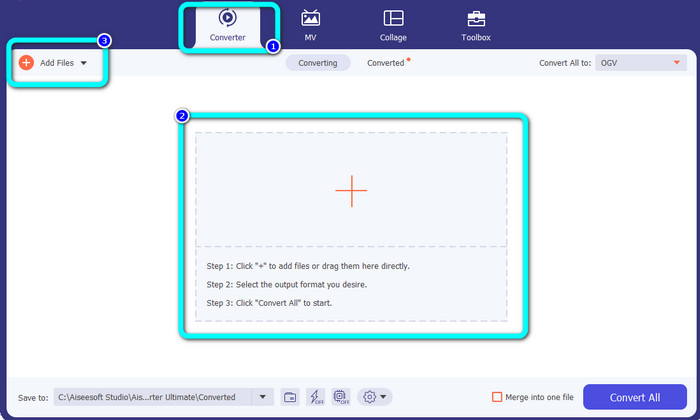
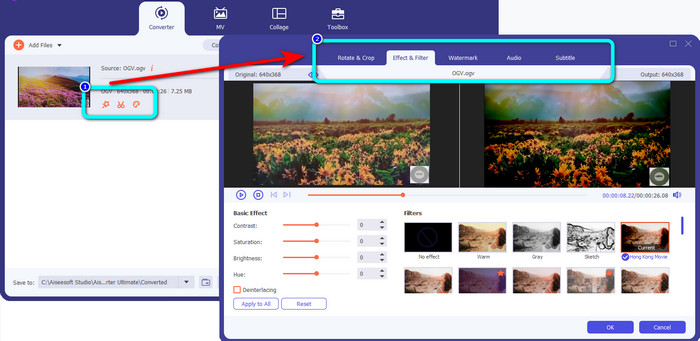
Langkah 3: Jika Anda ingin mengedit video OGV, klik ikon-ikon pada kotak pertama. Dengan cara ini, Anda dapat memotong dan memutar video, serta menambahkan filter, watermark, dan lainnya. Setelah selesai mengedit video, pilih OK.
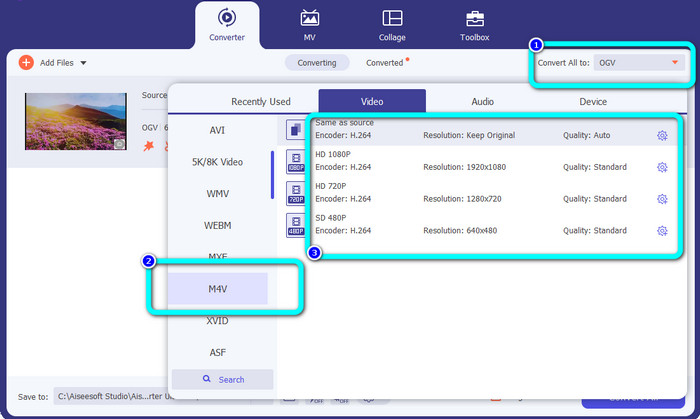
Langkah 4: Setelah itu, untuk mengonversi OGV Anda ke M4V, buka tombol Convert All to untuk menampilkan opsi format. Pilih format file M4V dan tentukan resolusi yang diinginkan.
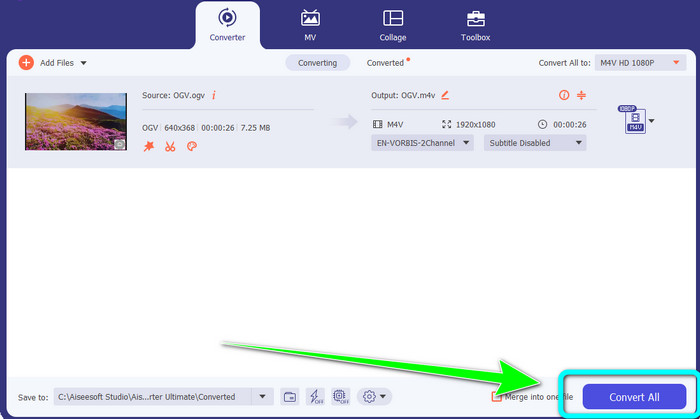
Langkah 5: Untuk langkah terakhir, klik tombol Convert All untuk mengonversi file OGV ke format M4V dan simpan video Anda ke perangkat.
Bacaan Lanjutan:
2 Cara Istimewa Teratas untuk Mengonversi M2TS ke M4V
Pelajari dan Temukan Cara Terbaik untuk Mengonversi MXF ke M4V
Bagian 4: FAQ tentang Konversi OGV ke M4V
Apakah OGV merugi?
Ya. Format OGV dikombinasikan dengan standar kompresi video sumber terbuka yang dikenal sebagai ekstensi file .ogv terutama dibuat oleh Xiph.org; itu terkait erat dengan OGG Vorbis dan dapat digunakan untuk penyimpanan lossy atau streaming online.
Berapa lama untuk mengubah OGV ke MP4?
Itu tergantung pada konverter yang Anda gunakan. Jika Anda menginginkan konverter dengan proses konversi yang cepat, gunakan Video Converter Ultimate. Alat ini menawarkan kecepatan konversi 30x lebih cepat.
Bisakah saya membuka file M4V saya di semua perangkat?
Sayangnya tidak. Anda hanya dapat mengakses file M4V melalui komputer resmi Apple. Jika Anda ingin memutar video Anda di semua perangkat, Anda dapat mengonversi video Anda menjadi file MP4.
Kesimpulan
Mengonversi OGV ke M4V di Mac dan Windows sangat mudah selama Anda mengetahui aplikasi praktis yang bisa digunakan. Artikel ini telah memperkenalkan dua aplikasi hebat untuk mengonversi OGV ke M4V dengan mudah dan cepat. Untuk konverter online, Anda bisa menggunakan FVC Free Video Converter Online. Di sisi lain, Anda dapat memakai Video Converter Ultimate untuk mengonversi file secara offline.
-
 Konverter OGV ke FLV Hebat yang Tidak Boleh Anda Lewatkan [Terbukti]
 Jika Anda ingin tahu cara cepat mengonversi file OGV ke FLV, artikel ini akan menunjukkan kepada Anda satu-satunya konverter yang Anda perlukan.
-
 5 Pengonversi OGV ke WMV yang Bermanfaat untuk Mengonversi File OGV Anda
 Ada 5 konverter OGV ke WMV berbeda yang dapat Anda gunakan untuk mengonversi file OGV. Artikel ini memberikan fakta kuat tentang 5 konverter ogv yang tersedia.
-
 Cara Menakjubkan untuk Mengonversi OGV ke MKV Secara Efisien dan Mudah
 Panduan ini akan memberi Anda prosedur tanpa kerumitan untuk mengonversi OGV ke MKV tanpa kerugian. Coba konverter paling andal ini, dan rasakan fungsinya yang luar biasa.
