


 Video Converter Ultimate
 Perekam Layar
 Perbaikan Video
Cara Luar Biasa untuk Mengonversi VOB ke 3GP dengan Mudah [Pengonversi Terbaik]
Ingin memutar file VOB di perangkat generasi ketiga Anda tetapi tidak bisa? Solusi terbaik untuk Anda adalah mengonversi file VOB ke file 3GP. File 3GP adalah format yang didukung oleh perangkat 3G. Maka dari itu, jika Anda mencari cara terbaik untuk mengodekan file VOB Anda ke 3GP, artikel ini mungkin jawabannya. Kami menyediakan cara termudah dan terbaik untuk mengonversi VOB ke 3GP.

Bagian 1. Bagaimana Mengonversi Menggunakan FVC Video Converter Ultimate
FVC Video Converter Ultimate adalah salah satu konverter berperforma terbaik yang tersedia di web. Konverter offline gratis ini dapat mengonversi berbagai format file, termasuk VOB, 3GP, MP4, MKV, MOV, AVI, FLV, dan lebih dari 1000 format file lainnya. Konverter ini juga memungkinkan Anda memotong durasi video, dan bahkan menambahkan efek untuk meningkatkan kualitas video Anda. Selain itu, jika Anda ingin menggabungkan beberapa file, konverter ini menyediakan fitur konversi batch. Jadi, jika Anda ingin mengonversi VOB ke 3GP dengan mudah, baca detail lebih lanjut di bawah ini dan unduh secara gratis.

FVC Video Converter Ultimate
5.689.200+ Unduhan- Dapat mengonversi lebih dari 1000+ format file yang tersedia di web.
- Dapat mengonversi banyak format file secara batch.
- Ini memiliki proses konversi yang sangat cepat dan akselerasi perangkat keras.
- Ini memiliki fitur pengeditan lanjutan untuk memotong, menambahkan subtitle, dan menambahkan tanda air ke file Anda.
- Tersedia di semua platform media seperti Windows dan Mac.
Unduh GratisUntuk Windows 7 atau yang lebih baruUnduhan Aman
Unduh GratisUntuk MacOS 10.7 atau yang lebih baruUnduhan Aman
Berikut langkah-langkah cara mengubah VOB ke 3GP menggunakan FVC Video Converter Ultimate:
Langkah 1. Pertama, unduh aplikasinya dengan mengklik tombol Download untuk Windows atau Mac. Lalu ikuti proses instalasi, dan buka aplikasinya.
Unduh GratisUntuk Windows 7 atau yang lebih baruUnduhan Aman
Unduh GratisUntuk MacOS 10.7 atau yang lebih baruUnduhan Aman
Langkah 2. Klik tombol Add Files atau tombol bergambar tanda +. File di komputer Anda akan muncul, lalu pilih file VOB untuk mengunggahnya ke dalam antrean.
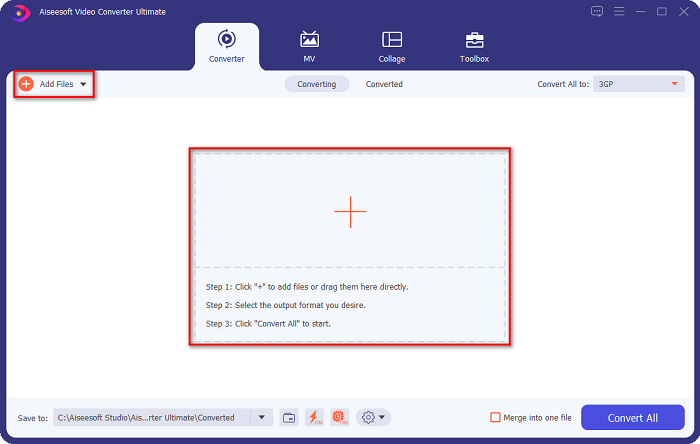
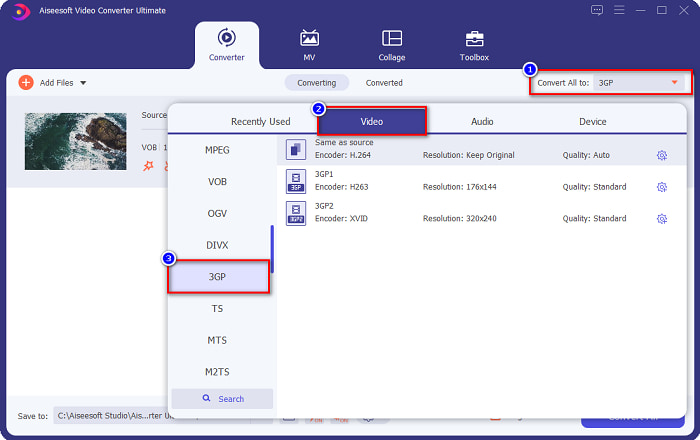
Langkah 3. Untuk langkah ketiga, klik tombol Convert All to untuk memilih format keluaran yang Anda inginkan. Klik 3GP, kemudian lanjut ke langkah berikutnya.
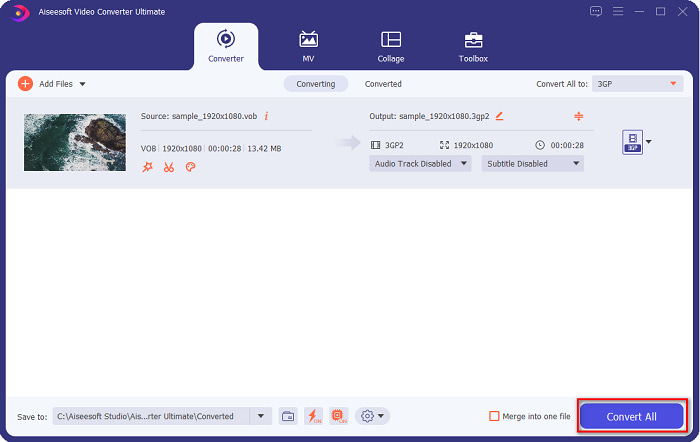
Langkah 4. Setelah memilih format keluaran yang diinginkan, klik tombol Convert All agar proses konversi dimulai. Tunggu beberapa detik, dan voila! Dengan langkah-langkah sederhana tersebut, Anda dapat dengan mudah mengonversi file VOB ke 3GP.
Bagian 2. Cara Mengkonversi VOB ke 3GP Gratis Online
Jika Anda ingin mengonversi file VOB ke file 3GP tanpa mengunduh, Anda dapat menggunakan konverter online yang tersedia di web. Kenyamanan dan efisiensi menggunakan konverter online tidak diragukan lagi bagus. Oleh karena itu, kami menyediakan dua cara untuk mengonversi file VOB Anda ke format file 3GP.
FileProInfo
FileProInfo adalah konverter online dengan antarmuka GUI yang mudah digunakan, sehingga menjadi alat yang ramah bagi pemula. Alat ini mendukung hampir semua format file standar yang tersedia di internet. Namun, konverter online seperti ini biasanya berisi banyak iklan yang mengganggu. Meski begitu, masih banyak orang yang menggunakan konverter ini.
Langkah 1. Di browser Anda, cari FileProInfo untuk pergi ke halaman web mereka. Pada antarmuka utama perangkat lunak, klik tombol Select VOB file dan pilih file VOB Anda untuk diunggah.

Langkah 2. Selanjutnya, pilih format keluaran yang Anda inginkan pada kotak di samping kata to.

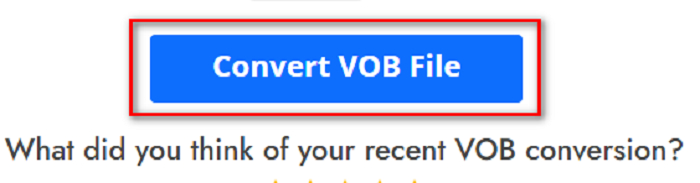
Langkah 3. Terakhir, klik Convert VOB File di bagian bawah antarmuka perangkat lunak. Lalu tunggu hingga proses konversi selesai.
Dan itu dia! Tanpa berkeringat, Anda dapat mengonversi file VOB Anda ke 3GP.
Konversi365
Convert365 adalah konverter VOB ke 3GP berbasis online yang memungkinkan Anda mengonversi sebagian besar format standar, termasuk VOB, 3GP, AVI, MOV, MP4, MPEG, dan lainnya. Jika Anda mencari konverter online yang dapat menormalkan volume audio, alat ini memiliki fitur tersebut. Namun, karena ini adalah alat online, Anda mungkin akan mengalami proses konversi yang lambat karena bergantung pada koneksi internet. Selanjutnya, ikuti langkah-langkah di bawah ini untuk mengonversi file VOB ke 3GP menggunakan Convert365.
Langkah 1. Cari Convert365 di browser Anda, klik tombol Add Files dan pilih file VOB Anda ketika file di komputer muncul.

Langkah 2. Lalu pada tombol drop-down di samping Convert to, pilih format keluaran Anda. Klik format file 3GP.
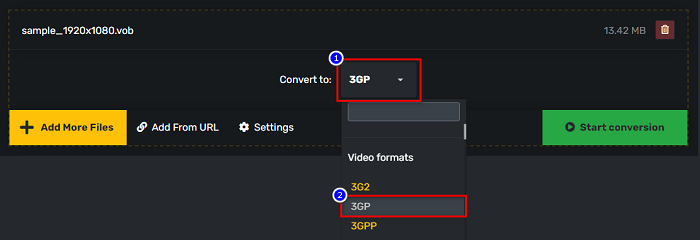
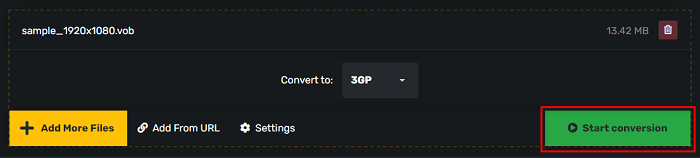
Langkah 3. Dan terakhir, klik Start conversion. tombol untuk mengonversi VOB Anda ke file 3GP.
Bagian 3. Konverter VOB ke 3GP mana yang harus saya gunakan
Saat memilih konverter terbaik untuk mengonversi VOB ke 3GP, Anda harus selalu mempertimbangkan kecepatan, file yang didukungnya, dan keunikan fitur konverter. Kami merekomendasikan untuk menggunakan alat offline FVC Video Converter Ultimate di antara konverter online dan offline terbaik yang ditunjukkan di atas. Konverter ini menawarkan banyak fitur berbeda yang tidak dimiliki konverter lain, seperti pembuat GIF pembuat 3D, penghapus tanda air, dan banyak lagi.
Selain itu, meskipun dapat memberikan output seperti profesional, ia juga memiliki antarmuka yang mudah digunakan sehingga Anda tidak akan kesulitan menggunakannya.
Bagian 4. Lebih lanjut tentang VOB dan 3GP
VOB atau Video Object adalah format wadah file yang digunakan DVD. Ini berisi konten video, audio, subtitle, dan menu. Jenis file ini memiliki batasan dan batasan penyalinan untuk melindunginya agar tidak disalin secara langsung. Sebaliknya, file 3GP adalah format file yang hanya dapat diputar di perangkat seluler generasi ketiga. Format file ini dikembangkan oleh Third Generation Partnership Project (3GPP). Apalagi jenis file ini hanya berisi ukuran file yang kecil, dibandingkan dengan file VOB, karena dibuat untuk berbagi ke perangkat 3G. 3GP dapat menyimpan file video dan audio yang biasa digunakan di ponsel 3G.
Bagian 5. FAQ tentang Mengubah VOB ke 3GP
Bisakah Anda memainkan 3GP di macOS?
File 3GP tidak dapat diputar di macOS, terutama pada versi QuickTime terbaru. Namun, Anda dapat mengonversi file 3GP ke format yang didukung macOS, yaitu MOV. Untuk mengetahui lebih lanjut tentang mengonversi file 3GP ke MOV, klik tautan ini.
Apakah mengonversi VOB ke 3GP akan memengaruhi kualitas file Anda?
Pastinya ya. Ukuran file akan terpengaruh saat Anda mengonversi VOB ke 3GP. Karena 3GP hanya berisi file video dan audio dan memiliki ukuran file yang lebih kecil, ukuran file file VOB Anda akan lebih kecil.
Apakah format file 3GP adalah file umum?
Sayangnya, saat ini, format file 3GP tidak begitu umum karena jumlah ponsel 3G saat ini lebih sedikit. File yang paling umum untuk pengguna ponsel saat ini adalah format file MP4.
Kesimpulan
Saat kami menyajikan konverter terbaik dan termudah untuk digunakan untuk mengonversi VOB ke MOV di Windows dan Mac, kami menyimpulkan bahwa FVC Video Converter Ultimate adalah yang terbaik di antara alat konverter online dan offline pilihan yang disajikan. Tidak hanya memiliki fitur unik untuk dicoba, ia juga menawarkan konversi berkecepatan tinggi. Masih ragu dengan konverter ini, unduh sekarang dan coba konverter VOB ke 3GP terbaik.
-
 Cara Terbaik untuk Mengonversi VOB ke FLV [Termasuk Gratis & Online]
 Ingin mengonversi file VOB ke file FLV? Anda dapat dengan mudah menyelesaikan tugas dengan konverter desktop atau online. Baca panduan ini dan pelajari cara mengubah VOB ke FLV dengan mudah dan cepat.
-
 3 Konverter Praktis Tersedia untuk Mengubah File VOB ke Format AVI [2021]
 Punya masalah karena file VOB tidak support untuk dimainkan? Kemudian mari kita coba mengonversinya dengan 3 cara yang disajikan di bawah ini dengan langkah-langkah terperinci pada setiap konverter.
-
 Metode Luar Biasa untuk Digunakan dalam Mengonversi VOB ke MOV
 Pengunduhan video online memang mudah, tetapi bagaimana jika video dalam format VOB dan pemutar Anda tidak mendukungnya? Posting ini akan mengajarkan Anda bagaimana mengkonversi VOB ke MOV.
