


 Video Converter Ultimate
 Perekam Layar
 Perbaikan Video
 Unduhan Aman
Panduan Luar Biasa untuk Mengonversi VOB ke DIVX Sepenuhnya
File yang paling sering ditemukan pada DVD disebut file VOB, dan file ini dapat menyimpan hampir semua data, termasuk navigasi, menu, subtitle, video, dan audio. Namun, ukurannya memakan terlalu banyak ruang pada perangkat. Jadi, jika Anda ingin ukuran file lebih kecil, Anda harus mengonversi file VOB ke format file lain seperti format DIVX. Untungnya, artikel ini memiliki metode terbaik yang bisa Anda coba untuk mengonversi berbagai file. Untuk mengonversi VOB ke DIVX, Anda harus membaca artikel ini dan mempelajari alat yang bisa Anda gunakan secara online maupun offline.

Bagian 1: Konverter VOB ke DIVX Luar Biasa Tanpa Kehilangan Kualitas
Ingin mengonversi VOB ke DIVX tanpa kehilangan kualitas? Maka artikel ini adalah jawaban terbaik untuk Anda. Konverter paling unggul dan bermanfaat yang bisa Anda gunakan adalah Video Converter Ultimate. Alat ini dapat membantu Anda mengonversi berbagai jenis file, seperti VOB, MT2S, DV, ASF, OGV, DIVX, MTV, MP4, M4V, AVI, AMV, GIF, dan lainnya. Alat ini juga mendukung konversi batch untuk mengonversi banyak file dalam satu klik. Selain itu, alat offline ini dapat mengonversi file dengan kecepatan tinggi hingga 30x lebih cepat dibandingkan konverter lain. Lebih jauh lagi, Anda dapat mengunduhnya di Mac maupun Windows, sehingga setiap pengguna dapat memanfaatkan alat ini.
Selain itu, Video Converter Ultimate memiliki banyak fitur, seperti pembuat Video Musik, pembuat kolase, dan lainnya. Dengan bantuan alat luring ini, Anda dapat melakukan apa pun yang Anda inginkan pada video Anda. Baca detail lebih lanjut tentang pengonversi offline ini di bawah.
Fitur
◆ Konversi berbagai format video, seperti VOB, DIVX, MP4, AVI, MTS, dan lainnya.
◆ Menawarkan proses konversi Batch.
◆ Buat Kolase yang bagus dan indah.
◆ Menawarkan berbagai alat pengeditan, seperti kompresor video, penambah, pengontrol kecepatan video, pemotong, dll.
Pro
- Dapat memanfaatkan Mac dan Windows secara efisien.
- Dapat diakses untuk pemula dan pengguna tingkat lanjut.
- Itu dapat mengkonversi hingga 30x lebih cepat.
Kontra
- Fitur lanjutan dapat digunakan dengan menggunakan versi berbayar.
Menawarkan berbagai alat pengeditan, seperti kompresor video, penambah, pengontrol kecepatan video, pemangkas, dll.
Langkah 1: Unduh Video Converter Ultimate di Mac atau Windows Anda dengan mengklik tombol Download di bawah ini. Instal dan jalankan aplikasinya.
Unduh GratisUntuk Windows 7 atau yang lebih baruUnduhan Aman
Unduh GratisUntuk MacOS 10.7 atau yang lebih baruUnduhan Aman
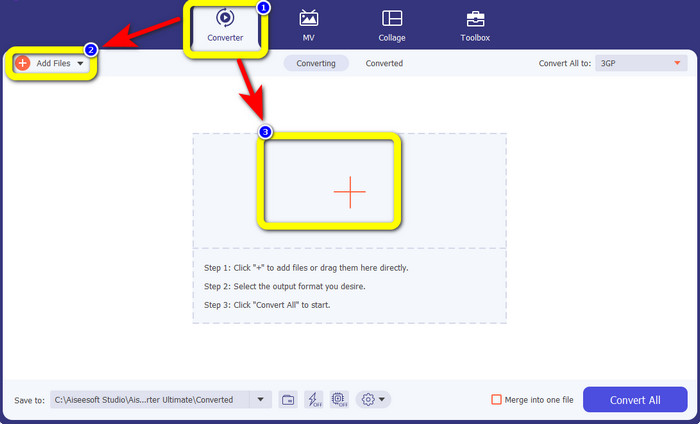
Langkah 2: Pilih panel Converter. Lalu, klik tombol Add Files untuk mengunggah file VOB Anda. Anda juga dapat mengklik tombol tanda Plus untuk mengunggah file.
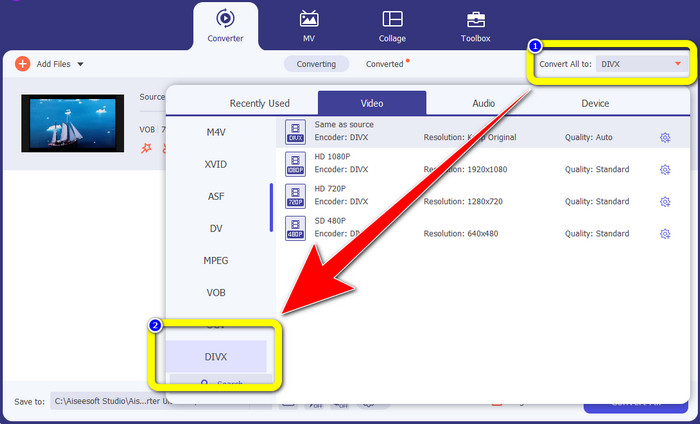
Langkah 3: Setelah mengunggah file, buka tombol Convert All to. Opsi format akan muncul, lalu pilih format file DIVX.
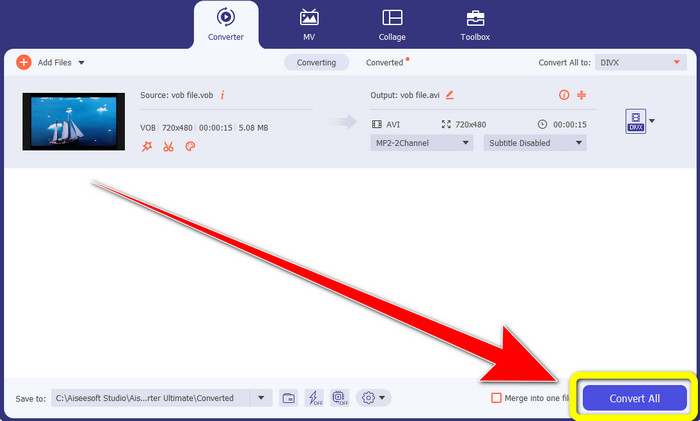
Langkah 4: Klik Convert All untuk mengonversi dan menyimpan hasil akhir Anda.
Bagian 2: Alat Online Gratis untuk Mengonversi VOB ke DIVX
Media.io
Jika Anda bertanya-tanya konverter apa yang bisa digunakan tanpa menginstalnya di Windows atau Mac, Anda dapat menggunakan Media.io. Alat online gratis ini mampu mengonversi VOB ke DIVX. Alat ini sangat mudah digunakan karena hanya membutuhkan tiga langkah sederhana untuk mengonversi berbagai file. Selain itu, konverter online ini mendukung berbagai format video dan audio, seperti MOV, AVI, XVID, DIVX, FLV, MP4, M4V, MP3, WAV, WMA, dan lainnya. Lebih dari itu, alat online ini bukan hanya sekadar konverter. Anda dapat melakukan banyak hal dengan alat ini, seperti mengedit video menggunakan berbagai alat, seperti editor video, penggabung, pemotong (cropper), pemangkas (trimmer), dan lain-lain. Namun, Media.io adalah aplikasi berbasis web, jadi Anda selalu bergantung pada akses internet. Tanpa koneksi internet, Anda tidak dapat menggunakan konverter ini. Selain itu, proses konversinya hanya normal, sehingga mengonversi banyak file akan memakan waktu agak lama. Untuk mengonversi file VOB ke format DIVX, ikuti langkah-langkah sederhana di bawah ini.
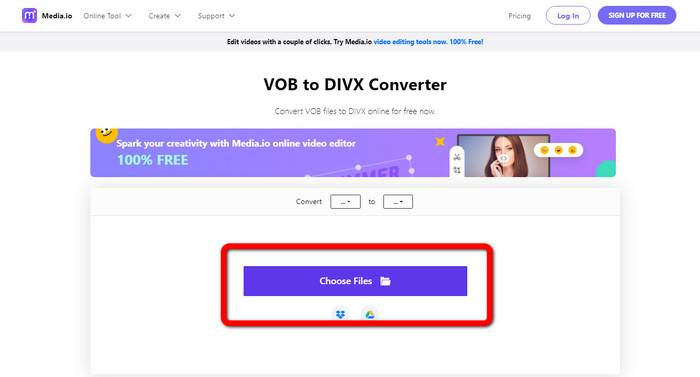
Langkah 1: Buka situs web Media.io. Klik tombol Choose Files. File Anda akan muncul di layar. Pilih file VOB yang ingin Anda konversi.
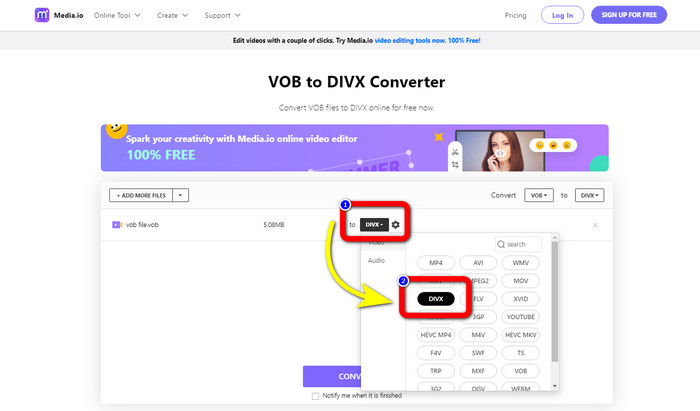
Langkah 2: Setelah selesai mengunggah file VOB, pilih format file DIVX dari opsi format.
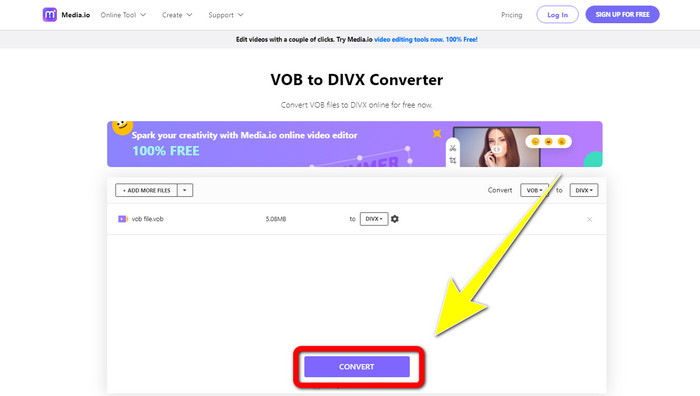
Langkah 3: Untuk langkah terakhir, klik tombol Convert. Lalu simpan ke desktop Anda.
Convertio
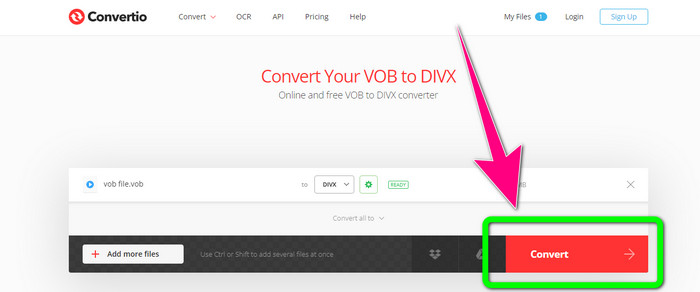
Perangkat lunak online lain yang dapat Anda gunakan untuk mengonversi VOB ke DIVX adalah Convertio. Alat online ini mendukung berbagai format file, seperti FLV, MP4, DIVX, VOB, MOV, MTS, WMV, dan banyak lagi. Selain itu, perangkat lunak ini mudah digunakan dan sempurna untuk setiap pengguna. Selain itu, Anda juga dapat mengonversi berbagai format mulai dari audio, gambar, presentasi, dokumen, e-book, dll. Sayangnya, penggunaan konverter online ini memiliki kelemahan. Anda hanya dapat menjatuhkan file dengan maksimal 100Mb menggunakan versi gratis. Satu-satunya cara untuk meningkatkan ukuran file maksimum adalah dengan membeli langganan. Dengan cara ini, Anda dapat menikmati mengonversi banyak file tanpa mengkhawatirkan batas ukuran file. Ikuti langkah-langkah di bawah ini untuk mengonversi file VOB ke DIVX menggunakan Convertio.
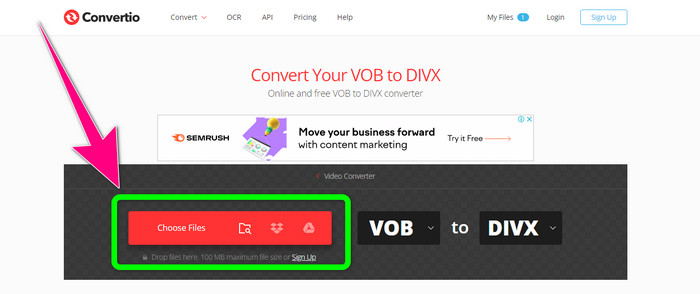
Langkah 1: Kunjungi situs web Convertio. Klik tombol Choose Files dan masukkan file VOB.
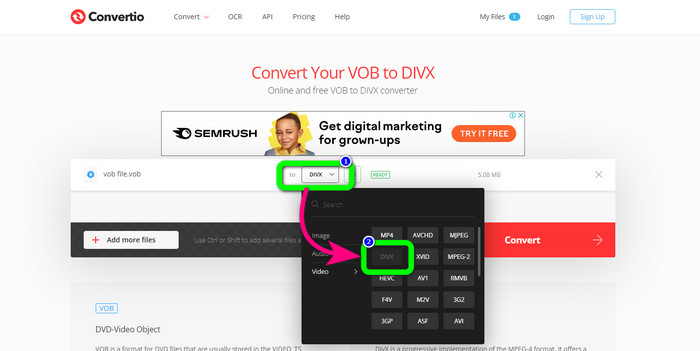
Langkah 2: Untuk langkah kedua, pilih format DIVX dari opsi format.
Langkah 3: Pada langkah terakhir, klik tombol Convert. Tunggu proses konversi dan simpan file DIVX Anda. Jika Anda perlu mengonversi VOB ke 3GP, Anda juga dapat menggunakan alat ini.
Bagian 3: VOB vs DIVX
| VOB | DIVX | |
| Ekstensi File | Format wadah video digital VOB (Video Object) biasanya terlihat dalam materi video DVD. Multipleks VOB menggabungkan video DVD, audio, menu, dan informasi teks seperti subtitle. Audio AAC dan codec video MPEG-1 atau MPEG-2 Bagian 2 sering digunakan. Meskipun gratis, versi tertentu dari format ini mungkin dienkripsi. | Codec video DivX, dibuat oleh DivX, LLC, terutama kompatibel dengan perangkat lunak Windows tetapi juga dapat diintegrasikan dengan konsol game, jam alarm, stereo kendaraan, dan perangkat lainnya. Saat ini, ada tiga codec DivX utama: codec video High Definition H.264/MPEG-4 AVC DivX Plus, HEVC Ultra HD, dan MPEG-4 Part 2 (DivX Plus). |
| Program Terkait | KM Player VLC Pemutar Media Pemutar Media Pemutar GOM Klasik | Pemutar DVD/Blu-ray Mobil Stereo XBox 360 Jam Alarm |
| Dikembangkan oleh | Forum DVD | DIVX Networks Inc. |
| Jenis MIME | Video/MPEG, VIDEO/DVD | DIVX/VIDEO |
Bagian 4: FAQ tentang Konversi VOB ke DIVX
1. Untuk apa DIVX digunakan?
Perusahaan DivX memproduksi barang dengan merek DivX. Kata ini terkadang digunakan untuk mengacu pada codec DivX yang terkenal, yang mengompres video panjang untuk mengurangi ukuran file sambil mempertahankan tingkat kualitas video yang wajar.
2. Bagaimana cara mengonversi format MP4 ke DIVX?
Anda dapat mengonversi format MP4 ke DIVX menggunakan Video Converter Ultimate. Dengan cara ini, Anda dapat dengan mudah mengubah format video Anda.
3. Apakah DIVX sama dengan AVI?
Meskipun format file DivX juga dapat menyertakan fitur seperti subtitle dan bab XSUB, ini juga didasarkan pada wadah AVI. Semua perangkat Bersertifikat DivX, termasuk TV dan gadget dalam mobil, akan mendukung video AVI dan DIVX untuk pemutaran.
Kesimpulan
Ini adalah metode terbaik untuk mengonversi VOB ke DIVX tanpa kehilangan kualitas menggunakan alat offline dan online. Namun, seperti yang Anda lihat, alat online memiliki beberapa kekurangan. Jadi, solusi terbaik adalah mengunduh konverter yang unggul di Windows atau Mac Anda, seperti Video Converter Ultimate.
-
 Cara Mengonversi File VOB ke WMV di Windows dan Mac [Cepat]
 Apakah Anda salah satu orang yang ingin mengonversi file VOB ke format file WMV? Kami telah mencoba konverter offline dan online dan memilih konverter VOB ke WMV terbaik.
-
 3 Cara Mengonversi VOB ke MKV di Windows, Mac, dan Online
 Apakah Anda ingin mengonversi DVD VOB ke MKV? Artikel ini memberi Anda tiga cara terbaik untuk mengonversi file VOB Anda ke MKV tanpa kesulitan mengonversi file.
-
 Cara Mengonversi DIVX ke 3GP di Windows, Mac, dan Online
 Bagaimana cara mengubah DIVX ke 3GP? Jika Anda mencari jawaban, baca artikel ini. Kami akan menunjukkan kepada Anda prosedur hebat dengan bantuan konverter yang berbeda.
