


 Video Converter Ultimate
 Perekam Layar
 Perbaikan Video
 Unduhan Aman
Mengubah YouTube menjadi Nada Dering: Konversi Menjadi Mudah
Apakah Anda lelah dengan notifikasi dari nada dering ponsel yang hambar dan berulang-ulang? Bagaimana kalau mulai memakai nada yang kekinian, enak didengar, dan penuh semangat dari YouTube? Tidak tahu caranya? Tenang, solusinya adalah mengonversi nada tersebut, dan keberuntungan Anda belum berhenti di situ karena kami sudah menyiapkan daftar perangkat lunak dan alat online yang dirancang khusus untuk mengonversi YouTube menjadi nada dering. Mulailah mengonversi video YouTube sekarang dan ubah nada dering harian Anda dari membosankan menjadi menyenangkan.

Bagian 1. Konversi Tautan YouTube ke Nada Dering MP3
Apakah Anda bertanya-tanya bagaimana cara menjadikan video YouTube sebagai nada dering? Nah, untuk bagian ini, kami akan menunjukkan cara mengonversi video YouTube menjadi nada dering MP3 dengan menyalin dan menempel tautan dan memanfaatkan alat konversi berbasis web seperti Y2Mate. Proses ini memakan waktu sekitar tiga langkah, memastikan konversi yang mudah untuk menghemat waktu Anda dan menyetel nada dering yang baru saja dikonversi.
Langkah 1. Salin tautan dari video YouTube pilihan Anda yang ingin Anda ubah menjadi nada dering. Ini bisa dilakukan melalui browser di desktop atau lewat aplikasi YouTube di ponsel.
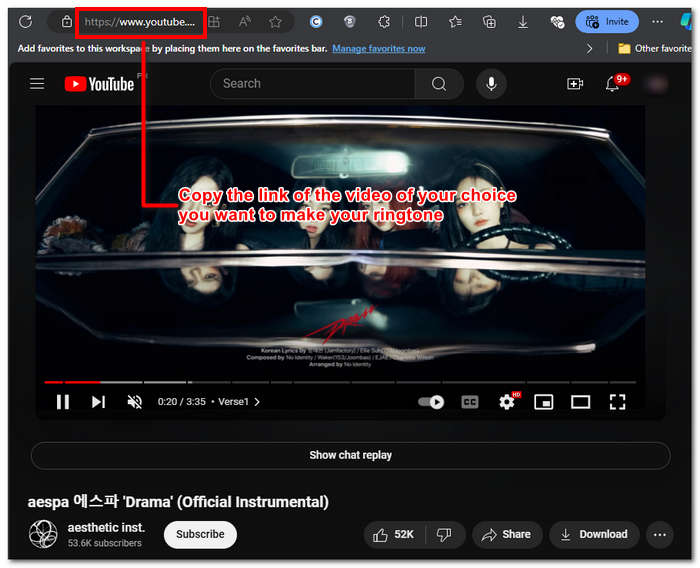
Langkah 2. Buka Y2Mate.com dan tempelkan tautan video YouTube Anda di kolom yang sudah disediakan.
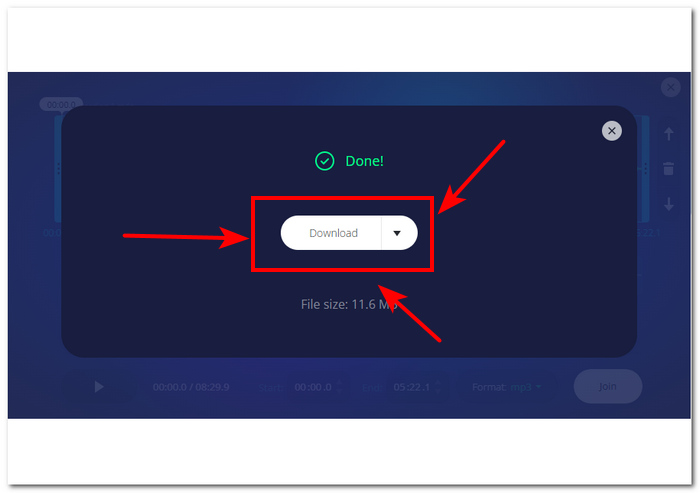
Langkah 3. Selanjutnya, klik tombol Audio lalu klik tombol Download untuk mengonversi file dan menyimpannya ke perangkat Anda.
Langkah ini juga berfungsi pada telepon seluler, karena Anda dapat menggunakan peramban telepon seluler Anda.
Bagian 2. Kustomisasi Video YouTube ke Nada Dering MP3 untuk Android/iPhone
Jika Anda ingin mengunduh video YouTube, menjadikannya nada dering, dan menyesuaikannya agar terasa lebih personal, maka alat berbasis perangkat lunak adalah solusi yang tepat. FVC-picked Video Converter Ultimate adalah alat serbaguna yang dapat mengonversi, meningkatkan kualitas, mengompres, dan bahkan mengedit video dan audio dengan dukungan hingga 1000 format file. Selain itu, alat ini dilengkapi dengan teknologi pemrosesan berkecepatan tinggi untuk menjamin kecepatan konversi yang cepat tanpa mengurangi kualitas.
Tugasnya adalah menyesuaikan berkas video YouTube sebelum mengubahnya menjadi nada dering M4R atau MP3. Dengan demikian, perangkat lunak ini dapat membantu Anda memperpendek durasi, menambahkan efek fade, dan menghapus bagian yang menurut Anda tidak perlu, sehingga menghasilkan penyesuaian lengkap yang sesuai dengan preferensi Anda dalam nada dering.
Sebelum menyesuaikan nada dering, Anda harus mengunduh video YouTube Anda. Jika Anda belum mengunduh video tersebut ke perangkat Anda, Anda dapat menggunakan Y2Mate untuk melakukannya.
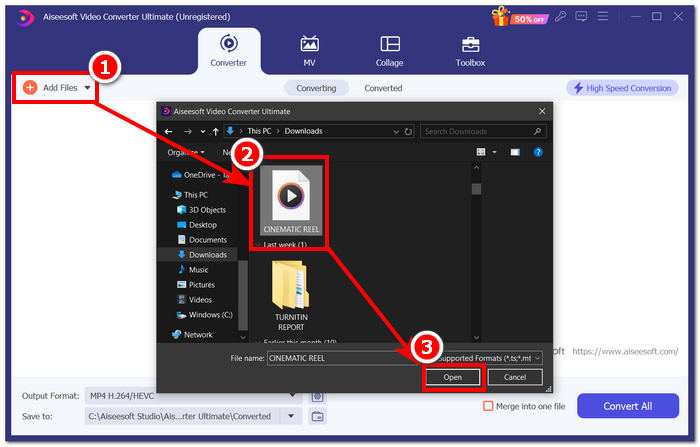
Langkah 1. Menggunakan desktop Anda, unduh dan pasang FVC-picked Video Converter Ultimate pada perangkat Anda. Buka program di perangkat lalu muat video YouTube yang sudah diunduh dengan mengklik tautan Add Files di bagian kiri atas antarmuka.
Unduh GratisUntuk Windows 7 atau yang lebih baruUnduhan Aman
Unduh GratisUntuk MacOS 10.7 atau yang lebih baruUnduhan Aman
Langkah 2. Setelah video masuk ke dalam program, klik ikon gunting di dekat video untuk mulai menyesuaikan nada dering Anda. Ketika jendela baru muncul di layar, Anda dapat menambahkan efek fade pada nada dering dan mempersingkatnya dengan menyeret bilah kursor dari kiri ke kanan. Jika sudah selesai menyesuaikannya, cukup klik tombol Save.
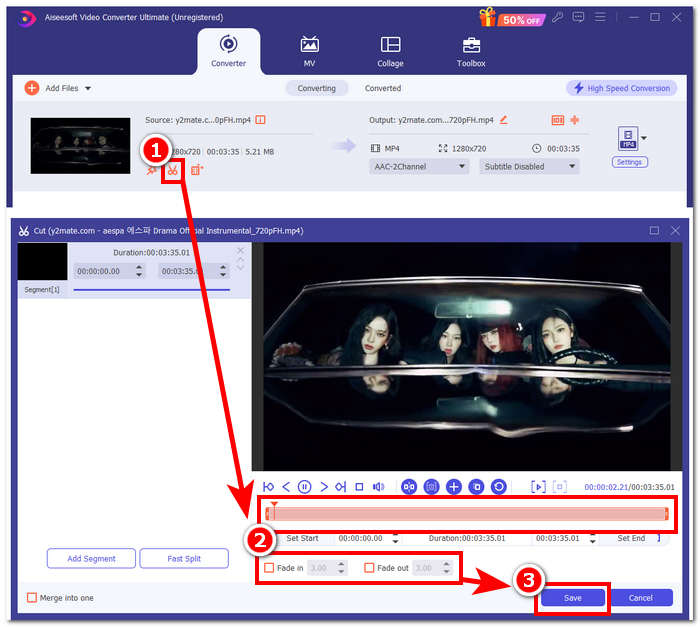
Langkah 3. Setelah Anda menyesuaikan nada dering, ubah format filenya dari MP4, yaitu format file video, menjadi format MP3 agar muncul sebagai file audio di perangkat Anda.
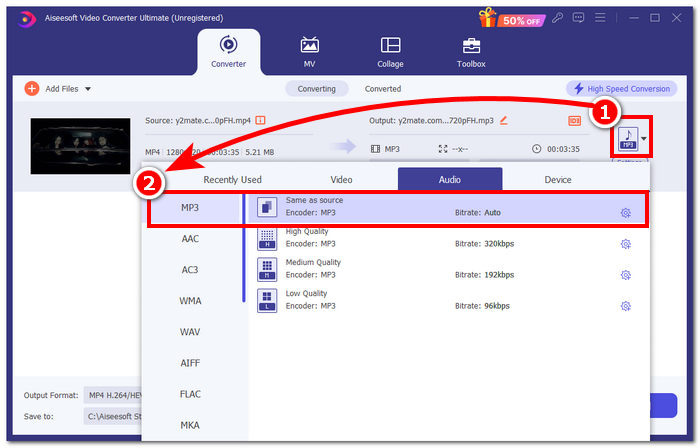
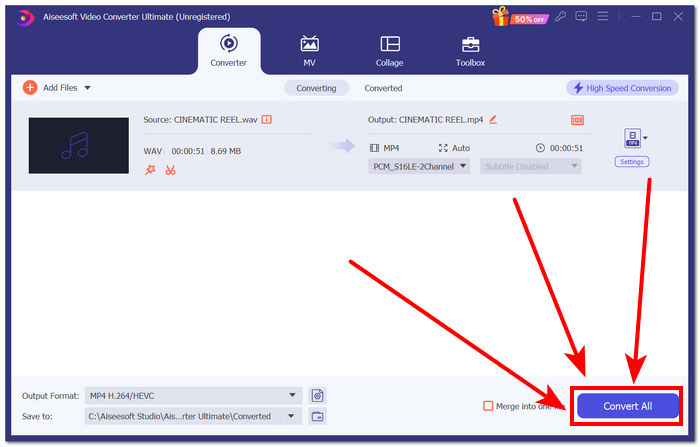
Langkah 4. Klik tombol Convert All untuk memulai proses konversi dan secara otomatis menyimpan nada dering ke perangkat Anda. Setelah selesai dikonversi, nada dering Anda akan berada di folder unduhan.
Bagian 3. Mengatur Video YouTube ke Nada Dering MP3
iPhone
Setelah membuat nada dering untuk iPhone, mengatur nada dering di iPhone terbilang cukup rumit dibandingkan Android. iPhone tidak memiliki dukungan bawaan untuk mempermudah proses pengaturan nada dering baru yang berasal dari sumber lain. Namun demikian, hal itu tidak menghentikan kita untuk mencari cara membuat nada dering YouTube yang sudah dikonversi ke MP3 di iPhone.
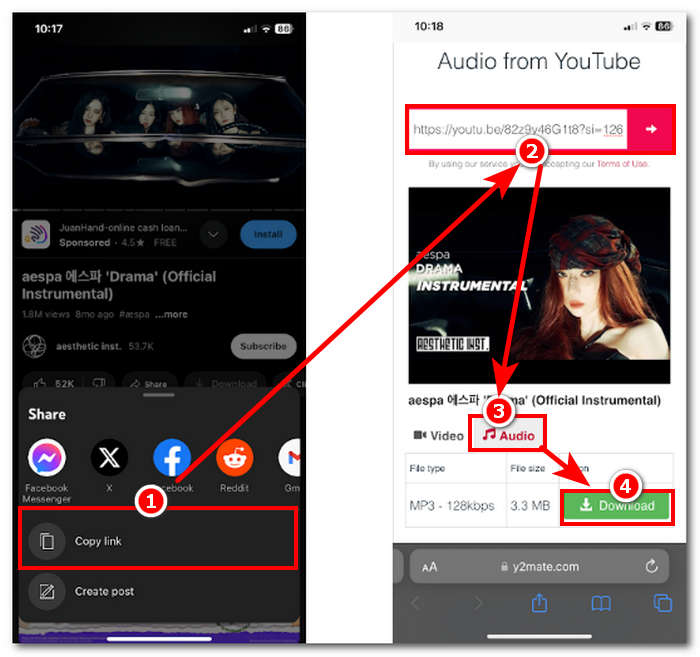
Langkah 1. Salin tautan video di aplikasi YouTube pada iPhone Anda.
Langkah 2. Tempel URL tersebut ke alat konversi pilihan Anda di Safari. Ingat untuk memilih opsi Audio terlebih dahulu agar video Anda dikonversi ke MP3 sebelum mengetuk tombol Download.
Catatan: Pastikan Anda menginstal aplikasi GarageBand dan RingtoneMaker sebelum melanjutkan ke langkah berikutnya.
Langkah 3. Buka aplikasi RingtoneMaker dan muat nada dering YouTube yang sudah diunduh ke dalam aplikasi. Setelah dimuat, ketuk tombol Make Ringtone dan pilih aplikasi GarageBand untuk melanjutkan.
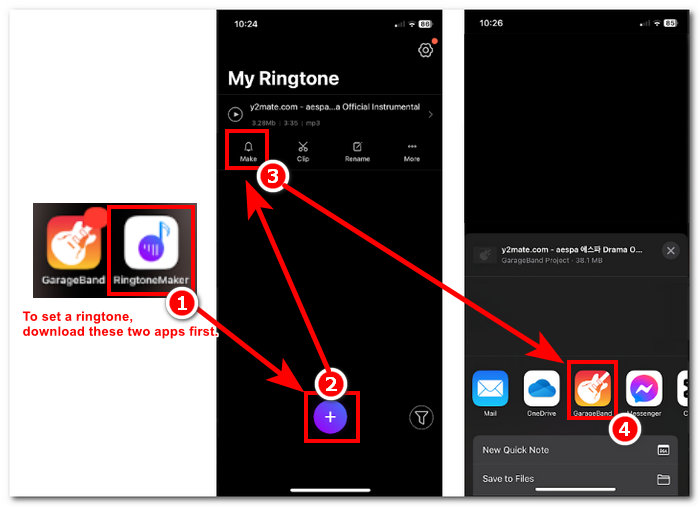
Langkah 4. Setelah Anda dialihkan ke aplikasi GarageBand, ketuk nada dering yang Anda impor ke aplikasi, lalu ikuti navigasi berikut: Share > Ringtone > Export.
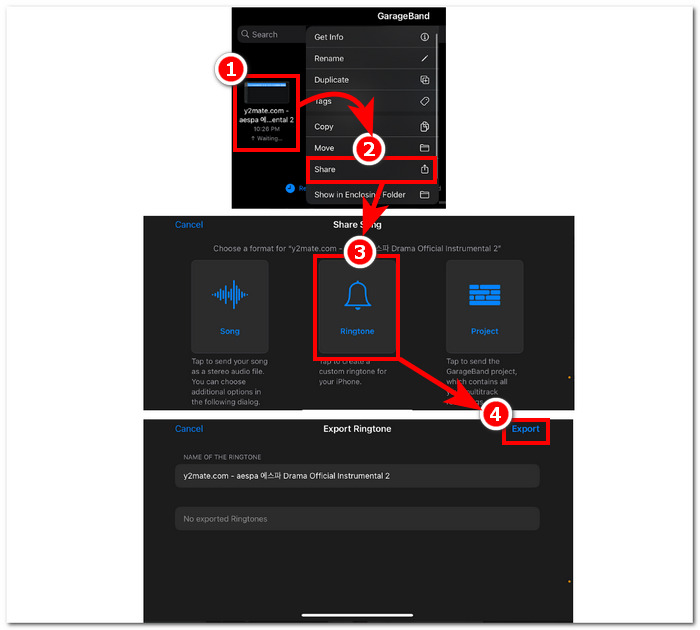
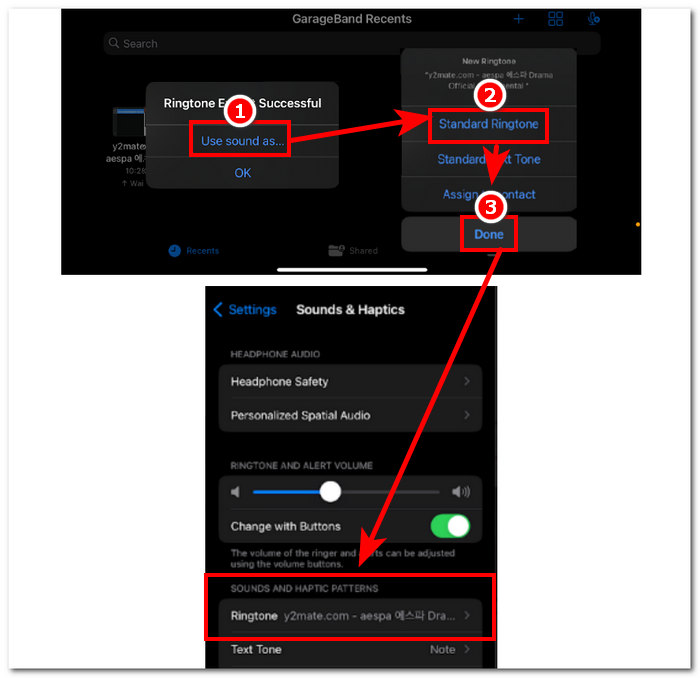
Langkah 5. Setelah selesai mengekspor, gunakan suara tersebut sebagai nada dering standar dan tekan tombol Done. Untuk mengecek apakah Anda berhasil mengatur nada dering baru, buka Settings > Sound & Haptics. Nama file Anda seharusnya muncul di bagian Ringtone.
Android
Mengonversi YouTube ke Nada Dering MP3 di Android semudah mengaturnya. Berkat fitur bawaannya, Android memungkinkan penggunanya untuk mengatur nada dering, sehingga prosesnya jauh lebih mudah dan nyaman. Dengan demikian, pengguna tetap perlu mengunduh dan mengonversi video YouTube menggunakan alat daring Y2mate.
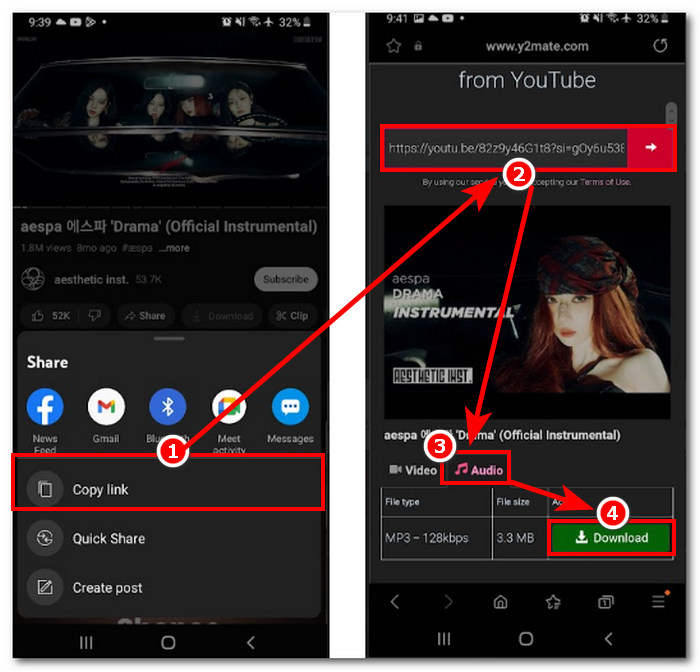
Langkah 1. Menggunakan aplikasi YouTube, salin tautan video yang ingin Anda jadikan nada dering.
Langkah 2. Menggunakan browser, tempelkan tautan tersebut ke alat konverter pilihan Anda. Sebelum mengklik tombol Download, ingat untuk memilih bagian Audio terlebih dahulu agar video Anda dikonversi menjadi MP3.
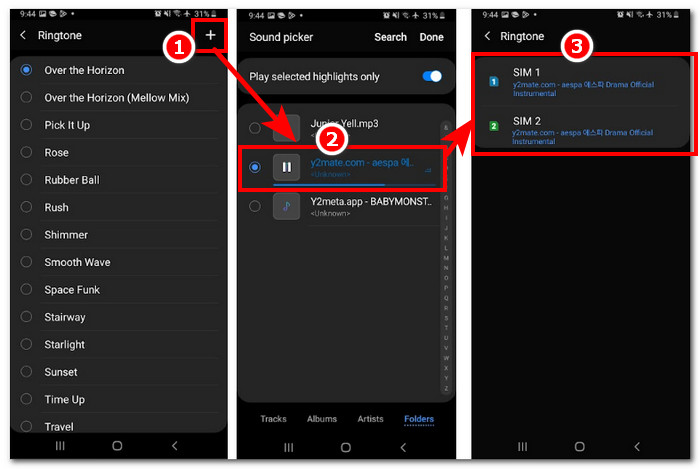
Langkah 3. Masuk ke pengaturan Nada Dering di ponsel Anda untuk mengatur audio yang baru dikonversi sebagai nada dering. Cukup ikuti langkah navigasi berikut: Settings > Sound and Vibration > Ringtone.
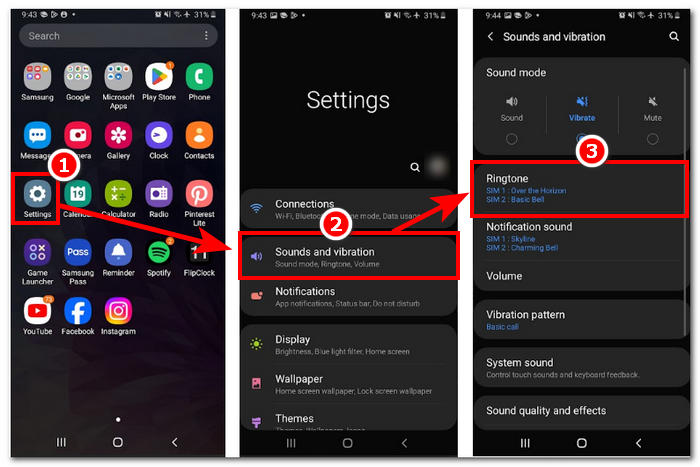
Langkah 4. Setelah berada di pengaturan Ringtone, lanjutkan untuk menambahkan nada dering baru dengan mengklik tombol + yang berada di bagian kanan atas layar Anda. Dan dengan begitu, Anda telah berhasil mengatur nada dering baru yang berasal dari video YouTube.
Bagian 4. FAQ tentang Nada Dering YouTube ke MP3
Alat AI apa yang mengubah YouTube ke MP3?
Banyak alat AI papan atas yang dapat mengonversi video YouTube ke MP3 secara efektif. Beberapa pilihan yang populer adalah YTMP3.cc dan ClipGrab.
Apa itu aplikasi konverter YouTube ke MP3?
Aplikasi YouTube ke MP3 adalah alat yang dapat diunduh ke perangkat seluler pengguna. Aplikasi konverter tersebut adalah TubeMAte, VideMate, dan Snaptube.
Bagaimana cara menyimpan audio dari YouTube Shorts?
YouTube melarang pengunduhan audio secara ilegal, dan begitu pula konten di platform tersebut. Untuk menyimpan audio dari YouTube Shorts secara ilegal, pengguna mengandalkan alat konverter daring dan perekaman layar ponsel.
Kesimpulan
Mengonversi YouTube ke file MP3 untuk digunakan sebagai nada dering bisa menjadi proses yang cukup panjang, terutama bagi pemula atau pengguna yang kurang paham teknologi. Oleh karena itu, mengikuti langkah-langkah di atas secara saksama dapat membantu pengguna membuat nada dering mereka sendiri dengan mudah. Artikel ini memberikan pilihan cara mengonversi video YouTube dan membuat nada dering menggunakan perangkat lunak online Y2Mate untuk perangkat Android dan iPhone, serta alat berbasis perangkat lunak FVC-picked Video Converter Ultimate untuk fitur kustomisasi.
-
 MOV VS MP4 - Yang Mana Yang Anda Pilih?
 MOV VS MP4, Mana yang Lebih Baik? Posting ini menjelaskan perbedaan antara MP4 dan MOV, sehingga Anda bisa mendapatkan pilihan yang lebih baik untuk digunakan untuk file video Anda.
-
 FLAC vs. MP3: Format File Audio Yang Merajai Tertinggi
 Posting ini akan membandingkan perbedaan utama antara FLAC vs. MP3. Itu termasuk kualitas suaranya, ukuran file, kompatibilitas, dan banyak lagi.
-
 Cara Mengonversi MP3 ke M4A untuk Meningkatkan Kualitas Suara
 Tingkatkan kualitas file musik Anda dengan mengonversi MP3 ke M4A dengan tip dan trik ahli kami. Panduan kami menawarkan petunjuk langkah demi langkah dan perangkat lunak yang direkomendasikan.
