


 Video Converter Ultimate
 Perekam Layar
 Perbaikan Video
 Unduhan Aman
Kompres File AVI untuk Mendapatkan Ukuran File yang Lebih Kecil tanpa Kehilangan Kualitas
Tidak peduli Anda ingin mengirim file AVI ke email, atau mengunggah file AVI ke situs web, sangat penting untuk mengompres AVI. Ada banyak editor dan kompresor video yang dapat mengecilkan file AVI. Untuk lebih spesifik, Anda dapat mengkonversi format video, memotong klip video yang tidak diinginkan atau mengatur ulang parameter untuk memperkecil video AVI Anda. Jika Anda ingin mempertahankan format dan konten video AVI, Anda dapat menggunakan kompresor video untuk mengatur ulang pengaturan video. Berikut adalah 3 cara gratis untuk mengompres file AVI tanpa kehilangan kualitas. Baca dan ikuti saja.

Bagian 1: Cara Mengompres File AVI Online Gratis
Ada begitu banyak kompresor video online di pasaran, mana yang bisa menjadi kompresor AVI online terbaik Anda? Bagi sebagian besar pengguna, ada beberapa faktor penting yang perlu Anda pertimbangkan.
Unduh GratisUntuk Windows 7 atau yang lebih baruUnduhan Aman
Unduh GratisUntuk MacOS 10.7 atau yang lebih baruUnduhan Aman
1. Sepenuhnya gratis dan aman digunakan.
2. Tidak ada batasan ukuran file maksimum.
3. Kompres batch file AVI.
4. Kompres video AVI besar di atas GB ke ukuran file yang sangat kecil.
5. Ubah format video AVI, resolusi dan bitrate untuk memperkecil ukuran video.
Untungnya, Anda bisa mendapatkan semua fitur tersebut di FVC Free Video Compressor. Anda dapat mengompres file AVI berukuran besar secara online secara gratis di komputer Windows dan Mac. Tidak perlu langganan atau pendaftaran. Kecepatan 30x lebih cepat membuat kompresi AVI jauh lebih cepat dibandingkan para pesaing lainnya. Sekarang, mari kita lihat cara mengompres ukuran video AVI secara online.
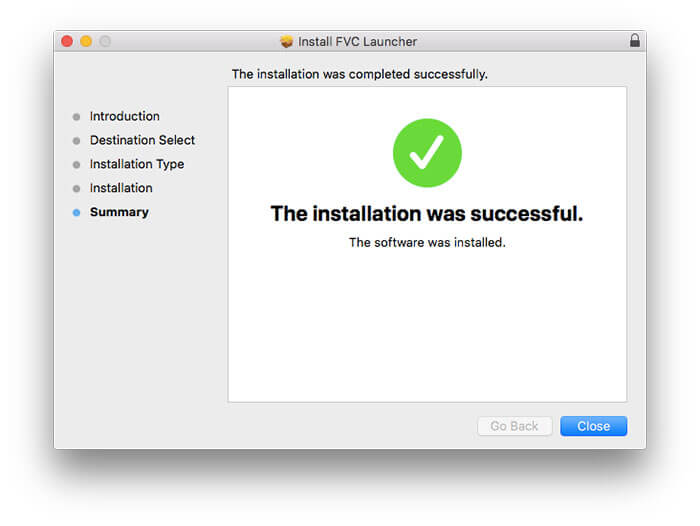
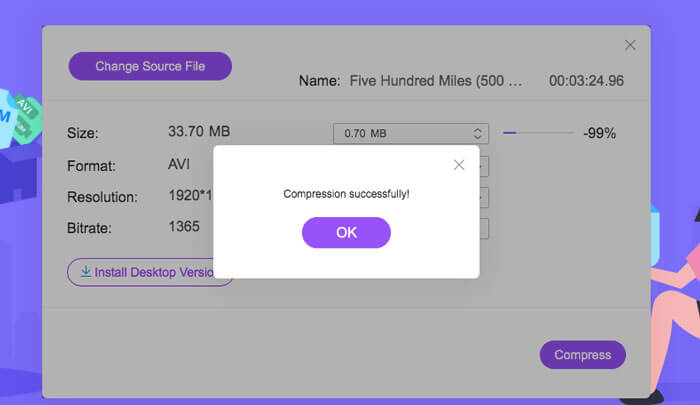
Langkah 1: Buka kompresor video online gratis ini. Klik Add Files to Compress untuk memasang peluncur (launcher).
Langkah 2: Telusuri dan tambahkan video AVI Anda. Anda akan mendapatkan antarmuka yang sederhana dan intuitif untuk kompresi AVI lebih lanjut.
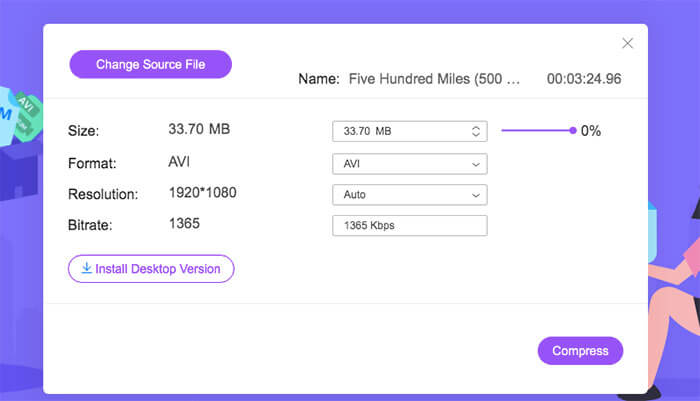
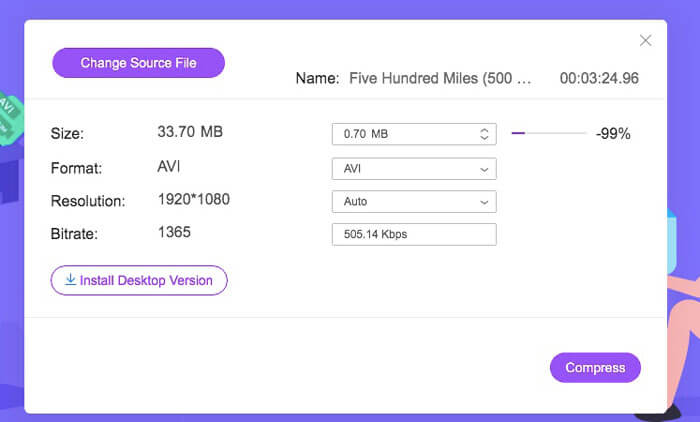
Langkah 3: Di bagian Size, Anda dapat mengurangi ukuran video AVI dengan menggeser slider di sampingnya. Atau Anda dapat menentukan ukuran video AVI terkompresi dengan panah Upside dan Downside.
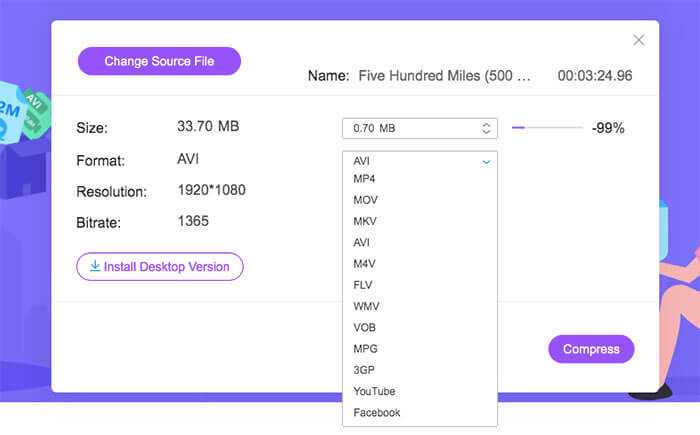
Langkah 4: Buka daftar Format. Anda dapat mengompres AVI ke MP4, MOV bahkan ke format YouTube dan Facebook. Setelah itu, pilih satu profil Resolution untuk mengurangi ukuran file AVI.
Langkah 5: Klik Compress dan atur folder keluaran. Setelah notifikasi Compression successfully muncul, Anda bisa mendapatkan video AVI yang sudah dikompres.
Bagian 2: Cara Mengompres Video AVI di Windows
Untuk mengompres video AVI di Windows 10/8/7 secara gratis, ada pilihan lain yang bisa Anda gunakan. Ini adalah Windows Movie Maker yang dapat mengompres file AVI pada Windows 10 dan versi sebelumnya. Lakukan saja seperti yang ditunjukkan paragraf berikut.
Langkah 1: Buka Windows Movie Maker. Klik Import Video di bawah Capture Video untuk menambahkan video AVI Anda.
Langkah 2: Pilih video AVI yang telah diimpor. Lalu seret dan lepaskan ke Timeline di bagian bawah.
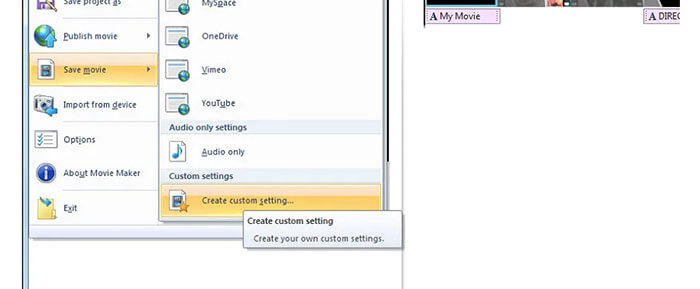
Langkah 3: Klik Save Movie File dan create custom settings dari daftar File.
Langkah 4: Di bawah Video settings, Anda dapat menyesuaikan lebar, tinggi, bitrate, dan frame rate video untuk membuat ukuran video AVI ini lebih kecil.
Langkah 5: Klik Save untuk mengecilkan video AVI Anda di Windows menjadi ukuran file yang lebih kecil.
Bagian 3: Cara Mengompres File Video AVI di Mac
iMovie juga dapat menjadi perangkat lunak kompresor video AVI gratis Anda. Anda dapat menggunakan iMovie untuk mengompres video .avi di Mac secara gratis. Selain itu, Anda juga dapat memotong tepi hitam dan bagian yang tidak diinginkan untuk mengurangi ukuran video dalam iMovie. Ada banyak alat pengeditan dan pengompresan video yang berguna di iMovie.
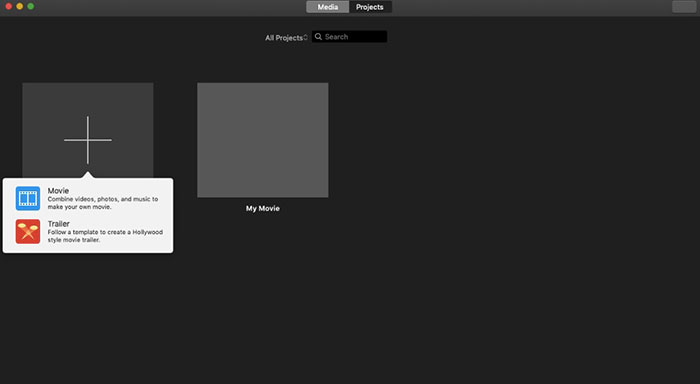
Langkah 1: Jalankan iMovie. Pilih New Movie dari daftar tarik-turun File.
Langkah 2: Buat proyek baru untuk file video AVI terkompresi Anda.
Langkah 3: Klik Import di bagian atas. Pilih dan tambahkan video AVI berukuran sangat besar ke iMovie.
Langkah 4: Buka daftar File dan pilih Share lalu File…. Klik ikon Export di pojok kanan atas, kemudian pilih File.
Langkah 5: Untuk mengurangi ukuran video AVI, Anda perlu menurunkan resolusi video dan profil kualitasnya. Klik Next lalu Save untuk mendapatkan file AVI terkompresi Anda.
Bagian 4: Tanya Jawab tentang Mengompresi AVI
Mengapa AVI begitu besar?
Anda dapat menemukan bahwa file berformat .avi cenderung lebih besar daripada file lainnya. AVI menggunakan lebih sedikit kompresi untuk menyimpan data video dan audio. Atau Anda dapat menganggap AVI sebagai format video lossless. Oleh karena itu, file AVI selalu dalam ukuran file yang besar.
Bagaimana cara mengompres AVI dengan After Effects?
Tambahkan video AVI Anda ke After Effects. Buka daftar Composition. Pilih Add to Adobe Media Encoder Queue. Di Media Encoder, temukan file proyek Anda di mesin render. Beralih ke daftar Video atau Audio di panel kanan. Ubah kualitas video/audio, bitrate, dan detail lainnya. Anda sebenarnya dapat melihat perkiraan ukuran file di pojok kanan bawah. Klik OK untuk menyimpan perubahan dan mengurangi ukuran file AVI di After Effects tanpa kehilangan kualitas.
Apakah ini berfungsi untuk mengompres AVI ke format MP4?
Ya. Anda dapat mengonversi dan mengompres AVI ke MP4 untuk mengurangi banyak ukuran video. AVI adalah format video lossless, sedangkan MP4 adalah format video lossy. Selain itu, Anda dapat menyesuaikan pengaturan video untuk menyelesaikan kompresi file AVI.
Anda dapat menggunakan alat di atas untuk mengompres AVI online dan offline secara gratis. Tidak ada batas panjang video atau ukuran file. Anda dapat mengurangi ukuran video dan mengompres AVI untuk email, Twitter, Facebook, dan lainnya secara langsung. Ngomong-ngomong, jika Anda perlu mengompres file AVI secara batch, menggunakan FVC Free Video Compressor adalah solusi tercepat Anda. Anda dapat memampatkan file AVI besar secara online dalam batch gratis dengan kecepatan 30x lebih cepat. Ini 100% gratis dan aman digunakan untuk semua pengguna.
-
 MKV vs MP4 - Perbandingan antara MKV dan MP4
 Bagaimana cara memilih antara MKV dan MP4? Format mana yang lebih baik untuk kualitas video? Pada artikel ini, kami akan membuat perbandingan mendetail MKV vs MP4 untuk membantu Anda membuat pilihan.
-
 Cara Mengompres Video MP4 ke Ukuran yang Lebih Kecil
 Video MP4 terlalu besar untuk diunggah? Ingin memperkecil ukuran video? Berikut adalah 3 cara efisien untuk mengompres file MP4 ke ukuran yang lebih kecil tanpa batas.
-
 MP3 VS MP4: Apa Perbedaan Antara MP3 dan MP4
 MP3 atau MP4, mana yang lebih baik? Apa perbedaan antara MP3 dan MP4? Artikel ini akan membandingkan MP3 dengan MP4 dari semua aspek yang dapat Anda gambar.
