


 Video Converter Ultimate
 Perekam Layar
 Perbaikan Video
 Unduhan Aman
2 Cara Mudah untuk Mengompresi MXF dengan Ukuran File yang Lebih Kecil
MXF adalah format file standar industri yang mendukung kode waktu (timecode) dan metadata secara penuh. Format ini terutama dirancang untuk penggunaan profesional konten video, khususnya dalam penyiaran TV. MXF adalah format kontainer video untuk konten video dan audio profesional standar SMPTE. Anda dapat dengan mudah mendapatkan video MXF berkualitas tinggi dari kamera digital Anda. Sementara itu, file MXF biasanya berukuran sangat besar.
Saat ingin membagikan video MXF yang besar, sangat perlu untuk mengompres MXF agar ukurannya lebih kecil. Pertanyaannya, apakah Anda tahu cara mengompres file MXF?

Sebenarnya, ada banyak alat kompresi dan pengeditan video di pasaran yang dapat membantu Anda mengompres MXF dan mengurangi ukuran file. Artikel ini akan menunjukkan kepada Anda cara mengompres MXF dengan Adobe Premiere Pro dan kompresor video online gratis.
Bagian 1. Cara Mengompres File MXF Secara Online Gratis
Untuk mengompres MXF dengan ukuran file yang lebih kecil, Anda dapat memilih perangkat lunak kompres video MXF populer, Free Video Compressor. Alat ini mampu mengurangi ukuran file video MXF sambil tetap mempertahankan kualitas gambar dan suara aslinya. Kompresor video ini mendukung berbagai format video yang umum digunakan termasuk MXF, MP4, MOV, AVI, MKV, FLV dan lainnya. Anda dapat mengompres MXF baik di PC Windows maupun Mac.
Langkah 1. Saat Anda ingin mengompres file MXF, buka situs resmi kompresor file MXF ini. Klik tombol Add Files to Compress untuk memasang peluncur berukuran kecil guna mengompres file MXF.

Langkah 2. Pilih dan tambahkan file MXF yang ingin Anda kompres ke kompresor video online gratis ini. Di sini Anda dapat dengan bebas menyesuaikan tingkat kompresi video sesuai kebutuhan. Selain itu, Anda diperbolehkan mengatur sendiri resolusi video, frame rate, bitrate, dan nama video. Anda juga dapat memilih format keluaran lain seperti MP4 untuk video hasil kompres.

Langkah 3. Setelah itu, Anda cukup mengklik tombol Compress untuk mulai mengompres file MXF secara gratis secara online.

Berbeda dengan banyak kompresor video online lainnya, Kompresor Video Gratis ini tidak akan menambahkan tanda air apa pun ke file MXF terkompresi Anda.
Bagian 2. Cara Mengompres MXF di Adobe Premiere Pro
Adobe Premiere Pro adalah paket produksi video profesional yang umum digunakan oleh para pengguna Mac dan Windows. Jika Anda telah memasang Premiere Pro di komputer, Anda dapat menggunakannya untuk mengompres file MXF.
Langkah 1. Jalankan Premiere Pro di komputer Anda. Saat masuk ke antarmuka utama, klik New Project untuk membuat proyek baru. Anda dapat menyesuaikan berbagai pengaturan di jendela tersebut.
Langkah 2. Klik File, Import lalu Media untuk memilih dan mengimpor file MXF Anda. Jika Anda ingin mengompres file MXF di kamera digital, Anda dapat menghubungkan kamera ke komputer. Anda juga boleh menyeret dan melepaskan video MXF langsung dari sebuah folder.
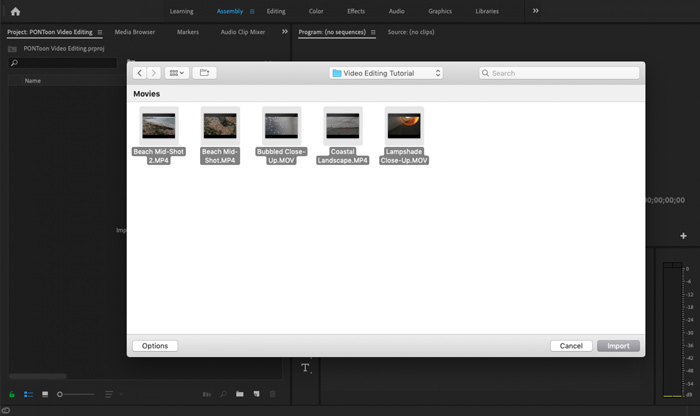
Langkah 3. Beralih ke ruang kerja Editing untuk mengompres file MXF Anda dengan lebih baik.
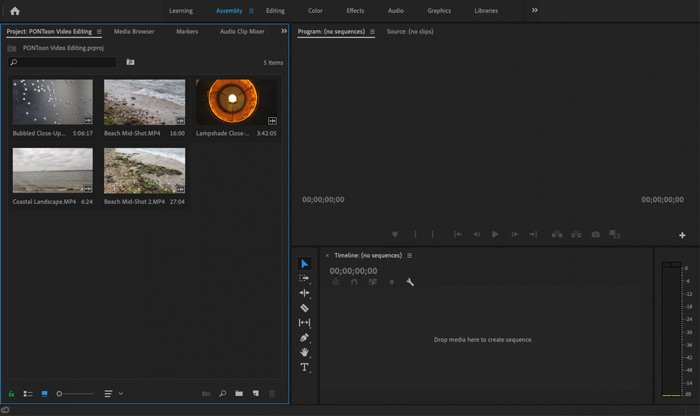
Langkah 4. Sekarang Anda dapat mengedit file MXF di timeline. Cukup seret dan lepaskan klip MXF dari media yang telah diimpor ke timeline untuk membuat sequence baru. Lalu Anda dapat memotong (trim) file MXF untuk mengurangi ukuran file.

Anda juga dapat memilih resolusi video kustom dan lainnya untuk mengompres file MXF. Selain itu, Anda dapat mengeluarkan MXF ke format video dengan ukuran file yang lebih kecil.
Bagian 3. Tanya Jawab tentang Mengompresi File MXF
Pertanyaan 1. Apakah format video MXF itu?
MXF, singkatan dari Material eXchange Format, adalah format kontainer yang menyimpan video, audio, dan metadata. Ini adalah format wadah video untuk konten video dan audio profesional standar SMPTE. Banyak camcorder digital profesional seperti Sony, Panasonic, Canon, dan lainnya menyimpan video dalam format MXF.
Pertanyaan 2. Bagaimana cara gratis mengkonversi MXF ke MP4 secara online?
MP4 tidak diragukan lagi adalah format paling populer yang didukung hampir semua pemutar, editor, dan perangkat. Jadi dalam banyak kasus, Anda perlu mengonversi MXF ke MP4 agar pemutaran atau pengeditan lebih baik. Anda dapat memilih Free Online Video Converter untuk melakukan konversi MXF ke MP4 dengan mudah.
Pertanyaan 3. Apakah MXF adalah format video lossless?
MXF dapat menyimpan rekaman RAW lossless yang menawarkan kemampuan lanjutan studio pasca-produksi profesional dalam alur kerja untuk penilaian warna dan pengeditan video. Format MXF dapat mendukung penuh kode waktu SMPTE.
Kesimpulan
Kami terutama membahas cara mengompres file MXF dalam artikel ini. Harus diakui, mengompres file MXF dengan Adobe Premiere Pro cukup rumit. Karena itu, Anda disarankan menggunakan Free Video Compressor yang direkomendasikan untuk mengurangi ukuran file MXF Anda.
-
 Cara Mengompres Video MP4 ke Ukuran yang Lebih Kecil
 Video MP4 terlalu besar untuk diunggah? Ingin memperkecil ukuran video? Berikut adalah 3 cara efisien untuk mengompres file MP4 ke ukuran yang lebih kecil tanpa batas.
-
 Tutorial untuk Mengompres GIF dan Mengurangi Ukuran File dengan Kualitas Tinggi
 Berikut adalah 2 cara mudah untuk mengompres GIF di komputer atau ponsel Anda. Anda dapat menggunakan Kompresor Video Online Gratis FVC dan Photoshop mengurangi ukuran file GIF dalam berbagai aspek.
-
 4 Cara untuk Mengompres File MOV QuickTime Besar tanpa Kehilangan Kualitas
 Artikel ini menunjukkan cara mengompres video QuickTime MOV di ponsel atau komputer Anda secara detail. Jika video MOV Anda terlalu besar untuk dikirim, dibagikan, atau disimpan, Anda bisa mendapatkan 4 solusi yang bisa diterapkan di sini.
