


 Video Converter Ultimate
 Perekam Layar
 Perbaikan Video
 Unduhan Aman
Cara Mengurangi Ukuran File SWF Secara Online Tanpa Flash Player
SWF adalah format file Adobe Flash yang digunakan untuk streaming melalui Internet. Apakah Anda mengunduh file SWF atau ingin mengunggah video SWF online, ukuran file SWF yang besar menarik garis yang sulit.
But the upside is that you can compress SWF files to solve this problem.

Awalnya, pemutar SWF resmi, Adobe Flash Player, dapat mengompresi file SWF dengan mengubah bitrate dan resolusinya, tetapi tidak lagi didukung setelah 31 Desember 2020.
Jangan khawatir, Anda punya pilihan!
This post shares a free SWF file compressor online to help you reduce SWF video size into smaller easily on PC and Mac.
Bagian 1. Kompresor File SWF Online Gratis Terbaik
Alat yang baik adalah hal yang penting. Untuk mengompres file SWF, kompresor file SWF adalah alatnya.
Free Online Video Compressor is a free wizard to reduce SWF file size into smaller online. Without signup, you can complete the SWF file compression process with simple clicks. It can compress Flash banners, slideshows, animations, games, movies, etc., to make SWF file smaller conveniently. Besides, this online SWF compressor can:
- 1. Kurangi ukuran file SWF hingga 95% dengan kehilangan kualitas kurang atau nol.
- 2. Kompres lebih dari 300 format video seperti SWF, MP4, MOV, AVI, WebM, MKV, dll.
- 3. Bebas untuk mengompres dan mengkonversi format video tanpa watermark.
- 4. Mendukung 1080p HD, 720p HD, dan resolusi video lainnya.

Kami di sini untuk memandu Anda tentang cara mengompres file SWF di bagian selanjutnya.
Bagian 2. Cara Mengompres SWF Online (Gratis 100%)
Proses mengompresi file SWF secara online dapat dilakukan dalam beberapa langkah sederhana.
Step 1. Add SWF file
Open this free online SWF file compressor via your browser on Windows or Mac computer. Click the Add Files to Compress button, and you are prompted to download and install a compressor launcher.
Setelah instalasi berhasil, jendela sumber terbuka akan muncul, dan Anda harus mencari file SWF di komputer Anda dan menambahkannya ke alat ini.

Step 2. Select compression rate and size
Next to Size, you can see the current SWF file size. Click the arrow-down or up icon to adjust the output SWF file size. Alternatively, you can move the slider on the right to reduce the file size by deciding its compression rate.
Next to Format, you can select other formats like MP4, MOV, MKV, AVI, FLV, etc., to convert SWF to other formats.
The output option of a lower Resolution will also help to make the SWF file size smaller.
Saat Anda mengompres file SWF menjadi ukuran yang lebih kecil, bitrate file ini akan menjadi lebih rendah di layar tampilan.
Step 3. Compress SWF
Click Compress to choose a destination to store the compressed SWF file and start reducing the SWF file size.
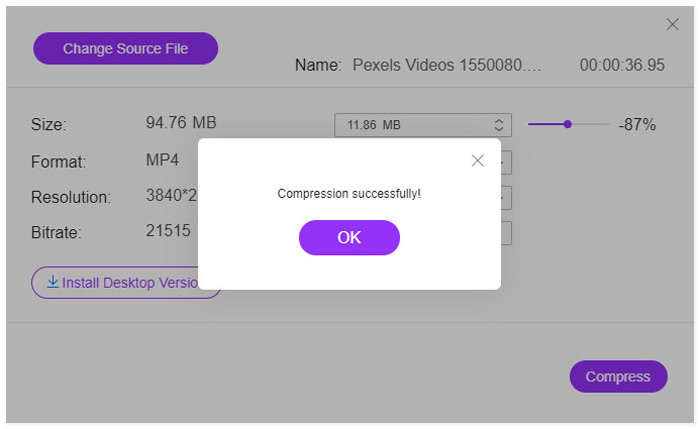
Setelah proses kompresi selesai, Anda akan melihat jendela pop-up. Kemudian Anda dapat menemukan file terkompresi dengan menavigasi lokasi yang Anda atur.
To be clear: This free online SWF compressor will convert the SWF file to other formats after compressing. If you want to compress the SWF file with keeping the original formats or compress 4K videos, you are recommended to download the desktop version of the SWF compressor, Video Converter Ultimate.
Unduh GratisUntuk Windows 7 atau yang lebih baruUnduhan Aman
Unduh GratisUntuk MacOS 10.7 atau yang lebih baruUnduhan Aman
Bagian 3. Tanya Jawab tentang Mengurangi Ukuran File SWF menjadi Lebih Kecil
Program apa yang akan membuka file SWF?
Initially, SWF files can be opened via its official player on browsers, Adobe Flash Player. However, Adobe Flash Player was discontinued will as of January 2021. Other SWF players like VLC, Windows Media Player, and more SWF player software can open an SWF file.
Apakah SWF dikompresi?
SWF menggunakan kompresi lossless untuk menjaga kualitas gambar, dan itu berarti video yang disimpan dalam file SWF tidak dikompresi, dan ukuran filenya besar.
Mengapa Adobe Flash dimatikan?
Standar terbuka seperti HTML5, WebGL, dan WebAssembly terus berkembang selama bertahun-tahun dan berfungsi sebagai alternatif yang layak untuk konten Flash. Selain itu, vendor browser utama mengintegrasikan standar terbuka ini ke dalam browser mereka dan menghentikan sebagian besar plugin lainnya (seperti Flash Player). Jadi, Adobe memutuskan untuk mematikan Adobe Flash Player.
Kesimpulan
SWF files are lossless and take up more space. Whether you want to save more space on a computer for SWF downloads, or upload SWF files online successfully, compressing SWF files becomes a common issue. This post shows a tutorial of reducing SWF file size free with an online SWF file compressor in 3 steps. No watermark or signup needs and you can complete the compression process quickly.
Sekarang giliran Anda.
Sudahkah Anda memahami metode mengurangi ukuran video SWF?
Atau apakah Anda punya saran lain untuk menyelesaikan kompresi SWF?
Beri tahu saya dengan meninggalkan komentar Anda di bawah.
-
 Cara Mengompres Video MP4 ke Ukuran yang Lebih Kecil
 Video MP4 terlalu besar untuk diunggah? Ingin memperkecil ukuran video? Berikut adalah 3 cara efisien untuk mengompres file MP4 ke ukuran yang lebih kecil tanpa batas.
-
 2 Cara Mengompresi Video untuk YouTube
 Video YouTube besar dan lambat diunggah? Cukup kompres ukuran file video menjadi lebih kecil untuk YouTube dengan 2 cara online dan di komputer.
-
 Cara Mengompres Video Gratis untuk Facebook dari GB ke MB
 Jika Anda dilarang mengunggah video besar di Facebook, jangan khawatir. Cukup kompres ukuran video besar dari GB ke MB dengan kompresor video gratis.
