


 Video Converter Ultimate
 Perekam Layar
 Perbaikan Video
 Unduhan Aman
Kompres File Video TS - Cara Mengompres File TS ke Ukuran yang Lebih Kecil
Jika Anda memiliki beberapa file video_ts dari DVD, file tersebut berukuran besar dan menghabiskan ruang hard drive. Jika Anda perlu menyimpan file TS ke NAS atau perpustakaan media, Anda perlu mengompres video TS. Tentu saja, kompresor video TS online harus menjadi pilihan awal. Tetapi sebagian besar layanan online memiliki batasan ukuran video. Anda dapat melihat kompresor TS online gratis dan alat profesional dari artikel.

Bagian 1: Cara Mengompres File TS Online Gratis
Apakah mungkin untuk mengompres file video TS secara online? Karena ukuran file TS besar, sulit menemukan kompresor TS online tanpa batasan ukuran. Free Video Compressor adalah kompresor TS online serbaguna yang mendukung file TS berukuran besar tanpa batasan. Alat ini hanya mengurangi ukuran video dari video TS, tetapi tetap mempertahankan kualitas video aslinya.
- 1. Kompres video TS dalam resolusi 4K dengan kualitas menakjubkan.
- 2. Tambahkan tidak ada tanda air ke file video TS yang dikompresi.
- 3. Kompres batch file TS dengan kecepatan 30x lebih cepat daripada alat lain.
- 4. Menyediakan fungsi keamanan privasi untuk melindungi informasi Anda.
Langkah 1: Kunjungi kompresor video online dengan browser apa pun, Anda bisa klik tombol Add Files to Compress untuk mengunduh instalernya. Klik kembali tombol tersebut untuk mengimpor file TS ke kompresor video online tanpa batasan ukuran.

Langkah 2: Setelah Anda mengunggah file TS secara online, Anda dapat menyesuaikan berbagai parameter, seperti Size, Format, Resolution, dan Bitrate hingga mendapatkan ukuran video yang diinginkan. Setelah itu, Anda dapat mengklik tombol Compress untuk mengompres video TS Anda secara gratis.

Bagian 2: Cara Mengompres File TS tanpa Kehilangan Kualitas
Saat Anda perlu menggabungkan klip film berbeda dari berbagai file TS, mengompres file TS untuk ponsel Android, atau bahkan mengonversi TS ke MP4 atau file MKV, Video Converter Ultimate adalah kompresor TS dengan banyak fitur yang dapat mengecilkan ukuran video dengan algoritma canggih. Perangkat ini juga memungkinkan Anda menghapus bagian yang tidak diinginkan dan menggabungkan klip video menjadi satu film.
Unduh GratisUntuk Windows 7 atau yang lebih baruUnduhan Aman
Unduh GratisUntuk MacOS 10.7 atau yang lebih baruUnduhan Aman
Langkah 1: Unduh dan instal Video Converter Ultimate di komputer Anda, lalu jalankan program tersebut di komputer. Klik menu Converter dan pilih tombol Add Files untuk mengimpor file TS.

Langkah 2: Setelah Anda mengimpor file TS, buka menu Tool dan klik opsi Video Compressor. Cukup ubah ukuran, nama, format, resolusi, dan bitrate file target. Setelah mendapatkan ukuran video yang diinginkan, Anda dapat mengklik tombol Compress untuk mengompres file TS.

Langkah 3: Anda juga dapat memilih MKV atau MP4 sebagai format keluaran. Alat ini akan mengompres TS ke MKV atau MP4 dengan ukuran yang relatif kecil. Klik ikon Scissors untuk memotong bagian TS yang diinginkan. Anda juga dapat menggabungkan klip TS yang berbeda menjadi satu dengan opsi Merge into one.
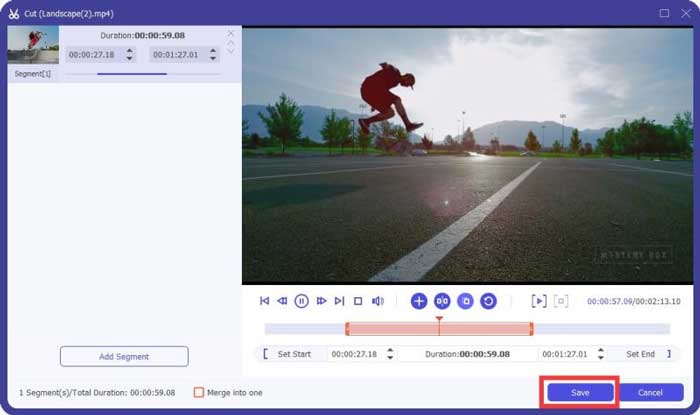
Langkah 4: Saat Anda sudah puas dengan video yang telah dikompres, Anda dapat memilih folder tujuan untuk video TS yang telah dikompres. Kemudian klik tombol Convert All untuk mulai mengompres file TS dari DVD Anda tanpa kehilangan kualitas aslinya.

Bagian 3: Tanya Jawab tentang Cara Mengompresi File Video TS
1. Apa itu Format File TS?
TS, kependekan dari Transport Stream yang merupakan format paket. Nama lengkap TS adalah MPEG2-TS, yang merupakan format wadah data standar untuk mengirim dan menyimpan audio, video, program, dll. Ini terutama digunakan dalam sistem penyiaran digital, seperti DVB, ATSC, dan IPTV.
2. Haruskah saya mengompres TS ke MP4 atau MKV?
Iya. Saat Anda ingin mempertahankan kualitas video asli, Anda cukup mengompres TS ke MKV dengan codec video asli. Tetapi jika Anda ingin mengompres TS untuk ponsel Android atau iPhone, MP4 harus menjadi salah satu pilihan terbaik.
3. Berapa Lama Waktu yang Dibutuhkan untuk Mengompresi File .TS Menggunakan H.264?
Itu tergantung pada ukuran file dari file .TS Anda. Sedangkan untuk H.264 dengan kompresi Bitrate 15 MBPS yang hanya membutuhkan waktu kurang dari 2 menit untuk melakukan kompres. Ini akan membuat file terkompresi 484 MB. Jika Anda perlu mengompres TS dari DVD 9GB, mungkin diperlukan waktu sekitar satu jam.
Kesimpulan
Artikel ini membagikan 2 cara yang bisa diterapkan untuk mengompres file video TS Anda. Anda dapat menggunakan Kompresor Video Gratis untuk mengompres file TS besar tanpa batasan. Ketika Anda perlu mengompres file TS Anda tanpa kehilangan kualitas, maka Video Converter Ultimate harus selalu menjadi pilihan terbaik.
-
 Cara Mengonversi TS menjadi AVI / MKV / MOV / WMV Online & Gratis di Win / Mac
 Ingin mengonversi file TS ke AVI / MKV / MOV / WMV dengan cepat? Artikel ini menunjukkan konverter video online dan offline dengan panduan lengkap. Mungkin Anda bisa mendapatkan konverter TS gratis terbaik di sini.
-
 MTS VS M2TS - Perbedaan Antara MTS dan M2TS
 Apa itu file MTS atau M2TS? Apa perbedaan antara M2TS dan MTS? Bagaimana saya bisa menonton file MTS atau M2TS yang direkam dengan camcorder? Temukan semua jawabannya di posting ini.
-
 10 Cara Gratis untuk Mengonversi File TS ke MP3, AIFF, ALAC, FLAC, dan Lainnya
 Bagaimana cara mengonversi file TS ke MP3 secara gratis? Dalam panduan ini, Anda akan menemukan 11 cara mudah untuk mengekstrak audio dari file TS dengan TS ke freeware audio dan alat konverter online.
