


 Video Converter Ultimate
 Perekam Layar
 Perbaikan Video
 Unduhan Aman
Cara Kerja Pewarna Video: 3 Alat Teratas yang Digunakan pada tahun 2023
Apakah Anda memiliki video lama yang direkam dalam nuansa hitam putih itu? Sambil bernostalgia mungkin cukup dengan sekali memutar, sekarang Anda dapat menjadikan video Anda karya yang tak lekang oleh waktu dengan mewarnainya. Syukurlah, era digital telah melahirkan banyak penemuan teknologi, termasuk alat yang dapat mewarnai video hitam putih. Dalam panduan ini, kami akan memperkenalkan program-program berkinerja terbaik yang dapat memanfaatkan warna dan algoritma cerdas—secara mulus menyesuaikan warna pada rekaman Anda.

Bagian 1. Mewarnai Video Offline
Mengubah film lama menjadi berwarna tidak lagi perlu merepotkan dengan menggunakan perangkat lunak andal seperti Video Converter Ultimate. Meskipun alat ini utamanya digunakan untuk mengonversi video dan audio, ia juga dilengkapi dengan editor video yang memungkinkan Anda menghidupkan kembali video hitam putih. Selain itu, Video Converter Ultimate menawarkan panel pratinjau waktu nyata di mana Anda dapat melihat perubahan yang Anda buat selama proses pengeditan. Lebih jauh lagi, Anda dapat memotong, memutar, dan menambahkan berbagai pilihan filter ke rekaman Anda untuk sentuhan kreativitas ekstra. Ikuti panduan sederhana di bawah ini untuk mewarnai video hitam putih dengan alat yang luar biasa ini.
Langkah 1. Luncurkan Pengubah Warna Video Terbaik
Pertama, unduh penginstal Video Converter Ultimate dengan mengklik sistem operasi terbaik untuk perangkat Anda. Setelah itu, jalankan wizard penginstalan untuk meluncurkan program di komputer Anda.
Free DownloadUntuk Windows 7 atau yang lebih baruUnduhan Aman
Unduh GratisUntuk MacOS 10.7 atau yang lebih baruUnduhan Aman
Langkah 2. Impor File ke dalam Program
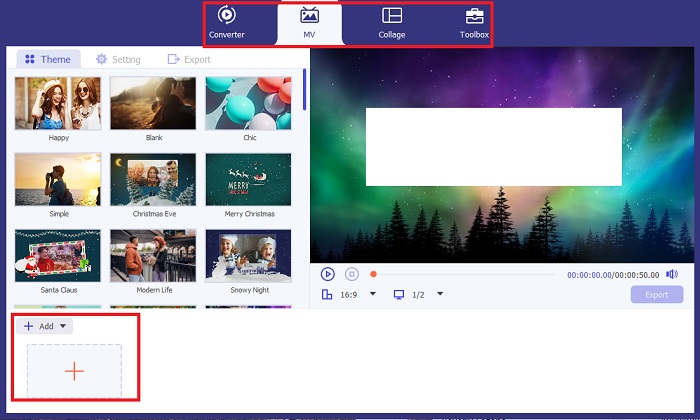
Selanjutnya, pergi ke bagian MV dari Video Converter Ultimate untuk mengakses editor video. Dari sana, klik tombol Plus untuk mengimpor rekaman mentah Anda dan tunggu hingga dimuat di layar.
Langkah 3. Warnai Rekaman
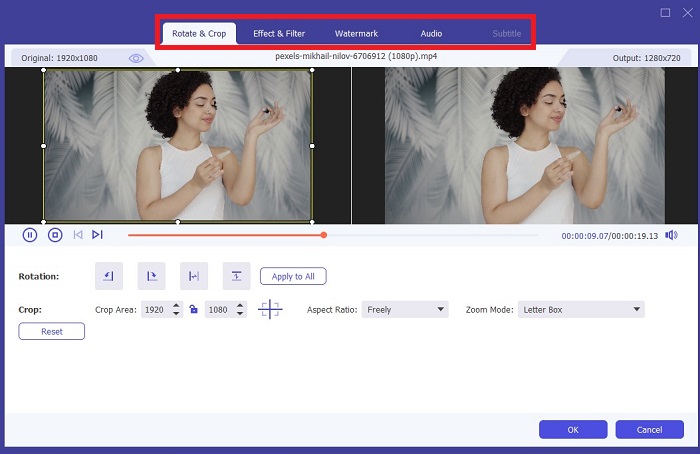
Setelah mengunggah file Anda, tambahkan penyesuaian warna dengan menyeret panah. Ada juga filter yang telah ditentukan untuk menambahkan efek instan ke video Anda.
Langkah 4. Simpan Hasil
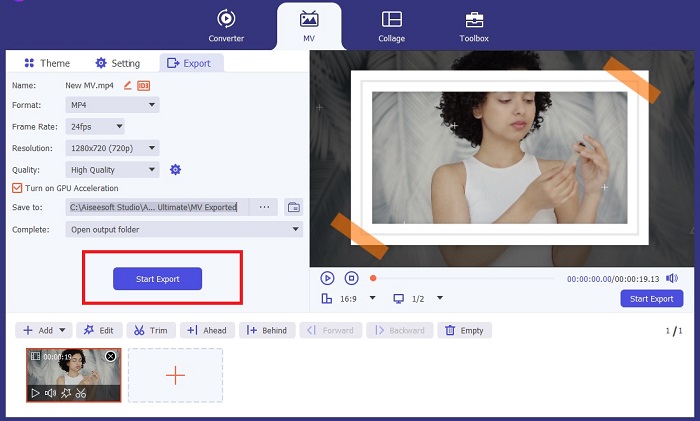
Setelah Anda puas dengan video yang telah diwarnai, tekan tombol Export untuk melanjutkan ke proses akhir. Berikutnya, ubah fps, nama, resolusi, dan format file Anda, lalu tekan Start Export untuk menyimpan keluaran di file lokal Anda.
Bagian 2. Mewarnai Video Online Gratis
Alat online adalah cara yang bagus jika Anda kekurangan penyimpanan untuk menginstal program offline. Dengan menggunakan teknologi AI, video atau foto Anda yang membosankan akan langsung hidup kembali. PickFrom adalah video berwarna online gratis yang membantu pengguna menambahkan rona pada rekaman mereka menggunakan algoritma kalibrasi warna. Ini berfungsi di sebagian besar browser web, termasuk Opera, Chrome, Safari, dan Internet Explorer. Selain itu, program ini 100% persen aman dan terjamin, berkat saluran enkripsi data, untuk mencegah invasi data.
Langkah 1. Pertama, buka peramban web Anda dan kunjungi situs PickFrom. Setelah itu, buka bagian Video Colorizer dan klik Add Files untuk mengunggah video mentah Anda.
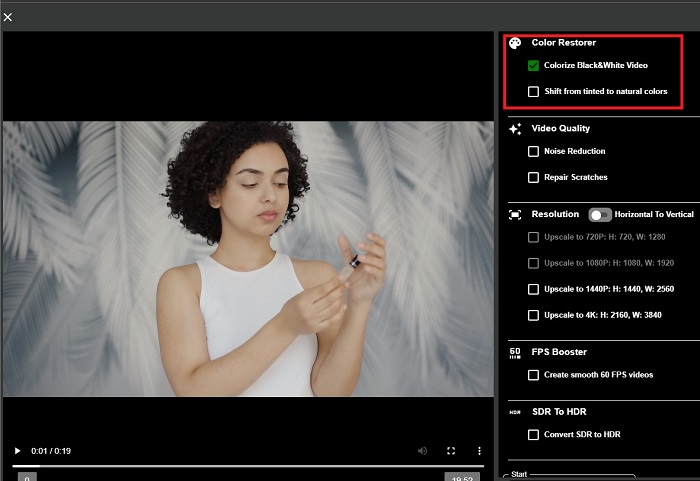
Langkah 2. Setelah mengunggah video, alat ini akan otomatis menampilkan keluaran video berwarna hasil AI. Anda juga dapat membuka menu Settings pada alat Colorize Video dan memilih resolusi file antara 780p dan 1080p.
Langkah 3. Terakhir, pilih Output atau format keluaran file Anda dengan membuka tab Format. Anda dapat memilih antara MP4, AVI, dan MKV. Setelah puas dengan hasilnya, klik tombol Start untuk mengunduh video hitam putih yang telah diwarnai.
Bagian 3. Mewarnai Video di Ponsel
Ubah rekaman Anda secara cerdik menggunakan alat aplikasi yang dikembangkan Google bernama Colorize! Seperti namanya, program ini adalah pilihan yang sangat baik untuk pengguna iOS dan Android dalam hal menerapkan warna pada rekaman lama Anda. Selain itu, Anda dapat memaksimalkan aplikasi video hitam putih berwarna dengan menambahkan filter dan efek khusus pada keluaran Anda dan dengan menyesuaikan rasio pilihan keluaran Anda. Berikut adalah panduan cepat untuk menambahkan warna pada video hitam putih dengan aplikasi seluler ini.
Langkah 1. Klik tombol Upload pada program dan pilih file hitam putih yang perlu Anda perbaiki.
Langkah 2. Saat proses unggah berlangsung, alat ini otomatis menerapkan warna pada proyek Anda, dan durasinya hanya bergantung pada panjang atau ukuran file tersebut.
Langkah 3. Setelah foto berwarna muncul, Anda dapat menyesuaikan detail pada foto dengan pergi ke bagian Enhance. Anda dapat menyesuaikan hue, saturasi, dan vibrance foto Anda. Setelah itu, ketuk tombol Download untuk menyimpan file ke perangkat Anda.
Bacaan Lanjutan:
Solusi Efisien untuk Mencerahkan Video dalam Waktu Kurang dari Satu Menit
5 Editor Video Windows Terbaik dengan Tips untuk Profesional & Pemula [2023]
Bagian 4. FAQ tentang Perangkat Lunak Video AI Colorize
Bagaimana cara orang mewarnai video lama?
Mewarnai video dan foto hitam putih kini dapat dilakukan melalui alat manipulasi digital, seperti pewarna video atau editor video. Terkadang, Anda harus menyesuaikan pengaturan secara manual untuk mencapai preferensi Anda atau menggunakan perangkat lunak video pewarna AI.
Apakah mungkin untuk mewarnai video hitam putih?
Pasti ya! Memperbaiki nada visual rekaman Anda dapat dilakukan 100% saat ini. Sebagai saran, lebih baik normalkan warna video Anda sebelum mengeditnya.
Mengapa saya perlu mewarnai video?
Penilaian warna adalah proses penting yang harus dilakukan pembuat film saat menyelesaikan keluarannya. Dengan proses ini, mereka dapat mencapai nada warna yang konsisten untuk menambahkan efek visual yang luar biasa kepada penontonnya.
Berapa lama waktu yang dibutuhkan untuk mewarnai foto dan video?
Selama Anda memiliki alat yang tepat di perangkat Anda, mewarnai foto dan video lama dapat dilakukan secara instan. Di sisi lain, pertimbangkan ukuran dan durasi video Anda.
Apakah video berwarna saya akurat?
Pewarna video memberi Anda warna video yang hampir akurat. Anda juga dapat meminta bimbingan dari para ahli untuk membantu Anda menentukan apa warna aslinya dengan memetakan video.
Kesimpulan
Dan selesai! Sekarang setelah Anda mengetahui 3 cara terbaik untuk mewarnai video hitam putih dengan alat offline, online, dan seluler, pengambilan keputusan tidak lagi sulit. Dengan pengubah warna video berbasis AI, alat ini akan secara otomatis menambahkan warna ke video Anda. Namun, alat tersebut tidak akan memungkinkan Anda menyesuaikan pengaturan warna secara mendalam seperti solusi offline, misalnya Video Converter Ultimate.
-
 Metode Bebas Masalah untuk Mengubah Gambar menjadi Hitam Putih
 Apakah Anda ingin membuat foto Anda terlihat nostalgia? Kami punya jawaban untuk Anda. Posting ini akan menawarkan cara-cara penting untuk mengonversi gambar berwarna menjadi hitam putih.
-
 Panduan Panduan: 7 Volume Booster Terbaik Tersedia di Semua Platform
 Ingin tahu penguat volume yang tersedia di PC, Mac, Online, Android dan iOS? Kemudian baca artikel ini dengan berbagai alat yang dapat Anda pilih.
-
 Pengubah Video Instagram Teratas untuk Mengoptimalkan Konten Instagram Anda
 Lihat panduan kami untuk mengubah ukuran video untuk Instagram. Pelajari cara memoles konten Anda dan meningkatkan keterlibatan di platform media sosial terpopuler di dunia.
