


 Video Converter Ultimate
 Perekam Layar
 Perbaikan Video
Review Pentingnya ID3 Tag Editor di Tahun 2022
Lagu-lagu yang Anda unduh dari situs web musik memang memiliki metadata atau dikenal sebagai tag ID3. Biasanya, semua informasi yang Anda butuhkan tentang lagu tersebut ada di dalam informasi tag. Dalam beberapa kasus, file musik tidak disertai tag atau berisi informasi yang salah. Dalam situasi seperti ini, Anda perlu menggunakan perangkat lunak yang dapat membantu Anda menangani tugas tersebut dengan mudah. Untuk itu, kami dengan senang hati memperkenalkan kepada Anda editor tag ID3 terbaik yang dapat Anda unduh di Windows, Mac, iOS, dan Android untuk mengedit tag pada lagu Anda.

Bagian 1. Apa itu Tag ID3
Tag ID3 sangat penting bagi setiap pengguna yang ingin mengetahui informasi detail tentang sebuah lagu. Contoh bagus tag yang bisa Anda lihat tanpa membuka informasi tag secara langsung adalah nama artis dan judul lagu. Meskipun kita tidak menambahkannya sendiri ke dalam file audio, informasi tersebut tetap tersemat untuk membantu kita mengetahui apakah kita memutar musik yang benar.
Namun demikian, jika Anda tidak memiliki tag pada lagu atau podcast Anda, maka ada kemungkinan file tersebut diacak di seluruh perpustakaan atau folder tempat mereka disimpan. Menambahkan tag pada file Anda dapat membantu Anda menentukan file dan mengaturnya agar terlihat teratur. Jika file Anda tidak memilikinya, Anda harus menambahkan data. Jaga agar bola terus bergulir untuk membantu Anda mencari editor tag ID3 yang harus Anda gunakan yang sesuai dengan kebutuhan Anda.
Tapi sebelum kita mulai, siapkan metadata yang ingin Anda tambahkan ke file audio Anda; ini termasuk judul, penulis, bab, halaman, komentar, lirik, dan semacamnya. Setelah membaca ini, Anda akan terkejut dengan ulasan kami tentang editor tag teratas yang dapat Anda gunakan di semua perangkat.
Bagian 2. Editor Tag ID3 Terbaik di Windows/Mac untuk Mengubah Metadata dengan Mudah
FVC Video Converter Ultimate – Editor Tag ID3 Terbaik
Salah satu hal umum yang perlu Anda ketahui saat memilih editor tag ID3 di Mac atau Windows adalah bahwa alat tersebut harus akurat, mudah digunakan, dan mudah diakses; semua ini bisa Anda temukan di FVC Video Converter Ultimate. Perangkat lunak ini dikenal sebagai editor metadata kelas satu yang mudah digunakan bahkan oleh pengguna yang tidak tahu cara menyesuaikan metadata dengan benar. Berbeda dengan editor tag lainnya, Anda tidak perlu melakukan banyak hal rumit untuk menambah atau memperbaiki tag audio maupun video Anda. Jadi, jika Anda baru dalam hal mengedit atau memperbaiki tag ID3, tanpa ragu inilah perangkat lunak serba ada yang Anda butuhkan.
Selain itu, kami tidak menyebutnya editor satu atap tanpa alasan; mungkin Anda berpikir mengapa. Jika kami menjelajahi lebih lanjut tentang alat ini, Anda akan melihat bahwa Anda dapat melakukan pengeditan video tingkat lanjut dan dasar di sini untuk membuat video Anda terlihat luar biasa dengan menambahkan efek dan filter. Masih ada terlalu banyak fitur yang tidak disebutkan yang dapat Anda ungkap jika Anda mengunduh alat ini. Namun hari ini, kami akan fokus menggunakan perangkat lunak pengedit tag ID3 ini untuk membantu Anda mengedit dan memperbaiki tag lagu dengan cepat.
Langkah 1. Pertama, unduh perangkat lunak pada sistem operasi pilihan Anda; tersedia dua opsi yaitu Windows dan Mac. Selanjutnya instal dengan benar, ikuti proses pemasangan, lalu buka alat tersebut setelah semua selesai.
Unduh GratisUntuk Windows 7 atau yang lebih baruUnduhan Aman
Unduh GratisUntuk MacOS 10.7 atau yang lebih baruUnduhan Aman
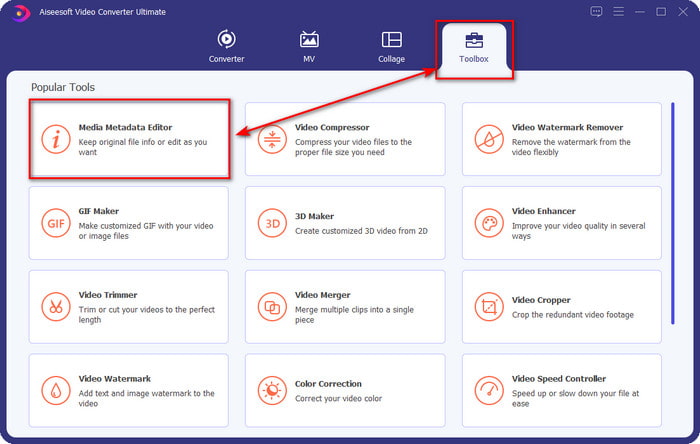
Langkah 2. Setelah Anda membuka alatnya, lanjutkan ke bagian Toolbox dan buka Media Metadata Editor dengan mengkliknya.
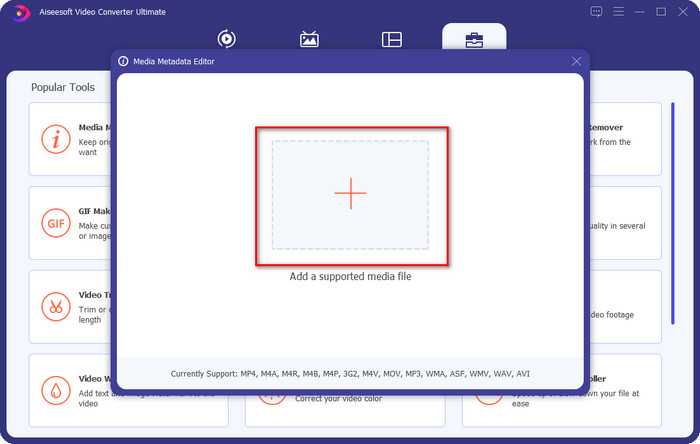
Langkah 3. Tekan ikon + pada jendela baru yang muncul di layar Anda, pilih file audio yang ingin Anda ubah tag ID3-nya, lalu tekan Open untuk mengunggahnya.
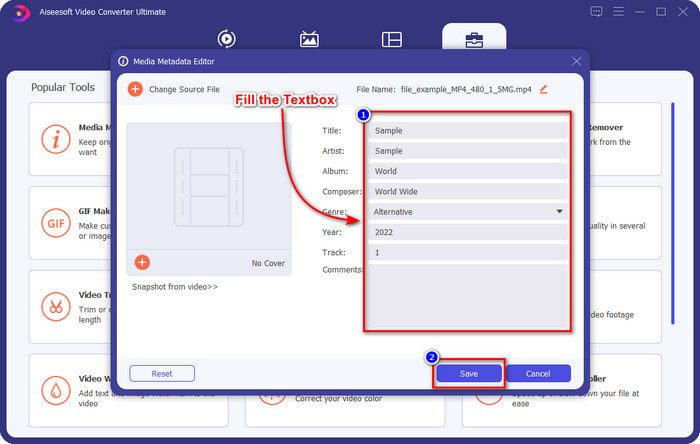
Langkah 4. Sekarang Anda dapat mengetik informasi yang ingin Anda tambahkan ke file audio dan klik Save jika Anda sudah selesai pada setiap textbox. Semudah itu, Anda kini telah menambahkan tag pada file audio dengan bantuan perangkat lunak ini.
Pro
- Mendukung perubahan MP3, WMA, WAV, dan 1000+ metadata dengan mudah.
- Konversi ultra-cepat dan akselerasi perangkat keras didukung untuk proses secepat kilat.
- Fitur pengeditan video utama hingga lanjutan tersedia di Toolbox.
- Ini adalah pilihan pertama dari jutaan pengguna di seluruh dunia untuk mengambil tugas ini.
Kontra
- Membeli alat diperlukan untuk memiliki semua fitur pengeditan yang mewah.
- Tidak tersedia di Android dan iOS.
VLC Media Player
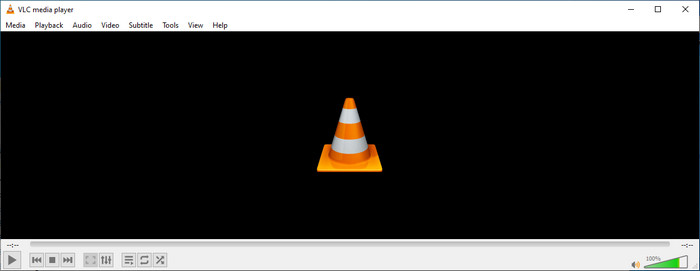
VLC Media Player adalah pemutar media kelas atas yang dapat Anda unduh di Windows dan Mac. Alat ini dapat membantu Anda memutar video tanpa perlu mengunduh codec apa pun ke sistem Anda, tetapi Anda juga dapat menggunakannya untuk mengedit tag ID3 pada file audio. Meskipun alat ini bukan editor metadata khusus, ia tetap dapat memperbaiki tag yang salah. Jadi, jika Anda sudah memiliki alat ini, Anda bisa dengan mudah menyesuaikan metadata lagu Anda, tetapi jangan berharap terlalu banyak karena kemampuannya tidak sebaik editor tag ID3 kelas satu di desktop.
Pro
- Pemutar media dan editor metadata yang dapat Anda gunakan di perangkat apa pun.
- Ini mendukung format media rata-rata untuk mengubah tag.
- GUI polos dan sederhana.
Kontra
- Ini bukan editor metadata pro.
- Mendukung fungsi terbatas terkait pengeditan tag.
Bagian 3. Top 3 ID3 Tag Editor di iOS/Android Mobile Devices
Editor Tag Musik Bintang
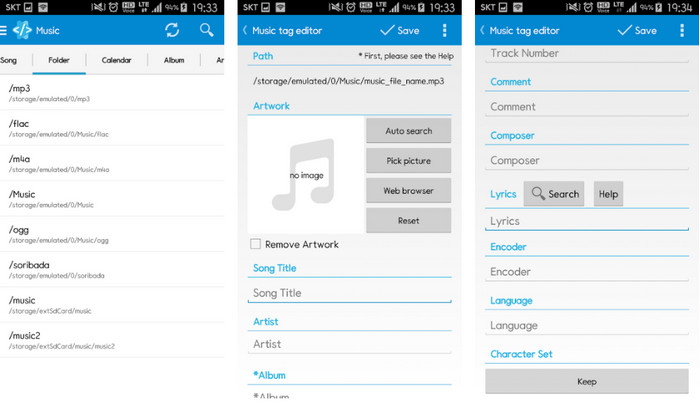
Star Music Tag Editor adalah salah satu editor tag ID3 yang paling banyak digunakan di Android. Aplikasi ini dapat menampilkan berbagai informasi tentang musik Anda, dan Anda bisa mengubahnya bila diperlukan. Antarmukanya sangat sederhana sehingga Anda dapat dengan mudah mempelajari cara menggunakannya meskipun belum terbiasa memakai alat untuk mengedit tag. Walaupun aplikasinya bagus, tetap ada beberapa kekurangan dalam penambahan metadata, khususnya pada sampul album. Meskipun mungkin terjadi beberapa masalah, aplikasi ini tetap merupakan editor tag yang dapat diandalkan untuk Anda unduh di ponsel Android Anda.
Pro
- Gratis untuk mengunduh editor metadata di Android.
- GUI sederhana dan mudah dimengerti.
- Tambahkan tag pada file audio dengan mudah.
Kontra
- Memang ada masalah menambahkan sampul gambar pada file audio.
- Terkadang bug masih terjadi.
Pemutar Musik Awan untuk Awan
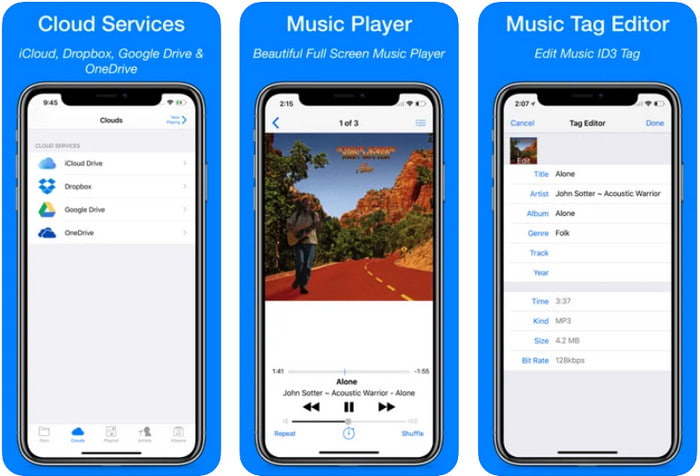
Clouds Music Player for Clouds adalah aplikasi serbaguna yang dapat Anda unduh di perangkat iOS. Aplikasi ini dapat mengedit tag ID3 di iPhone, memutar musik, dan membuat nada dering dari musik tersebut. Dengan fitur-fiturnya, antarmukanya terlihat polos dan sederhana, dan Anda dapat mengakses layanan cloud melalui aplikasi ini. Meski antarmukanya ramah pengguna, informasi yang dapat Anda tambahkan sebagai metadata pada file audio masih terbatas, yang berarti hanya tag dasar yang tersedia untuk diedit. Namun demikian, aplikasi ini tetap layak diunduh jika Anda pengguna iOS.
Pro
- Tersedia di perangkat iOS apa pun untuk diunduh.
- Editor musik multifungsi dan editor tag.
- Editor metadata intuitif di iOS.
Kontra
- Itu tidak mendukung penambahan lebih banyak metadata.
- Mengubah bug dan masalah metadata terjadi tetapi tidak sering.
Dash- Aplikasi Infotainment
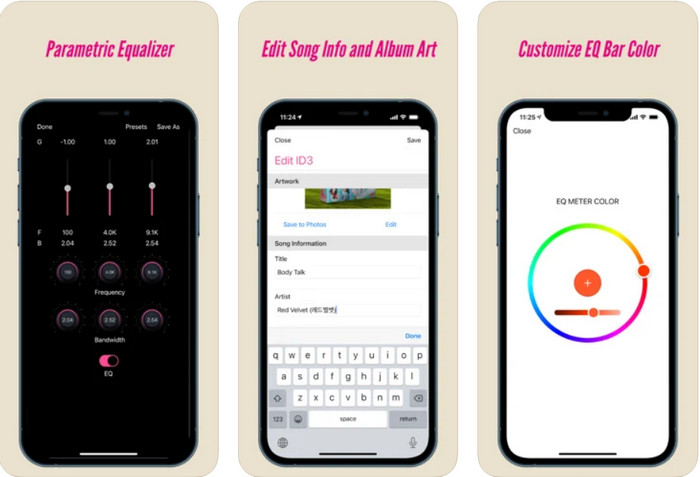
Dash- Infotainment App adalah alat lain yang bisa Anda unduh untuk mengedit tag ID3 di iPhone kapan pun Anda membutuhkannya. Tidak banyak hal yang perlu Anda pelajari sebelum menggunakan aplikasi ini karena antarmuka penggunanya sederhana dan ringkas. Anda dapat menggunakan alat ini untuk mengubah parameter FLAC dan ALAC dengan mudah menggunakan equalizer yang mudah digunakan. Selain itu, Anda dapat melihat kecepatan dan kompas (tempo/arah) dari lagu yang Anda unggah di sini. Sama seperti editor tag iPhone yang pertama, Anda hanya bisa menambahkan judul, artis, dan sampul album di sini, tetapi ingat bahwa format Anda harus FLAC atau ALAC saja; jika bukan dalam format tersebut, maka Anda tidak dapat mengunggahnya.
Pro
- Kurva belajarnya tidak terlalu kaku.
- Sebuah equalizer audio beraneka ragam tersedia.
- GUI tidak banyak, dan tidak kurang.
Kontra
- Ini hanya mendukung format FLAC dan ALAC.
- Tidak banyak yang bisa ditawarkan dalam hal mengedit metadata.
Bagian 4. FAQ tentang Editor Tag ID3
Apa editor tag ID3 baris perintah terbaik yang dapat saya gunakan?
Jika Anda mencari editor tag ID3 berbasis command-line, Anda harus tahu bahwa FFmpeg adalah editor berbasis command-line. Dengan alat ini, Anda dapat mengonversi, memutar (rotate), memotong, memangkas, dan mengedit tag metadata Anda. Jika Anda ingin mengetahui lebih lanjut tentang FFmpeg, Anda bisa membaca cara menggunakannya dengan mengklik tautan untuk mengedit metadata FFmpeg dengan mudah.
Apa jenis metadata lainnya?
Ada enam jenis metadata: deskriptif, administratif, referensi atau penjelasan, statistik, legal, dan struktural. Jika Anda ingin mengetahui lebih lanjut tentang jenis-jenis ini dan informasinya, Anda dapat mengeklik tautan ini dan membaca penjelasan selengkapnya.
Apakah mungkin untuk melihat tag tanpa aplikasi?
Ya, alih-alih mengunduh perangkat lunak, Anda dapat menggunakan alat daring untuk melihat tag file Anda. Klik tautan ini untuk melihat metadata di desktop Anda secara online, tetapi kami juga akan memperkenalkan beberapa alat yang mungkin ingin Anda unduh.
Kesimpulan
Dengan informasi yang kami cantumkan di atas, menjadi mungkin untuk mengedit tag ID3 menggunakan editor yang kami sajikan di atas, apa pun perangkat yang Anda gunakan saat ini. Selain itu, aplikasi dan perangkat lunaknya sangat cocok untuk pengguna yang perlu mengedit metadata mereka. Meskipun alat tersebut membuka peluang bagus bagi pengguna untuk mengedit metadata, tidak diragukan lagi bahwa alat utama menyajikan cara yang efektif untuk mengedit tag ID3 pada file musik apa pun. Jika Anda ingin memiliki editor tag ID3 terbaik di Windows dan Mac, Anda dapat mengunduhnya langsung dengan mengklik tombol unduh yang disajikan di atas, lalu nikmati kehebatannya.
-
 2 Cara Terbaik untuk Mengedit Metadata OGG Yang Harus Anda Coba Gratis
 Perlu mengedit metadata OGG? Nah, Anda dapat dengan mudah menangani pengeditan tag dengan menggunakan perangkat lunak yang benar. Jika Anda tidak memiliki satu membaca artikel ini adalah suatu keharusan.
-
 Tinjauan Mutlak tentang Pentaho Metadata Editor [Diperbarui 2022]
 Tidak menemukan artikel terpercaya tentang Pentaho Metadata Editor? Untungnya, kami meninjau alat itu sendiri untuk memberikan fakta yang akan Anda ketahui tentang alat tersebut.
-
 Tips & Trik VLC Metadata Editor Wajib Anda Ketahui di 2022
 Apakah Anda ingin menggunakan VLC sebagai editor metadata? Dalam hal ini, Anda dapat membaca artikel ini karena kami memberikan ulasan yang tidak bias tentang editor metadata VLC.
