


 Video Converter Ultimate
 Perekam Layar
 Perbaikan Video
 Unduhan Aman
2 Metode Efisien untuk Menggabungkan File WebM Tanpa Kehilangan Kualitas
Bagaimana cara menggabungkan file WebM? Saat Anda mengunduh serangkaian video yang diunggah dari orang lain secara online dan ingin memutar ulang terus menerus untuk mendapatkan pengalaman menonton yang lebih baik, Anda dapat mempertimbangkan untuk menggabungkan video WebM ini menjadi satu. Namun, karena kualitasnya yang tinggi dan ukurannya yang kecil, Anda sebaiknya menggabungkan file WebM ke MKV untuk menjaga kualitas tinggi dalam ukuran yang relatif kecil. Jadi ada dua cara efisien untuk membantu Anda menggabungkan WebM sebagai file MKV.

Bagian 1: Cara Menggabungkan File WebM Online Gratis Tanpa Rugi
FVC Free Online Video Merger adalah penggabung video serbaguna untuk menggabungkan file dalam format apa pun, termasuk menggabungkan file WebM gratis secara online. Anda tidak perlu mengunduh perangkat lunak, jadi Anda cukup mengunggah file WebM di browser dan menggabungkannya hanya dengan beberapa klik.
- 1. Klik sederhana untuk menggabungkan sejumlah file video WebM menjadi satu online gratis.
- 2. Dukungan untuk mengekspor sebagian besar format video populer termasuk format MKV dengan kualitas tinggi.
- 3. Tidak ada tanda air untuk langsung mengunggah video di YouTube, Facebook, atau platform lainnya.
- 4. Hapus file yang diunggah secara permanen dalam 24 jam untuk melindungi privasi Anda.
Langkah 1: Buka FVC Free Online Joiner dan ikuti panduan untuk memasang plugin dalam beberapa detik. Lalu klik tombol Upload the Videos to Merge untuk memilih salah satu file video WebM yang diinginkan.

Langkah 2: Klik ikon plus untuk menambahkan file video WebM lain yang ingin Anda gabungkan. Anda harus menambahkan video‑video ini sesuai urutan yang Anda inginkan. Kemudian pilih format MKV dan Resolusi 1920*1080 untuk menjaga kualitas video tetap tinggi.

Langkah 3: Klik tombol Merge Now dan setelah memilih folder lokal, proses penggabungan file video WebM akan dimulai secara otomatis.
Bagian 2: Cara Paling Profesional untuk Bergabung dengan File WebM untuk Membuat Yang Baru
Penggabung online gratis ini dapat membantu Anda menggabungkan video WebM dengan mudah. Namun jika Anda ingin menggabungkan beberapa bagian dari file WebM untuk membuat video baru, sebaiknya gunakan alat profesional – Video Converter Ultimate yang tidak hanya dapat menggabungkan file WebM, tetapi juga mengedit video sebelum digabungkan.
- 1. Menggabungkan file video WebM menjadi satu dengan berbagai format termasuk MKV.
- 2. Mampu mempertahankan kualitas asli video WebM, termasuk 1080p HD dan 4K.
- 3. Alat pengeditan yang mudah digunakan untuk memotong video, menambahkan filter, menyesuaikan efek video, dan membagi video.
- 4. Kecepatan penggabungan cepat untuk menggabungkan beberapa file video WebM dalam beberapa menit.
Unduh GratisUntuk Windows 7 atau yang lebih baruUnduhan Aman
Unduh GratisUntuk MacOS 10.7 atau yang lebih baruUnduhan Aman
Langkah 1: Unduh Video Converter Ultimate dan jalankan. Klik tombol Add Files di pojok kiri atas untuk memilih semua file WebM yang ingin Anda gabungkan.

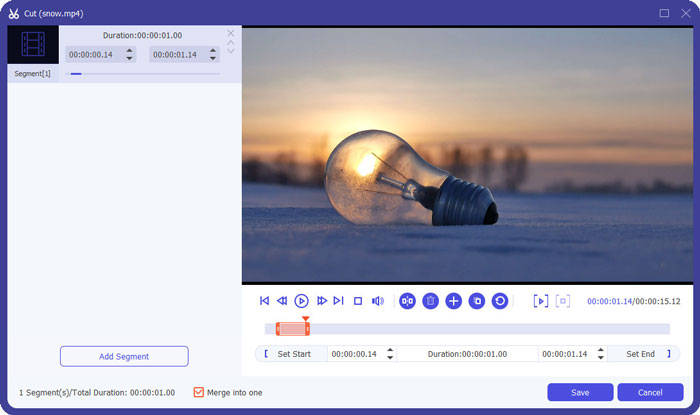
Langkah 2: Klik tombol Cut untuk memotong setiap video satu per satu. Geser timeline atau masukkan titik waktu yang tepat untuk memilih bagian yang dibutuhkan. Lalu klik tombol Save untuk menyimpan pengaturan.
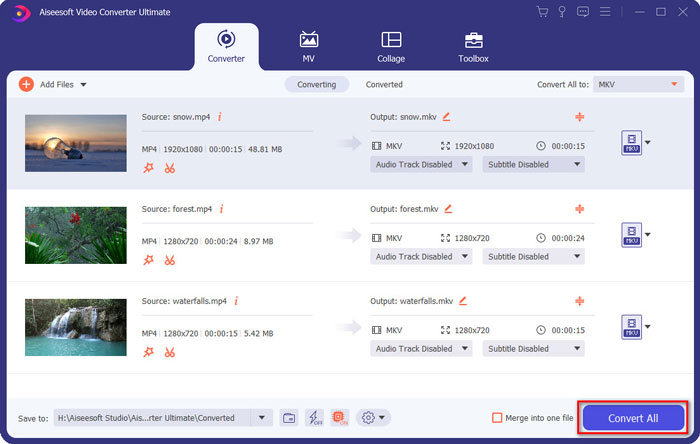
Langkah 3: Klik tombol Convert All to > Video > MKV dan pilih tombol Same as Source. Meskipun ukuran file WebM akan sedikit membesar, kualitasnya akan tetap sama dengan video asli.

Langkah 4: Setelah memilih lokasi penyimpanan, centang Merge into one file dan klik tombol Convert All untuk menyimpan.
Anda Mungkin Juga Ingin Tahu: Cara Menggabungkan Video di iPhone.
Bagian 3: FAQ Bergabung dengan File WebM
1.Apa itu WebM?
WebM adalah sejenis format video yang diusulkan oleh Google. Dan video WebM selalu digunakan di situs web karena dapat diputar dengan lancar di hampir semua browser termasuk Google Chrome, Firefox, dan sebagainya dengan kualitas tinggi dan ukuran kecil.
2.Apakah menggabungkan file WebM akan mengurangi kualitas video?
Ya, itu akan terjadi, terutama ketika Anda menggabungkan beberapa file WebM menjadi satu file WebM. Cara terbaik untuk menjaga kualitas aslinya adalah dengan menggabungkan file video WebM sebagai file MKV.
3.Dapatkah saya menyimpan format WebM setelah menggabungkan file video WebM?
Ya, bisa. Namun sebaiknya ubah formatnya ke MKV, yang merupakan prototipe dari WebM. Karena meskipun WebM dapat mempertahankan kualitas tinggi dengan ukuran file yang kecil, format MKV lebih sering digunakan dibandingkan WebM. Namun jika Anda mau, Anda juga bisa mengonversi WebM ke MP4.
Kesimpulan
Saat Anda ingin menggabungkan file video WebM yang diunduh di situs web untuk mendapatkan pengalaman menonton yang lebih lancar, cara termudah adalah menggunakan penggabung video online gratis untuk membantu Anda. Namun, jika Anda ingin membuat video baru dengan menggabungkan file video WebM, Anda perlu memotong bagian yang diperlukan sebelum bergabung. Dalam hal ini, mengunduh konverter video profesional - Video Converter Ultimate untuk memotong dan menggabungkan file WebM secara bersamaan.
-
 5 Pemain WebM Terbaik untuk Android/iPhone/Windows/Mac
 Jika Anda ingin memainkan WebM dengan sukses di perangkat Anda, Anda harus mempelajari lebih lanjut tentang 5 pemutar WebM terbaik untuk Android, iPhone, Windows, Mac dari artikel ini.
-
 Kompres WebM - Cara Mengompres File WebM Secara Online
 Bagaimana cara mengompres file WebM secara online? Apa cara tercepat untuk mengompres file besar? Posting ini memberi tahu 2 cara gratis untuk mengompres WebM.
-
 MP4 to WebM Converter - 4 Metode Terbaik untuk Mengonversi MP4 ke WebM
 Jika Anda ingin mengonversi MP4 ke WebM secara gratis, Anda dapat mempelajari lebih lanjut tentang 4 metode yang paling sering digunakan untuk mendapatkan video yang diinginkan secara gratis dari artikel.
