


 Video Converter Ultimate
 Perekam Layar
 Perbaikan Video
 Unduhan Aman
Cara Menggabungkan Video 3GP dari Ponsel Menjadi Satu File
Saat Anda merekam beberapa video selama perjalanan dengan ponsel cerdas, Anda mungkin ingin menggabungkan file 3GP menjadi satu video. Apa metode terbaik untuk menggabungkan klip video? Apakah Anda hanya bergabung dengan video 3GP, atau membuat film dengan file smartphone, Anda dapat mempelajari lebih lanjut tentang 2 metode yang paling sering digunakan dari artikel.

Bagian 1: Cara Menggabungkan 3GP Online Gratis
To merge your 3GP files without editing, you only need a convenient tool that can merge 3GP videos free online. FVC Free Online Video Merger is one of the best 3GP video mergers with a simple interface. It enables you to combine 3GP files without a number or size limit. Moreover, you can adjust the resolution and video format.
Step 1: Go to the Free Online Video Merger with any web browser. You can click the Upload Videos to Merge button to load one 3GP file into the online video merger. It will direct you to an online video joiner interface.
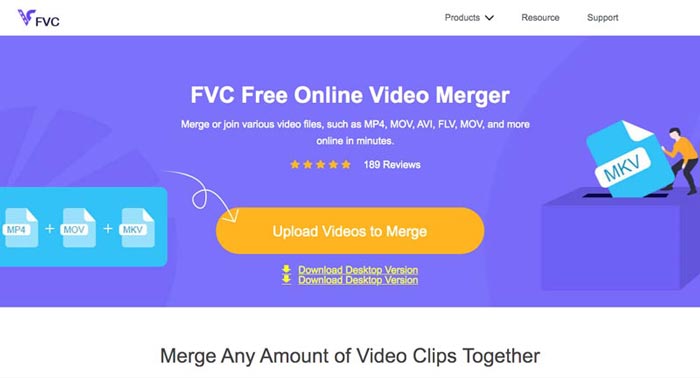
Step 2. Just upload more 3GP files that you need to combine. Then you can change the resolution and the format of your video by clicking the Resolution and Format fields. You can merge your 3GP files into popular video files like MP4 or MKV.
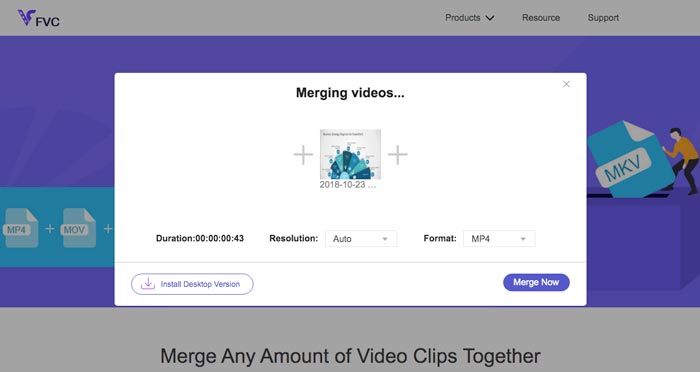
Step 3. Once you are satisfied with the output video, you can click the Merge Now button to start the combination process. When the merging is finished, the joined video will be saved on your hard drive.
Ini adalah cara mudah untuk bergabung dengan file 3GP online secara gratis. Tetapi jika Anda ingin melakukan lebih banyak pengeditan untuk file video Anda, Anda memerlukan alat yang lebih profesional.
Bagian 2. Bagaimana Menggabungkan Video 3GP menjadi Film
Whether you need to combine 3GP videos into a movie with some stunning filters, or simply join 3GP files into one, Video Converter Ultimate is a versatile video converter you should take into consideration. It enables you to split and merge video clips, select the video themes, add watermarks to videos, and even convert 3GP videos to other video formats for social media websites directly.
- 1. Memungkinkan Anda untuk memotong bagian yang diinginkan, atau menggabungkan beberapa 3GP menjadi satu.
- 2. Menyediakan fitur pengeditan video dasar, seperti trim, split, crop, dan rotate.
- 3. Gabungkan klip video 3GP ke dalam film dengan berbagai filter, tema, file musik, dll.
- 4. Tambahkan subtitle, trek audio, efek 3D, tanda air, kompres video, dan lainnya.
Unduh GratisUntuk Windows 7 atau yang lebih baruUnduhan Aman
Unduh GratisUntuk MacOS 10.7 atau yang lebih baruUnduhan Aman
Metode 1: Cara Menggabungkan Beberapa Video 3GP Secara Langsung
Step 1: Download and launch Video Converter Ultimate from the official website. Choose the Converter interface and click the Add Files button to add the 3GP files you want to merge. Moreover, you can also drag the 3GP videos into the program.

Step 2: Once you have imported the 3GP files, you should choose the format of the output file. Click the scissors icon to cut out the desired part. Moreover, you can rotate/crop the videos, apply filters, add a watermark, or adjust audio tracks for the output video.

Step 3: Go to the bottom of the user interface to choose the destination folder for the merged 3GP files. After that, you can click the Merge into One File box and click the Convert All to start to merge 3GP files.

Metode 2: Cara Menggabungkan File 3GP ke dalam Film
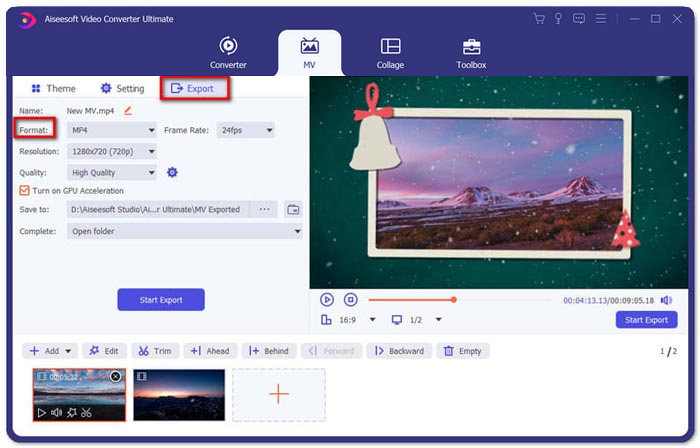
Step 1: When you need to join 3GP files into a movie, you can choose the MV menu, and then you will enter into the MV creating interface. Click the Add button from the lower left of the window to import your 3GP videos and pictures.
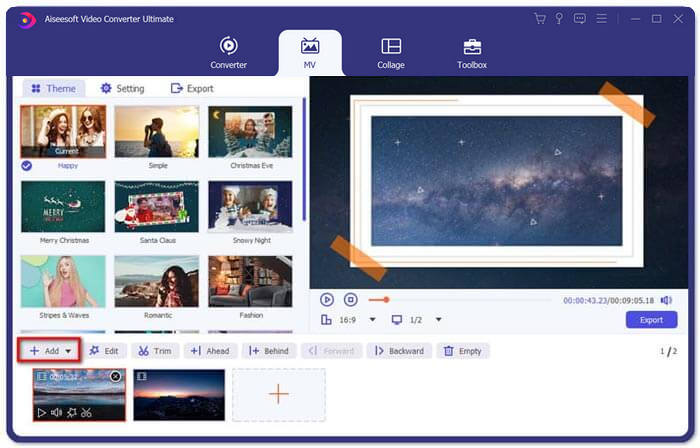
Step 2: After that, you can click the Edit button to apply the video effects. Moreover, you can also select a theme for your MV movie. On the left section, click the Theme tab and then choose your desired theme for your MV.
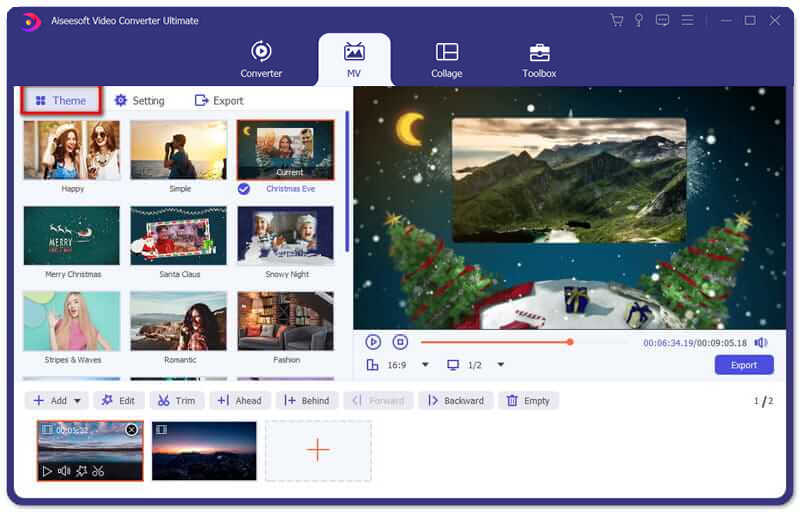
Step 3: If you are satisfied with the combined 3GP file, you can click the Export button to save the video file. By default, the output format is MP4. Of course, you can also choose the preferred video format according to your requirement.
Bagian 3. FAQ tentang Cara Menggabungkan 3GP
1. Apa itu format 3GP?
3GP adalah format file multimedia yang dirancang untuk menghemat penyimpanan data. Ini banyak digunakan di perangkat seluler. Saat Anda mengambil foto atau merekam video dengan ponsel Anda, biasanya file disimpan dalam format 3GP. Biasanya 3GP digunakan pada ponsel 3G dan juga dapat dimainkan di beberapa ponsel 2G dan 4G.
2. Bagaimana cara menggabungkan file 3GP di smartphone?
Saat Anda ingin menggabungkan file 3GP di iPhone atau ponsel Android, Anda dapat menggunakan Video Merger untuk ponsel Android, VivaVideo untuk iPhone, atau mengunduh aplikasi lain untuk menggabungkan video. Tetapi ketika Anda perlu menggabungkan file 3GP sebagai film, Anda masih perlu menggunakan penggabungan video profesional.
3. Dapatkah saya menggabungkan video 3GP dengan file audio?
Iya. Tetapi Anda tidak dapat menggunakan file audio sebagai latar belakang untuk video 3GP. Apakah Anda perlu menggabungkan dua file, atau menggunakan audio sebagai latar belakang video 3GP, penggabung 3GP profesional harus menjadi pilihan Anda.
Kesimpulan
When you need to merge 3GP video files on your mobile devices into one video file, you can learn 2 efficient methods from this article. You can merge 3GP free online by using Free Online Video Joiner. If you need to edit and put some special effects in your video, Video Converter Ultimate should be an ideal tool for you. If you have any questions about merge 3GP files, you can feel free to contact us.
-
 3 Cara Gratis Teratas untuk Mengonversi FLV ke 3GP di Windows / Mac
 Tidak dapat membuka file FLV di ponsel cerdas atau tablet? Jangan khawatir! Di sini kami membagikan tiga metode untuk mengonversi FLV ke 3GP tanpa kehilangan kualitas untuk dimainkan di ponsel.
-
 3 Metode untuk Mengonversi MP4 ke 3GP Tanpa Repot
 Ingin mengonversi MP4 ke 3GP dengan cara cepat dan mudah? Di sini kami akan membagikan 3 konverter MP4 ke 3GP untuk mengubah MP4 menjadi 3GP untuk diputar di berbagai ponsel.
-
 3 Pemain 3GP Gratis Terbaik untuk Komputer dan Seluler yang Harus Anda Ketahui
 Jika Anda ingin memutar film 3GP dengan mudah tanpa penginstalan atau konversi codec video, Anda dapat mempelajari lebih lanjut tentang 3 pemutar 3GP terbaik di Windows, Mac, Android, dan iPhone di artikel ini.
