


 Video Converter Ultimate
 Perekam Layar
 Perbaikan Video
 Unduhan Aman
Cara Menghapus Tanda Air yang Dapat Digigit dari Video Anda dengan Mudah
Jika Anda sedang mencari cara terbaik dan termudah untuk menghapus watermark Biteable dari video Anda, Anda tidak perlu repot lagi. Terus terang, menonton video yang penuh watermark itu mengesalkan dan membuat frustrasi. Anda tidak bisa menikmati video yang sedang ditonton. Selain itu, watermark juga mengganggu para penonton. Dapat dipahami bahwa watermark digunakan untuk melindungi pemilik video. Namun, memasang watermark berukuran besar tidaklah baik. Itu hanya menimbulkan kesan negatif bagi orang-orang yang senang menonton video favorit mereka. Salah satu contohnya adalah watermark Biteable. Watermark Biteable berasal dari aplikasi Biteable, di mana watermark akan otomatis terpasang setelah membuat atau menyimpan video. Untungnya, Anda dapat menggunakan berbagai aplikasi untuk menghapus watermark ini dari video Anda. Anda bisa menonton video favorit tanpa rasa kesal dan frustrasi. Jika Anda ingin mengetahui aplikasi terbaik dan paling andal yang dapat Anda gunakan untuk menghapus watermark ini, teruslah membaca artikel ini.

Bagian 1: Cara Terbaik untuk Menghapus Tanda Air yang Dapat Digigit dari Video
Video Converter Ultimate adalah aplikasi yang paling luar biasa yang dapat Anda gunakan untuk menghapus watermark Biteable dari video Anda. Selain itu, software hebat ini juga mampu menghapus objek lain yang tidak relevan dan mengganggu, seperti logo, teks, tanda tangan, dan sebagainya. Proses penghapusan dan penyimpanannya juga sangat cepat, sehingga Anda tidak perlu menghabiskan banyak waktu. Lebih jauh lagi, Video Converter Ultimate menyediakan dua metode mudah untuk menghapus watermark dari video Anda, yaitu pemotong video (video cropper) dan penghapus watermark video (video watermark remover). Aplikasi ini juga memiliki lebih banyak alat pengeditan yang bisa Anda nikmati, seperti pengatur kecepatan video, konverter video, kompresor video, koreksi warna, pembuat kolase, pembuat GIF, pemotong video, konverter gambar, dan lainnya. Bagian terbaik dari alat ini adalah kemudahannya digunakan karena memiliki antarmuka yang sederhana dan mudah dipahami, sempurna untuk pemula. Aplikasi ini juga mendukung berbagai format file, seperti MP4, MOV, FLV, MKV, OGV, DIVX, dan banyak lagi. Terakhir, Video Converter Ultimate dapat diakses di Windows maupun Mac, sehingga sangat praktis bagi pengguna. Jika Anda ingin menghapus watermark dari sebuah video, ikuti langkah-langkah mudah berikut ini.
Menggunakan alat Penghilang Tanda Air Video
Langkah 1: Kunjungi situs web Video Converter Ultimate dan unduh aplikasinya. Lalu lanjutkan ke proses instalasi. Setelah instalasi selesai, jalankan aplikasinya.
Unduh GratisUntuk Windows 7 atau yang lebih baruUnduhan Aman
Unduh GratisUntuk MacOS 10.7 atau yang lebih baruUnduhan Aman
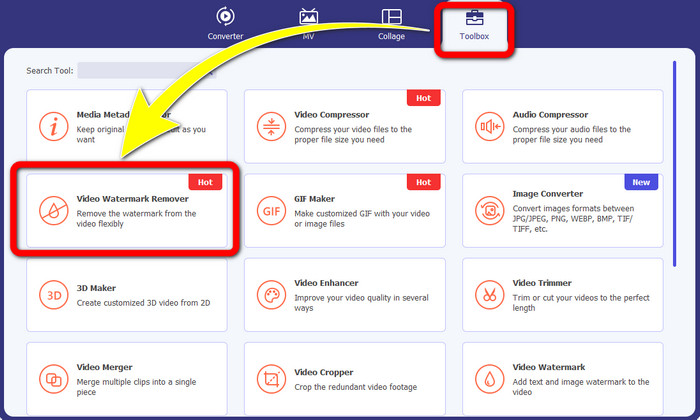
Langkah 2: Setelah membuka Video Converter Ultimate, klik tombol Toolbox > Video Watermark Remover. Setelah itu, antarmuka lain akan muncul di layar.
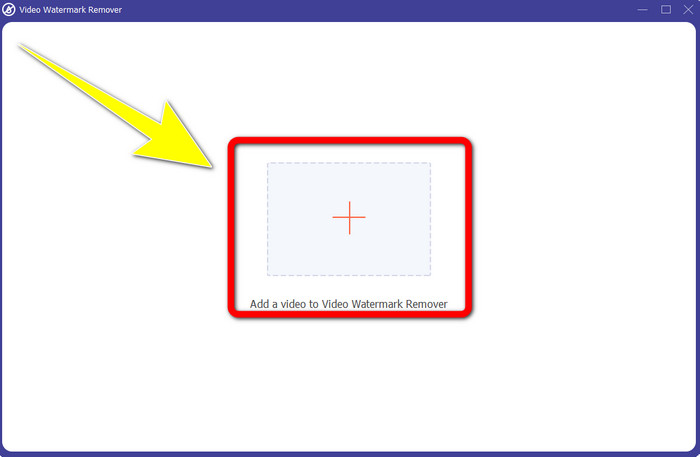
Langkah 3: Ketika antarmuka baru sudah muncul di layar Anda, klik tombol tanda Plus untuk menambahkan video Anda yang memiliki watermark Biteable.
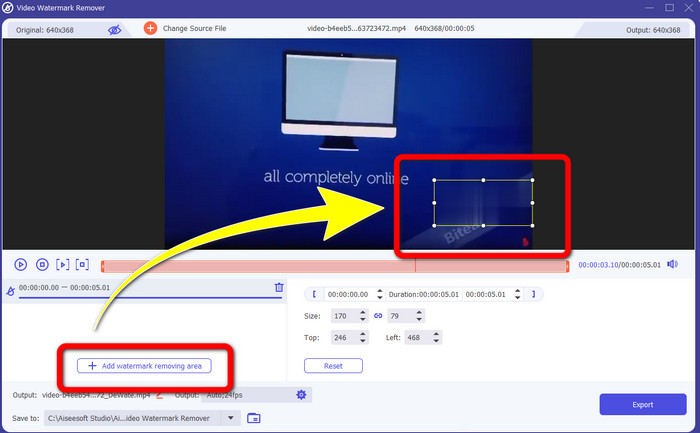
Langkah 4: Setelah Anda menambahkan video, klik Add Watermark Removing Area. Maka sebuah kotak kecil akan muncul di video Anda. Seret kotak tersebut untuk menutupi watermark.
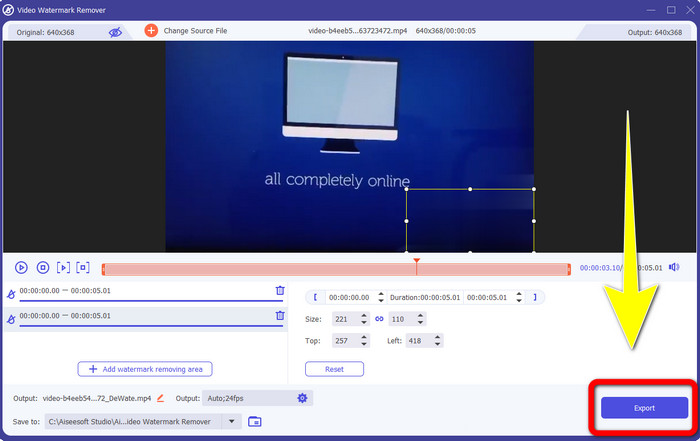
Langkah 5: Jika Anda sudah menghapus watermark Biteable dari video, klik tombol Export untuk menyimpan hasil akhir Anda.
Menggunakan alat Pemotong Video
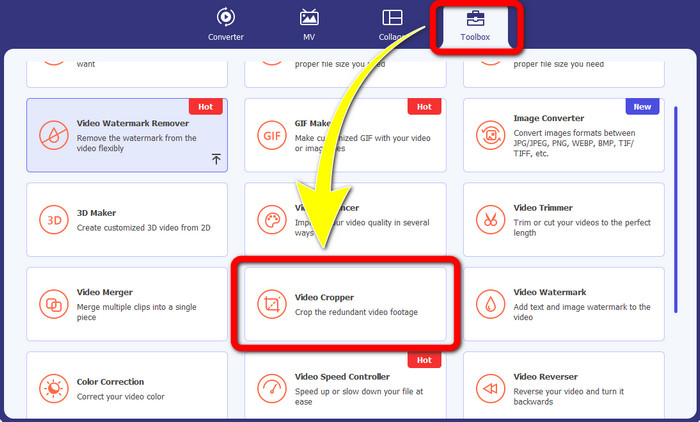
Langkah 1: Jalankan Video Converter Ultimate. Klik tombol Toolbox > Video Cropper.
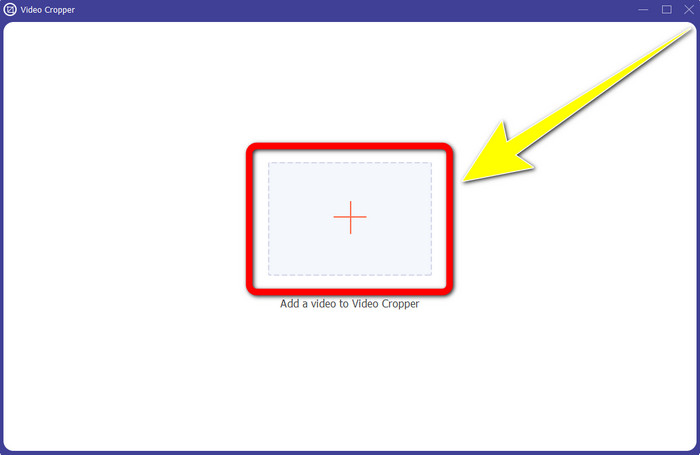
Langkah 2: Setelah mengklik Video Cropper, akan muncul antarmuka baru di layar Anda. Klik ikon Plus dan tambahkan video Anda yang memiliki watermark Biteable.
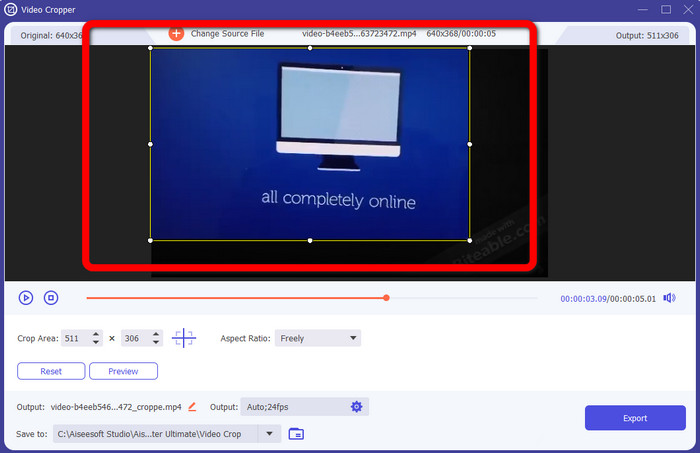
Langkah 3: Setelah video Anda ditambahkan, Anda bisa langsung Crop bagian video untuk menghapus watermark.
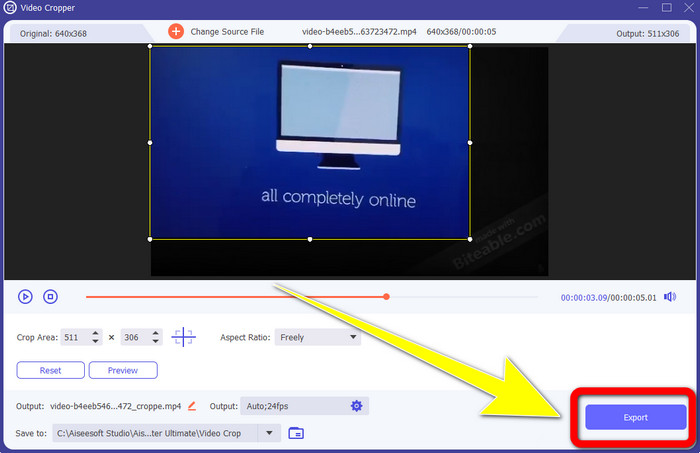
Langkah 4: Jika Anda sudah selesai memotong (crop) video, klik tombol Export dan simpan video Anda tanpa watermark Biteable.
Bagian 2: Cara Menghapus Tanda Air yang Dapat Digigit dari Video Online
1. Menggunakan BeeCut
Jika Anda ingin menghapus tanda air yang dapat digigit secara online gratis, BeeCut adalah aplikasi online terbaik yang dapat Anda manfaatkan. Itu mampu menghapus tanda air dari video Anda. Ini adalah alat online sederhana yang dapat Anda gunakan, yang sangat cocok untuk pemula. Anda dapat menghapus tanda air yang dapat digigit dari empat video hanya dalam beberapa langkah.
Selain itu, BeeCut memiliki banyak alat pengeditan, seperti pemangkasan, pemotongan, pemisahan, dan penggabungan video. Selain itu, jika Anda ingin membuat video, Anda dapat menambahkan subtitle ke video Anda di bawah ini, yang nyaman bagi pemirsa. Namun, lambat dalam mengunggah file dan menyimpan proses menggunakan alat ini. Juga, Anda tidak dapat menggunakan alat ini jika Anda tidak memiliki koneksi internet. Jika Anda ingin menghapus tanda air yang dapat digigit dari video Anda menggunakan alat online ini, ikuti beberapa langkah di bawah ini.
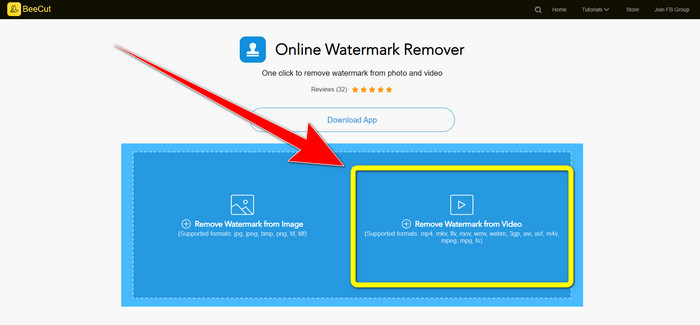
Langkah 1: Kunjungi situs web BeeCut. Kemudian klik tombol Remove Watermark from Video dan tambahkan video Anda yang memiliki watermark Biteable.
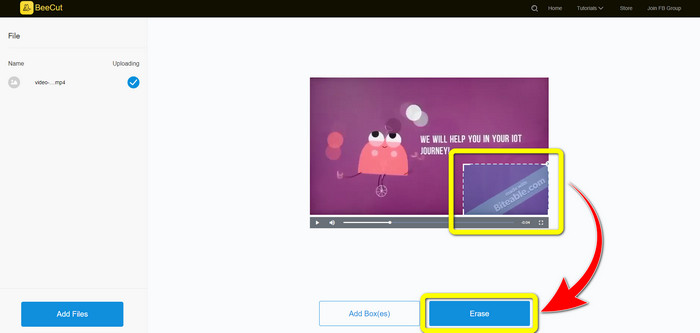
Langkah 2: Setelah menambahkan file, sebuah kotak kecil akan muncul di video Anda. Seret kotak tersebut dan tutupi watermark Biteable. Jika Anda sudah selesai menutupi watermark, klik tombol Erase.
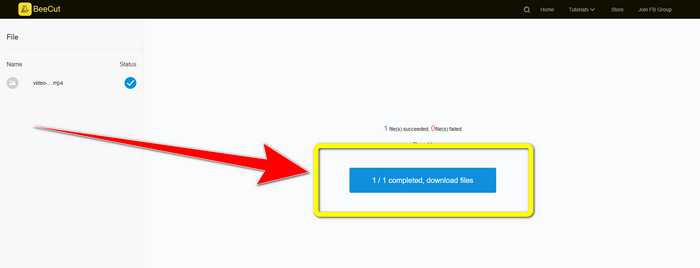
Langkah 3: Setelah Anda mengklik tombol Erase, tunggu proses penghapusan. Setelah selesai, Anda dapat mengunduh file dan menikmati video tanpa watermark Biteable.
2. Menggunakan Video Blur Online
Jika Anda masih mencari aplikasi lain yang dapat Anda gunakan untuk menghapus tanda air yang dapat digigit dari video online Anda, Blur Video Online adalah alat yang hebat untuk Anda. Dan Blur Video Online tersedia untuk hampir semua perangkat dan browser, seperti Google Chrome, Opera, IE, Mozilla Firefox, dan banyak lagi. Namun, aplikasi yang bergantung pada web ini terlalu lambat dalam mengimpor file video, dan proses menghapus tanda air memakan waktu. Ini juga merupakan alat yang bergantung pada internet, yang berarti hanya beroperasi jika Anda memiliki koneksi internet. Ikuti langkah-langkah sederhana di bawah ini untuk menghapus/memburamkan tanda air yang Dapat Digigit dari video Anda.
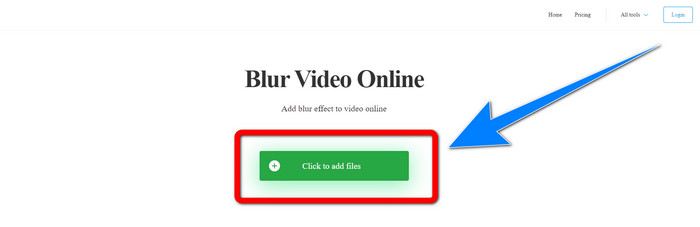
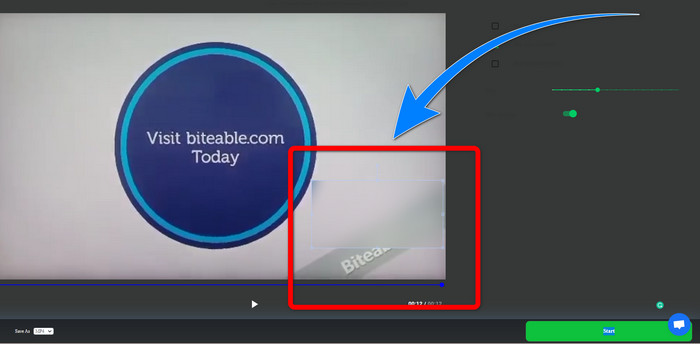
Langkah 1: Buka situs web Blur Video Online. Lalu klik tombol Click to Add File dan tambahkan video Anda yang memiliki watermark.
Langkah 2: Jika Anda sudah memasukkan video, sebuah kotak akan muncul di video Anda. Seret kotak tersebut untuk menutupi watermark dan simpan hasil akhir Anda.
Terkait dengan:
Cara Terbaik Menghapus Watermark dari Camtasia 9 di Windows Anda
Cara Cepat Menghapus Banner Watermark dari AVS Video Editor
Bagian 3: FAQ tentang Menghapus Tanda Air yang Dapat Digigit dari Video
Dapatkah saya menghapus cap tanggal menggunakan Video Converter Ultimate?
Ya kamu bisa! Video Converter Ultimate dapat membantu Anda menghilangkan objek yang mengganggu dari video Anda, seperti cap tanggal, tanda air, teks, dll.
Apakah menghapus tanda air dari video saya memakan waktu?
Itu tergantung pada aplikasi yang Anda gunakan. Beberapa aplikasi dapat langsung menghapus tanda air dari video Anda, dan beberapa aplikasi membutuhkan waktu untuk menghapus tanda air.
Apakah ada penghapus tanda air yang dapat saya gunakan tanpa kehilangan kualitas video saya?
Ya, ada! Anda bisa menggunakan Video Converter Ultimate. Aplikasi ini tidak hanya unggul dalam menghapus watermark dan mengedit video. Aplikasi ini memungkinkan Anda menghapus watermark dari video tanpa mengurangi kualitas.
Kesimpulan
Menghapus watermark dari video Anda adalah hal yang sangat baik, terutama jika Anda ingin menonton video favorit tanpa objek yang tidak perlu. Artikel ini telah memberikan berbagai aplikasi praktis yang dapat Anda gunakan untuk menghapus watermark Biteable dari video Anda. Terakhir, menggunakan Video Converter Ultimate adalah pilihan terbaik jika Anda mencari aplikasi yang paling unggul dan mengesankan untuk menghapus watermark dari video Anda.
-
 Cara Menghilangkan Tanda Air Powtoon Menggunakan 4 Metode Efektif
 Baca artikel ini untuk mempelajari cara menghapus tanda air Powtoon menggunakan alat terbaik yang kami sertakan di sini dan tutorialnya.
-
 Ulasan Penghilang Tanda Air Apowersoft – Fitur, Pro & Kontra, dan Harga
 Apowersoft Watermark Remover adalah salah satu penghilang watermark terbaik yang mendukung online dan offline, klik ini untuk mengetahui lebih lanjut!
-
 3 Penghilang Tanda Air Shutterstock Terbaru yang Anda Butuhkan
 Tidak suka tanda air Shutterstock yang dilampirkan pada video yang diekspor? Anda dapat menggunakan penghapus tanda air Shutterstock untuk menghapusnya secara efektif.
