


 Video Converter Ultimate
 Perekam Layar
 Perbaikan Video
 Unduhan Aman
Metode Tidak Menantang tentang Cara Menghapus Logo iSkysoft dari Video
iSkysoft adalah aplikasi yang sangat baik dengan banyak fitur luar biasa, yang membuatnya menonjol dari aplikasi lainnya. Ini adalah aplikasi sederhana yang memungkinkan Anda mengonversi format video ke format lain dan melakukan beberapa pengeditan video dasar. Namun, bagian paling disayangkan dari perangkat lunak ini adalah munculnya watermark iSkysoft berukuran besar pada video Anda setelah menggunakan aplikasi ini. Memiliki watermark/logo besar pada video sama sekali tidak nyaman untuk ditonton. Untungnya, ada aplikasi andal yang dapat Anda gunakan untuk menghapus objek mengganggu seperti logo/watermark iSkysoft. Anda harus membaca artikel ini jika Anda ingin mengetahui metode terbaik untuk menghapus logo iSkysoft dari video Anda.

Bagian 1: Hapus Logo iSkysoft dari Video di Desktop
Logo iSkysoft di layar Anda sangat mengganggu, terutama jika Anda sedang menonton video favorit. Namun Anda tidak perlu khawatir lagi. Anda dapat menghilangkan logo tersebut menggunakan Video Converter Ultimate. Perangkat lunak andal ini dapat membantu Anda menghapus logo iSkysoft dari video Anda dengan dua cara mudah: melalui alat Video Watermark Remover dan alat Video Cropper. Dengan alat‑alat ini, Anda dapat dengan mudah menghilangkan logo iSkysoft dari video Anda. Jika logo iSkysoft berada di sudut video, disarankan menggunakan alat Video Cropper. Namun, jika logo diletakkan di bagian tengah, Anda dapat menggunakan alat Video Watermark Remover. Dengan begitu, Anda bisa menonton film atau video favorit tanpa terganggu oleh logo.
Selain itu, selain menghapus tanda air dari video Anda, Video Converter Ultimate memiliki lebih banyak fitur. Ini memiliki penambah video, penggabungan video, pemangkas, pemangkas, rotator, konverter, dan banyak lagi. Selain itu, salah satu fungsi utama aplikasi ini adalah mengonversi berbagai format file video. Pengguna non-profesional juga dapat memanfaatkan aplikasi ini karena memiliki antarmuka yang sederhana. Jika Anda ingin mempelajari cara menghapus logo iSkysoft dari video Anda, kami akan menunjukkan kepada Anda dua cara mudah yang disediakan aplikasi ini.
Menggunakan Penghapus Tanda Air Video
Langkah 1: Anda harus terlebih dahulu mengunduh Video Converter Ultimate ke desktop Anda untuk menggunakan perangkat lunak hebat ini. Setelah mengunduhnya, ikuti proses instalasi dan jalankan aplikasinya.
Unduh GratisUntuk Windows 7 atau yang lebih baruUnduhan Aman
Unduh GratisUntuk MacOS 10.7 atau yang lebih baruUnduhan Aman
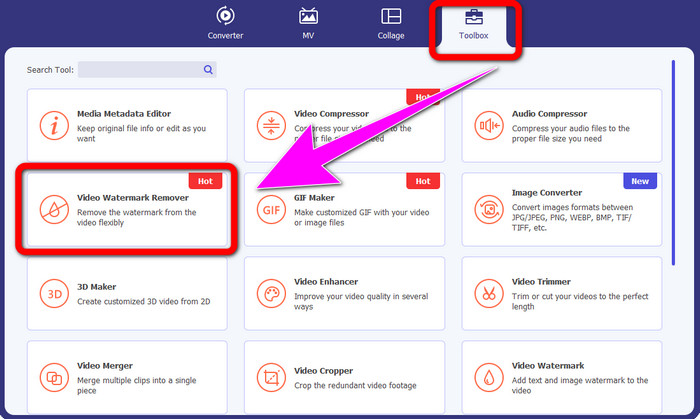
Langkah 2: Setelah Anda menjalankan perangkat lunak, lanjutkan ke panel Toolbox dan pilih alat Video Watermark Remover. Akan muncul antarmuka lain di layar Anda.
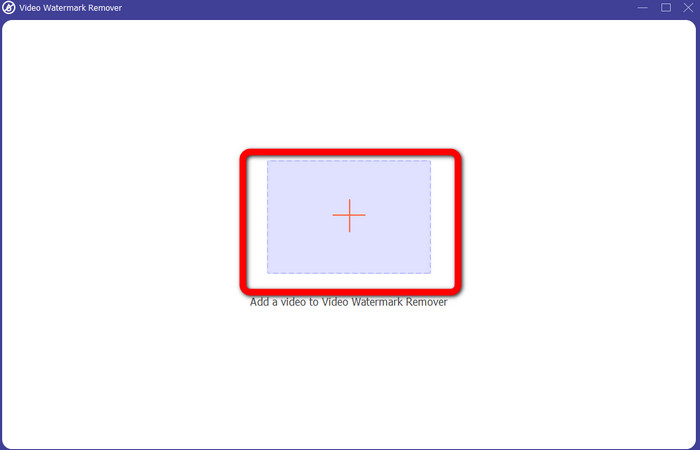
Langkah 3: Saat Anda sudah melihat antarmuka baru, klik ikon plus dan lampirkan video yang memiliki logo iSkysoft yang ingin Anda hapus.
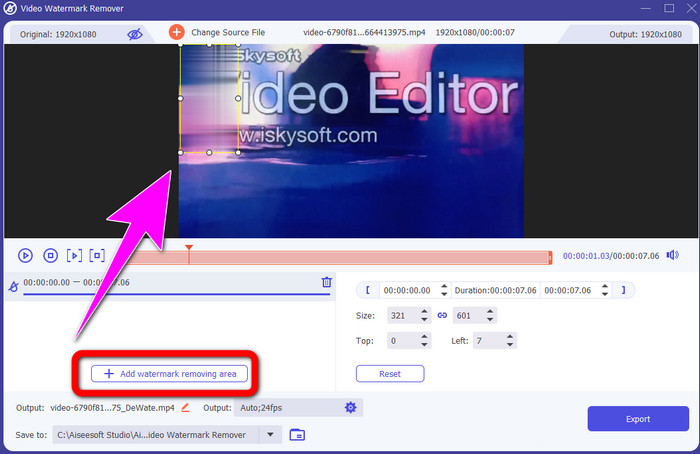
Langkah 4: Selanjutnya, klik tombol Add Watermark Removing Area. Geser kotak pada video Anda dan tutupi logo iSkysoft.
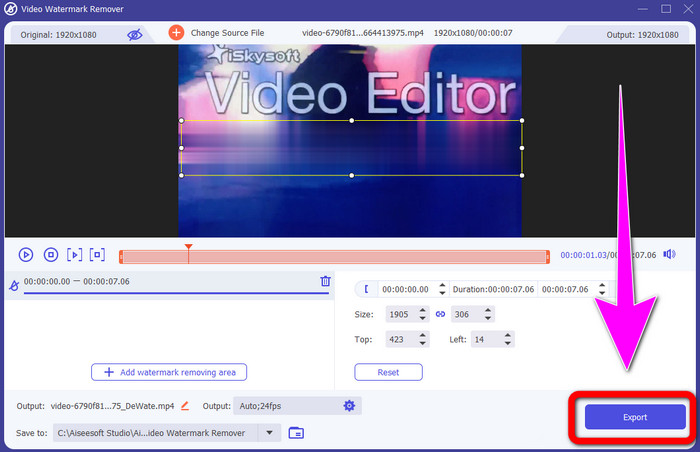
Langkah 5: Terakhir, klik tombol Export untuk menyimpan video final Anda.
Menggunakan Pemotong Video
Pada bagian ini, kami akan menunjukkan cara menghapus logo iSkysoft dari video Anda menggunakan alat Pemotong Video.
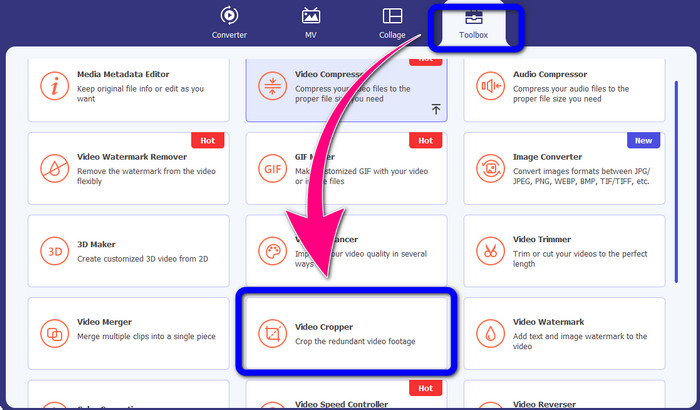
Langkah 1: Jalankan aplikasi di desktop Anda. Di bawah panel Toolbox, Anda harus mengklik alat Video Cropper. Sama seperti alat sebelumnya, akan muncul antarmuka lain di layar Anda.
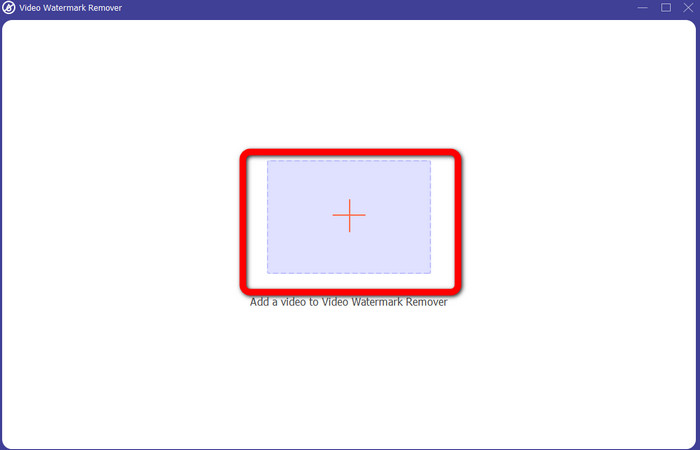
Langkah 2: Klik tombol tanda Plus untuk mengimpor video Anda yang memiliki logo iSkysoft.
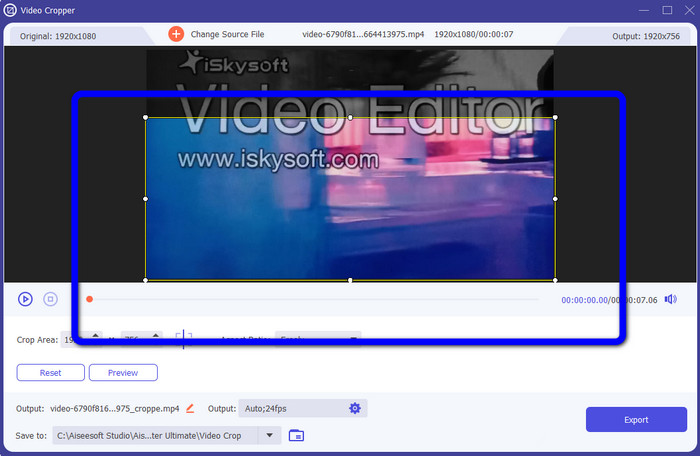
Langkah 3: Pada bagian ini, Anda sekarang dapat memotong video untuk menghapus logo iSkysoft dari video Anda. Gunakan mouse untuk menggeser tepi area video.
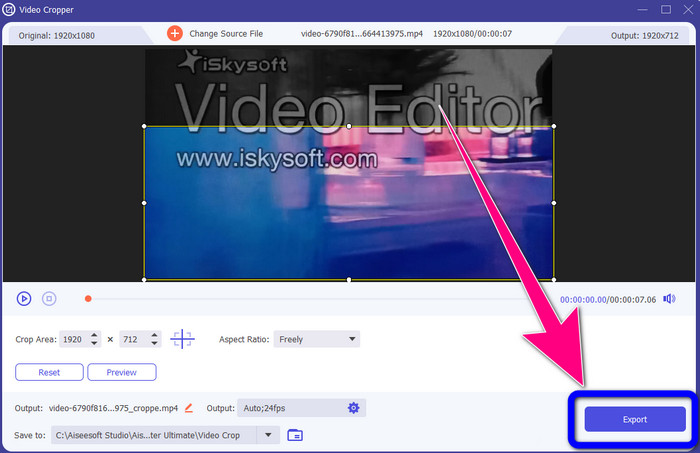
Langkah 4: Untuk langkah terakhir, klik tombol Export dan simpan hasilnya di desktop Anda.
Bagian 2: Cara Menghapus Logo iSkysoft dari Video Online
Menggunakan HitPaw
Anda juga dapat menghapus logo iSkysoft secara online. Salah satu alat terbaik yang bisa Anda gunakan adalah HitPaw. Aplikasi online ini dapat dengan mudah menghapus logo dari video Anda. Anda dapat menggunakannya baik di desktop maupun secara online, sehingga nyaman bagi siapa saja. Selain itu, HitPaw aman digunakan. Alat ini memastikan bahwa video dapat diedit dan dilihat hanya oleh Anda sendiri. Selain itu, Anda tidak perlu khawatir dengan batasan perangkat lunak ini. Tidak ada batasan dalam hal menghapus logo dari video Anda. Anda tidak perlu membeli aplikasi ini karena gratis. Namun, jika Anda menghapus logo atau apa pun
elemen yang tidak perlu dari video Anda, Anda harus menunggu sedikit lebih lama. Aplikasi ini memiliki prosedur penghapusan yang lambat, yang memakan waktu bagi pengguna. Juga, itu tergantung pada koneksi internet Anda. Ini akan bekerja dengan baik jika Anda memiliki koneksi yang cepat. Tetapi, jika Anda memiliki koneksi yang lambat, maka akan terjadi penundaan. Ikuti langkah-langkah sederhana di bawah ini untuk menghilangkan logo iSkysoft dari video Anda.
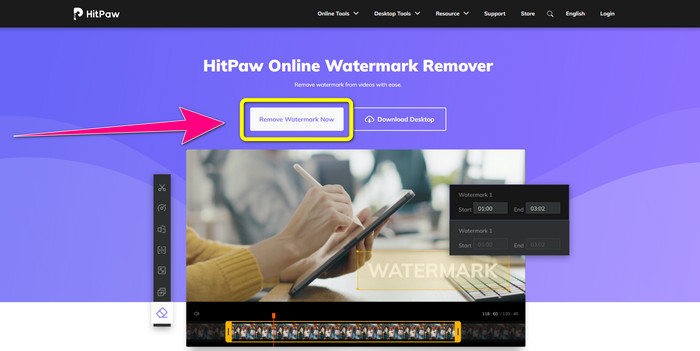
Langkah 1: Kunjungi situs web HitPaw. Klik tombol Remove Watermark Now - Choose File untuk memasukkan video Anda yang memiliki logo iSkysoft yang ingin Anda hilangkan.
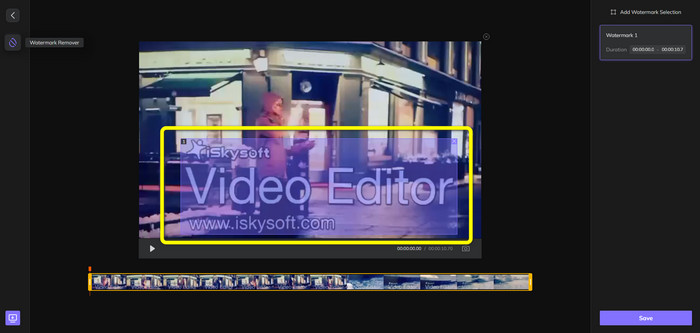
Langkah 2: Setelah Anda melampirkan file video, sebuah kotak berwarna biru akan muncul di layar Anda. Gunakan kotak ini untuk menutupi logo iSkysoft. Anda dapat mengubah ukuran kotaknya.
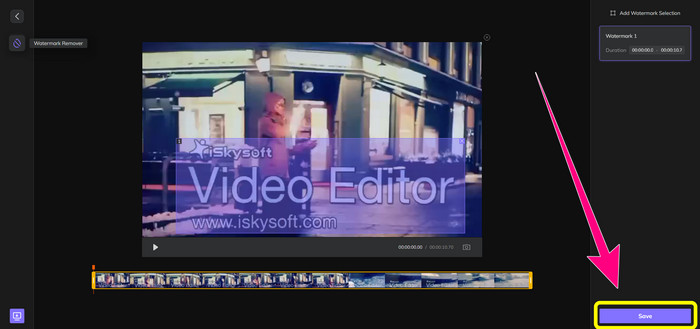
Langkah 3: Jika Anda sudah selesai menutupi logo iSkysoft pada video, klik tombol Save. Tunggu proses penghapusan dan simpan video Anda.
Menggunakan Penghapus Tanda Air Video Online
Alat online lain yang bisa Anda gunakan adalah Video Watermark Remover Online. Dengan aplikasi ini, Anda dapat menghapus logo iSkysoft dari video Anda. Ini juga merupakan perangkat lunak yang mudah digunakan, sehingga cocok untuk pengguna nonprofesional. Anda juga dapat menghapus elemen mengganggu apa pun dari video tanpa mengurangi kualitasnya. Namun, jika menggunakan versi gratis, ada batasan dalam menghapus logo dari video Anda. Anda hanya dapat menghapus logo atau watermark dari 5 video. Anda harus membeli langganan jika ingin melampirkan lebih banyak video menggunakan Video Watermark Remover Online. Selain itu, Anda tidak dapat menyimpan hasil dalam format lain. Anda hanya bisa menyimpannya dalam format yang sama, yang kurang ideal. Terakhir, pemrosesan filenya lambat. Ikuti panduan sederhana di bawah ini untuk menghapus logo iSkysoft dari video Anda.
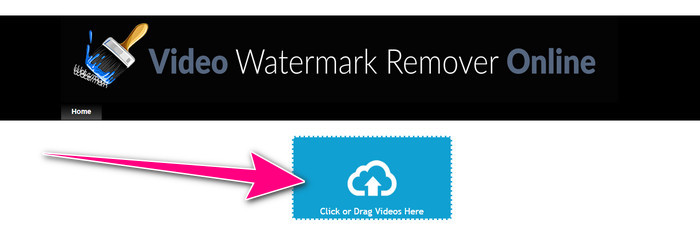
Langkah 1: Buka situs web Video Watermark Remover Online. Pilih tombol Click or Drag Videos Here untuk mengimpor file video Anda yang memiliki logo iSkysoft yang ingin Anda hapus.
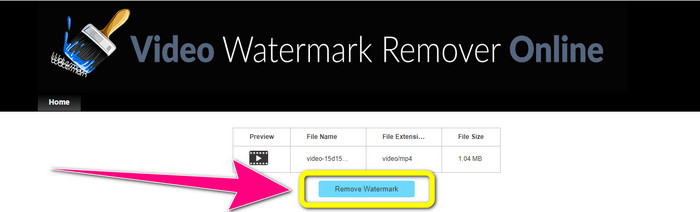
Langkah 2: Selanjutnya, klik tombol Remove Watermark dan tunggu proses penghapusannya.
Terkait dengan:
Cara Tercepat Menghapus Logo dari Video di Adobe Premiere Pro
Cara Menghapus Logo dari Video Menggunakan Windows Movie Maker
Bagian 3: FAQ tentang Menghapus Logo iSkysoft
Bisakah Anda menghapus logo dari gambar?
Ya, Anda dapat menggunakan FVC Free Watermark Remover untuk menghapus logo dari gambar Anda dengan mudah dan cepat.
Apakah menghapus tanda air itu ilegal?
Menurut Undang-Undang Hak Cipta AS, pasal 1202, menghapus tanda air tanpa izin pemilik adalah ilegal.
Bagaimana cara menghapus logo secara gratis?
Anda dapat menggunakan uji coba gratis Video Converter Ultimate untuk menghapus logo dari video Anda secara gratis.
Kesimpulan
Artikel ini telah memberikan metode-metode yang sangat baik untuk menghapus logo iSkysoft dari video Anda menggunakan alat di desktop maupun secara online. Namun jika Anda ingin mencari penghapus logo yang benar‑benar unggul untuk digunakan, Anda dapat mengunduh Video Converter Ultimate. Aplikasi ini menawarkan proses penghapusan yang cepat. Aplikasi ini juga mudah diakses oleh semua pengguna.
-
 8 Penghilang Tanda Air Video Online dan Offline
 Jika Anda mencari perangkat lunak penghapus watermark video gratis terbaik yang dapat Anda gunakan di ponsel Windows, Mac, iPhone, dan Android, artikel ini untuk Anda
-
 Metode Terbaik tentang Cara Menghapus Tanda Air yang Dapat Digigit dari Video
 Artikel ini akan menunjukkan kepada Anda penghapus tanda air yang dapat digigit paling andal dan fantastis. Aplikasi luar biasa ini akan membantu Anda memecahkan masalah semacam ini
-
 Prosedur yang Mudah Dipelajari untuk Menghapus Logo dari Video
 Apakah Anda mencari penghapus logo video terbaik dan mudah? Maka, artikel ini bagus untuk Anda. Manfaatkan kesempatan untuk mempelajari cara menghapus logo dari video.
