


 Video Converter Ultimate
 Perekam Layar
 Perbaikan Video
 Unduhan Aman
Panduan Cara Menghapus Tanda Air Lumion di Desktop dengan Mudah
Lumion adalah aplikasi yang paling umum digunakan oleh arsitek untuk membuat desain 3D dari rumah, rumah sakit, sekolah, infrastruktur, dll. Dengan perangkat lunak canggih seperti ini, Anda dapat dengan mudah memberikan gambaran visual kepada orang-orang tentang seperti apa bentuk bangunan secara nyata -waktu. Meskipun Anda dapat menggunakan uji coba gratis, masalah utama yang akan Anda hadapi adalah ia akan meninggalkan tanda air setelah Anda mengekspor. Ini tidak bagus untuk presentasi profesional.
Daripada mengkhawatirkan masalah ini, Anda dapat menggunakan perangkat lunak terbaik untuk menghapus watermark sehingga dapat ditampilkan tanpa logo Lumion. Ingin tahu cara menghapus watermark Lumion? Jika ya, Anda harus melanjutkan membaca informasi yang kami tambahkan di bawah ini pada setiap perangkat lunak yang dapat menyelesaikan masalah tersebut.

Bagian 1. Cara Terbaik Cara Menghapus Tanda Air Lumion di Web & Offline
FVC Video Converter Ultimate
Bisakah Anda menghapus watermark Lumion Pro 9? Tidak perlu lagi menanyakan hal itu karena FVC Video Converter Ultimate adalah solusi terbaik untuk menghapus watermark dari video yang Anda ambil di Lumion. Perangkat lunak ini unggul dalam menghapus watermark; ia menghapus watermark yang menempel pada file video hasil ekspor dengan cara yang unik. Selain itu, jika Anda pengguna Windows, Anda dapat mengunduh versi Windows‑nya untuk menghapus watermark dengan bantuan software andalan ini. Namun jika Anda pengguna Mac, tidak perlu khawatir karena software ini juga tersedia di sistem operasi lainnya.
Apalagi? Itu juga dapat melakukan banyak hal, seperti menambahkan efek ke video yang Anda ambil di Lumion dan menerapkan beberapa efek transisi untuk membuatnya lebih baik. Dibandingkan dengan perangkat lunak lain, alat ini adalah perangkat lunak terbaik di antara penghapus tanda air lainnya yang dapat Anda unduh di pasaran. Jadi, jika Anda ingin menghapus tanda air Lumion, Anda dapat mengikuti langkah-langkah di bawah ini untuk membantu Anda melakukannya dengan mudah dan dalam beberapa langkah.
Langkah 1. Untuk mengunduh perangkat lunak di Windows atau Mac Anda, klik tombol unduh di bawah ini. Silakan pilih tombol yang sesuai untuk mengunduh versi yang benar. Tekan file yang Anda unduh tadi untuk memasangnya, lalu buka untuk melanjutkan ke langkah berikutnya.
Unduh GratisUntuk Windows 7 atau yang lebih baruUnduhan Aman
Unduh GratisUntuk MacOS 10.7 atau yang lebih baruUnduhan Aman
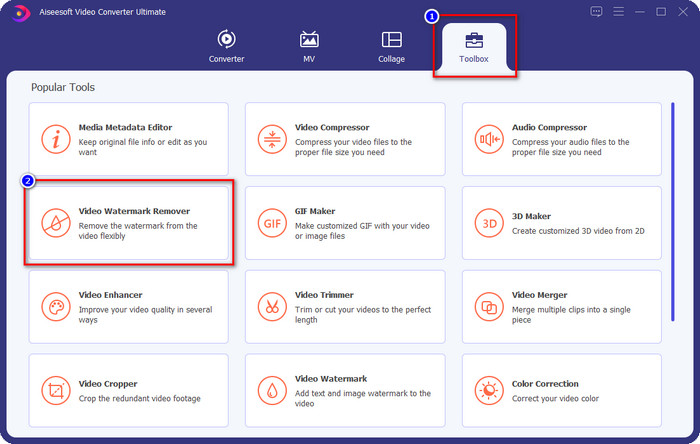
Langkah 2. Setelah meluncurkan perangkat lunak, buka Toolbox, dan cari Video Watermark Remover pada kumpulan fitur yang muncul setelah Anda mengeklik Toolbox.
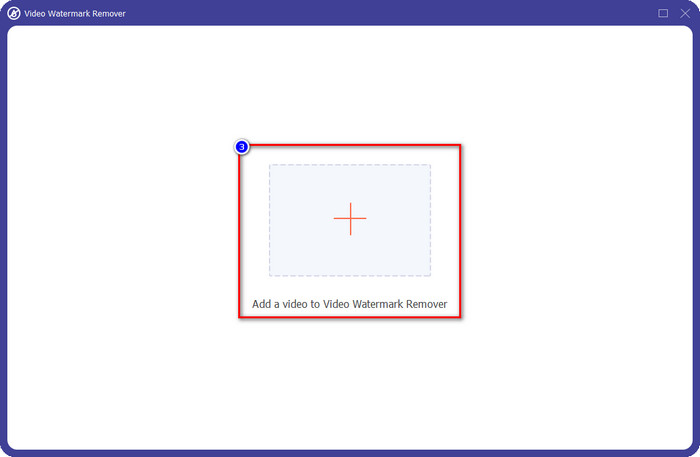
Langkah 3. Untuk mengunggah file Lumion yang Anda ekspor dengan watermark, klik ikon +, cari file video yang memiliki watermark, klik file tersebut, lalu tekan Open untuk mengunggahnya.
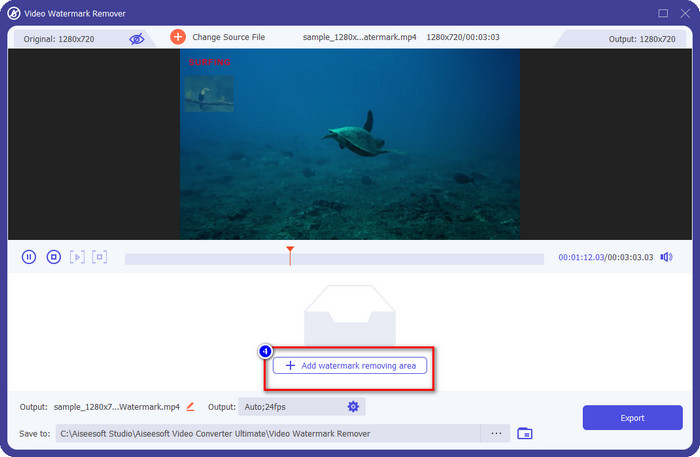
Langkah 4. Klik Add Watermark Removing Area untuk menghapus watermark Lumion yang ditempatkan pada video.
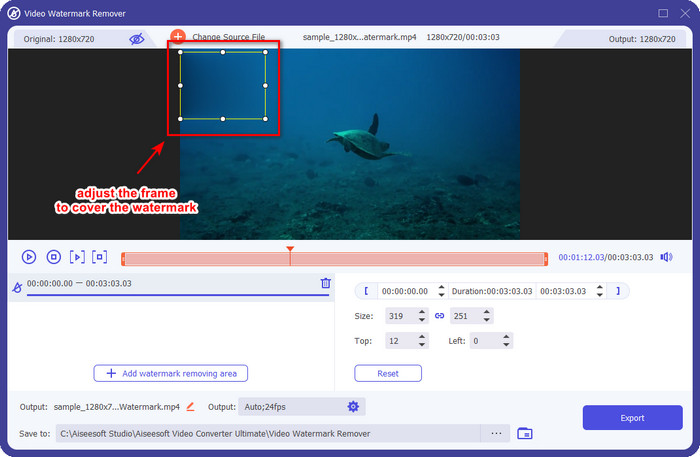
Langkah 5. Sesuaikan area penghapus watermark dengan menyeret titik‑titik bingkai hingga menutupi watermark. Anda dapat menahan dan menyeret bingkai untuk menempatkannya dengan tepat pada bagian video yang memiliki watermark.
Langkah 6. Untuk menyimpan video tanpa watermark Lumion, klik Export, dan video tanpa watermark akan otomatis tersimpan.

Penghilang Tanda Air Gratis Aiseesoft Online
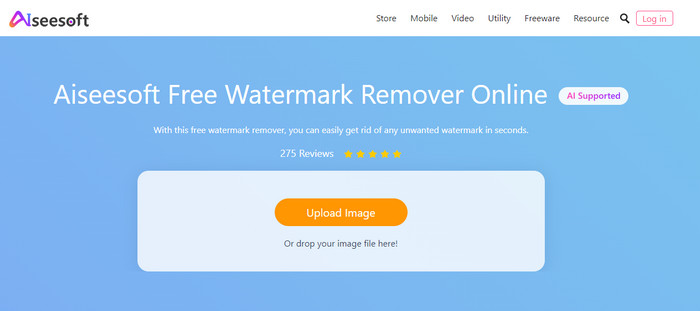
Aiseesoft Free Watermark Remover Online memungkinkan Anda menghapus watermark Lumion pada gambar tangkapan Anda. Meskipun alat web ini tidak dapat menghapus watermark pada video, Anda tetap bisa menggunakannya secara online jika ingin menghapus watermark pada gambar. Selain itu, Anda tidak perlu mengunduh alat ini karena tersedia di web. Jadi, jika Anda ingin menghemat ruang di desktop dan tidak ingin menunggu proses pengunduhan, maka Anda beruntung karena bisa menggunakan software ini untuk menghapus watermark.
Software ini adalah solusi terbaik untuk menghilangkan watermark pada setiap gambar yang Anda miliki. Namun demikian, alat ini gratis untuk digunakan dan dapat diakses di semua browser web untuk mencari.
Langkah 1. Cari situs web resmi penghapus watermark ini secara online, lalu buka situs web penghapus watermark tersebut, dan klik Upload Image untuk menambahkan gambar yang memiliki watermark Lumion.
Langkah 2. Sorot watermark menggunakan alat yang disajikan di atas; pastikan watermark Lumion tertutup seluruhnya agar dapat dihapus.
Langkah 3. Klik Remove untuk menghilangkan watermark uji coba Lumion sebelum menyimpan gambar. Setelah itu, klik Save untuk mengekspor gambar Lumion tanpa watermark.
Editor Video Gihosoft
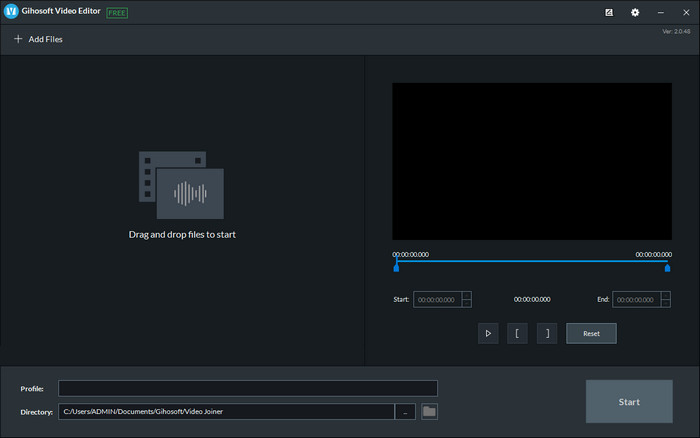
Gihosoft Video Editor dapat membantu Anda menghapus watermark pada video dengan cara memotong (trimming) bagian tersebut. Alat ini dapat mengonversi file video yang Anda impor dan sekaligus menghapus watermark. Walaupun software ini gratis digunakan di Windows dan Mac, beberapa kekurangan saat menghapus watermark menjadi masalah bagi banyak pengguna ketika memakainya. Perangkat lunak ini tidak dapat langsung menghapus watermark pada video yang Anda unggah, terutama jika watermark tersebut ditempatkan di tengah video dan bukan di awal atau akhir klip. Meskipun software ini tidak sebagus penghapus watermark lain yang kami sebutkan di atas, Anda tetap bisa menggunakannya untuk memotong bagian video yang berisi watermark dengan mudah.
Langkah 1. Untuk mengunduh software ini di desktop, Anda perlu mengunjungi halaman web resminya untuk mendapatkan video cutter‑nya.
Langkah 2. Buka software, klik Add Files, dan unggah video yang memiliki watermark.
Langkah 3. Tahan dan seret play heads in and out untuk memangkas bagian watermark pada video Anda.
Langkah 4. Untuk menyimpan perubahan, klik Cut, dan proses ekspor akan dimulai.
Bagian 2. FAQ tentang Cara Menghapus Tanda Air Lumion
Bisakah saya membeli Lumion premium untuk menghilangkan tanda air?
Ya, Anda dapat membeli versi premiumnya. Saat Anda mengekspor desain 3D yang Anda buat, tidak akan ada tanda air, baik itu video atau gambar.
Bagaimana cara yang efektif untuk menghilangkan watermark Lumion?
Alih-alih mengunduh perangkat lunak di perangkat Anda untuk menghapus tanda air dari video atau gambar yang Anda ekspor di Lumion, Anda dapat membeli versi premiumnya. Tapi anggaplah Anda tidak punya uang untuk membayarnya. Dalam hal ini, Anda dapat menggunakan penghapus tanda air yang berbeda yang kami sebutkan di artikel ini.
Mengapa saya tidak dapat meluncurkan Lumion dengan benar?
Jika Anda ingin menggunakan Lumion dengan benar, Anda memerlukan desktop spesifikasi tinggi yang sesuai dengan standar yang dibutuhkan. Meskipun Anda dapat meluncurkannya pada spesifikasi versi rendah, itu akan sering macet, dan akan ada saat-saat Anda tidak dapat meluncurkan perangkat lunak dengan benar di desktop Anda.
Kesimpulan
Sekarang setelah kita mengetahui berbagai cara menghapus watermark Lumion, Anda dapat memahami bagaimana menghilangkan watermark pada desain 3D yang telah Anda buat sehingga dapat dipresentasikan secara profesional. Jadi, menurut Anda, alat mana yang akan memenuhi kebutuhan Anda? Jika Anda belum menentukan pilihan, kami sangat merekomendasikan Anda menggunakan FVC Video Converter Ultimate untuk menghapus watermark video karena ini memang yang terbaik di antara semuanya. Jadi, jika Anda ingin memiliki penghapus watermark video yang paling lengkap, klik tombol unduh di atas dan gunakan segera setelah Anda mengunduh dan memasangnya.
-
 Cara Menambahkan Tanda Air ke Video di iMovie di Mac [Semua Merangkul]
 Ingin tahu rahasia menambahkan tanda air ke video di iMovie? Jangan menumpahkan teh pada siapa pun, dan pelajari dengan membaca artikel ini.
-
 3 Cara termudah untuk Menambahkan Tanda Air ke GIF Online & Offline
 Menambahkan tanda air ke GIF bisa semudah 1-2-3 jika Anda menggunakan alat yang tepat dengan benar. Alat di pasar terlalu luas, tetapi kami akan menyajikan tiga alat yang dapat Anda andalkan.
-
 4 Cara Terbaik untuk Menghapus Tanda Air dari GIF [Online & Offline]
 Perlu menghapus tanda air dari GIF? Dengan alat di artikel ini, Anda akan mempelajari berbagai gaya dengan penghapus tanda air berbeda yang tersedia di platform Anda.
