


 Video Converter Ultimate
 Perekam Layar
 Perbaikan Video
 Unduhan Aman
Cara Menghapus Tanda Air dari Video Ekspor Renderforest Akhirnya
Renderforest adalah pakta penuh template animasi yang sangat baik untuk intro, outro, judul, iklan, atau semacamnya. Anda dapat memulai dari awal atau menggunakan template yang tersedia di sini. Meskipun Anda bukan ahli dalam mengedit video, Anda tetap bisa mengatasinya dengan menggunakan platform web ini. Karena penggunaan dan keuntungan optimalnya, banyak pengguna memilih platform ini untuk membuat desain berkualitas tinggi, efisien, kompatibel, dan andal jika Anda memanfaatkan langganan.
Jadi, Anda dapat mengunduh video yang Anda edit di sini secara gratis jika Anda mendaftar, tetapi dengan watermark. Watermark ini menimbulkan masalah bagi banyak dari kita yang sudah mengekspor video di sini dan bagi mereka yang tidak mampu membayar biaya langganan alat ini. Di bawah ini kami akan mencantumkan tutorial tentang menghapus watermark dari Renderforest menggunakan alat‑alat paling bermanfaat yang kami kumpulkan selama proses penelusuran kami. Kami akan membagikannya kepada Anda jika Anda terus membaca bagian berikutnya dari artikel ini.

Bagian 1. 3 Cara Efektif Cara Menghilangkan Tanda Air dari Video Renderforest
FVC Video Converter Ultimate
FVC Video Converter Ultimate adalah penghapus watermark video yang luar biasa yang dapat memandu Anda tentang cara menghapus watermark Renderforest. Anda dapat mengandalkan alat ini untuk menghapus watermark pada video Anda tanpa repot. Jika kita membandingkan alat pamungkas ini dengan yang lain, alat ini memiliki kemampuan untuk menghapus watermark pada video Anda dengan dukungan teknologi AI. Selain itu, ini adalah alat terbaik untuk menghapus watermark di video Anda dalam format apa pun yang Anda unggah. Apa yang membuat alat ini sangat baik? Anda tidak perlu ahli teknologi untuk menggunakannya; dengan panduan dan langkah‑langkah sederhana di bawah ini, Anda dapat menghapus watermark yang ditempelkan Renderforest pada video.
Langkah 1. Silakan unduh perangkat lunak di desktop Anda dengan mengklik tombol unduh yang sesuai. Klik file unduhan, instal, lalu klik Start Now untuk segera meluncurkan perangkat lunak.
Unduh GratisUntuk Windows 7 atau yang lebih baruUnduhan Aman
Unduh GratisUntuk MacOS 10.7 atau yang lebih baruUnduhan Aman
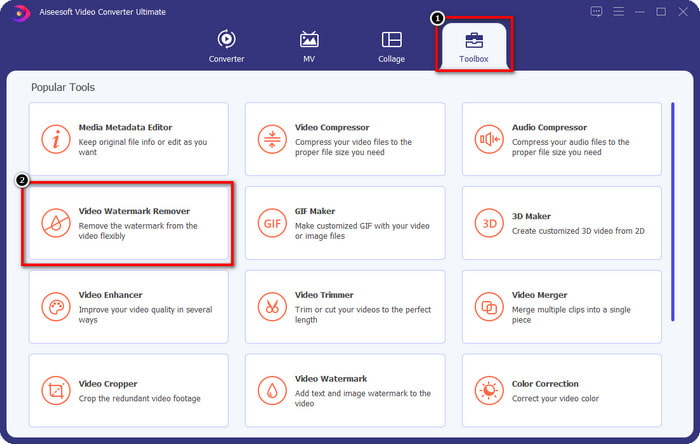
Langkah 2. Setelah meluncurkan perangkat lunak, buka Toolbox, lalu klik Video Watermark Remover yang ada di dalamnya.
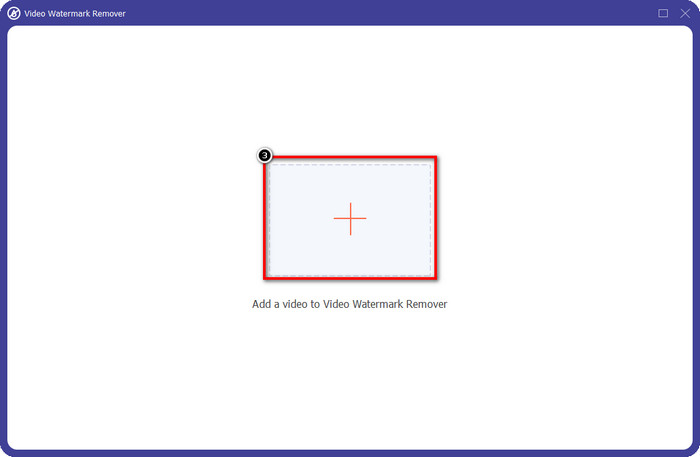
Langkah 3. Klik ikon + di layar Anda untuk mengunggah video Renderforest yang Anda ekspor dengan watermark.
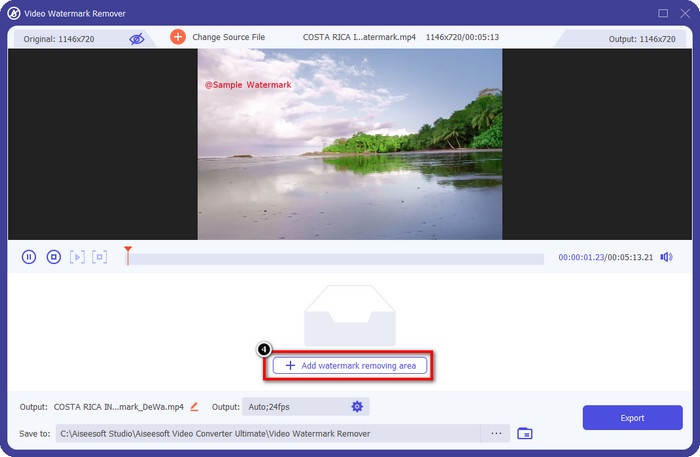
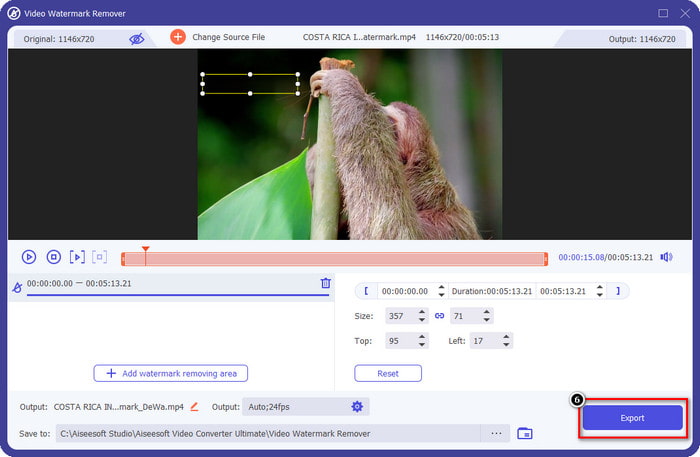
Langkah 4. Tekan Add Removing Watermark Area untuk mulai menghapus watermark Renderforest.
Langkah 5. Pada jendela baru di layar Anda, seret kotak seleksi dan sesuaikan hingga pas dengan watermark. Anda dapat menyesuaikan kotak seleksi secara bebas jika diperlukan.
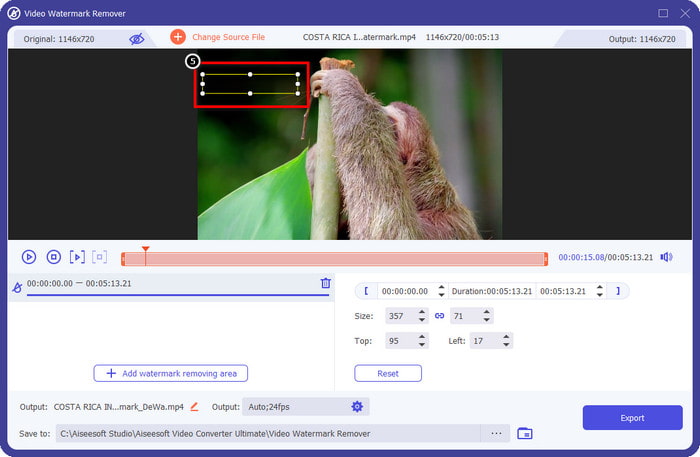
Langkah 6. Setelah kotak seleksi mendeteksi watermark di video Anda, klik Export untuk mulai menghapus dan menyimpan video tanpa watermark. Proses video akan berlangsung sangat cepat, dan setelah itu Anda dapat menggunakan video tanpa watermark yang mengganggu.
Terkait:
Hapus Logo Sekarang
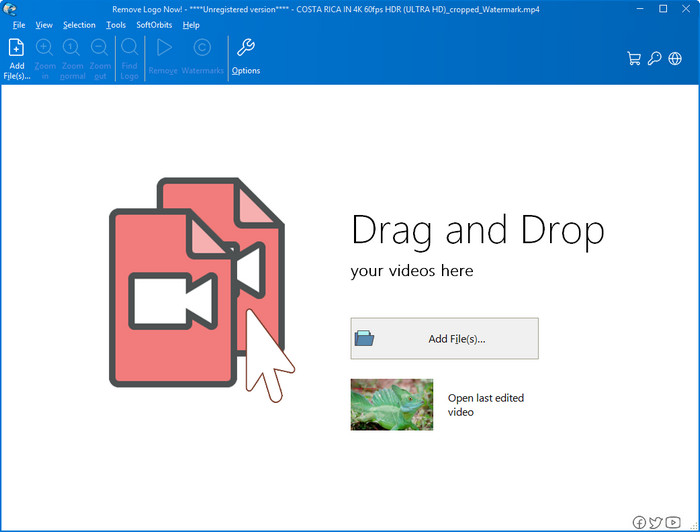
Berikutnya dalam daftar, Remove Logo Now membangun reputasi yang sangat baik dalam menghapus watermark yang menempel pada video di Windows. Dengan alat ini, Anda tidak memerlukan keahlian khusus untuk mengetahui cara menghapus watermark Renderforest di PC. Setelah watermark dihapus, jika Anda memperhatikan dengan saksama, akan ada sedikit jejak di area tempat watermark sebelumnya berada. Namun jika tidak dilihat secara mendetail, Anda tidak akan menyadari adanya watermark atau bekas pada video yang diekspor. Tutorial di bawah ini akan mengajarkan Anda cara menghapus watermark pada video di perangkat Windows Anda.
Langkah 1. Unduh dan instal Remove Logo Now di desktop Anda, lalu ikuti proses instalasinya.
Langkah 2. Luncurkan perangkat lunak, kemudian klik Add Files untuk mengunggah video ke sini. Anda juga dapat drag and drop video ke sini agar proses pengunggahan file lebih efisien.
Langkah 3. Pilih alat yang ingin Anda gunakan untuk menandai watermark. Setelah memilih salah satunya, sorot watermark dan klik Remove.
Langkah 4. Klik Start untuk memulai proses penghapusan watermark yang disediakan alat ini.
Penghilang Tanda Air Video Online

Tidak ingin mengunduh perangkat lunak di desktop tetapi tetap ingin tahu cara menghapus watermark Renderforest? Cobalah gunakan Video Watermark Remover Online. Anda dapat menggunakan penghapus watermark otomatis penuh ini untuk menghilangkan watermark pada video Anda secara gratis tanpa perlu mengunduhnya ke desktop. Sama seperti alat yang disebutkan sebelumnya, meskipun Anda pemula dalam pengeditan video atau penghapusan watermark, Anda dapat menguasai penggunaan alat ini dalam beberapa menit. Anda dapat mengikuti tutorial di bawah ini untuk mengetahui cara menggunakannya.
Langkah 1. Buka penghapus watermark online dengan mencarinya melalui peramban web favorit Anda.
Langkah 2. Klik ikon upload cloud di situs utama untuk memasukkan video yang Anda ekspor dari Renderforest.
Langkah 3. Tunggu proses pengunggahan karena watermark pada video Anda akan dihapus secara otomatis, lalu klik Download untuk mendapatkan video tanpa watermark.
Bagian 2. FAQ tentang Cara Menghapus Tanda Air Renderforst
Berapa biaya berlangganan Renderforest?
Renderforest mendukung tiga jenis harga yang dapat Anda manfaatkan; $ 14.99 untuk Lite, $24.99 untuk Pro, dan $29.99 untuk Bisnis setiap bulan. Penetapan harga ini memang memiliki tujuan yang berbeda satu sama lain; Anda dapat pergi ke situs web utamanya untuk melihat apa saja tamtama yang tersedia pada langganan yang ingin Anda manfaatkan.
Apakah mungkin untuk menghapus tanda air dari Video Renderforest tanpa alat?
Ya, Anda dapat menghapus tanda air di Renderforest Anda tanpa menggunakan alat, dan cara itu adalah dengan membeli biaya bulanan atau tahunan pada perangkat lunak. Sehingga ketika Anda mengekspor file video, tidak akan ada watermark yang ditambahkan ke dalamnya.
Yang merupakan rencana terbaik untuk Renderforest; Bulanan atau Tahunan?
Langganan bulanan adalah pilihan yang baik jika Anda ingin menggunakan alat ini beberapa kali, tetapi jika Anda memutuskan untuk menggunakan perangkat lunak untuk waktu yang lama, lebih baik menggunakan paket Tahunan karena biayanya lebih murah daripada pembaruan setiap bulan. Tetapi sebelum Anda berhasil, Anda dapat menggunakan Renderforest secara gratis dengan memasukkan akun Anda di sini, lalu coba gunakan template lain yang disediakan secara gratis.
Kesimpulan
Memang artikel ini memberikan bukti kuat untuk menghilangkan watermark Renderforest secara gratis menggunakan tiga penghilang watermark paling bermanfaat yang bisa Anda gunakan. Jika Anda adalah pengguna Windows dan ingin menghapus watermark di desktop Anda, Anda harus mencoba menggunakan Hapus Logo Sekarang. Tetapi jika Anda tidak suka mengunduh perangkat lunak, Anda harus mencoba menggunakan Video Watermark Remover Online karena Anda dapat menggunakan alat ini untuk menghilangkan tanda air secara efektif.
Tetapi jika Anda adalah pengguna Windows atau Mac yang menginginkan penghapus tanda air yang efektif, maka tanpa ragu, penghapus tanda air terbaik yang dapat Anda gunakan adalah FVC Video Converter Ultimate. Ini adalah penghapus tanda air terbaik yang dapat Anda gunakan untuk menghilangkan tanda air yang mengganggu video Renderforest Anda secara efisien dan profesional.
-
 2 Cara Menghapus Tanda Air VSDC di Windows & Mac Dengan Cepat
 Apakah Anda mencari cara untuk menghapus tanda air VSDC di video Anda? Dengan artikel ini, kami menyediakan alat yang dapat Anda gunakan untuk menghilangkan tanda air.
-
 Hapus Tanda Air Animoto pada Video dengan Mudah dan Efektif
 Bagaimana cara menghilangkan watermark Animoto pada video? Teruslah membaca artikel ini karena kami menyediakan tutorial lengkap tentang cara melakukannya.
-
 Cara Menghilangkan Watermark dari Video Menggunakan Final Cut Pro [Panduan Lengkap]
 Punya masalah dengan tanda air di video? Tidak perlu dikatakan lagi, karena kami menyediakan tutorial tentang cara menghapus tanda air dari video menggunakan Final Cut Pro.
