


 Video Converter Ultimate
 Perekam Layar
 Perbaikan Video
 Unduhan Aman
Cara Menghilangkan Tanda Air dari Grafik Asal Secara Efektif pada Grafik
Anda mungkin perlu menggunakan Origin Graph untuk membuat template data matematika atau ilmiah yang terlalu rumit untuk dijelaskan dengan kata-kata. Perangkat lunak ini sudah membantu pelajar, peneliti, profesor, pebisnis, dan orang lain yang perlu membuat grafik sendiri. Dengan kumpulan template yang bisa Anda pilih, Anda dapat membuat grafik yang menarik secara visual sehingga mampu menarik perhatian pemirsa. Masalah yang mungkin akan Anda temui jika menggunakan versi gratisnya adalah adanya watermark teks pada hasil akhir. Kesulitan menangani watermark tersebut? Tidak perlu khawatir! Karena kami siap membantu. Di sini, kami akan menyajikan tips bermanfaat tentang menghapus watermark dari Origin Graph dan kemudian menggunakannya di presentasi Word atau PowerPoint Anda.

Bagian 1. Cara Menghapus Tanda Air dari Grafik Asal dengan Penghilang Tanda Air Gambar Online
FVC Free Watermark Remover Online adalah penghapus watermark teks kelas atas yang bisa Anda gunakan untuk menghilangkan watermark Origin Graph. Alat ini sangat efisien dalam menghapus objek apa pun pada gambar Anda sehingga tampak lebih profesional setelah watermark dihapus. Dengan ini, kami dapat meyakinkan Anda bahwa ini adalah penghapus watermark khusus yang bisa Anda gunakan dan andalkan saat menghadapi masalah seperti ini. Bertanya-tanya apakah alat ini mudah digunakan? Tidak perlu khawatir! Karena langkah-langkah yang kami tambahkan di bawah ini adalah langkah-langkah yang bisa Anda ikuti untuk menghilangkan watermark teks pada gambar yang ditambahkan Origin Graph.
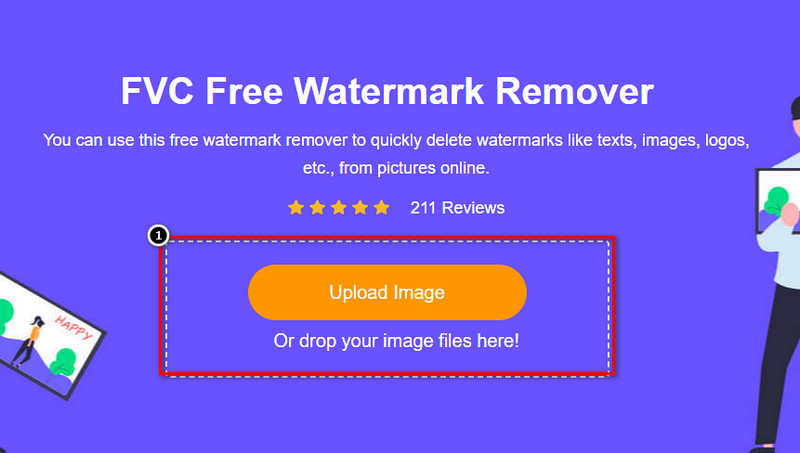
Langkah 1. Anda bisa klik tautan ini untuk membuka penghapus watermark gambar online; ini akan langsung membuka tab baru tempat Anda dapat mengakses alat tersebut.
Langkah 2. Tekan Upload Image untuk menambahkan foto yang memiliki watermark, cari file foto di folder, lalu klik Open untuk mengunggahnya dengan sukses.
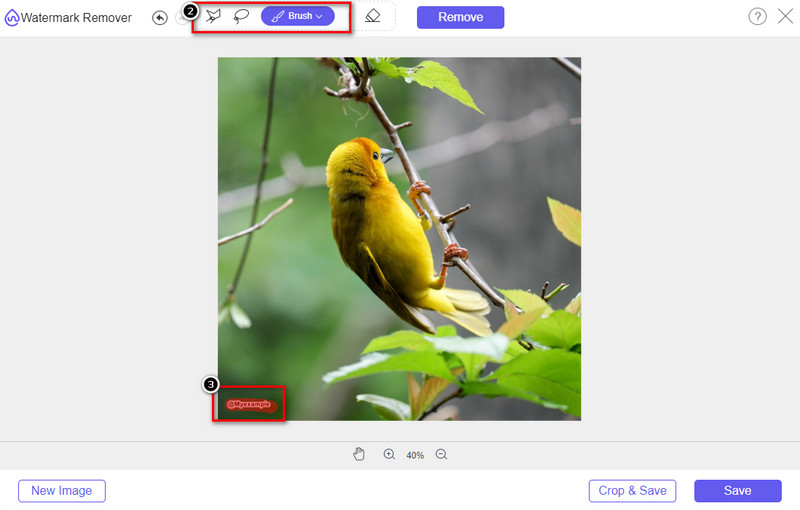
Langkah 3. Anda dapat menggunakan tiga alat untuk menyorot watermark; meskipun fungsinya berbeda, tingkat efektivitasnya sama. Pilih salah satu alat, lalu sorot area gambar yang memiliki watermark.
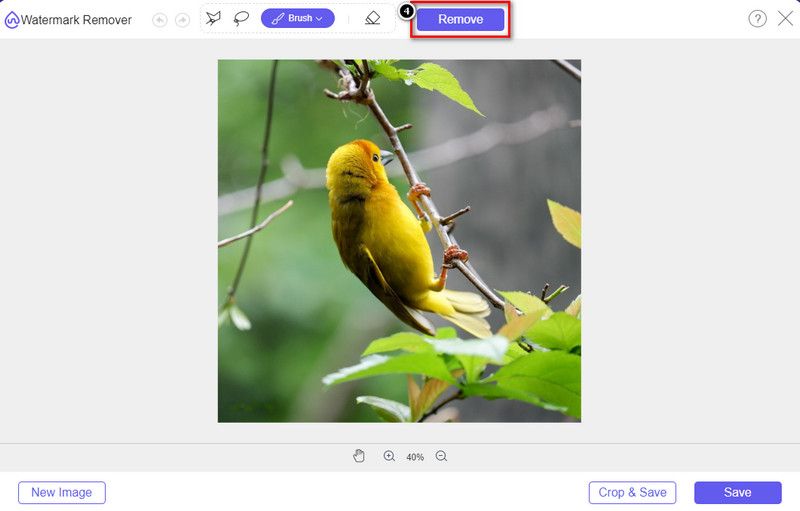
Langkah 4. Pastikan untuk mengklik ikon Remove setelah menyorot watermark dengan alat tersebut. Langkah ini penting agar saat Anda mengekspor gambar, hasilnya sudah tanpa watermark.
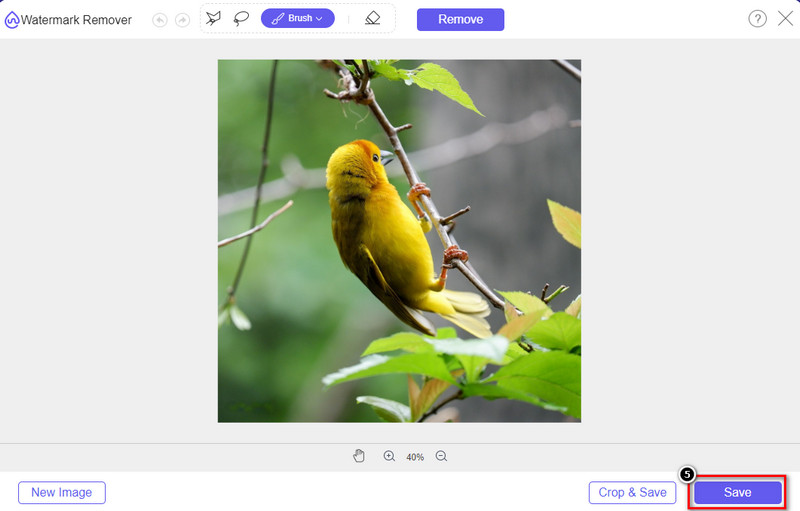
Langkah 5. Untuk memulai proses ekspor, sekarang Anda dapat mengklik tombol Save. Tunggu prosesnya, dan setelah itu Anda dapat melihat gambar tanpa watermark Origin Graph yang sebelumnya terlihat pada area tersebut.
Pro
- Penghapus tanda air gambar berbasis web gratis yang dapat Anda akses.
- Ini bekerja secara efisien untuk menghilangkan tanda air dengan dukungan AI-Technology.
- Ini mendukung berbagai format gambar yang mungkin Anda miliki di drive lokal Anda.
- Tidak ada tanda air yang ditambahkan pada gambar yang diekspor.
Kontra
- Perlu konektivitas internet untuk berfungsi.
- Fokusnya adalah menghilangkan tanda air dan tidak ada yang lain.
Bagian 2. Cara Menyalin Grafik dari Origin ke Word atau PowerPoint tanpa Watermark
Di bagian artikel ini, kami akan memberi Anda prosedur yang perlu Anda ketahui untuk menambahkan grafik yang Anda buat di Grafik Asal tanpa tanda air. Ikuti sesuai untuk menambahkan grafik yang berhasil Anda buat di Microsoft Word dan PowerPoint tanpa tanda air.
Anda harus mengosongkan setidaknya 1,9 GB karena ukuran filenya yang sangat besar. Dalam file 1.9GB, Anda dapat memperoleh bantuan yang Anda butuhkan, tetapi jika Anda tidak menginginkan bantuan, Anda dapat mengunduh versi 652 MB melalui .zip atau .exe.
Langkah-langkah Cara Membuat Grafik pada Grafik Asal tanpa Watermark:
Langkah 1. Pertama, unduh Origin Graph pada sistem operasi Anda dengan mengunjungi situs resminya. Buka alat tersebut untuk mulai membuat grafik yang Anda inginkan.
Langkah 2. Setelah meluncurkan perangkat lunak, tambahkan nilai pada tabel yang Anda perlukan. Di sini Anda dapat menambahkan lebih banyak variabel dan jumlah grafik yang sesuai.
Tambahan: Anda dapat mengklik Plot untuk melihat grafik lain yang bisa digunakan, seperti Basic 2D, Bar, Statistical, dan lainnya.
Langkah 3. Klik File, lalu tekan Save untuk mengekspor grafik yang sudah Anda buat.
Langkah 4. Anda dapat mengikuti langkah-langkah yang sudah kami tambahkan pada Bagian 1 dan mengikuti tutorial menghapus watermark dari Origin Graph dengan bantuan FVC Free Watermark Remover Online.
Cara Menggunakan Grafik di Word tanpa Watermark:
Langkah 1. Buka aplikasi Word di desktop Anda, lalu klik Blank Page. Jika Anda sudah membuat dokumen Word, maka buka file tersebut.
Langkah 2. Buka bagian Insert, lalu klik Pictures. Cari file grafik di drive lokal Anda, klik sekali, lalu tekan Open untuk mengunggahnya ke Word.
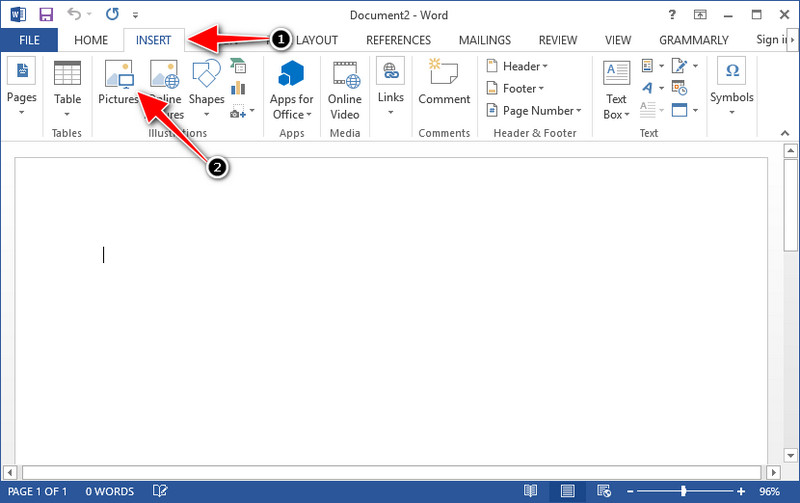
Langkah 3. Grafik akan dimuat secara otomatis di dokumen Word yang Anda buka atau buat; sekarang Anda dapat menempatkan grafik dengan menahan dan menyeretnya di dalam Word.
Cara Menggunakan Grafik pada Powerpoint tanpa Watermark:
Langkah 1. Jalankan PowerPoint di komputer Anda dan klik Blank Presentation. Anda juga dapat melihat presentasi terbaru yang sudah Anda buat di sisi kiri. Jika ada file yang perlu Anda tambahkan grafiknya, klik untuk membukanya.
Langkah 2. Tekan Insert dan klik Picture untuk menyisipkan gambar grafik yang Anda buat di Origin Graph.
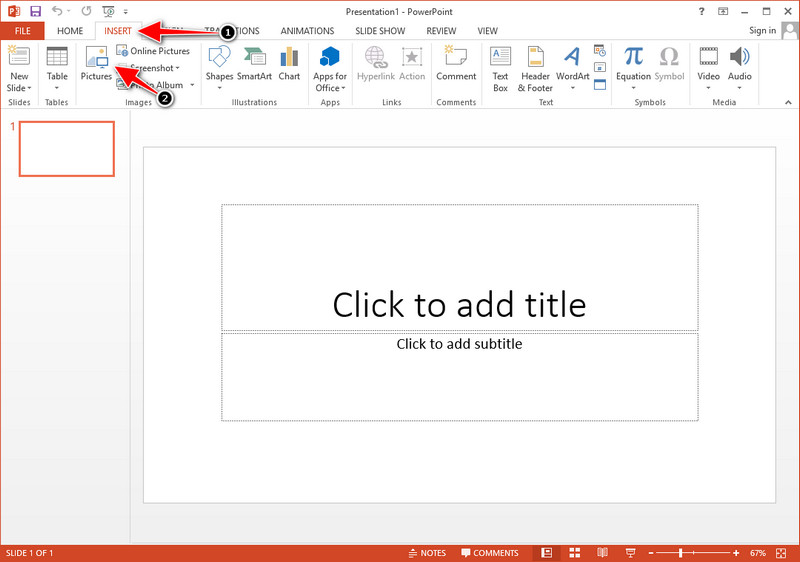
Langkah 3. Sesuaikan gambar grafik dan tempatkan pada slide.
Bacaan Lanjutan:
Cara Menghapus Watermark B612 dari Gambar Anda
Cara Menghapus Watermark WOW Slider Secara Gratis
Bagian 3. FAQ tentang Cara Menghapus Tanda Air dari Grafik Asal
Berapa harga Origin Pro?
Untuk pengguna individu, Anda bisa mendapatkan versi premium Grafik Asal untuk $435 mulai. Anda dapat mengunjungi toko resminya di Origin Lab.
Di mana saya dapat mengunduh Grafik Asal secara resmi?
Kunjungi Lab Asal untuk mengunduh Grafik Asal. Sebelum Anda dapat mengunduh perangkat lunak di desktop Anda, itu akan mengajukan pertanyaan. Setelah itu akan ada dua pilihan untuk mendownload file tersebut, apakah ingin mendownload dengan bantuan atau tidak, dalam bentuk .exe atau zip.
Apakah Excel dan Origin sama?
Excel dan Origin memiliki GUI seperti spreadsheet untuk mengatur data, menghitung, dan menentukan label. Namun, Excel fokus untuk memuat banyak kolom dan baris yang dapat Anda gunakan. Tapi dengan Origin, itu untuk mengatur atribut yang menggunakan rumus kolom daripada rumus sel seperti yang didukung Excel.
Kesimpulan
Sekarang setelah Anda mempelajari cara menghapus tanda air dari Grafik Asal, sekarang saatnya Anda menggunakan grafik yang telah Anda buat dan menyajikannya secara profesional. Jika tujuan Anda adalah menggunakannya di Word atau Powerpoint, Anda dapat membaca Bagian 2 untuk mempelajari cara melakukannya. Menghapus tanda air dengan alat ini sejauh ini merupakan hal yang paling diinginkan oleh siapa saja yang ingin menghilangkan tanda air pada gambar. Masalah diselesaikan dengan alat ini. Jika artikel ini membantu Anda, silakan tinggalkan 5 bintang di bawah.
-
 Cara Menghapus Tanda Air dengan Pixlr dalam Langkah Mendetail [Efektif]
 Ingin tahu cara menghilangkan tanda air dengan Pixlr? Jika demikian, lanjutkan membaca di bawah ini untuk mengetahui cara melakukannya dan alternatif yang dapat Anda gunakan.
-
 Hapus Tanda Air Animotica pada Video yang Diekspor dengan 3 Cara Terbukti
 Pernahkah Anda bertanya-tanya apakah mungkin untuk menghapus tanda air Animotica pada video yang Anda ekspor? Artikel ini menyediakan cara melakukannya.
-
 Cara Gratis Menghapus Tanda Air VideoShop di Video [Dengan Mudah]
 Untuk menghapus tanda air VideoShop, perangkat Anda memerlukan penghapus tanda air. Untuk mengetahui apa itu, baca artikel ini.
