


 Video Converter Ultimate
 Perekam Layar
 Perbaikan Video
 Unduhan Aman
Cara Menghapus Tanda Air WeVideo pada Video yang Diedit seperti Pro
Tidak ingin mengunduh atau memanfaatkan editor video bulanan apa pun di desktop Anda karena Anda tidak memiliki cukup anggaran untuk itu? WeVideo adalah alat yang harus dicoba jika Anda menginginkan editor video gratis yang tidak akan menghabiskan uang. Alat web ini memungkinkan Anda membuat output video yang luar biasa dalam jangkauan Anda dan dengan cara yang lebih indah dengan melakukan beberapa langkah sederhana. Karena popularitasnya, alat ini telah menjadi salah satu editor video yang paling banyak dikunjungi yang dapat Anda akses di web.
From this day forward, the chances of users visiting the website for its video editor will go more. But users have some queries about this video editor online, and more often, users ask does WeVideo have a watermark applied on the video edited? To answer the question, you must read the whole article to find out if it does leave a watermark on the video you edited here.

Bagian 1. Apakah WeVideo memiliki Tanda Air?
Ya, itu menambahkan tanda air WeVideo setelah Anda mengekspor video yang Anda edit di sini. Ada berbagai metode untuk menghapus tanda air WeVideo, tetapi tidak semua penghilang tanda air yang Anda lihat di pasaran seefektif penghilang tanda air lainnya. Alih-alih mencoba semua alat untuk melihat mana yang cocok untuk Anda, hal terbaik dipertimbangkan di sini, karena kami memberi Anda penghapus tanda air pilihan kami yang memberikan hasil terbaik dalam menghilangkan tanda air. Meskipun Anda seorang profesional atau tidak, Anda dapat menggunakan penghapus tanda air ini untuk menghilangkan tanda air di video Anda dengan mudah.
Bagian 2. Bagaimana Menyingkirkan Tanda Air WeVideo
FVC Video Converter Ultimate
FVC Video Converter Ultimate provides the best video output for starters and professionals. With its power to remove the watermark on the video, it became popular with many users, and it became their first choice for removing the watermark in their video. It is compatible with Windows and macOS, so it supports multiple platforms from the oldest up to the latest version. Even though the tool is not free to use, you will still achieve the best output once you use this software on your end, for the users who want to use this and those who have already tried it but want to know how to get rid of WeVideo watermark. The step-by-step below will lead you on a path to where you can remove the watermark that is in your video effectively.
Step 1. You can download this software by clicking the download button presented below, choosing which operating system you are currently using, and ensuring to click the right button. After that, install the software promptly, follow the guide on setting it up, then open it.
Unduh GratisUntuk Windows 7 atau yang lebih baruUnduhan Aman
Unduh GratisUntuk MacOS 10.7 atau yang lebih baruUnduhan Aman
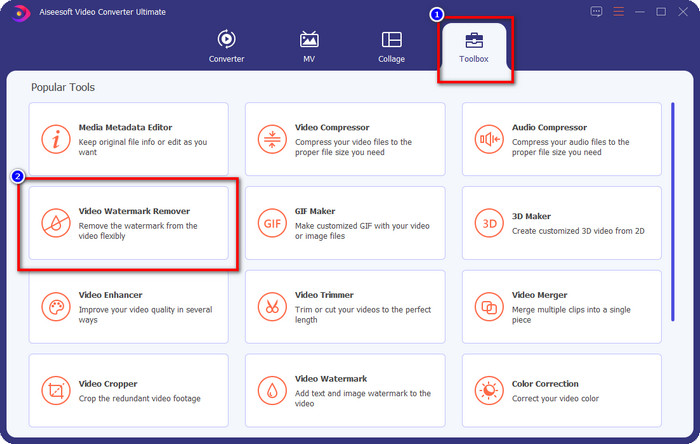
Step 2. On the Toolbox, locate the Video Watermark Remover this tool has, and click it to proceed.
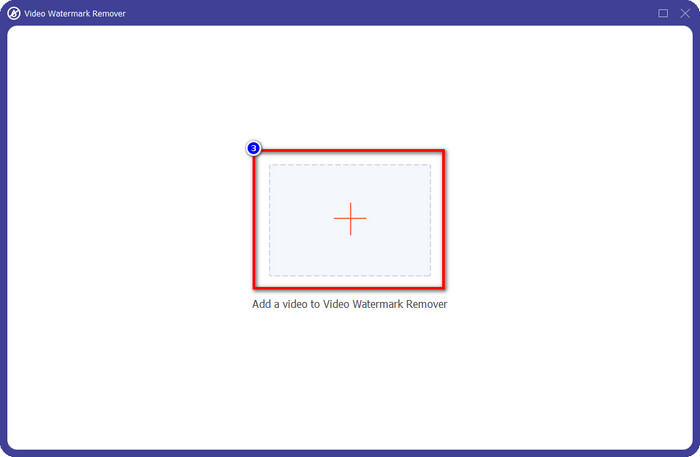
Step 3. By clicking the + icon, you upload the video containing a watermark. Search it over the folder that will show on your screen, click the file once, then press Open to upload it.
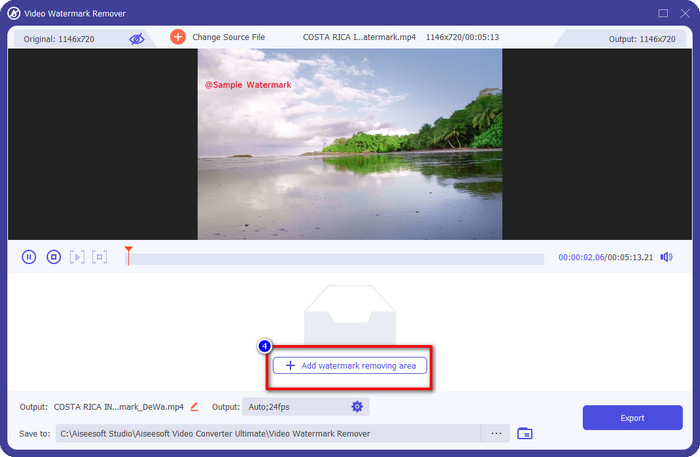
Step 4. After uploading the video with a watermark, press Add Watermark Removing Area and wait for the short loading process.
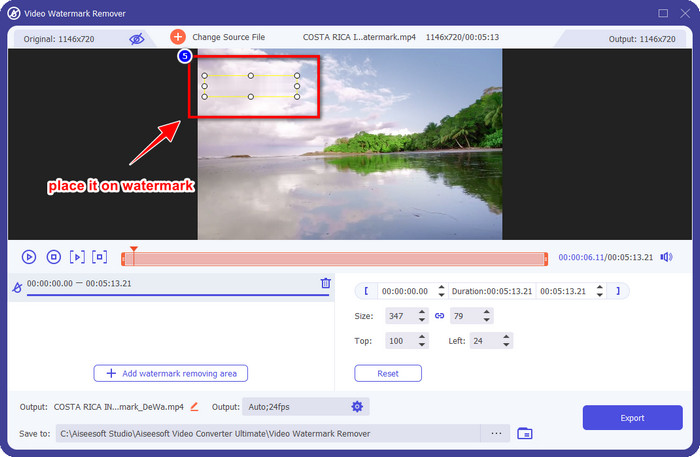
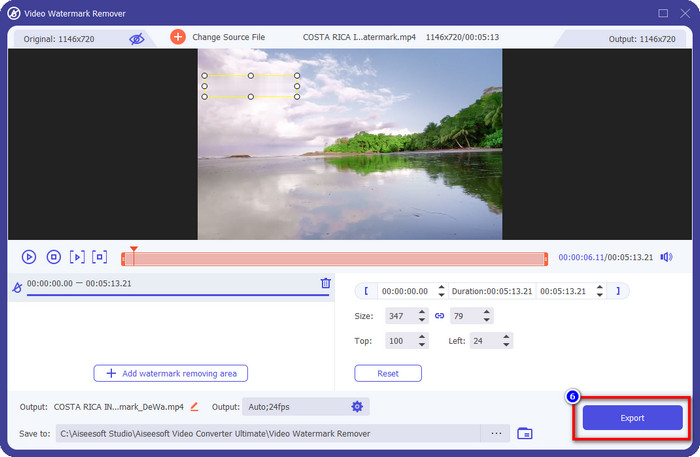
Step 5. Place the selection box to the WeVideo watermark and cover it all up so that when you export the video, you wouldn't see any traces of the watermark at the end of the video.
Step 6. You can save the video now; you remove the watermark here by clicking the Export button. The saving process wouldn't take much time because it supports ultra-fast processes and hardware acceleration.
iMyFone Mark Go
iMyFone Mark Go is another watermark remover you can download on your Windows and Mac to help you how to remove the WeVideo watermark. This tool effectively removes the watermark in your video, like what the ultimate tool can give you. Like any other offline software you can download on your desktop, you will need to avail the tool to remove the watermark and make good use of the premium version to remove the watermark on your video. Though it would cost you, it is not that expensive compared to other watermark removers you can download. So, if you want to remove the watermark on your video easily and effectively, you can follow the indicated steps below as we teach you how to do it step by step.
Step 1. Download the software on your desktop by going to its official website.
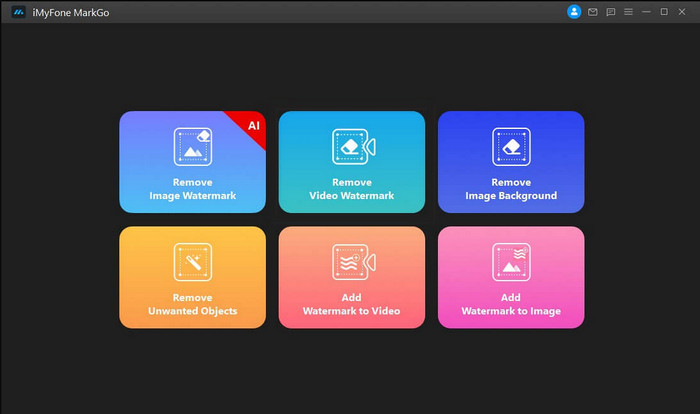
Step 2. After you've launched the software, click the Remove Video Watermark.
Step 3. Add the video file by clicking the Add the Video. Choose the video file that has a watermark.
Step 4. Move the rectangular shape that will show and place it to the watermark to cover it up. Even though there are three other options for removing the watermark, you can't access them because these options are for premium users.
Step 5. Click the Export button to save the video you removed the watermark on it.
Pemotong Video Online – Hapus Logo Dari Video
How to remove the WeVideo watermark for free? Use the Online Video Cutter – Remove Logo From Video. This software is a free web tool that you can use to remove the watermark in your video on the web without downloading any or paying any. This tool is effective as the other watermark remover on the market if we are about to compare, but not as good as the ultimate software. It can cover up the watermark in your video to make the video visual better. However, if you don't have an internet connection, this tool wouldn't be the best choice for removing the watermark in your video. But if you do have, then you can follow the steps below to start using this tool to remove the watermark on your video.
Step 1. Open a new tab and search the tool's name to start removing the watermark from the video.
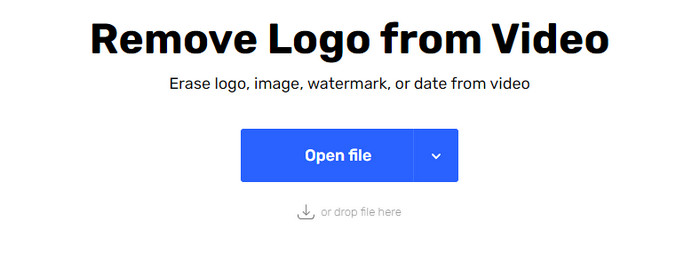
Step 2. Click Open File to upload the WeVideo video here and for it to generate the preview of the video you uploaded.
Step 3. Click on the watermark to apply the removing area this tool has. Once you click any part of the video, there will be a selection box.
Step 4. Press Save to have the video without the watermark on it.
Terkait:
How to Remove Movavi Watermark
How to Remove the Weibo Watermark
Bagian 3. FAQ tentang Menghapus Tanda Air WeVideo
Alat mana yang terbaik untuk menghapus Tanda Air WeVideo?
Tanpa ragu lagi, ini adalah FVC Video Converter Ultimate; alat ini memberikan hasil terbaik dalam menghilangkan tanda air di video Anda. Di antara penghapus watermark yang dipilih, tidak dapat disangkal bahwa alat pamungkas lebih unggul dari penghapus tanda air lainnya.
Bisakah saya memotong tanda air WeVideo?
Ya, Anda dapat memangkas tanda air yang ditinggalkan WeVideo di video Anda. Namun dimensi video akan berkurang, dan ada kemungkinan kualitasnya akan berkurang karena Anda memotong rasio aspek.
Apa yang menjadikan WeVideo sebagai editor video terbaik di web?
Dengan fitur pengeditan video fundamental yang lengkap, Anda dapat membiasakan diri, dan betapa mudahnya menggunakan alat ini. Ini adalah pengetahuan paling umum tentang apa yang menjadikan WeVideo salah satu editor video terbaik yang dapat Anda gunakan di web. Tetapi tidak sebagus editor video lainnya Adobe Premiere Pro, Final Cut Pro, dll.
Kesimpulan
Akhirnya, dengan metode yang kami berikan di atas, Anda sekarang memiliki ide tentang cara menghilangkan tanda air WeVideo. Tapi apa pendapat Anda tentang alat yang kami daftarkan? Jika Anda masih tidak tahu apa yang harus digunakan, Anda harus menguji FVC Video Converter Ultimate menurut pendapat kami. Ini memberikan yang terbaik dari yang terbaik dalam menghilangkan tanda air dan juga mudah digunakan. Jadi, apa yang Anda tunggu? Klik tombol unduh untuk mendapatkan penghapus tanda air dan segera gunakan.
-
 Penghilang Tanda Air 123rf – Tinjauan Menyeluruh dari Alat Utama
 Jika Anda ingin tahu apa itu penghilang tanda air 123rf yang paling luar biasa, baca artikel ini secara menyeluruh. Artikel ini memberikan tinjauan mendalam tentang alat-alat tersebut.
-
 Cara Menghapus Tanda Air DeviantArt di Windows dan Mac
 Ingin mempelajari cara menghapus tanda air DeviantArt pada gambar Anda? Dengan menggunakan penghapus tanda air DeviantArt yang paling luar biasa, Anda dapat dengan mudah menghapus tanda air yang mengganggu itu.
-
 Perangkat Lunak Terbaik untuk Menghapus Tanda Air Video Helper pada Video yang Diekspor [2022]
 Apakah Anda ingin tahu cara menghilangkan tanda air pada video yang Anda unduh di Video Helper? Jika demikian baca artikel ini untuk mengetahuinya.
