


 Video Converter Ultimate
 Screen Recorder
 Riparazione video
In recensioni dettagliate sulle 5 migliori app per amplificatori audio accessibili
Tutte le persone nell’intero universo amano la musica, che sia pop, metal, rock, jazz e così via. Tuttavia, non tutti gli altoparlanti offrono un’ottima resa sonora tale da farci venire i brividi sulla pelle. Inoltre, l’acquisto di amplificatori può costare più di cento dollari o, peggio ancora, superare i mille. Non è costoso, vero? Ma possiamo evitare di spendere così tanto denaro se proviamo a usare questi migliori amplificatori disponibili su tutte le piattaforme. E ora, se vuoi usare un sound amplifier app, prova a leggere l’elenco qui sotto: costano meno delle cifre appena menzionate e offrono comunque un’ottima amplificazione.

Parte 1. Amplificatore audio fenomenale disponibile su PC e Mac
Se vuoi ottenere un effetto 8D o 16D senza spendere molto in apparecchiature di amplificazione audio, prova a usare Video Converter Ultimate. A differenza dei tradizionali amplificatori, con questo strumento spenderai meno e non dovrai effettuare alcuna installazione complessa o leggere lunghi manuali per capire come usarlo. Inoltre, questo software desktop è eccellente nel migliorare video, audio, GIF e altro ancora. Anche se lo strumento è a pagamento, è comunque molto comodo da usare, senza complicazioni, e offre funzioni avanzate che puoi applicare facilmente ai tuoi video e ai tuoi file audio. Quindi, se vuoi sapere come utilizzare il software, è fondamentale seguire i passaggi riportati di seguito.
Passaggi per usare il Volume Booster di Video Converter Ultimate:
Passo 1. Prima di tutto, scarica il software sul disco del tuo PC o Mac. Poi installalo sul computer ed effettua la semplice configurazione manuale.
Download gratuitoPer Windows 7 o versioni successiveDownload sicuro
Download gratuitoPer MacOS 10.7 o versioni successiveDownload sicuro
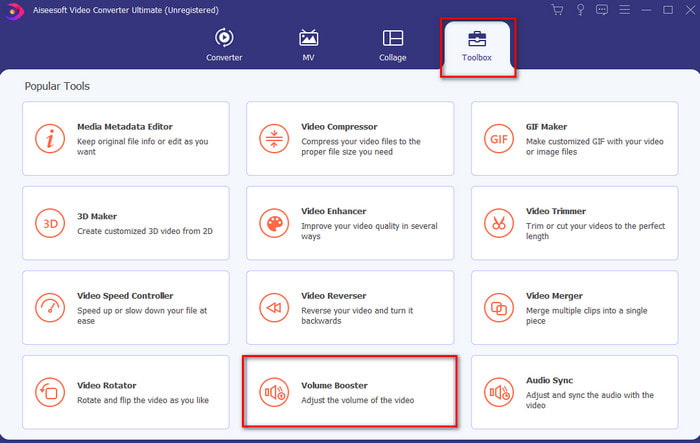
Passo 2. Nella sezione Toolbox fai clic su Volume Booster.
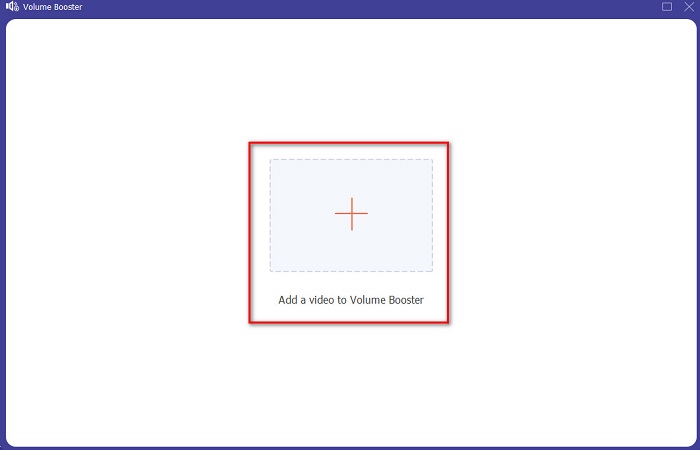
Passo 3. Fai clic sul pulsante + per scegliere il file di cui vuoi amplificare il suono. Quindi premi Open per procedere.
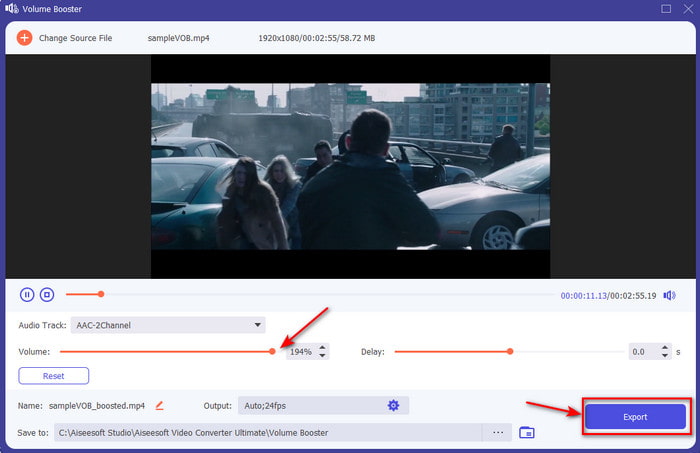
Passo 4. Nell’interfaccia puoi ora trascinare il cursore del volume per rendere il suono più alto e chiaro. Quando hai terminato la regolazione dell’audio, fai clic su Export.
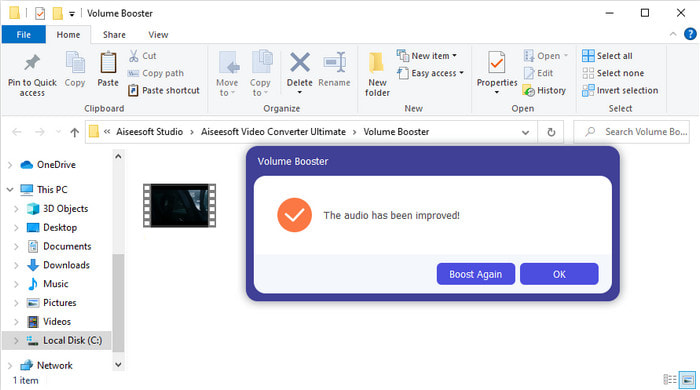
Passo 5. Attendi alcuni secondi che il processo si completi e, una volta terminato, sullo schermo apparirà un file manager con il file che hai amplificato: fai clic sul file per ascoltarlo.
Professionisti
- Questo software è facile da usare e può rendere il tuo audio fenomenale.
- Le prestazioni del software sono molto apprezzate dai suoi clienti.
- È disponibile e facilmente scaricabile su PC e Mac.
Contro
- Questo software non supporta i dispositivi mobili.
- Questo strumento è a pagamento ma non è così costoso rispetto agli altri strumenti desktop.
Correlato:
Come aumentare il volume dei video MP4
Come correggere il ritardo audio in VLC
Parte 2. 4 della migliore app per l'amplificatore del suono disponibile su telefoni cellulari iOS e Android
1. Aumento del volume – Amplificatore audio 4+ (iOS)
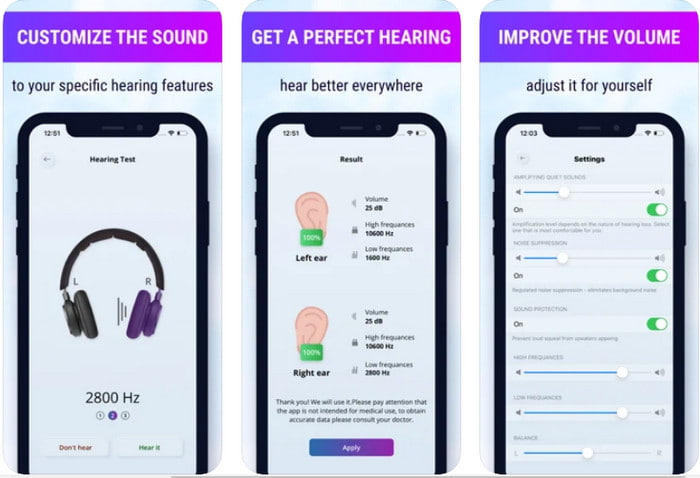
Gli utenti iOS possono scaricare facilmente e gratuitamente Volume Boost- Sound Amplifier 4+. Quest’app può amplificare il suono senza alcuna difficoltà grazie alla regolazione automatica, ma puoi anche intervenire manualmente. Inoltre, l’app è ottima da usare come amplificatore, tuttavia non funziona con altoparlanti Bluetooth né con auricolari o AirPods. Dovrai anche fare i conti con numerosi arresti improvvisi dell’app e con pubblicità inevitabili quando la apri. Sebbene l’app sia scaricabile gratuitamente, sono previsti acquisti in-app per rimuovere gli annunci e sbloccare altre funzioni.
Professionisti
- Scaricabile gratuitamente su qualsiasi dispositivo iOS.
- Amplifica facilmente l'audio del tuo altoparlante fino a 30 dB.
- Interfaccia e configurazione intuitive.
Contro
- Su questa app sono ancora presenti molti arresti anomali, blocchi e bug.
- Gli annunci sono molti da evitare.
2. Amplificatore di volume extra: altoparlante ad alto volume (Android)
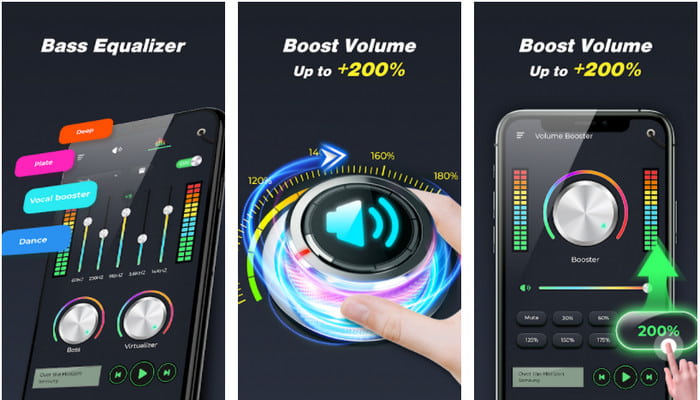
Se gli utenti iOS dispongono di un’app di amplificazione del suono, anche gli utenti Android dovrebbero avere qualcosa di simile, come Extra Volume Booster. Inoltre, molti utenti sono già soddisfatti delle prestazioni di questa app, perché è molto efficace nell’amplificare e potenziare l’audio. Tuttavia, quando apri questa app, tutti i suoni generati dal telefono, come suonerie delle chiamate, sveglie, notifiche e altro, verranno amplificati. Ciò significa che non esistono impostazioni separate per questi elementi. Anche se lo strumento è gratuito, è comunque in qualche modo migliore rispetto ad altre app a pagamento su Android o persino su iOS. Ma se porti il volume al 200%, aspettati possibili danni ai tuoi altoparlanti integrati o Bluetooth che non sono in grado di gestire un volume audio di 200%.
Professionisti
- Versione semplificata dell'amplificatore che puoi scaricare su dispositivi Android.
- Sebbene l'interfaccia dell'app non sia molto, è fantastica.
- In questa app sono disponibili amplificazioni e potenziamenti diversi.
Contro
- Aspettati di incontrare innumerevoli annunci durante l'utilizzo dell'app.
- Durante l'utilizzo dello strumento c'è la possibilità che la CPU o il telefono si surriscaldino.
3. Potenziamento altoparlanti: amplificatore di volume e amplificatore audio 3D (Android)
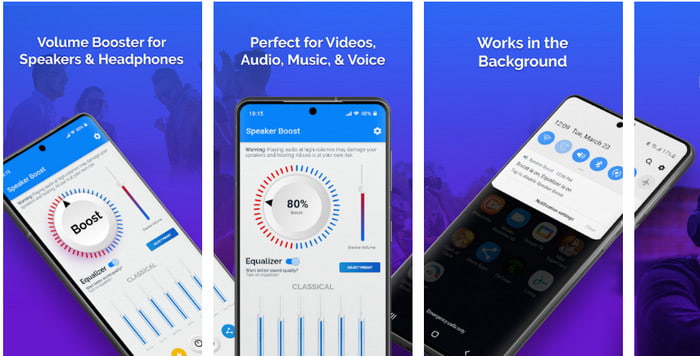
Un’altra app Android che puoi usare e che offre un ottimo effetto di surround come amplificatore è Speaker Boost. Proprio come Extra Volume Booster, questa app è molto precisa e più semplice da usare anche se non hai alcuna esperienza. Inoltre, puoi scaricare questo strumento gratuitamente, ma sono disponibili acquisti in-app che potresti desiderare, ad esempio per rimuovere le fastidiose pubblicità e altro ancora. Sebbene lo strumento sembri valido, l’acquisto delle funzioni interne dell’app può risultare piuttosto costoso rispetto ad altri software in questo elenco. Un’altra preoccupazione che disturba molti utenti è che l’app funziona anche in presenza di ad‑blocker e c’è il rischio che possa comportarsi come uno spyware.
Professionisti
- Sul punto per aumentare facilmente il suono e tuttavia è potente da usare.
- Scarica lo strumento gratuitamente senza il problema di amplificare i suoni.
- Eseguire l'override manuale sull'equalizzatore.
Contro
- Questo strumento è incompleto, il che significa sostanzialmente che è in fase sperimentale.
- Quando aumenti il suono, sentirai alcune distorsioni.
4. Boom: amplificatore di bassi ed equalizzatore 4+ (iOS)
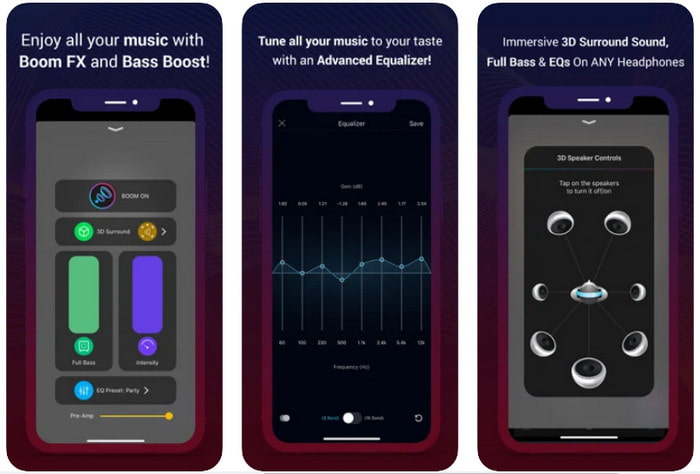
Se stai cercando un’app di amplificazione audio avanzata, allora Boom: Bass Booster è un’ottima scelta. Tuttavia, questa app è disponibile solo per dispositivi iOS e non la troverai su Android. Finora questo strumento ha già ricevuto molti elogi dagli utenti, ma alcuni formati non sono supportati per l’amplificazione. Inoltre, quando utilizzi l’app, aspettati qualche bug e crash durante l’uso. Inoltre, l’app può risultare fuorviante per i nuovi utenti. Sebbene le prestazioni dell’app siano tutto sommato discrete, necessita ancora di miglioramenti per diventare davvero valida.
Professionisti
- Alcune delle funzionalità avanzate sono disponibili qui.
- Amplificatori portatili che puoi usare facilmente.
- L'app riceve 4,1 stelle su 5.
Contro
- Non è la scelta migliore per i principianti a causa della struttura dell'interfaccia confusa.
- La maggior parte dei formati audio non sono supportati per essere amplificati con questa app.
- Problemi di bug e ritardi continuano a verificarsi con l'app.
Parte 3. Domande frequenti sugli amplificatori del suono
Cos'è db?
Db significa decibel e questa è l'unità di misura per esprimere il volume o la potenza dell'onda sonora. Inoltre, con l'aiuto dei decibel possiamo facilmente determinare quale suono possiamo sentire al sicuro a lungo. E tutti gli 85 decibel sottostanti sono molto sicuri da ascoltare.
Quali sono gli svantaggi del suono forte?
È molto comune per noi che quando siamo esposti a suoni forti, l'udito può essere danneggiato. Ma lo sapevi che questo può provocare nausea, mal di testa, stress, affaticamento e altro ancora. Quindi, se stai per usare un amplificatore, usalo correttamente e non esagerare per evitare gli inevitabili effetti dannosi.
Perché sento delle crepe sui miei altoparlanti?
Questo problema è molto comune per gli altoparlanti con un hertz molto limitato in grado di gestire. Quindi, se aumenti l'audio, assicurati che l'altoparlante sia in grado di gestirlo. E se senti dei crepitii, devi abbassare immediatamente il suono. Tuttavia, se senti delle crepe anche se abbassi il suono, allora è troppo tardi.
Conclusione
Tutte le app e i software presentati qui sono ottimi da usare come amplificatori. Anche se i programmi citati sopra presentano alcune differenze, le loro funzioni sono simili. Tuttavia, se stai cercando il miglior amplificatore audio per PC e Mac, allora Video Converter Ultimate è probabilmente la scelta giusta. Questo perché offre straordinarie funzioni avanzate che puoi usare con facilità. Quindi, se ti stai chiedendo se sia davvero la soluzione migliore, scaricalo prima sul disco del tuo computer e segui i passaggi indicati sopra.
Download gratuitoPer Windows 7 o versioni successiveDownload sicuro
Download gratuitoPer MacOS 10.7 o versioni successiveDownload sicuro
-
 [Facile] Come risolvere audio e video non sincronizzati
 Supponiamo che tu'pianifichi il tuo streaming per domani, ma quando controlli la tua configurazione, l'audio e il video non sono sincronizzati. Leggi questo articolo per saperne di più su questa preoccupazione.
-
 7 semplici passaggi su come risolvere i problemi di ritardo audio di OBS [Risolto]
 Fai fatica a guardare il tuo video clip dopo la registrazione a causa del ritardo audio quando usi OBS Studio? Leggi l'articolo di seguito per sapere come correggere efficacemente l'audio non sincronizzato.
-
 Come aggiungere gratuitamente audio e musica al video sul tuo computer / telefono
 Questo articolo mostra 4 semplici modi per aggiungere gratuitamente l'audio al video. Indipendentemente dalla traccia audio che desideri aggiungere al tuo video, puoi ottenere risultati soddisfacenti qui.
