


 Video Converter Ultimate
 Screen Recorder
 Riparazione video
Convertitore fenomenale da Mini DV a AVI disponibile su Windows e Mac OS
DV files primary purpose is to contain digital video from video cameras or camcorders under the maker Panasonic and Sony in late 1995. This codec and tape format became famous for its transition from analog to digital production. But nowadays, you can't play the DV file on your default media player or even share it online. And now, if you want to play this file, you must consider converting the file into a most supported and playable format like the AVI. Moreover, the details below will help you understand DV, convert DV files to AVI, and play it to a media player if you don't want to convert.

Parte 1. Battaglia dei Formati: DV VS AVI
Il file DV e AVI sono quasi simili in quanto questi due formati possono contenere video e audio. Tuttavia, il loro scopo e il modo in cui archiviano il file multimediale sono lontani l'uno dall'altro. In tal caso, determiniamo quali sono le differenze tra DV e AVI confrontando le loro 3 abilità uniche.
Compatibility of the Format
AVI gains more support and is one of the most compatible formats to play and edit a video. This format can contain a video playback in a synchronized format. In contrast, DV file is unsupported by numerous video editors and media players on PC and Mac. Because of that, this is one of the reasons you need a mini DV to AVI converter.
Compression Supported
AVI è un formato di file senza perdita di dati per l'archiviazione robusta e avanzata di file multimediali. Tuttavia, questo formato consumerà gran parte della memoria del tuo disco rigido perché non è compresso. Mentre DV utilizza una compressione con perdita di dati per il suo video, ma il file audio non è compresso. Il motivo per cui il formato è con perdita è perché utilizza il DCT come base per fotogramma per fotogramma utilizzato per comprimere il video.
Audio Fidelity
Il file DV di fedeltà audio supporta una qualità audio compresa tra la media e la migliore perché utilizza un audio PCM di campionamento fino a 48 kHz con una lunghezza di 20 bit di una parola. AVI utilizza un PCM non compresso e la qualità dell'audio è eccellente. Tuttavia, può essere meglio se usi DV come codificatore per ottenere DV-AVI che si comprime.
Ora che abbiamo capito quali sono questi formati, ora è il momento giusto per convertire DV in AVI su Mac o PC leggendo il tutorial fornito di seguito.
Parte 2. Il miglior strumento di conversione fenomenale per convertire DV in AVI su Mac e Windows
FVC Video Converter Ultimate
Do you have trouble choosing a converter that produces a phenomenal output? If that is the case, we would like you to use the FVC Video Converter Ultimate. This software became one of the most popular choices of the users who do convert format often. Also, the name ultimate is not just by name, but it is also in its performance provided. Moreover, generally speaking, this format is all-out for everyone who needs a helping hand on their conversion problem. Before we proceed to the steps, let's first determine the advantages you will get if you download this software.

Video Converter Ultimate
30000+ download- Converti il tuo file video DV in oltre 200 formati disponibili.
- Supporta tutti i sistemi operativi come PC e Mac.
- La sua cassetta degli attrezzi include funzionalità avanzate come la creazione di GIF, la modifica di video, l'unione e altro ancora.
- Interfaccia intuitiva per tutti.
- Supporta una conversione 30 volte più veloce rispetto agli altri convertitori online o offline.
Download gratuitoPer Windows 7 o versioni successiveDownload sicuro
Download gratuitoPer MacOS 10.7 o versioni successiveDownload sicuro
Quindi, senza ulteriori indugi, procediamo al tutorial qui sotto e convertiamo DV in AVI senza perdere la qualità del video.
Steps on How to Convert DV to AVI with the FVC Video Converter Ultimate:
Step 1. Press the Download button that is below, choose the OS you are currently using. Install the software to your drive and click Start Now to proceed to the next step.
Download gratuitoPer Windows 7 o versioni successiveDownload sicuro
Download gratuitoPer MacOS 10.7 o versioni successiveDownload sicuro
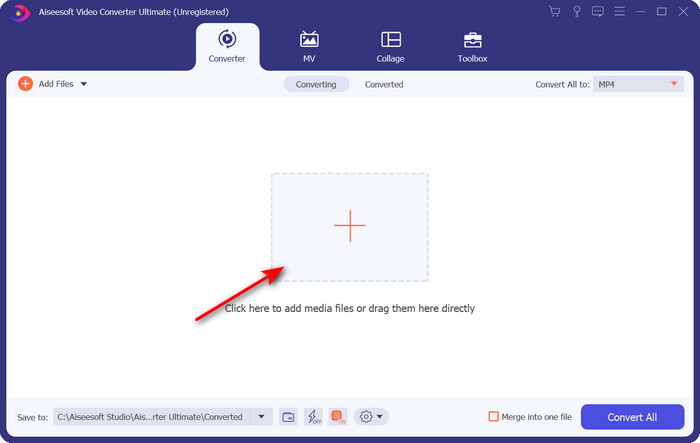
Step 2. Open the software and click the + button located in the middle of the interface of the tool. A folder will show, and to upload the .dv file, click Open.
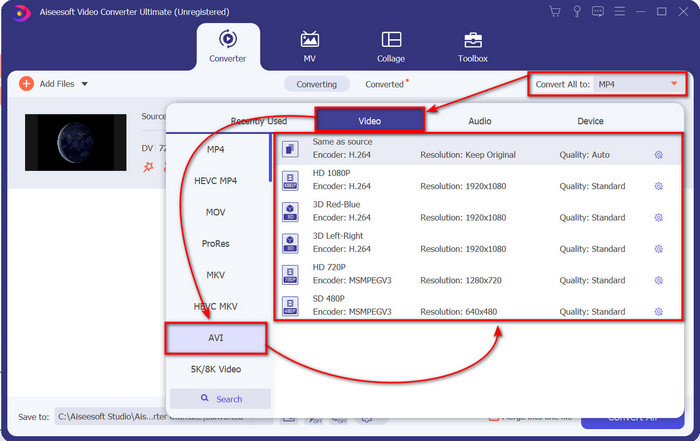
Step 3. To change the .dv file into a .avi, click the drop-down button and search the AVI format.
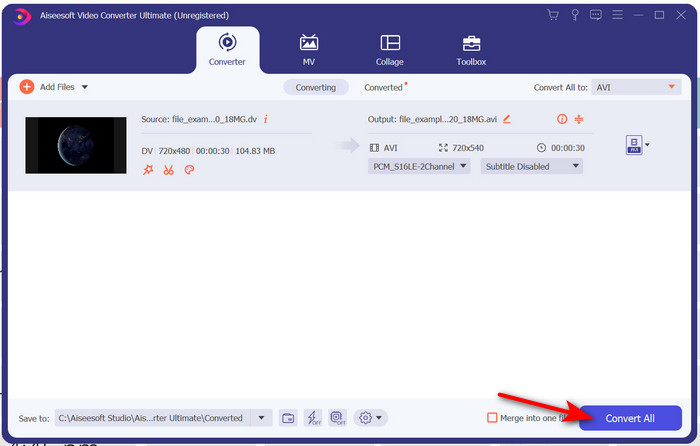
Step 4. Once you choose the format, it is now the right time to turn your DV to AVI by clicking Convert All.
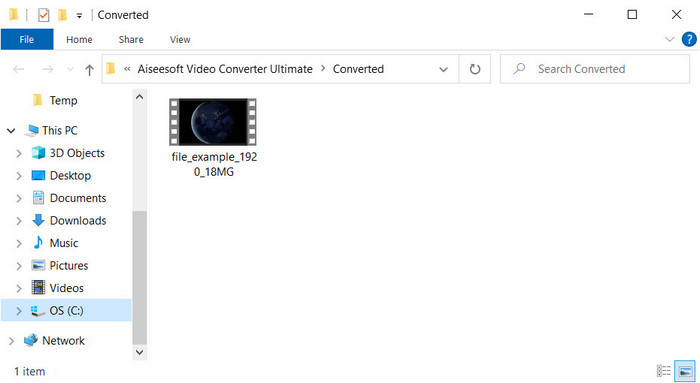
Step 5. Converting a file will take you less than a minute, so waiting is not necessary. Another folder will show with the converted files.
Parte 3: Riproduci i tuoi file DV con il lettore video DV disponibile su PC e Mac
Lettore Blu-ray
Don't want to convert mini DV to AVI, then try to use this media player that supports this type of format, the Blu-ray Player. This media player supports 300+ formats and codecs as well to play the video on your desktop without any hassle. Also, this media player has the most advanced features a media player should provide to make your watching experience better. You can also use a CD, DVD, or Blu-ray disk to play the video on your computer; basically, everyone uses a portable media player. So now, if you don't want to get into trouble with converting the .dv file, follow these steps to play the video.
Steps on How to Play the DV File with the Help of Blu-ray Player:
Step 1. To download this media player, click the button below, then install the player and launch it.
Download gratuitoPer Windows 7 o versioni successiveDownload sicuro
Download gratuitoPer macOS 10.7 o versioni successiveDownload sicuro
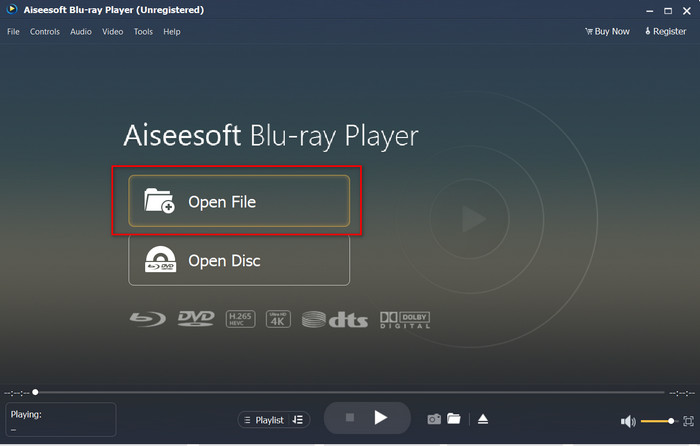
Step 2. Click Open File, then locate the .dv file on your folder and press Open.
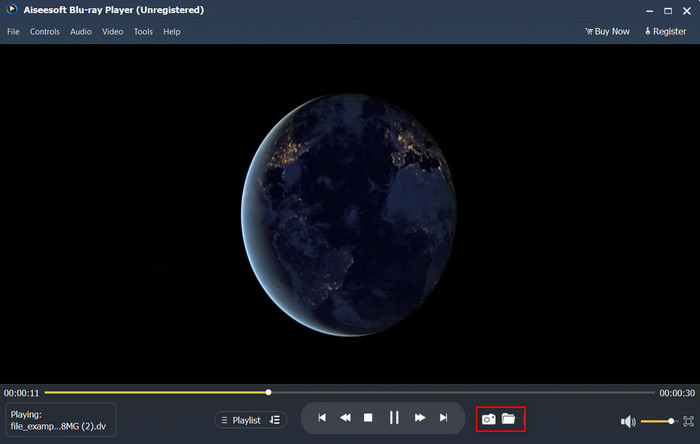
Step 3. The DV file will automatically play on your desktop. Additionally, click the camera button if you want to take a screenshot of what you are watching. Then if you're going to look for the snapshots you've taken, click the folder button.
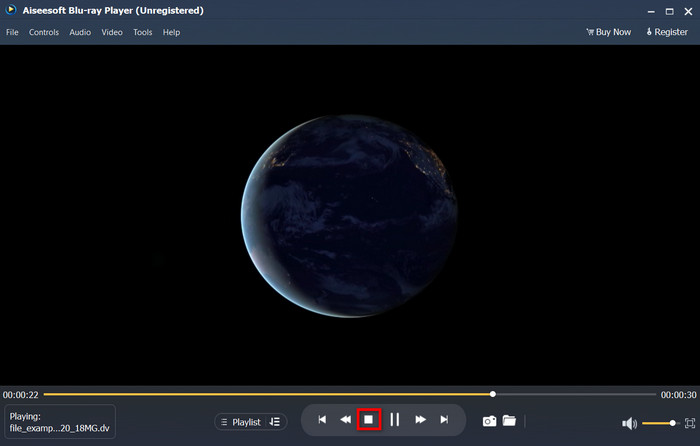
Step 4. If you want to stop watching the .dv file, click the cube button.
Step 5. To watch another file in a different format, follow steps 2 and 3, then enjoy watching the high-quality video.
Related:
Parte 4. Domande frequenti sulla conversione da DV a AVI
La conversione dei file DV perde la loro qualità?
La conversione di qualsiasi formato in una nuova versione non dovrebbe ridurre la qualità del formato video originale. Tuttavia, alcuni convertitori non supportano la conversione di qualità video 1080 o 4k perché richiederà tempo. Quindi, se non vuoi perdere la qualità, usa FVC Video Converter Ultimate. Non aspettarti niente di meno perché questo software non toccherà la tua qualità e ti fornirà un'opzione per aumentarla o mantenerla.
Posso giocare a .dv su VLC?
Per quanto riguarda oggi, VLC non supporta nessun file .dv da riprodurre; tuttavia, se comprimi AVI e usi invece DV-AVI, puoi riprodurre il video su VLC.
Quale formato è il miglior sostituto del DV?
Se vuoi conoscere il miglior sostituto di un file DV, prova a utilizzare il file MP4. Questo formato è noto come formato multifunzionale perché è compatibile con tutti i desktop e dispositivi se desiderano riprodurre il video o modificarlo. Ma la qualità di MP4 e DV è molto diversa l'una dall'altra se dovessimo confrontarli. Tuttavia, per quanto riguarda la compatibilità MP4 è il miglior formato multimediale che puoi utilizzare come sostituto.
Conclusione
To sum it up, we only presented one DV converter to AVI because this is the only software that performs well on converting this file type. As we continued reading this article, we found another way of playing the .dv file by using this DV player. Moreover, we present two tools to do their job, whether you want to play the .dv or convert the file. So now, if you choose the FVC Video Converter Ultimate, then expect a phenomenal quality output within an ample of time. But if you decide to play the DV file, then your go-to must be the Blu-ray Player.
-
 Le 5 migliori scelte per convertire MPEG in formato AVI [Online & Offline]
 Hai difficoltà a cercare un convertitore per MPEG? Quindi prova a leggere questo articolo mentre impariamo come modificare il formato MPEG in AVI con passaggi dettagliati.
-
 4 incredibili convertitori per convertire gratuitamente WMV in AVI online [2021]
 Stai cercando un convertitore da WMV ad AVI? E se è così, prova a leggere questo articolo mentre setacciamo tutti gli strumenti che possiamo trovare sul web per aiutarti in questo compito.
-
 4 convertitori online e offline più recenti per convertire F4V in formato AVI
 Don'non hai idea di quale convertitore dovresti usare per convertire F4V in AVI o qualsiasi altro formato video? Quindi leggi questo articolo mentre impariamo come convertire con lo strumento disponibile.
