


 Video Converter Ultimate
 Screen Recorder
 Riparazione video
2 dei migliori convertitori da M4V a FLV per Windows/Mac/Online
Un contenitore video e audio creato principalmente per l’uso su tutti i dispositivi Apple iTunes, M4V. Questo formato è protetto dalla protezione DRM per evitare problemi di copyright. In questo caso, il file è difficile da riprodurre se non hai un account su iTunes con le credenziali. Quindi, se vuoi guardare i video sul tuo PC o telefono Android, è indispensabile convertirli in FLV riproducibile. Per sapere come convertire M4V in FLV, leggi questo articolo e fatti un’idea generale su M4V e FLV.

Parte 1. Prima scelta sulla conversione di M4V in FLV su Mac e PC
È il convertitore più efficiente che ti piacerà usare, soprattutto se converti M4V in FLV su Mac o PC. FVC Video Converter Ultimate è il convertitore più scelto da cui molti utenti già dipendono. Inoltre, se desideri avere uno strumento multiuso che offra un risultato fenomenale, questo è imprescindibile. Puoi anche convertire qualsiasi file multimediale e impostare la qualità su SD, HD, 1080p e persino video 4K. Non aspettarti niente di meno se scarichi questo strumento sul tuo disco, perché, come dice il nome, è “ultimate”. Inoltre, segui il tutorial scritto di seguito se vuoi sperimentare la massima capacità di conversione di questo strumento.
Come convertire M4V in FLV con l’aiuto di FVC Video Converter Ultimate:
Passaggio 1. Fai clic sul pulsante di download qui sotto, scegli il sistema operativo che stai utilizzando. Dopo il download, fai clic su Installa e verrà mostrata un’interfaccia di benvenuto, quindi premi Avvia ora.
Download gratuitoPer Windows 7 o versioni successiveDownload sicuro
Download gratuitoPer MacOS 10.7 o versioni successiveDownload sicuro
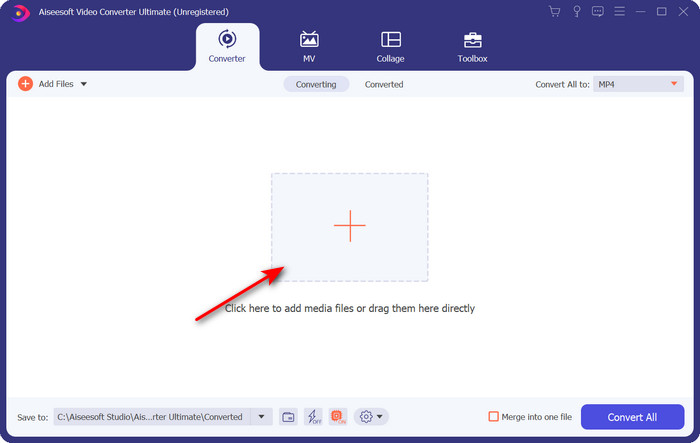
Passaggio 2. Avvia lo strumento, fai clic sul segno + al centro dell’interfaccia e seleziona il file .m4 nella cartella che verrà visualizzata, cliccaci sopra e premi Apri.
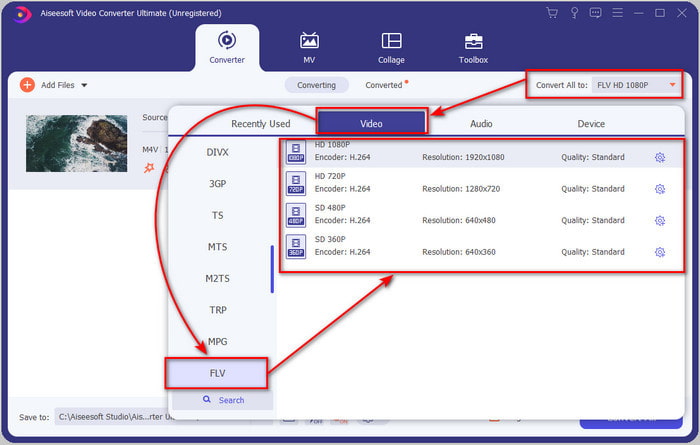
Passaggio 3. Una volta che il file .m4v è sull’interfaccia, fai clic su Converti tutto in e trova il formato FLV.
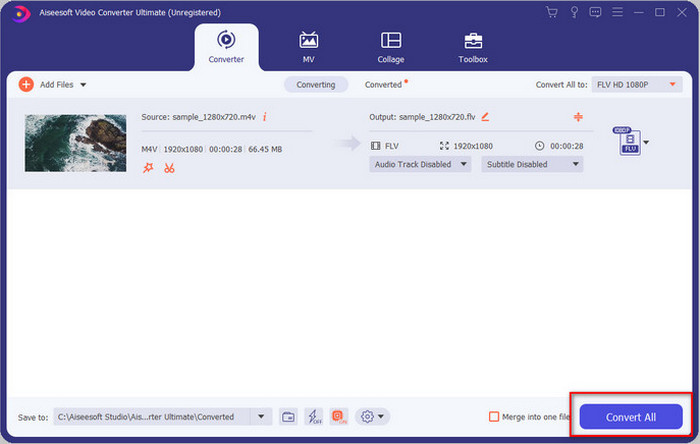
Passaggio 4. Vai avanti e fai clic su Converti tutto per iniziare la trasformazione da M4V a FLV.
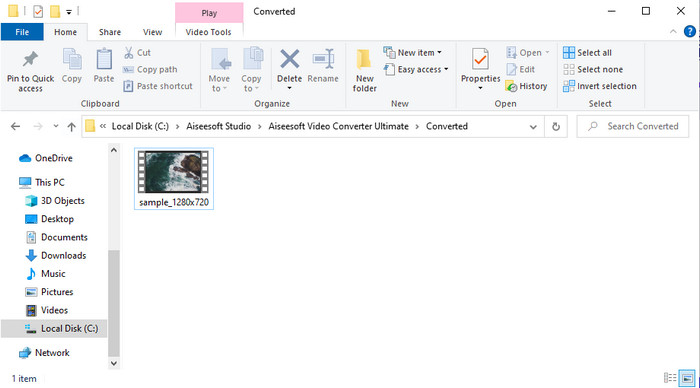
Passaggio 5. La conversione del file richiederà meno di un minuto grazie alla velocità di conversione che questo strumento offre. Si aprirà una cartella con il tuo file convertito; fai clic sul file per guardarlo o condividerlo online.
Professionisti
- Sono disponibili la conversione rapida e l'accelerazione hardware per la migliore esperienza.
- Disponibile su tutte le piattaforme come PC o Mac.
- L'esecuzione della modifica di video per renderli eccezionali può essere superata qui.
Contro
- Pagamento prima dell'uso ma il prezzo è abbordabile.
- Scarica il software prima dell'uso.
Parte 2. Seconda scelta sulla conversione gratuita di M4V in FLV tramite online
Convertire i tuoi file online può essere eseguito in modo efficiente se utilizzi un convertitore M4V in FLV online adeguato, con l’aiuto di FVC Free Video Converter Online. Questo strumento online è il miglior convertitore a cui puoi accedere da tutti i browser web, se disponi di una connessione a Internet. Inoltre, puoi convertire qui senza limiti di dimensione, ma non puoi eseguire la conversione in batch. Anche se il software online è eccellente, è comunque necessaria la connessione a Internet; quindi, se non ce l’hai, questa non è un’opzione, come accade per gli altri convertitori web disponibili. Ma, se hai una connessione a Internet e vuoi sperimentare un’ottima conversione online gratuita, devi seguire i passaggi riportati di seguito.
Come convertire M4V in FLV con l’aiuto di FVC Free Video Converter Online:
Passaggio 1. Clicca su questo link per andare al convertitore online gratuito che FVC mette a tua disposizione.
Passaggio 2. Nell’interfaccia web, fai clic su Add Files to Convert per scaricare l’installer. Una volta che il download dell’installer è terminato, premi di nuovo Add Files to Convert e, nella cartella che si aprirà, seleziona il file M4V.
Scarica la Versione Desktop per convertire i file in batch.
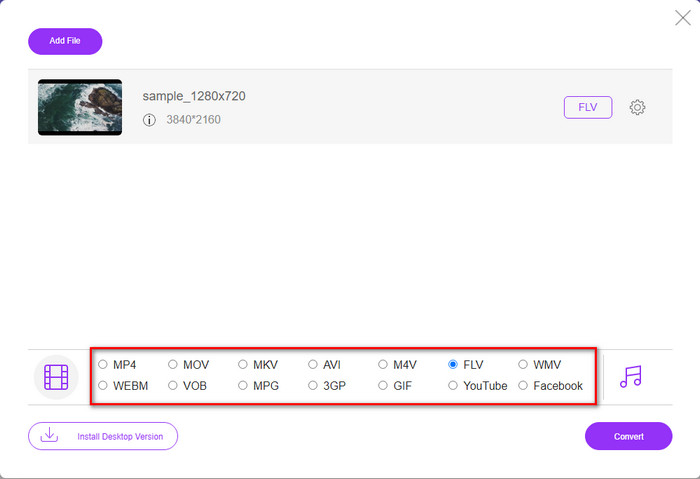
Passaggio 3. Verrà mostrata una nuova interfaccia web; in basso scegli il formato FLV cliccandoci sopra.
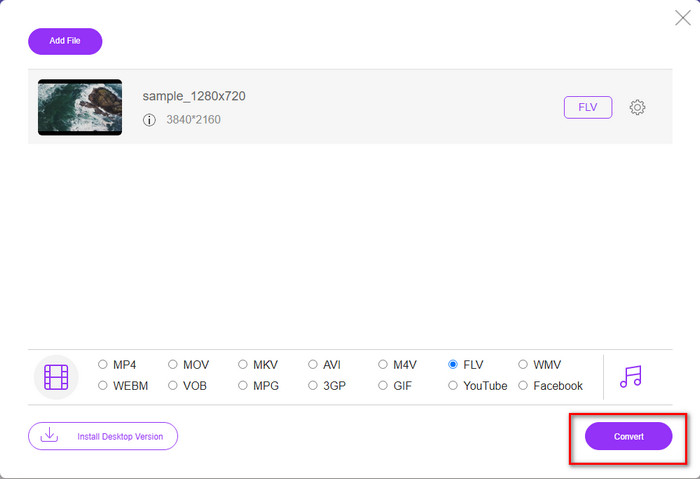
Passaggio 4. Quindi, per iniziare a convertire M4V in FLV gratuitamente, fai clic su Convert.
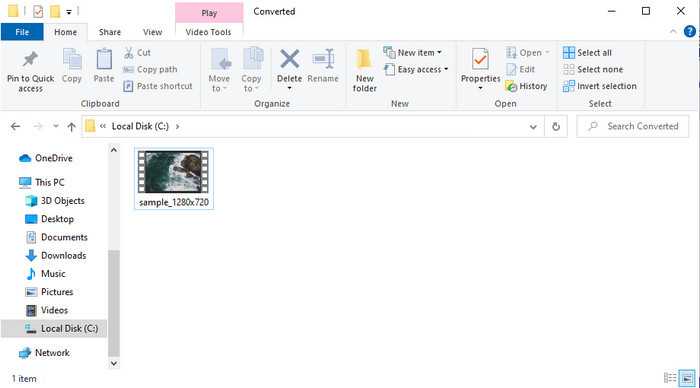
Passaggio 5. Dopo la conversione, una cartella verrà mostrata sull’interfaccia; fai clic sul file per riprodurlo sul tuo lettore multimediale locale.
Professionisti
- Gratuito e compatibile con tutti i browser web.
- Dimensione file e conversione illimitate.
- Sicuro e senza pubblicità nello strumento web principale.
Contro
- Per utilizzare lo strumento è necessaria la connettività Internet.
- Formato meno supportato per caricare e convertire.
Parte 3. Differenze tra i formati M4V e FLV
M4V memorizza la massima qualità video scaricata sul tuo Apple iTunes Store. Questo formato è simile all'MP4 perché usano il codec MPEG-4 come compressore. Ma i video M4V sono protetti dalla protezione del copyright DRM di Apple FairPlay. Quindi, riprodurre video in questo formato è complicato perché non verrà riprodotto immediatamente se li inserisci su un lettore multimediale diverso da iTunes o Quicktime Player. È possibile accedere ai file M4V non protetti sul lettore multimediale modificando l'estensione del file in .mp4.
Al contrario, FLV viene utilizzato per trasferire dati video e audio sul Web il più rapidamente possibile. Flash Video è il formato più vantaggioso presente su ogni sito Web HTML 5. Tuttavia, questo formato è stato interrotto perché Adobe Flash era già stato ritirato. Tuttavia, puoi ancora riprodurlo sui plug-in del tuo lettore multimediale necessari dopo averlo scaricato o convertito.
M4V contro FLV
L'M4V è sviluppato da Apple, che utilizza anche MPEG 4. I file M4V vengono spesso utilizzati per archiviare i video scaricati dall'Apple iTunes Store, come video musicali, episodi TV, ecc. Potresti trovare alcuni file M4V protetti da copia poiché utilizza Protezione del copyright di FairPlay DRM di Apple.
Adobe Flash Player utilizzava FLV per fornire contenuti video come film e programmi TV. Al giorno d'oggi, Adobe non sviluppa più il lettore e consiglia agli utenti di disinstallarlo per motivi di sicurezza. Tuttavia, puoi ancora utilizzare il formato FLV su molti programmi non Adobe/Macromedia.
Parte 4. Domande frequenti sulla conversione da M4V a FLV
Che è migliore; MP4 o M4V?
Se vuoi proteggere il tuo file, allora M4V è il formato che devi usare perché questo è disponibile solo su Apple ed è protetto. Ma supponiamo di volere un formato compatibile con tutti i lettori multimediali, l'editor e altro ancora. In tal caso, MP4 è il formato multimediale universale che ti piacerebbe utilizzare.
Posso giocare a M4V su VLC?
VLC è gratuito e compatibile con tutte le piattaforme; inoltre, può riprodurre quasi tutti i formati multimediali. Ma i file M4V protetti non possono essere riprodotti qui perché sono protetti. Quindi, se vuoi guardare file .m4v su VLC, è indispensabile convertire il file M4V in MP4 o AVI.
Perdo la qualità dopo aver convertito M4V?
Dopo aver convertito M4V, la sua qualità dovrebbe mantenere il tasso standard della qualità M4V originale. Tuttavia, alcuni convertitori non supportano la conversione del video in HD, 1080 o 4k. Quindi, è meglio scegliere lo strumento perfetto e non lo strumento giusto che soddisferà le tue esigenze nella conversione senza perdere la sua qualità.
Conclusione
In conclusione, i due strumenti online e offline presentati qui sono destinati a dare ottimi risultati, soprattutto se vuoi convertire M4V in FLV. Inoltre, abbiamo acquisito informazioni sui due formati, M4V e FLV. Sebbene modificare l’M4V sia necessario per guardare il file protetto, scegliere lo strumento giusto per il compito giusto non è semplice. Per questo presentiamo due strumenti che puoi usare per convertire il formato gratuitamente, utilizzando FVC Free Video Converter Online, oppure per vivere un livello superiore di conversione con FVC Video Converter Ultimate. E ora, cosa stai aspettando se vuoi guardare i tuoi M4V gratuitamente? Scegli uno degli strumenti sopra, segui i passaggi rapidi e semplici illustrati e voilà, goditi il video.
-
 [Guida] Come convertire video M4V in GIF animate su Windows/Mac
 Se vuoi creare file GIF animati dai tuoi video M4V preferiti, puoi conoscere 2 modi semplici ed efficienti per convertire i video M4V in GIF con impostazioni personalizzate.
-
 3 Programma di conversione video utilizzato per convertire iTunes M4V in AVI su Mac
 Non hai idea di come convertire MKV in un formato AVI? Continuando a leggere questo articolo, conosceremo i 3 strumenti che possono aiutarti a convertire questo formato di file.
-
 Convertitore M4V in MOV gratuito – Come convertire M4V in MOV
 Se il tuo lettore multimediale non supporta M4V, hai mai faticato a guardare un film sul tuo iPhone? L'argomento principale di questo articolo è convertirlo in un file video MOV.

