


 Video Converter Ultimate
 Screen Recorder
 Riparazione video
Metodi vantaggiosi per convertire facilmente DV in FLV
Il file DV è un file che contiene un video digitale. La nostra analisi dei file DV ha rivelato che il Digital Video è uno degli utilizzi di questo formato. Non abbiamo ancora spiegato completamente cosa contengano questi file o come gli utenti li stiano utilizzando, ma il nostro team lavora su migliaia di tipi di file. Se hai informazioni sul formato, ci farebbe piacere conoscerle. Tuttavia, l’estensione di file .flv indica i file FLV (Flash Video). Gli utenti possono usare Adobe Flash Player o Adobe Air per trasmettere contenuti audio e video via Internet utilizzando FLV. I file FLV codificano i loro dati nello stesso modo dei file SWF. Per risolvere il problema del formato video DV, gli utenti tendono a convertirlo nel formato FLV, che è compatibile con un’ampia gamma di lettori multimediali. Quindi, se stai cercando strumenti che possano convertire DV in FLV, continua a leggere questo articolo.

Parte 1. Il modo migliore per convertire offline DV in FLV
Video Converter Ultimate è uno degli eccellenti software che può aiutarti a convertire il formato video DV in FLV. Grazie al suo sistema di potenziamento a velocità ultra-rapida, puoi convertire DV in FLV in appena un secondo, una performance che altri strumenti non riescono a eguagliare. Grazie a questo software, non dovrai più preoccuparti di convertire DV in altri formati, perché supporta numerosi formati che forse non immagini nemmeno, come MP4, MOV, 3GP, FLV, WMV, WEBM, MPEG, ecc. Oltre a convertire i file, questo software offre altre funzioni integrate: può tagliare, migliorare, unire, accelerare e dispone di molti altri strumenti utili che possono portare il tuo video a un livello superiore.

Video Converter Ultimate
Oltre 6.357.200 download- Supporta oltre 1000 diversi formati video e audio.
- Converti 30 volte più velocemente rispetto ad altri convertitori.
- Può convertire video fino alla qualità 4K HD.
- Offre numerosi altri strumenti in primo piano che aiutano a migliorare il tuo video.
- Non richiede hardware di manutenzione pesante per funzionare.
Download gratuitoPer Windows 7 o versioni successiveDownload sicuro
Download gratuitoPer MacOS 10.7 o versioni successiveDownload sicuro
Passaggio 1: Scarica il software facendo clic sul pulsante Download gratuito situato in alto. Successivamente, devi installare il software sul tuo computer ed eseguirlo facendo clic su Avvia ora dopo aver terminato l’installazione.
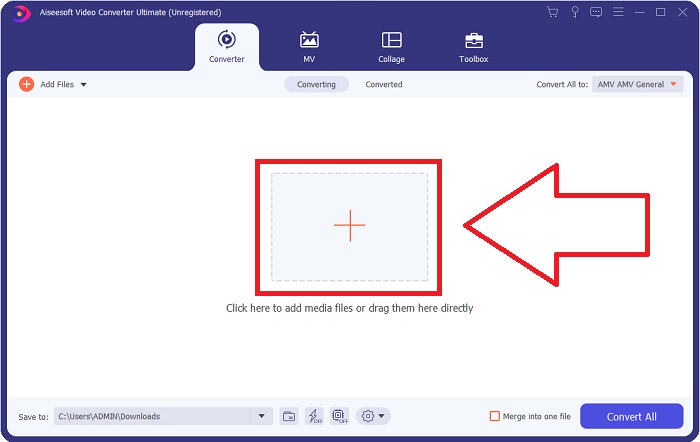
Passaggio 2: Vedrai quindi una finestra che si apre sullo schermo. Il software mostrerà la funzione Converter. Per importare un file dal tuo computer, fai clic sul pulsante + al centro, oppure puoi semplicemente trascinare qualsiasi file in formato video DV al centro.
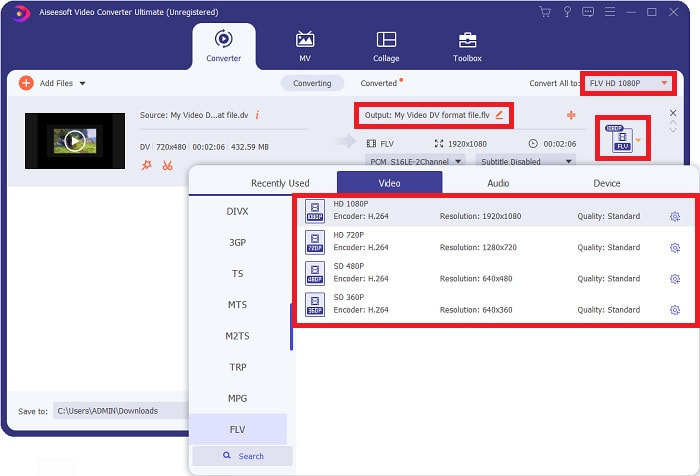
Passaggio 3: Sei a metà del processo. Fai clic sull’icona di selezione del formato proprio accanto all’output del tuo video e scegli il formato video FLV. In seguito, puoi anche selezionare le diverse qualità video offerte dal software.
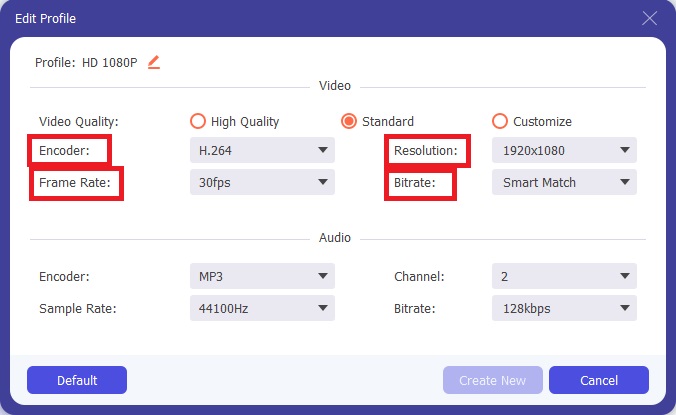
Passaggio 4: Ancora un piccolo sforzo per finire. Quando le qualità video predefinite non soddisfano le tue esigenze, puoi personalizzare la qualità video dell’output facendo clic sull’icona a forma di ingranaggio accanto alla selezione delle qualità video.
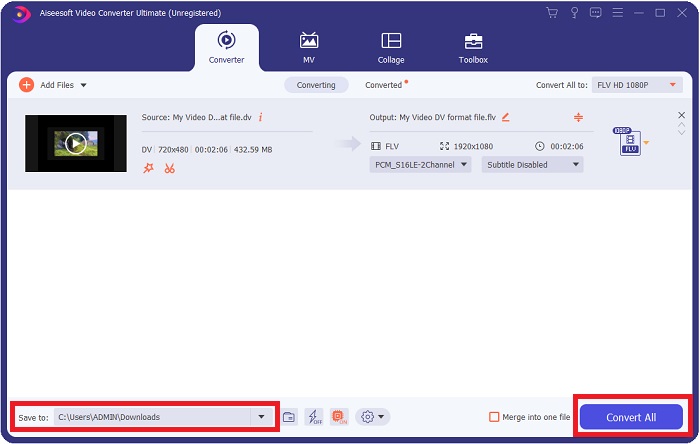
Passaggio 5: Ora che sei quasi arrivato alla fine, vai al campo Salva in nell’altro angolo per scegliere la posizione in cui salvare il file convertito. Ora puoi convertire il tuo file facendo clic sul pulsante Converti tutto situato nell’angolo in basso a destra dello schermo.
Parte 2. Come convertire DV in FLV online
Internet produce e presenta diversi strumenti online che possono aiutarti a convertire DV in FLV. Ma questo strumento online chiamato Free Video Converter Online è diverso dagli altri per la rapidità del processo di conversione, perché può convertire un file in appena un secondo. Supporta anche formati come MP4, FLV, MOV, M4A, TS, WMV, ASF, VOB, AAC, WMA e altri ancora. Converte inoltre i video in formato HD senza perdita di qualità. Questo strumento gratuito di conversione video è famoso per la conversione e permette agli utenti di perfezionare i propri video senza difficoltà. Vediamo ora tutti i passaggi che ti aiuteranno a usare questo convertitore online.
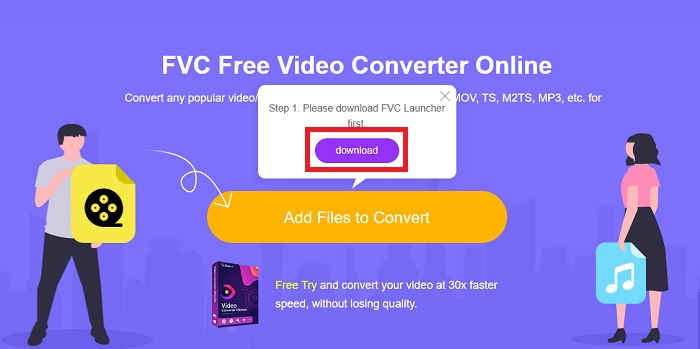
Passaggio 1: Per accedere alla pagina principale di questo strumento online, fai clic su questo link e procedi. Fai clic sul pulsante Aggiungi file da convertire sulla schermata principale del tuo computer per scaricare il launcher che ti consentirà di usare questo strumento online. Poi fai di nuovo clic sul pulsante per procedere al caricamento di un file.
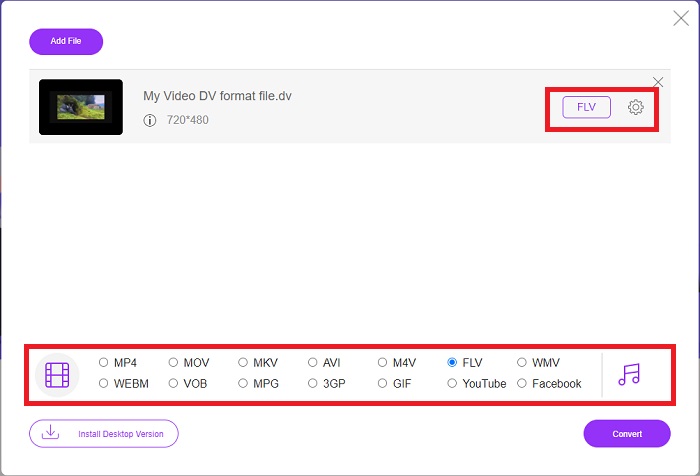
Passaggio 2: Ora che hai selezionato il file che desideri convertire, devi scegliere il formato video FLV dalla selezione dei formati video nella parte inferiore dello schermo. Puoi anche regolare alcune specifiche del video modificando alcune impostazioni, come risoluzione, frame rate, ecc., facendo clic sull’icona a forma di ingranaggio.
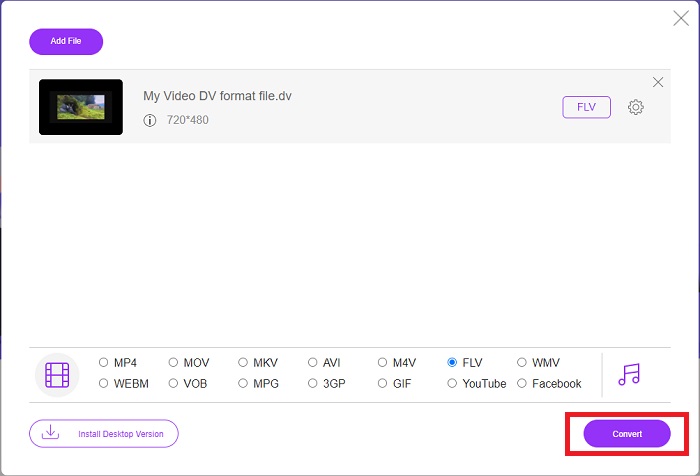
Passaggio 3: Successivamente, puoi convertire il file facendo clic sul pulsante Converti situato in basso a sinistra nella finestra.
Parte 3. Grafico di confronto: DV vs. FLV
Un file Digital Video (DV) viene creato da una fotocamera digitale e salvato nel formato raw che gli utenti utilizzano sempre. Un file video digitale (DV) comprende blocchi di interfaccia digitale (DIF), ciascuno contenente 80 byte. Audio, video e metadati possono essere tutti inclusi nei blocchi DIF. I blocchi DIF possono essere archiviati come file del computer nella loro forma grezza o come formati di file avvolti attorno ad essi, moltiplicando i blocchi in sequenze di 150 blocchi. Un fotogramma video può contenere fino a dieci o dodici sequenze.
Tuttavia, i servizi di streaming video come YouTube, Hulu e Vevo utilizzano il formato Flash Video di Adobe Systems per i loro video online. Adobe Flash Player (inclusi i plug-in per browser) e software di terze parti possono leggere e riprodurre i file FLV su quasi tutti i sistemi operativi (tranne iOS). Gli iPhone e i dispositivi Android possono riprodurre file FLV usando software open source e browser specifici. Flash rappresenta ancora un problema per iOS. I file FLV possono essere visualizzati solo con software appositi per FLV, e gli utenti possono usare software di cattura e registrazione dello schermo per registrare video FLV.
| Estensione del file | DV (.dv) | FLV (.flv) |
| Nome del file | Video digitale | File video flash |
| Sviluppato da | Più produttori di videocamere | Adobe System Incorporated |
| Professionisti | ◆ Un Mini DV standard ha una capacità di 19,5 GB, che corrisponde a circa 0,25 centesimi per GB di spazio di archiviazione. ◆ Conversione intuitiva da HD a standard ◆ I nastri sono facili da etichettare e ideali per la conservazione a lungo termine. | Quando si tratta di creare pagine Web dinamiche e interattive, Adobe Flash può essere una risorsa enorme. Il processo è semplice, ma i risultati potrebbero essere significativi. Nel suo periodo di massimo splendore, Flash era ampiamente utilizzato anche per semplici videogiochi. |
| Contro | ◆ È necessaria una connessione firewire (la maggior parte dei PC di serie non la dispone). ◆ La qualità di una registrazione diminuisce ad ogni passaggio successivo. ◆ Registra solo da 60 a 90 minuti alla volta. | È uno svantaggio che FLV abbia perso popolarità nel corso degli anni. La creazione di contenuti FLV può richiedere molto tempo e costare un sacco di soldi. Inoltre, gli utenti non possono visualizzare i contenuti Flash sui dispositivi iOS, limitando gravemente la sua capacità di attirare nuovi follower. |
| Programmi che supportano il file | Lettore multimediale VLC | RealPlayer Riproduttore Apple QuickTime Lettore multimediale VLC Lettore MP3 |
Parte 4. Domande frequenti sulla conversione da DV a FLV
Che risoluzione è DV?
Con DV, la risoluzione standard registra 720 pixel orizzontali e 480 linee interlacciate nei paesi che utilizzano corrente elettrica a 60Hz e 576 linee con corrente elettrica a 50Hz. Una versione ad alta definizione del video digitale (HDV) è uno standard HDV ufficiale e DVCPRO HD di Panasonic è un esempio di tale formato (vedi HDV e DVCPRO).
Il video DV è interlacciato?
C'è sempre un sacco di filmati DV in basso prima. Potrebbero apparire prima altri filmati. Interpreta di nuovo la clip importata con la separazione dei campi attiva, prima in basso (file> interpreta metraggio> centrale) per vedere se è interlacciato. Quindi, nella finestra del progetto, usa la scorciatoia Alt e fai doppio clic per accedervi. Utilizzare i tasti Pagina su/Dn per navigare nel video. L'interlacciamento si verifica se il video cambia ogni volta che si preme il pulsante di riproduzione. Un movimento a scatti indica che l'ordine dei campi non è corretto e il metraggio deve essere reinterpretato utilizzando l'altro ordine dei campi.
FLV è un formato video adatto?
Adobe Flash Player salva i file video nel formato FLV. Tutte le piattaforme video e i browser lo accettano come uno dei formati video supportati. Le piattaforme di streaming video online come YouTube traggono vantaggio dall'utilizzo del formato FLV. Grazie alla loro piccola dimensione del file, sono veloci e semplici da scaricare.
Conclusione
Per riassumere tutti gli argomenti trattati, noterai che i migliori convertitori che questo articolo raccomanda di usare sono il software Video Converter Ultimate e lo strumento online Free Video Converter Online. Poiché questi due convertitori superano gli altri, dispongono di funzioni professionali aggiuntive e di un’interfaccia intuitiva per l’utente.
-
 La migliore strategia su come convertire file DV in formato AVI con passaggi dettagliati
 Vuoi convertire il tuo file DV in AVI? Quindi leggi questo articolo per conoscere lo strumento unico che puoi utilizzare per convertire e un lettore multimediale per riprodurre i tuoi DV sul tuo PC o Mac.
-
 I 2 modi migliori per convertire i file DV in MOV gratuitamente su desktop e online
 Hai problemi a convertire i tuoi file DV in MOV sul tuo Mac? Se questo è il tuo problema, possiamo risolverlo insieme se leggiamo questo articolo.
-
 Da MP4 a FLV | I 3 migliori convertitori gratuiti (online / Mac / Windows)
 Questo post è la guida dettagliata alla conversione da MP4 a FLV. Puoi prendere i primi 3 convertitori gratuiti per cambiare MP4 in FLV online, su computer Windows o Mac con facilità.
