


 Video Converter Ultimate
 Screen Recorder
 Riparazione video
5 modi rapidi e semplici per trasformare MKV in FLV gratuitamente [Online e offline]
Non riesci a condividere i tuoi file MKV su Internet perché le dimensioni sono troppo grandi? Perché non li converti invece di comprimerli e rischiare di perdere qualità? Questo problema è risolto se leggi i dettagli qui sotto prima di inviarli. Non c’è bisogno di passare un’ora a leggere questo articolo, quindi, senza ulteriori indugi, scopriamo i sei convertitori che puoi usare per convertire MKV in FLV.

Parte 1. Il miglior convertitore da MKV a FLV da scaricare
FVC Video Converter Ultimate può aiutarti a trasformare MKV in FLV in modo semplice ed efficace, senza alcuno sforzo. Questo straordinario convertitore è molto diverso dagli altri presenti in questo elenco o da quelli che usi già o meno. È il miglior codificatore e decodificatore che puoi scaricare sul tuo PC o Mac e funziona perfettamente offline anche se non hai un computer di fascia alta.

FVC Video Converter Ultimate
4.987.355+ download- Converti MKV in FLV, AVI, MP4, MOV o in oltre 200 formati disponibili su Windows e Mac.
- Rendi il tuo formato MKV compatibile con tutti i desktop e dispositivi.
- Può eseguire la conversione batch per i tuoi formati MKV o altri formati.
- Convertitore infallibile per l'uso da parte di chiunque.
- Supporta output ad alta definizione e persino una qualità video fino a 4K.
Download gratuitoPer Windows 7 o versioni successiveDownload sicuro
Download gratuitoPer MacOS 10.7 o versioni successiveDownload sicuro
Passaggi su come convertire MKV in FLV con FVC Video Converter Ultimate
Passaggio 1. Scarica l’applicazione sull’unità e poi segui la procedura di installazione.
Download gratuitoPer Windows 7 o versioni successiveDownload sicuro
Download gratuitoPer MacOS 10.7 o versioni successiveDownload sicuro
Passaggio 2. Dopo l’installazione, apri l’applicazione per aggiungere i file MKV; puoi trascinare e rilasciare il file sull’interfaccia oppure fare clic sul pulsante Add Files.
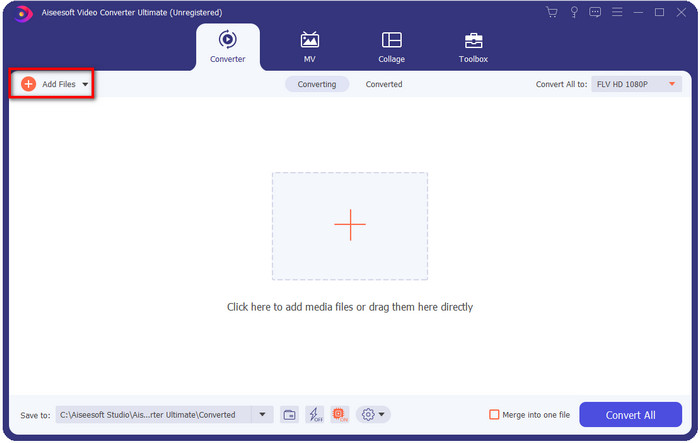
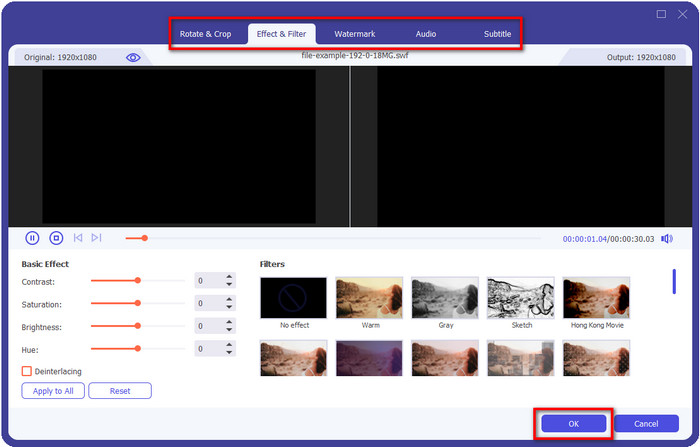
Se vuoi modificare i tuoi file MKV prima di convertirli, puoi fare clic sul pulsante a forma di bacchetta per aggiungere un tocco magico al tuo output, ad esempio aggiungere Effetti, Ritagliare, aggiungere Sottotitoli e altro ancora. Per salvare le modifiche che hai aggiunto al video, fai clic su OK.
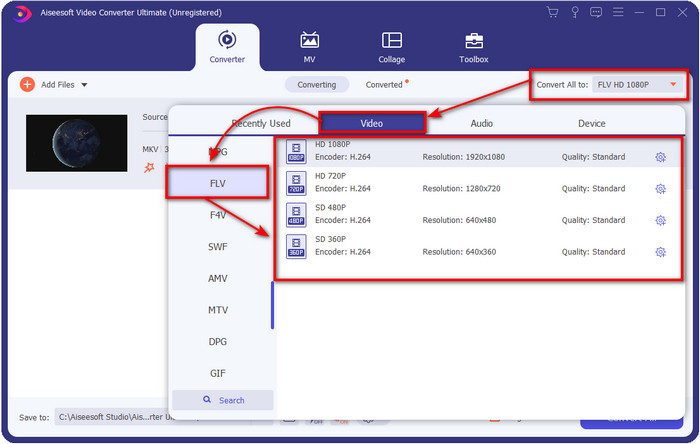
Passaggio 3. Fai clic sul pulsante drop-down e scegli il formato FLV nell’elenco delle impostazioni.
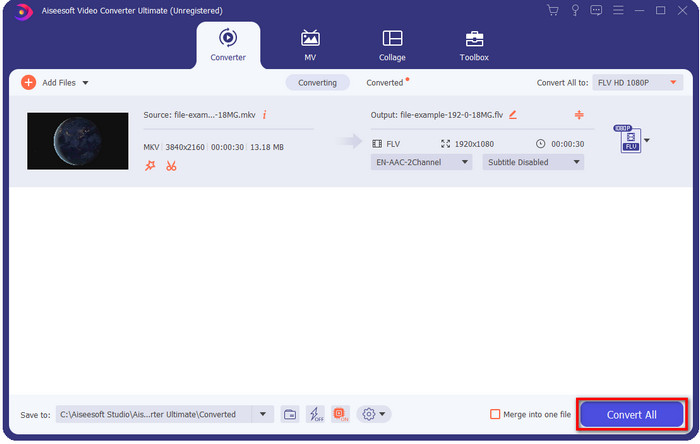
Passaggio 4. Fai clic sul pulsante Convert All per iniziare a convertire MKV in FLV gratuitamente. Al termine del processo si aprirà una cartella con il nuovo file FLV.
Parte 2. 4 Miglior convertitore da MKV a FLV basato sul Web
1. Convertitore video gratuito FVC online
FVC Free Video Converter Online offre un semplice ma efficace convertitore MKV in FLV gratuito online disponibile in tutti i browser. Supporta anche un numero medio di formati tra cui puoi scegliere e verso cui caricare. Sebbene lo strumento dipenda da Internet, qui convertire e caricare i file è più semplice e veloce. Vuoi sapere come usarlo? Allora segui i passaggi qui sotto.
Professionisti
- È disponibile per essere utilizzato da chiunque abbia Internet.
- Interfaccia intuitiva e di facile comprensione.
- Nessuna limitazione per la dimensione del file.
- Impostazioni avanzate per video e audio.
Contro
- Formato medio.
Passaggio 1. Per aprire il convertitore online, fai clic su questo link.
Passaggio 2. Premi il pulsante Add Files to Convert per aggiungere il file dalla cartella del tuo computer, quindi fai clic su Open.
Scarica la Versione Desktop per convertire i file in batch.
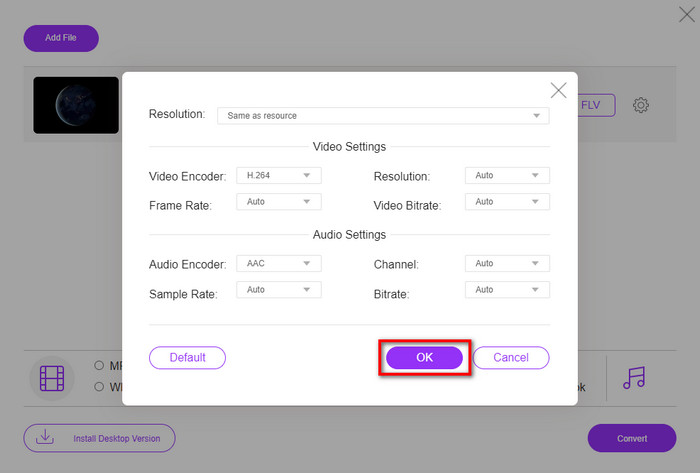
Anche se qui non puoi modificare i video, puoi cambiare le impostazioni di video e audio facendo clic sul pulsante a forma di ingranaggio.
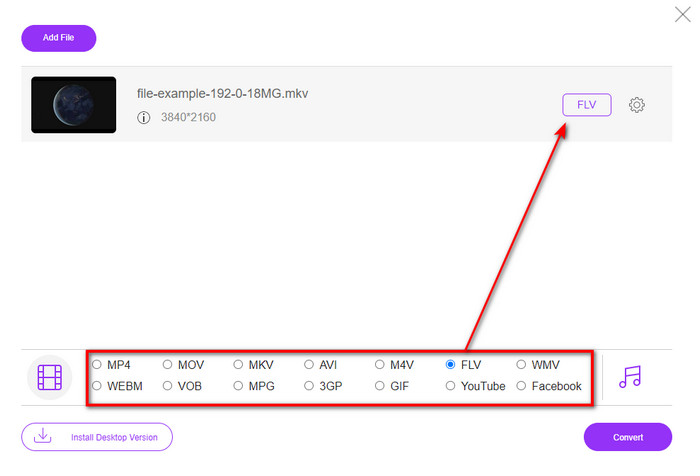
Passaggio 3. Seleziona il formato FLV nell’elenco delle impostazioni.
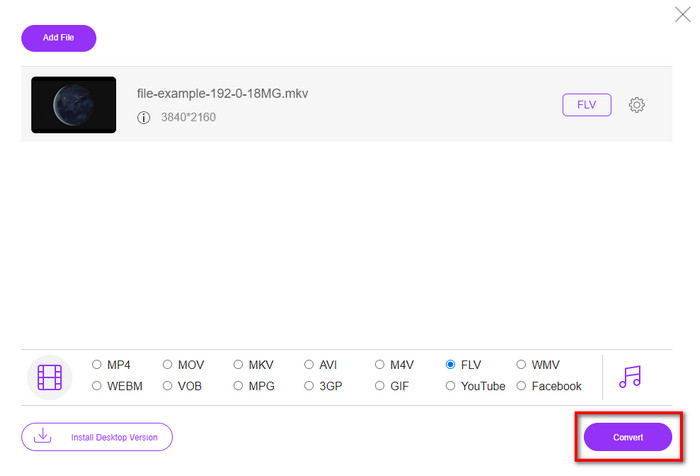
Passaggio 4. Fai clic su Convert per avviare il processo di conversione.
2. Convertitore
Uno dei convertitori MKV in FLV online più sicuri che puoi usare è Mconverter. Oltre a convertire formati video e audio, qui puoi anche convertire immagini, archivi, documenti e molti altri formati multimediali. Anche se questo convertitore è gratuito, c’è un limite per ogni file che puoi caricare.
Professionisti
- Converti video, audio, documenti e altro online.
- Supporta conversioni multiple.
- Facile da usare.
Contro
- La dimensione del file non deve superare i 200 MB.
- Alcuni annunci durante la conversione del file.
Passaggio 1. Apri Mconverter nel tuo browser, trascina il file .mkv e rilascialo nel riquadro.
Passaggio 2. Fai clic sul formato FLV e il processo inizierà automaticamente.
Passaggio 3. Una volta terminato, il file verrà scaricato automaticamente sulla tua unità.
3. Freeconvert.com
Freeconvert.com ti aiuterà a convertire MKV in FLV online gratuitamente. Questo convertitore web offre un’interfaccia facile da capire che chiunque può usare. Tuttavia, questo convertitore online supporta solo un numero ridotto di formati tra cui scegliere e sulla pagina web sono presenti molti annunci.
Passaggio 1. Cerca Freeconvert.com sul motore di ricerca.
Passaggio 2. Fai clic su Choose File per caricare il file .mkv dalla cartella del tuo computer, premi il pulsante drop-down e scegli il formato FLV.
Passaggio 3. Fai clic su Convert FLV per iniziare la conversione e, per scaricarlo, fai clic su Download FLV.
Professionisti
- Un convertitore online gratuito che puoi utilizzare.
- Convertitore web sicuro e semplice.
- Supporta un file da 1 GB da convertire.
Contro
- Supporta un formato su piccola scala.
- Il processo di conversione e download richiederà molto tempo.
4. Convertitore video online Movavi
Movavi Online Video Converter è uno dei convertitori consigliati per convertire MKV in FLV online. È la versione web gratuita di Movavi Video Converter, utilizzata da molti utenti sul web per l’efficienza che offre e per il suo aspetto professionale.
Passaggio 1. Apri il tuo browser preferito e cerca il sito web di Movavi.
Passaggio 2. Premi +Add Your Media per aggiungere il file che vuoi convertire. Fai clic sul pulsante drop-down e premi Video; trova il formato FLV e fai clic su di esso.
Passaggio 3. Premi Convert per avviare il processo di conversione.
Professionisti
- Nessuna interfaccia web pubblicitaria.
- Convertitore semplice che chiunque può utilizzare.
- Supporta un formato di media scala.
Contro
- Il processo di conversione del formato richiede più tempo.
- Dipendente da Internet come gli altri convertitori web.
Parte 3. Grafico di confronto
| Caratteristiche | FVC Video Converter Ultimate | Convertitore video gratuito FVC online | Convertitore | Freeconvert.com | Convertitore video online Movavi |
| Conversione delle capacità di formato |  | | | | |
| Dipendente da Internet |  | | | | |
| Conversione in batch | | | | | |
| Funzionalità di modifica avanzate | | | | | |
| Piattaforme disponibili | Strumento basato su desktop | Strumento basato sul Web | Strumento basato sul Web | Strumento basato sul Web | Strumento basato sul Web |
MKV contro FLV
Il formato contenitore multimediale Matroska, rilasciato nel 2002, è un formato open source che può includere numerose tracce video, audio, immagini e sottotitoli. Quindi, puoi usarlo per archiviare facilmente brevi video clip, programmi TV e film. È abbastanza popolare per i sottotitoli dei fan degli anime.
Adobe Flash Player utilizzava FLV per fornire contenuti video come film e programmi TV. Al giorno d'oggi, Adobe non sviluppa più il lettore e consiglia agli utenti di disinstallarlo per motivi di sicurezza. Tuttavia, puoi ancora utilizzare il formato FLV su molti programmi non Adobe/Macromedia.
Parte 4. Domande frequenti sulla conversione da MKV a FLV
Perché i file MKV sono troppo grandi?
Ci sono due motivi principali per cui i file MKV sono così grandi. Il primo motivo è che questo formato può contenere in un unico file contenuti ed elementi illimitati tra video, audio e metadati. Il secondo motivo è che, se il tuo video è lungo, è normale che le dimensioni del file aumentino. Tuttavia, puoi comprimere il file MKV con l’aiuto di questo compressore MKV che puoi usare. Ma se vuoi una via più semplice, dovresti considerare di convertire i file MKV in MP4, AVI, MOV, FLV, ecc.
MKV è meglio di AVI?
MKV e AVI sono formati quasi simili, poiché possono contenere video in alta definizione e file di grandi dimensioni. Tuttavia, questi contenitori hanno scopi e strutture differenti che li rendono unici. Ad esempio, il formato AVI è un formato non compresso che può contenere contenuti video grezzi, ideale per la riproduzione. È anche la base per lo sviluppo del file MKV. Sebbene i file MKV utilizzino un compressore, i loro contenuti e i loro elementi sono molto più numerosi di quelli che AVI può gestire. Quindi, se vuoi mantenere l’alta qualità dei tuoi video, scegli il formato MKV. Ma se desideri la massima compatibilità, allora meglio AVI. Se vuoi sapere come convertire MKV in AVI, fai clic su questo link.
Il freno a mano gestisce la conversione da MKV a FLV?
Il freno a mano può gestire questo lavoro, ma questo convertitore non supporta i programmi macOS e Windows che non siano 10 sopra.
Conclusione
Per concludere, ora sai come convertire MKV in FLV, sia online che offline. Questi strumenti sopra non sono stati selezionati a caso, ma scelti in base alle preferenze degli utenti. Durante la nostra ricerca e analisi, abbiamo scoperto che questi sei strumenti offrono le migliori prestazioni nel loro lavoro di convertitori. Ma FVC Video Converter Ultimate supera addirittura le aspettative come convertitore. Vuoi conoscere le altre capacità di questo straordinario convertitore? Allora cosa aspetti? Devi scaricarlo subito.
-
 MKV to MOV - Come convertire MKV in MOV
 Come posso convertire MKV in MOV su Mac? IMovie può leggere MKV? Cosa significa formato MOV? Questo post spiega 2 semplici modi per aiutarti a convertire MKV in MOV con convertitori video online e professionali gratuiti.
-
 Come convertire video MKV in GIF animate senza Photoshop/FFmpeg
 Dopo aver scaricato e visto film MKV sul tuo computer, potresti voler condividere alcuni momenti meravigliosi con gli amici o su Internet come GIF. In questo articolo, puoi conoscere i 2 modi più semplici per convertire MKV in GIF.
-
 Suggerimenti e trucchi su come convertire i file MKV in MP3 [2025]
 Hai problemi a scegliere il convertitore giusto per MKV in MP3? Quindi continua a leggere questo post mentre abbiamo presentato diverse soluzioni su un problema.

