


 Video Converter Ultimate
 Screen Recorder
 Riparazione video
[Modo rapido e semplice] Converti file RMVB in WMV con i 2 migliori convertitori RMVB
Al giorno d’oggi, gli asiatici producono più episodi televisivi, film d’animazione e film e li distribuiscono in tutto il mondo, in modo simile al Nord America. La maggior parte di questi film è codificata in formato .rmvb perché i file RMVB sono più piccoli, hanno un bitrate più basso ma offrono comunque un’ottima qualità. Tuttavia, quando scarichi questo tipo di file su Windows, il tuo lettore multimediale predefinito non è in grado di riprodurlo perché il formato non è supportato. È decisamente scomodo, giusto? Oggi però possiamo convertire il tuo file RMVB in un WMV riproducibile. Per questo motivo, iniziamo subito a vedere come convertire RMVB in WMV con i due strumenti che puoi utilizzare.

Parte 1. Altri motivi per cui è necessario convertire il file RMVB in WMV
Prima di iniziare la nostra spedizione di conversione, comprendiamo innanzitutto il possibile motivo per la conversione del file RMVB. L'elenco seguente mostra i possibili motivi per cui hai bisogno di un convertitore da RMVB a WMV online o offline.
Come detto sopra, il file RMVB non è compatibile con quasi tutti i lettori multimediali, in particolare con Windows Media Player. Questo problema non è nuovo, perché esistono molti formati che Windows Media Player non supporta e, sfortunatamente, RMVB è uno di questi. Anche se puoi convertire il file RMVB in un nuovo formato compatibile, esiste comunque un’altra soluzione: scaricare un lettore multimediale di terze parti come il Blu-ray Player. Questo lettore supporta un numero di formati molto più ampio per la riproduzione video rispetto a Windows Media Player. Quindi, se desideri scaricare questo lettore, puoi fare clic sul pulsante di download qui sotto. Ma se vuoi leggere informazioni più dettagliate sui lettori RMVB, fai clic su questo link.
Download gratuitoPer Windows 7 o versioni successiveDownload sicuro
Download gratuitoPer macOS 10.7 o versioni successiveDownload sicuro
I file RMVB sono un contenitore di file open source, che questo formato non utilizza un codec specifico. Anche se è un grande vantaggio manipolare il codec, non tutte le applicazioni supportano apertamente tutti i tipi di codec. Pertanto, se desideri utilizzare il file RMVB per scopi di modifica o riproduzione, non dovresti sorprenderti se non funzionerà con il codec non supportato.
Quindi ora, per capire come convertire RMVB in WMV, procediamo con i dettagli di seguito e leggiamolo attentamente. Trascorrerai solo cinque minuti a leggere questo articolo e ad acquisire conoscenze sufficienti su come convertire i tuoi file RMVB con i convertitori disponibili.
Parte 2. Convertitore più eccezionale per convertire RMVB in WMV con Video Converter Ultimate
FVC Video Converter Ultimate è specializzato nella conversione dei tuoi RMVB in WMV, AVI, MKV, MOV, MP4 e molti altri formati in meno di un minuto. Dispone di una conversione superveloce integrata e dell’accelerazione hardware per completare la conversione più rapidamente di un lampo. A dire il vero, questo convertitore supporta molteplici e avanzatissime funzioni di editing che ti conquisteranno. Vuoi quindi finire subito il compito di convertire il tuo file RMVB perché sei di fretta? Allora che cosa stiamo aspettando? Procediamo direttamente al processo copiando i passaggi qui sotto.
Passaggi su come convertire i file RMVB in formato WMV con FVC Video Converter Ultimate:
Passaggio 1. Scarica FVC Video Converter Ultimate sul tuo Windows facendo clic sul pulsante di download qui sotto. Se invece utilizzi un Mac, devi fare clic sull’altro pulsante per scaricare la versione per Mac dello strumento. Segui la procedura di installazione e apri il convertitore.
Download gratuitoPer Windows 7 o versioni successiveDownload sicuro
Download gratuitoPer MacOS 10.7 o versioni successiveDownload sicuro
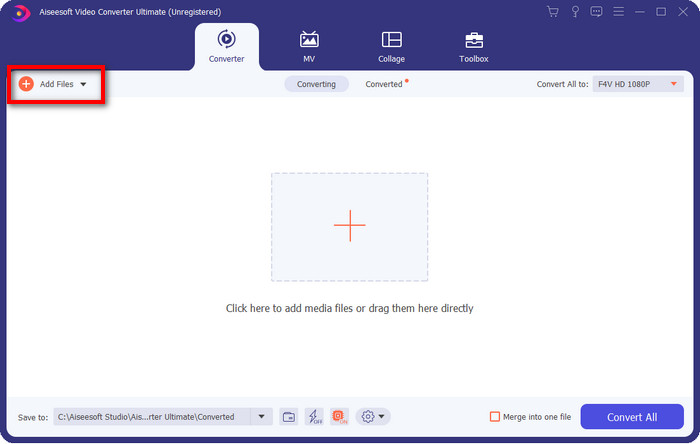
Passaggio 2. Inserisci i file RMVB nel convertitore premendo Add Files, individua il file nella cartella che apparirà sullo schermo e premi Open.
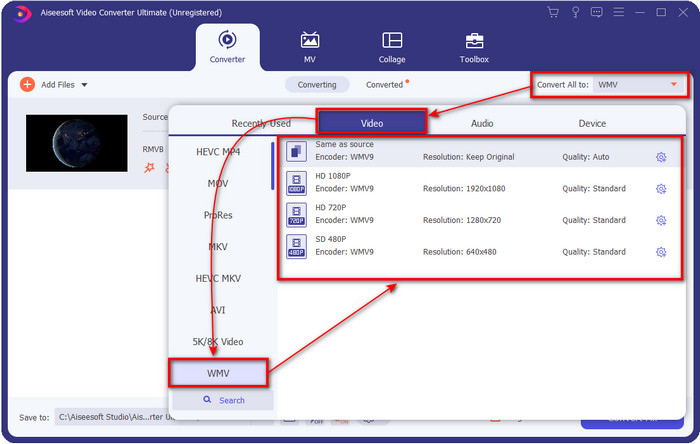
Passaggio 3. Premi il pulsante Convert All to e verrà mostrato un elenco di formati; scegli il formato che desideri o WMV cliccandoci sopra.
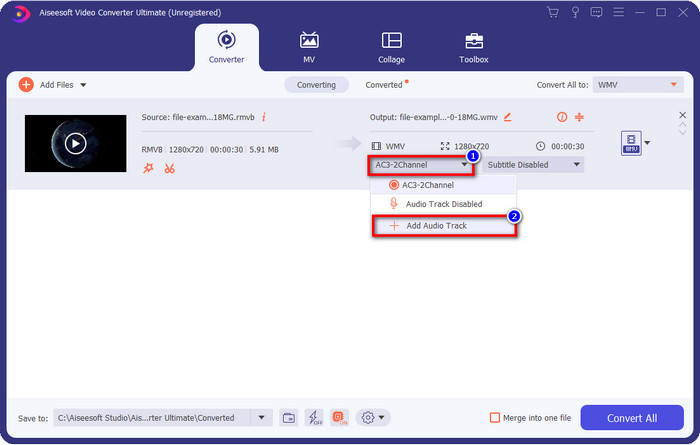
Opzionale: Vuoi aggiungere una traccia audio al tuo video prima di convertire il file? In tal caso, fai clic sul pulsante drop-down, poi su Add Audio Track, sfoglia la traccia audio salvata sul desktop e premi Open.
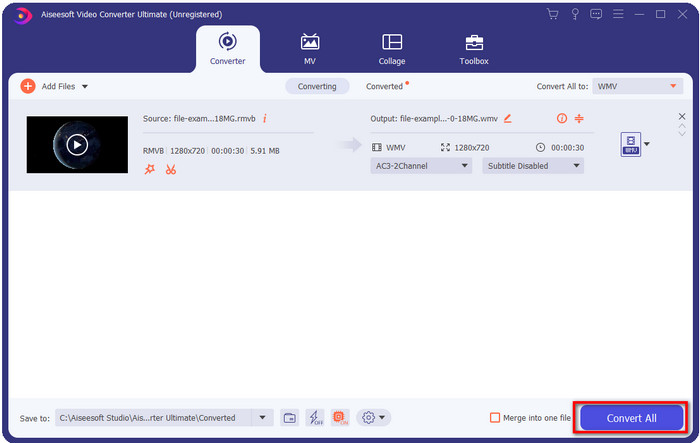
Passaggio 4. Facendo clic sul pulsante Convert All la conversione del file inizierà. Al termine del processo, una cartella con il file convertito verrà mostrata sullo schermo.
Parte 3. Il miglior convertitore Web per convertire RMVB in WMV online
Se stai cercando un potente convertitore da RMVB a WMV online, allora devi usare FVC Free Video Converter Online. Questo convertitore web è senza dubbio la migliore soluzione ai tuoi problemi di conversione. Tuttavia, supporta solo un numero limitato di formati che puoi caricare e selezionare; questo è un problema, giusto? Ma se cerchi una soluzione online, il file RMVB è supportato qui. Inoltre, di seguito trovi l’elenco dei passaggi su come usare questo strumento web.
Passaggi su come convertire i file RMVB in formato WMV con FVC Free Video Converter Online:
Passaggio 1. Clicca su questo link e una nuova scheda si aprirà nel tuo browser.
Scarica la Versione Desktop per convertire i file in batch.
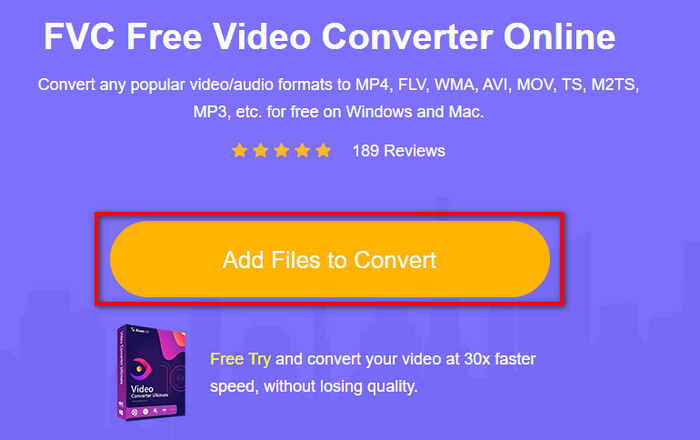
Passaggio 2. Clicca su Add Files to Convert sul sito web e una cartella del desktop apparirà sullo schermo. Seleziona il file RMVB che vuoi convertire e premi Open.
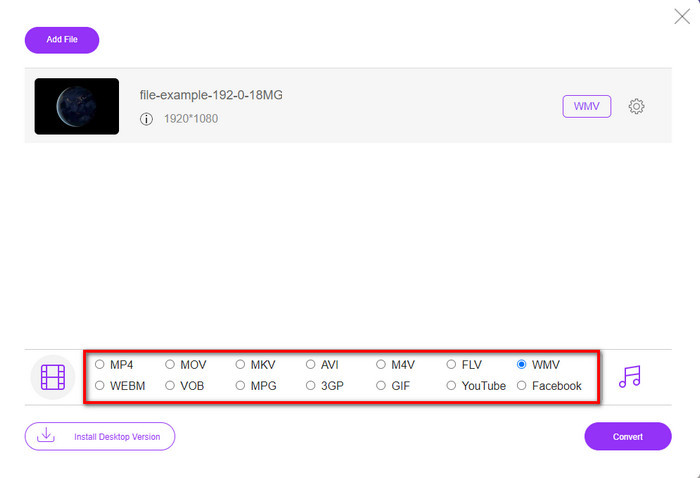
Passaggio 3. Una volta caricato, scegli il formato WMV in basso o qualsiasi altro formato desideri dall’elenco.
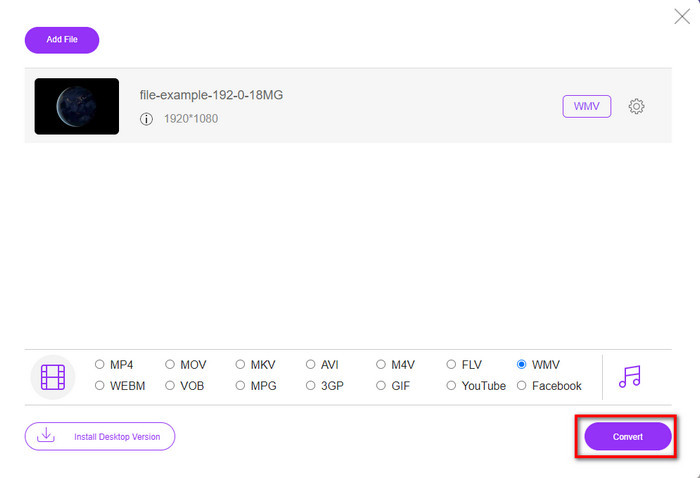
Passaggio 4. Clicca su Convert per avviare il processo di conversione.
RMVB contro WMV
RMVB, una variazione più recente del formato standard Real Media (.RM), è un formato di file video Real Media compresso utilizzando un bitrate variabile. È un formato popolare per film e anime asiatici. I file RMVB sono di dimensioni inferiori e hanno bitrate inferiori ma una qualità migliore.
Prodotto da Microsoft, WMV era uno dei formati video più comuni negli anni 2000. Può essere visto sul Web e riprodotto da vari lettori multimediali su Windows. Ed è anche il formato di file video predefinito di Windows Media Player. Ma è stato recentemente rilevato da altri formati.
Parte 4. Domande frequenti sulla conversione da RMVB a WMV
RMVB e RM sono gli stessi?
Non ci sono differenze significative tra i due contenitori. Le modifiche al nome sono dovute al fatto che il CBR era un vecchio codec reale solo per scopi di streaming. Il nome è cambiato, ma lo scopo del formato non lo è.
Cosa devo fare per riprodurre file RMVB su Mac?
Puoi scaricare un lettore RMVB di terze parti sul tuo Mac per riprodurre il video. Ma se non vuoi scaricare un lettore di terze parti, prendi in considerazione la conversione del file RMVB in MOV. Vuoi sapere come fare? Allora clicca su questo link per scoprire come convertire RMVB in MOV.
La conversione del file RMVB perde la qualità?
La conversione del tuo RMVB non dovrebbe ridurre la qualità del video stesso. Ma la maggior parte del convertitore cambia la qualità perché i pixel di qualità 1080 o anche superiore non sono supportati. Quindi ora, se vuoi convertire i tuoi file senza perdere la qualità, devi utilizzare FVC Video Converter Ultimate. Questo strumento supporta la conversione di file 1080 e anche superiori senza degradare la qualità.
Conclusione
Se vuoi scaricare un convertitore sul tuo desktop e tenerlo installato, oppure preferisci usare uno strumento online, FVC è al tuo fianco. I due convertitori citati sono eccellenti sotto molti aspetti rispetto ad altri convertitori online o offline. Invece di confrontare questi due strumenti con gli altri, confrontiamo i due tra loro. FVC Free Video Converter Online ti aiuterà a risolvere i problemi di conversione. Inoltre, il grande vantaggio di questo strumento è che è pronto all’uso ogni volta che hai una connessione a Internet. Al contrario, FVC Video Converter Ultimate offre un risultato fenomenale che stupirà te e gli altri. Quindi, se vuoi rendere il processo di conversione ancora più interessante, usa questo convertitore “ultimate” e fai ancora di più.
-
 Le 4 migliori app di conversione da RMVB a FLV gratuite su desktop o online
 Questo articolo ti dirà il miglior software di conversione da RMVB a FLV e le app Web in grado di convertire i file RMVB (RealMedia Variable Bitrate) in video FLV.
-
 2 della migliore scelta di convertitore da file RMVB a AVI [online e offline]
 Non sai come convertire RMVB in AVI? Questo articolo si concentra sui convertitori che puoi utilizzare per convertire RMVB in AVI, sia online che offline.
-
 Guida su come convertire RMVB in MP4 su Windows / Mac (3 modi gratuiti)
 Vuoi convertire RMVB in MP4 per una facile riproduzione sul tuo computer o telefono cellulare? Troverai modi semplici per convertire i tuoi file RMVB in MP4 in questa guida.

