


 Video Converter Ultimate
 Screen Recorder
 Riparazione video
Processo di conversione online e offline: da SWF a WMV
SWF is a legacy file format created by Adobe for the Shockwave Flash player. Flash is no longer supported by many browsers, was never supported by iOS devices, and the SWF file format is seldom used these days due to performance and security problems. On the other hand, WMV is a set of video compression codecs created for early internet video streaming and physical media such as HD-DVD and Blu-Ray. Video in this file format is natively viewable on Windows devices, so you may wish to convert SWF files to WMV because Flash players are becoming more unsupported, and you can no longer play SWF files. Hence, we provide you with two options to convert your SWF to WMV.

Parte 1. Come convertire facilmente SWF in WMV su Windows e Mac
Video Converter Ultimate is a multimedia converter that converts practically all major video and audio files to your desired output format. It can convert video files in batches, making it more potent than it seems. It does not stop at converting; it also enables users to modify their videos with the help of helpful editing tools. Furthermore, this video converter supports various formats, including the most widely used nowadays. More significantly, it converts at a faster rate than comparable software. To use this particular software, follow these simple steps:
Step 1: Click the Free Download button to download the .exe file you will need to install the software. Wait for it to finish, open it, and follow the installation process promptly. Click Start Now and launch the software.
Download gratuitoPer Windows 7 o versioni successiveDownload sicuro
Download gratuitoPer MacOS 10.7 o versioni successiveDownload sicuro
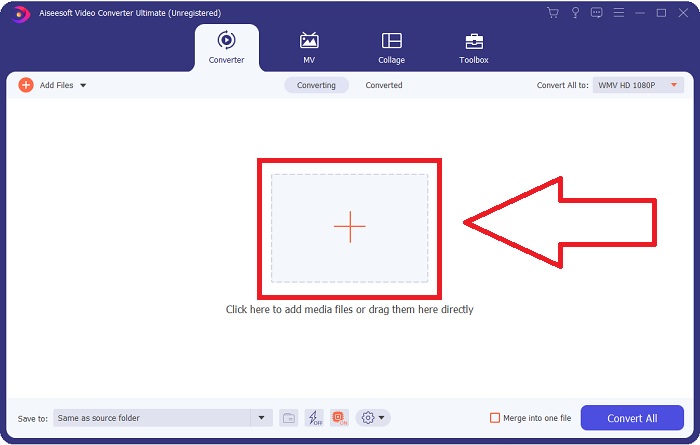
Step 2: Upload the video file you wish to convert by clicking the + button in the middle of the interface. Alternatively, drag the file from your desktop and drop it on the interface, and it will automatically import.
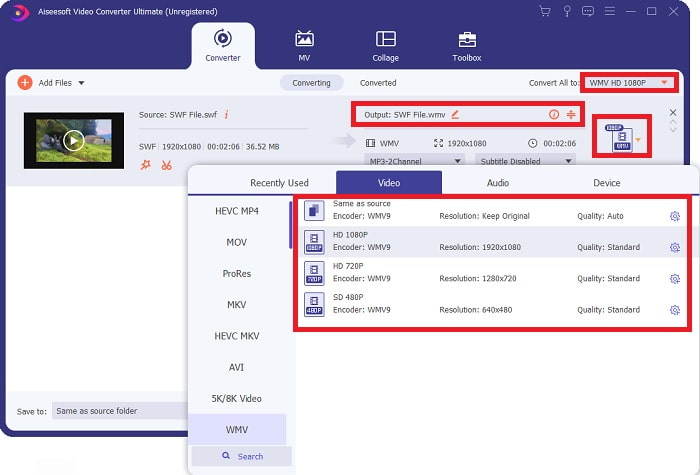
Step 3: Click the drop-down arrow on the right in which you will see the current format your video is in, and it will show you all the available formats to choose. In this case, scroll down and select WMV or just type it in the search bar. All video qualities are also available to choose from on the right panel.
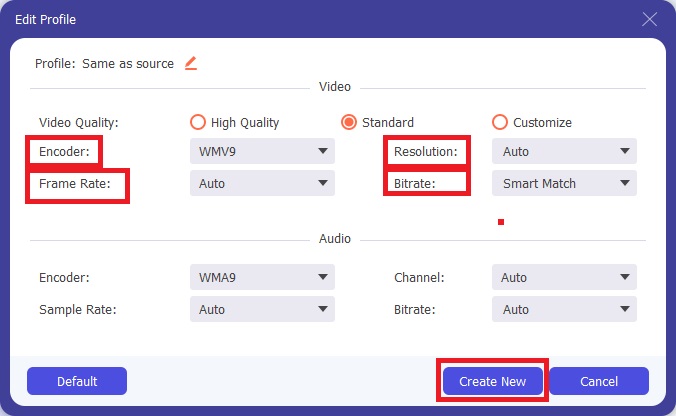
Step 4: To further edit your video, click on the gear icon on the right to show all the handy editing tools. From there, you can make all the necessary adjustments that best suit your needs. Just click the Create New button once you are finished.
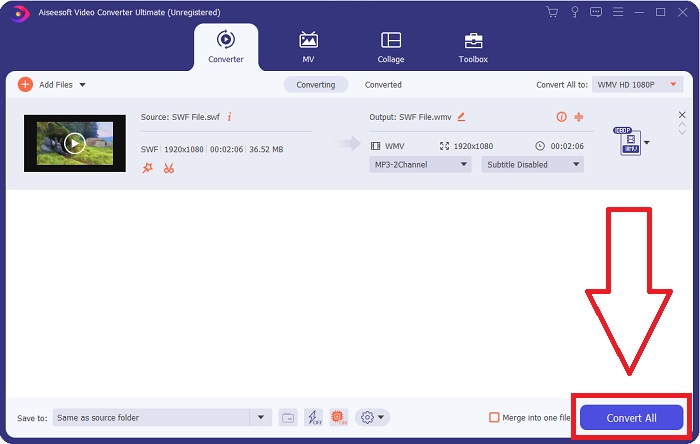
Step 5: Finish the conversion process by finally clicking the Convert All button on the window's bottom right corner and waiting for it to finish.
Parte 2. Un altro suggerimento per convertire SWF in WMV online
FVC Free Video Converter è sempre gratuito e non richiede registrazione. Alcuni convertitori video online gratuiti limitano i tempi di conversione o le dimensioni del file. Se hai utilizzato tutti i tuoi tempi di conversione gratuiti o il tuo file è troppo grande, dovrai acquistare un piano, anche se raramente converti video. Ma FVC Free Video Converter non ha tali restrizioni e può convertire video in qualsiasi momento.
Inoltre, questo servizio non necessita di registrazione per convertire file più grandi, a differenza della maggior parte dei convertitori video online richiede la registrazione per convertire video superiori a 1 GB. Ecco i passaggi che devi seguire per questo fantastico strumento:
Step 1: To go to the website, click this link. Then, download the launcher quickly by clicking the Add Files to Convert button and waiting for it to finish.
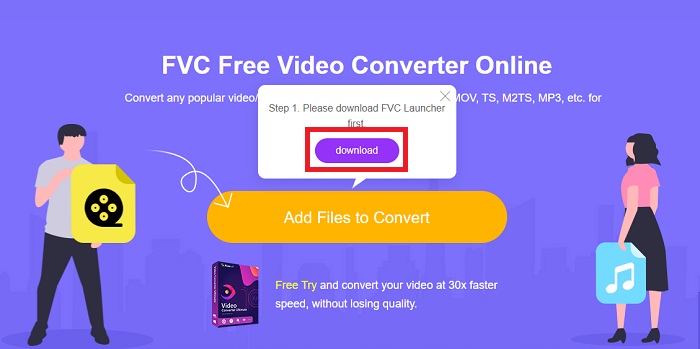
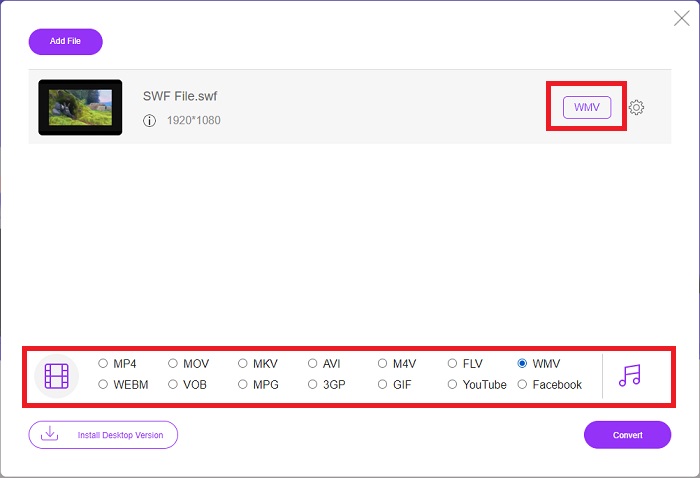
Step 2: Click the said button again, and this time, it will allow you to upload the video file you wish to convert. After that, select WMV among all the available formats.
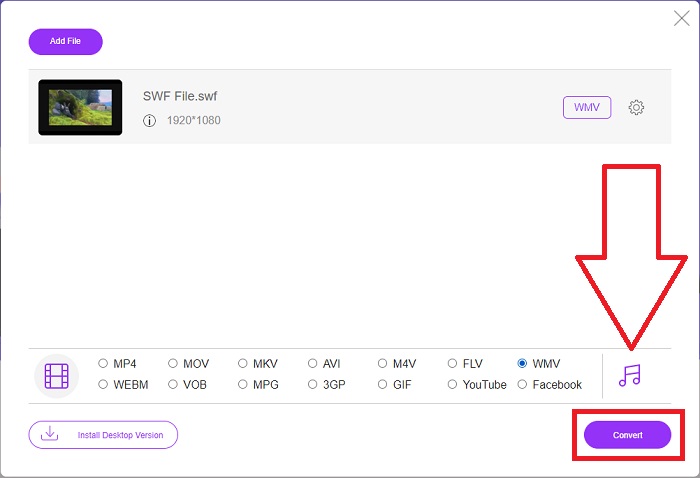
Step 3: You can still use handy editing tools like the software itself. Just click the gear icon, and it will show you all the adjustments you can make. To save the changes made, click OK and once you finish adjusting, click Convert to start the process.
Related:
Parte 3. Ampia conoscenza dei formati SWF e WMV
Se vuoi saperne di più sui due formati, continua a leggere questo articolo. Forniamo tutte le informazioni necessarie ed essenziali di cui potresti aver bisogno come sfondo.
Adobe utilizza il formato file SWF per archiviare film e animazioni vettoriali. Small Web Format è l'abbreviazione; tuttavia, è anche noto come ShockWave Format. Di solito viene utilizzato per trasmettere video tramite Internet, in particolare i giochi basati su browser. Sfortunatamente, Adobe ha dichiarato che avrebbe smesso di supportare il formato Flash entro la fine del 2020 a causa di problemi di prestazioni e sicurezza.
D'altra parte, un file WMV è un file Windows Media Video che può essere compresso utilizzando uno o più formati di compressione video di Microsoft. È un popolare formato di archiviazione video in Windows, motivo per cui è utilizzato da alcune app di terze parti per cose come brevi animazioni. È progettato per funzionare con lettori multimediali Microsoft come Windows Media Player e Film e TV. Per l'utilizzo con i sistemi DRM (Digital Rights Management), i file WMV possono essere crittografati.
| Piccolo formato web | Video Windows Media | |
| Estensione del file | .swf | .wmv |
| Sviluppatore | Adobe Systems Incorporated | Microsoft |
| Programmi di supporto | Adobe Flash Player ◆ Adobe Flash ◆ CC professionale ◆ Giocatore GOM ◆ Adobe Dreamweaver 2020 | Lettore multimediale VLC Lettore MP3 ◆ Lettore multimediale classico ◆ Windows Media Player |
Parte 4. Domande frequenti sulla conversione di SWF e WMV
Qual è l'uso dei file WMV?
I file video WMV sono il formato migliore per la vendita di materiale video online o tramite HD DVD e Blu-ray Disc.
A cosa serve il file SWF?
I file Flash, o file SWF, vengono spesso utilizzati per la distribuzione efficiente di informazioni multimediali su Internet.
È possibile modificare i file SWF?
Adobe Flash è un formato di file utilizzato da Adobe. A differenza di altri file multimediali, il file SWF richiede il plug-in Flash Player per visualizzare un browser web. Inoltre, gli utenti non possono modificare direttamente i file SWF.
Conclusione
FVC Video Converter Ultimate è l'opzione perfetta per te se sei un principiante o semplicemente un dilettante quando si tratta di conversione video. Non converti i formati video molto frequentemente. I suoi vantaggi, come la conversione costante del formato video, la conversione veloce dei file video rispetto a programmi comparabili, il funzionamento semplice, il supporto per vari formati e così via, lo aiutano a diventare il miglior convertitore video in circolazione. Quando si tratta di conversione video, Video Converter Ultimate e il suo equivalente online sono le opzioni più accettabili.
-
 [2 Soluzioni] Come convertire facilmente e gratuitamente file SWF in GIF
 Quando non riesci a esportare il formato GIF tramite il software Flash, puoi provare a salvare i file in formato SWF all'inizio. Quindi puoi imparare 2 semplici modi per convertire file SWF in GIF da questo articolo.
-
 I 5 migliori convertitori gratuiti da SWF a AVI [basati su Web e desktop]
 Vuoi sapere come convertire il tuo file SWF in AVI? Quindi, in caso contrario, leggi questo articolo poiché forniamo una soluzione alla tua conversione del problema SWF.
-
 [Gratuito e facile] Strumenti eccezionali da utilizzare per convertire SWF in MOV
 Hai provato a convertire SWF in MOV perché non puoi't modificare i video? Di chi è la colpa per l'incompatibilità del tuo editor video's? Continua a leggere per la tua soluzione.
