


 Video Converter Ultimate
 Screen Recorder
 Riparazione video
Scopri quali sono i 3 migliori convertitori da FLV a MKV per convertire i tuoi file FLV in MKV
Sei stanco di cercare su Internet il modo migliore per convertire FLV in MKV gratis? Forse è un caso, ma oggi abbiamo trovato i migliori converter FLV che puoi usare; ovviamente abbiamo scelto solo i migliori. Per rendere la tua ricerca molto più semplice, continua a leggere l’articolo qui sotto: imparerai molto su FLV, MKV e sui converter che puoi utilizzare.

Parte 1. 2 modi per convertire gratuitamente FLV in MKV
1° modo. Usa il convertitore online per convertire FLV in MKV
Questo converter online è senza dubbio uno dei grandi transcoder per convertire FLV in MKV online. FVC Free Video Converter Online è un convertitore semplice e facile da capire che puoi usare direttamente sul web. Tuttavia, questo strumento dipende da Internet, il che significa che se non hai una connessione, non potrai usarlo per convertire. Anche se è basato sul web, non presenta annunci sull’interfaccia che possano infastidirti ed è privo di malware. Se vuoi fare un’esperienza diretta con questo strumento, segui i passaggi riportati di seguito.
Passaggio 1. Fai clic su questo link per aprire FVC Free Video Converter Online in una nuova scheda.
Passaggio 2. Premi il pulsante Add Files to Convert per aprire la cartella sul computer che stai usando. Scegli il file FLV che vuoi convertire e premi Open per caricare il file.
Scarica la Versione Desktop per convertire i file in batch.
Passaggio 3. Seleziona il formato MKV dall’elenco dei formati presentato in basso.
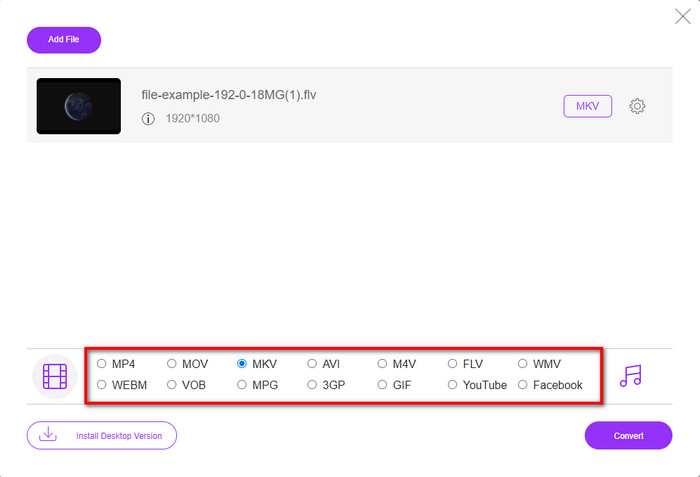
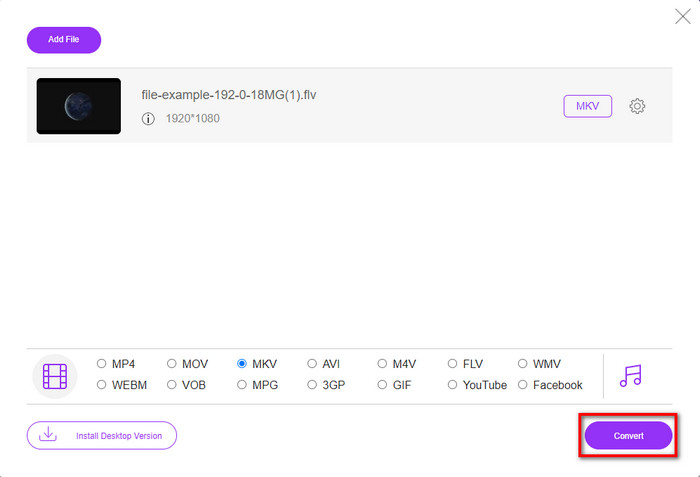
Passaggio 4. Avvia il processo di conversione facendo clic sul pulsante Convert; al termine il file convertito verrà salvato automaticamente sul disco del tuo computer.
2a Via. Usa il convertitore gratuito disponibile per il download su Windows e Mac
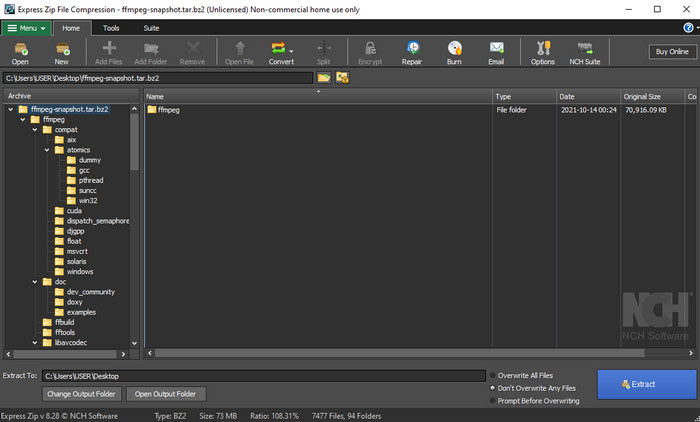
FFmpeg non è il classico convertitore a cui sei abituato. Anche se non è il solito converter, può comunque convertire il tuo file FLV. Ciò che rende questo strumento diverso è che utilizza un’interfaccia basata su CLI, il che significa che, prima di effettuare la conversione, devi impartire comandi tramite codifica, o per dirla semplice, digitando. Se trovi interessante questo converter, leggi i dettagli qui sotto per usare questo FFmpeg da FLV a MKV seguendo i passaggi.
Passaggio 1. Scarica e apri FFmpeg.exe.
Passaggio 2. Apri il prompt dei comandi sul tuo computer.
Passaggio 3. Cerca il file FLV usando il CMD. Poi copia questo codice e incollalo nel prompt dei comandi: ffmpeg -i input.flv -vn -ar 44100 -ac 2 -b:a 192k output.mkv quindi premi Invio sulla tastiera per avviare il processo.
Parte 2. Converti FLV in MKV con il miglior convertitore da FLV a MKV senza perdite
3a via. Usa il convertitore professionale per convertire FLV in WMV
Non sei ancora soddisfatto dei primi due converter presentati sopra? Allora dovresti provare FVC Video Converter Ultimate. Perché? Perché offre un risultato professionale anche se non ti impegni troppo nella conversione. Inoltre, supporta molti più formati per convertire il tuo file FLV in MKV, AVI, MOV, AVI, MP4 e oltre 200 altri formati. Ancora non ti convince? Forse vuoi aggiungere un tocco di magia al tuo video. In tal caso, sei fortunato ad avere questo converter, perché offre funzioni avanzate di editing video che puoi usare. Hai dei dubbi perché pensi che lo strumento possa essere troppo complesso da gestire? Allora segui i passaggi riportati di seguito per provare e imparare a usare questo convertitore da FLV a MKV.
Passaggio 1. Prima di usare questo converter, devi prima scaricarlo facendo clic sul pulsante di download qui sotto. Dopo il download, segui le istruzioni di installazione e avvialo.
Download gratuitoPer Windows 7 o versioni successiveDownload sicuro
Download gratuitoPer MacOS 10.7 o versioni successiveDownload sicuro
Passaggio 2. Per aggiungere il file FLV che vuoi convertire, premi il pulsante +. Sfoglia il file FLV nella cartella che verrà mostrata sull’interfaccia e premi Open per procedere al passaggio successivo.
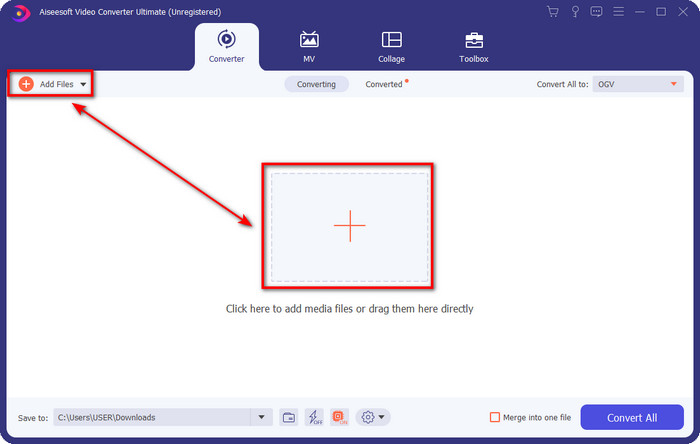
Passaggio 3. Dopo di che, cambiamo il formato in MKV facendo clic sul pulsante drop-down nell’angolo in alto a destra dell’interfaccia utente.
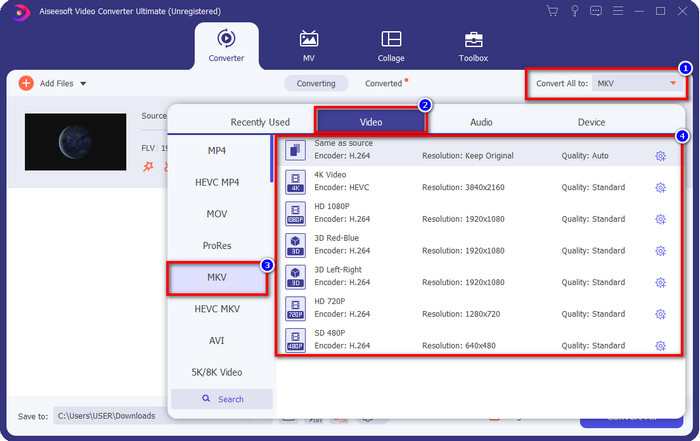
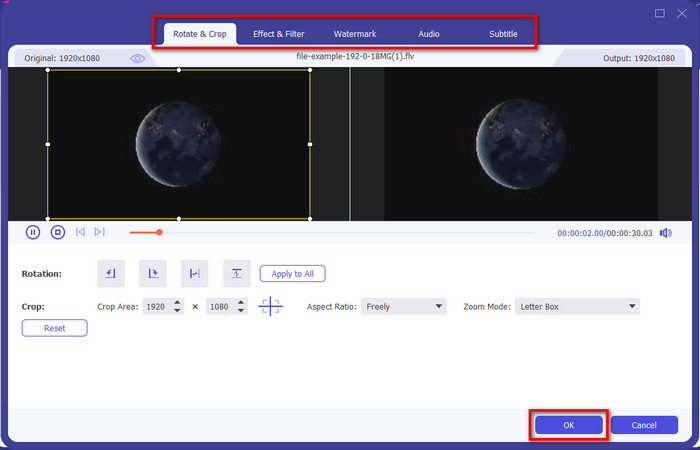
Opzionale. Se hai bisogno di modificare il video, puoi fare clic sul pulsante a forma di bacchetta, se lo desideri. Si aprirà una nuova interfaccia: qui puoi Ruotare, Ritagliare, applicare Effetti, Filtri, Filigrana, modificare Audio e Sottotitoli. Non limitare la tua immaginazione, fai tutto ciò che vuoi e, per applicare tutta la magia che hai creato, fai clic su OK.
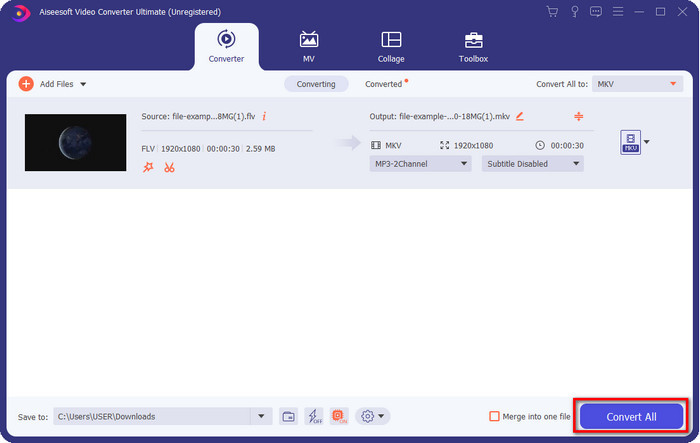
Passaggio 4. Infine, fai clic su Convert All per convertire il FLV in formato MKV. Il processo richiederà meno di un minuto, quindi non dovrai aspettare troppo a lungo. Sullo schermo si aprirà una cartella con il FLV convertito.
Correlato:
Parte 3. Qual è la differenza tra FLV e MKV
FLV e MKV sono noti per essere tra i migliori contenitori che tutti conoscono. Ma prima di ogni altra cosa, confrontiamo e vediamo informazioni più dettagliate sui due formati.
FLV è noto su tutti i siti Web perché è popolare nelle pagine Web, principalmente perché Adobe lo ha creato. Inoltre, .flv riproduce flussi video online perché sono molto più facili da caricare rispetto all'altro formato. Inoltre, questo formato necessita di un plug-in-play prima di poter visualizzare o guardare il video in questo formato oppure di scaricare facilmente Flash Player. Anche se il formato è eccellente, i plug-in-play che utilizza sono già decollati, il che significa che il formato non è la scelta migliore. Tuttavia, molti lettori multimediali supportano ancora questo formato e gli utenti che lo utilizzano ancora.
MKV è noto per essere il formato più simile al futuro disponibile. Questo formato non sarebbe come qualsiasi altro formato in un certo senso se dovessimo confrontarlo. Ad esempio, la struttura costruita in questo formato non è la stessa di MP4 o AVI, ma è diversa. Il design e l'esclusiva memorizzazione dei file multimediali lo rendono più impressionante. Al giorno d'oggi, è difficile scegliere quale formato è obsoleto e uno è l'MKV.
Se scaviamo più nei dettagli, troveremo molti motivi per cui è necessario convertire FLV in MKV. Sebbene i due formati contengano contenuti multimediali, MKV è più potente di FLV. Quindi, se vuoi avere la potenza unica di MKV, devi convertire il tuo file in questo formato.
FLV contro MKV
Adobe Flash Player utilizzava FLV per fornire contenuti video come film e programmi TV. Al giorno d'oggi, Adobe non sviluppa più il lettore e consiglia agli utenti di disinstallarlo per motivi di sicurezza. Tuttavia, puoi ancora utilizzare il formato FLV su molti programmi non Adobe/Macromedia.
Il formato contenitore multimediale Matroska, rilasciato nel 2002, è un formato open source che può includere numerose tracce video, audio, immagini e sottotitoli. Quindi, puoi usarlo per archiviare facilmente brevi video clip, programmi TV e film. È abbastanza popolare per i sottotitoli dei fan degli anime.
Parte 4. Domande frequenti sulla conversione da FLV a MKV
È sicuro convertire FLV in MKV online?
Bene, la conversione del formato dovrebbe essere sicura se usi uno strumento web. Tuttavia, non tutti i convertitori online sono sicuri per convertire il tuo formato di file. Poiché ci sono alcune tendenze, ci saranno molti errori imprevisti quando si utilizza il convertitore sbagliato. Ad esempio, la perdita di qualità è un problema diffuso, virus durante il download del file dopo la conversione, più annunci pop-up, malware infettivo e molti altri. Quindi, se vuoi avere un processo di conversione online sicuro, devi invece utilizzare FVC Free Video Converter Online.
La conversione di FLV richiederà tempo?
Il processo di conversione dipenderà da molti fattori e uno di questi è lo strumento che stai utilizzando e la dimensione del file. Se hai un file FLV di grandi dimensioni, devi utilizzare FVC Video Converter Ultimate, soprattutto di fretta. Poiché questo strumento fornisce un processo alla velocità della luce, non avrai bisogno di una connessione Internet per usarlo. E ora, se stai cercando un convertitore in grado di elaborare il tuo formato più velocemente, allora lo strumento definitivo è la scelta.
Perché non riesco ad aprire il mio file FLV?
Ci sono diversi motivi per cui non puoi aprire i tuoi file FLV. Prendi nota; questo seguente dettaglio è uno dei centesimo motivo per cui non puoi aprire il file FLV. Prima di tutto, non puoi aprire un file FLV se il file è rotto o contiene un virus. In secondo luogo, il problema più comune è il file video non supportato sull'app che stai utilizzando. Terzo, se scarichi un file FLV su Internet, ci sarà un caso in cui il file perde alcune informazioni vitali per riprodurlo. Sebbene questo sia un problema, possiamo comunque aiutarlo convertendo il tuo FLV in un altro formato. Ma ricorda, non puoi ripristinare il file FLV cambiando il formato se è danneggiato o incompleto.
Conclusione
Abbiamo imparato ciò che dobbiamo sapere per convertire FLV in MKV in diversi modi. Gli strumenti sopra sono ottimi da usare se vogliamo convertire il formato in una nuova versione. Ora sta a te scegliere quale strumento ritieni ti si addica di più per trasformare il tuo formato. Qualunque dei tre strumenti sopra ti garantirà il successo, ma se vuoi un risultato professionale e tirare fuori il meglio dal tuo file video, dovresti scegliere FVC Video Converter Ultimate. Non servono spiegazioni, perché questo strumento colmerà tutte le tue esigenze.
-
 3 soluzioni su come convertire FLV in PSP senza perdita di dati
 Come convertire FLV in PSP? Qui troverai la guida passo passo per convertire i video Flash in formati supportati da PSP (WMV, MP4, AVI, FLV, ecc.) su Windows e Mac.
-
 2 metodi per convertire FLV in audio WMA [gratuito e online]
 Vuoi estrarre l'audio WMA da video FLV? Ecco 2 estrattori audio WMA gratuiti per convertire FLV (Flash Video) in WMA (Windows Media Audio) con velocità di conversione elevata su Mac OS X e Windows 10/8/7.
-
 [Risolto] Come convertire gratuitamente video FLV in file GIF animati
 Se desideri creare GIF dai segmenti video FLV per un migliore invio, puoi saperne di più su come convertire facilmente i video FLV in file GIF da questo articolo.

