


 Video Converter Ultimate
 Screen Recorder
 Riparazione video
[Recensione completa] 5 taglierine MP3 più recenti disponibili su Windows/Mac/Online
Spesso desideriamo tagliare l’audio che ascoltiamo e impostarlo come suoneria, mettendo in evidenza la parte essenziale oppure eliminando i dettagli sonori superflui. Sebbene esistano diversi cutter che puoi usare su tutte le piattaforme, alcuni non sono comunque affidabili. Perciò oggi ti presentiamo i cutter che abbiamo trovato sul mercato e di cui ti puoi fidare, perché abbiamo provato personalmente tutti questi strumenti per assicurarci che fossero privi di malware e affidabili. Prima di selezionarli abbiamo seguito standard molto rigorosi, pensando al pubblico che ha bisogno di un cutter affidabile. Per permetterti di navigare in rete a tutta velocità, qui sotto presentiamo i cinque MP3 cutter che abbiamo trovato pronti a svolgere il compito di tagliare qualsiasi formato audio.

Parte 1. 2 Software di taglio MP3 offline Windows e Mac
1. Video Converter Ultimate: il miglior cutter MP3 [fortemente consigliato]
Il miglior audio MP3 cutter in questa lista è Video Converter Ultimate, che consente agli utenti di tagliare qualsiasi audio senza sforzo. Con l’aiuto di questo strumento “ultimate” puoi rifilare il suono per rimuovere le parti indesiderate, unire più file audio tagliati in un unico file e potenziare l’audio se ti sembra che il volume sia un po’ basso. Inoltre, questo software offre un processo ultra‑rapido preservando al contempo la qualità originale dei suoni.
A differenza di qualsiasi taglierina, questo strumento supporta un ampio spettro di formati, non solo MP3 ma anche FLAC, M4R, M4A, OGG, MKA, WAV, WMA e altri, e in effetti il tuo file audio è supportato qui per essere tagliato. Forse non sai come tagliare il tuo file audio e usarlo per le tue esigenze in questo momento. Oggi è il tuo giorno fortunato perché ti insegneremo come utilizzare gratuitamente il cutter MP3 e il creatore di suonerie seguendo il tutorial qui sotto.
Passaggio 1. Scarica l’audio cutter sul tuo desktop cliccando il pulsante di download qui sotto. Scegli se stai usando Windows o Mac, installa rapidamente il software e avvialo. Ricorda: dovrai familiarizzare con l’interfaccia dello strumento per poter seguire con facilità i passaggi successivi.
Download gratuitoPer Windows 7 o versioni successiveDownload sicuro
Download gratuitoPer MacOS 10.7 o versioni successiveDownload sicuro
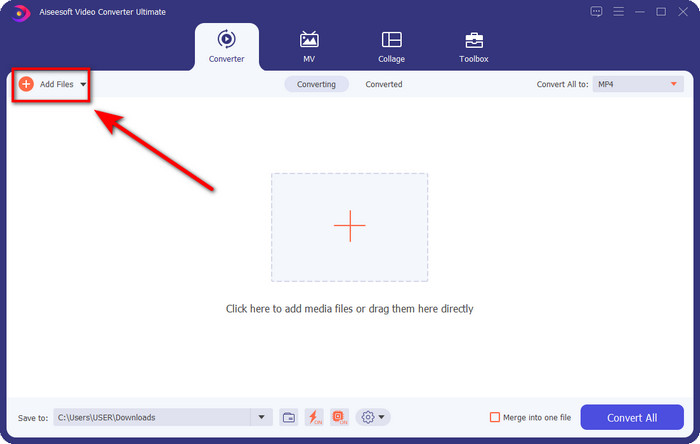
Passaggio 2. Trascina il file audio che vuoi tagliare sull’interfaccia, oppure clicca su Add Files e individua l’audio nella cartella del computer che verrà mostrata. Premi Open per procedere al passaggio successivo.
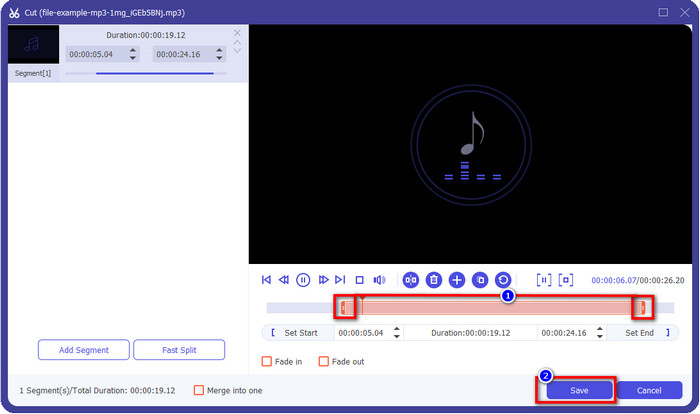
Passaggio 3. Dopo aver inserito il file audio, è il momento di cliccare il pulsante a forma di forbici. Trascina i marcatori di inizio e fine alla lunghezza desiderata dell’audio che vuoi ottenere. Ricorda che l’audio evidenziato tra i marcatori di inizio e fine è l’unica parte che verrà mantenuta. Quindi premi Save per tagliare l’audio.
Opzionale. Hai bisogno di potenziare il tuo audio? In tal caso, clicca il pulsante a forma di bacchetta, regola il cursore del volume trascinandolo verso l’alto e premi OK per salvare.
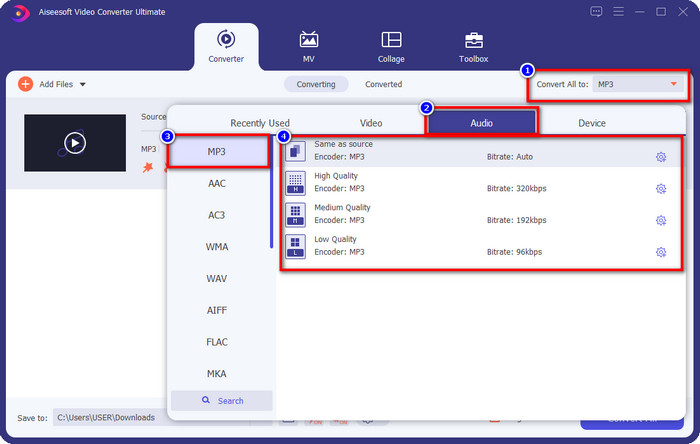
Passaggio 4. Vai su Convert All to, Audio e imposta il formato su MP3. Anche se non stai convertendo in un altro tipo di file, assicurati che il nome sotto Convert All to sia MP3 e non un altro formato, per evitare di cambiare il file in un formato diverso.
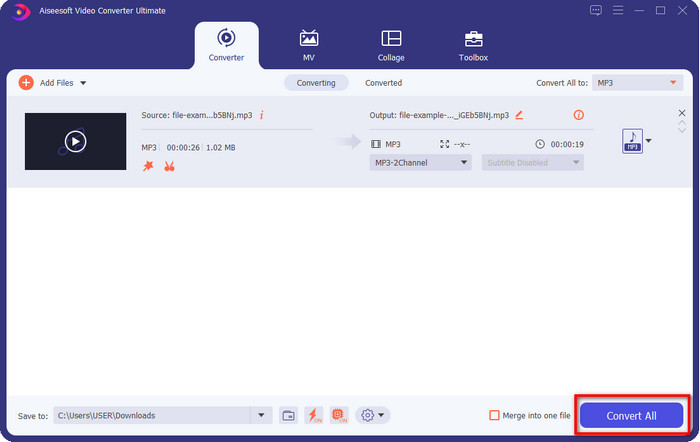
Passaggio 5. Cliccando su Convert All inizierà il salvataggio dell’audio tagliato. Ora hai il tuo audio tagliato con il miglior MP3 cutter gratuito, in modo semplicissimo.
Professionisti
- Può tagliare l'audio il più rapidamente possibile ed elaborarlo in meno di un secondo.
- Sono disponibili funzioni avanzate per aumentare la potenza del volume.
- Supporta tutti i sistemi operativi come Windows o Mac.
- Unisci più file audio è possibile con la fusione audio di questo strumento.
Contro
- È necessario acquistare lo strumento.
2. Audacia
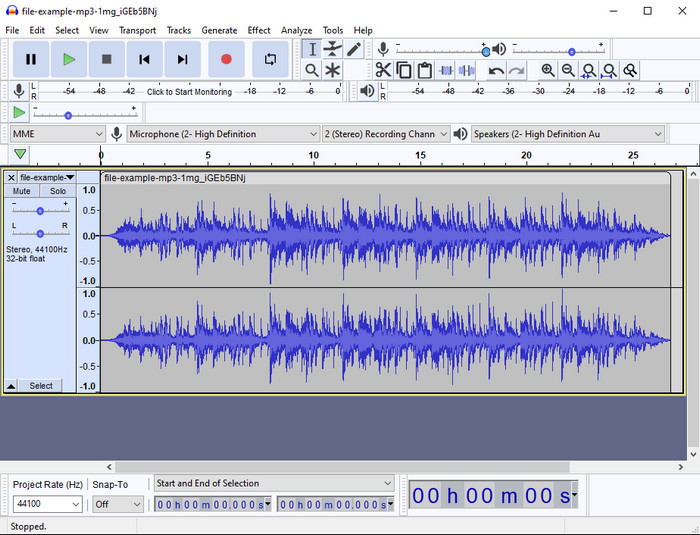
Audacity ha offerto per anni funzioni di editing professionali per l’audio. Questa app è gratuita da scaricare e permette agli utenti di effettuare mixaggi multitraccia. È nota per essere usata dai podcaster per registrare e modificare i podcast con facilità. Tuttavia, alcune delle sue funzioni sono difficili da capire, soprattutto se non sei abituato a utilizzare software specialistici di questo tipo.
Sebbene tu possa ancora imparare a usarlo, ci vorrà del tempo per sfruttare tutto il potenziale di questo rifinitore audio MP3 e, per tagliare l'audio, è giusto dire che taglia istantaneamente e senza sforzo se ne hai bisogno.
Professionisti
- Scaricabile gratuitamente in tutti i programmi come Windows e Mac.
- Sono disponibili editor audio avanzati e professionali per rendere il tuo audio eccezionale.
- È meglio per la registrazione di podcast e altro.
Contro
- Molti concorrenti forniscono un'interfaccia utente intuitiva.
- Non è la scelta migliore per i principianti per un risultato immediato di taglio e altri scopi di editing.
- Alcuni rapporti mostrano che i tuoi dati vengono raccolti se utilizzi questo strumento, ma non ci sono ancora prove evidenti.
Parte 2. 3 Taglierine MP3 online accessibili sul Web
1. mp3cut.net
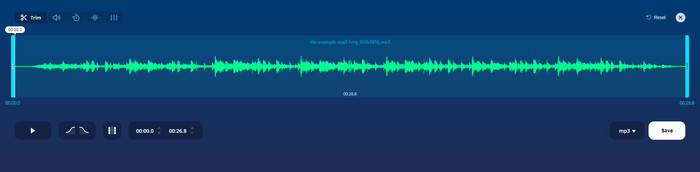
Potresti usare mp3cut.net se hai bisogno di un cutter MP3 online per il lavoro. Dopo aver caricato il file in questo cutter online, ora puoi rimuovere il suono che desideri disegnare sul tuo file audio. Inoltre, lo strumento ha anche alcune funzionalità di modifica minori per modificare la velocità e il tono dell'audio, se necessario.
Sebbene abbia questo tipo di capacità, lo strumento si arresta in modo anomalo per la maggior parte del tempo e non può riprodurre l'audio da ascoltare se lo tagli correttamente. Quindi, per usarlo di nuovo, dovrai aggiornare il tuo browser e ripetere di nuovo la regolazione che hai fatto.
Professionisti
- Facile da usare e accessibile tramite Internet.
- Sul punto, funzionalità per aiutarti a tagliare l'audio.
- Sono disponibili funzionalità di modifica di base.
Contro
- Ha annunci sull'interfaccia web.
- A volte si arresta in modo anomalo e deve essere ricaricato di nuovo per utilizzarlo.
2. audiotrimmer.com
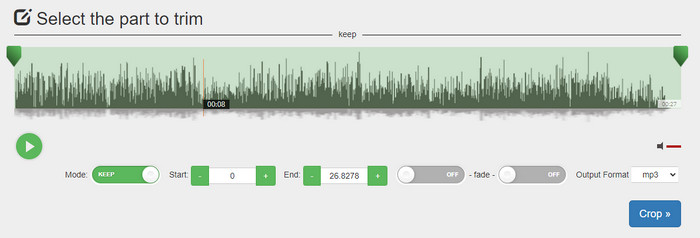
Un altro mp3 cutter gratuito online è audiotrimmer.com. Questo strumento offre funzioni di taglio semplici e facili da comprendere; tutte le sue funzioni sono davvero essenziali e mirate. Con esso puoi scegliere se mantenere una parte dell’audio o rimuoverla. Inoltre, dispone di effetto fade‑in e fade‑out, come gli altri trimmer qui citati. Tuttavia, quando abbiamo provato a usare il fade‑in e il fade‑out, non hanno funzionato: non è stato aggiunto alcun effetto al nostro audio. Ma se ti interessa solo un taglio rapido e semplice, questo strumento web è assolutamente da provare.
Professionisti
- Gratuito e disponibile in tutti i browser per l'accesso.
- Facile da usare per tagliare l'audio.
- Ha effetti di dissolvenza in entrata e in uscita.
Contro
- La dissolvenza in entrata e in uscita non funziona bene.
- Ci sono molti annunci fastidiosi se accedi ad essi. Quindi, fai attenzione a non cliccarli.
3. Clideo

Uno dei migliori MP3 cutter e joiner online che puoi usare è Clideo. La maggior parte degli utenti apprezza e preferisce questo strumento per le sue capacità di editing. Inoltre, puoi anche aggiungere il fade‑in e il fade‑out al tuo file audio, se necessario. Ma dopo aver esportato il file e averlo riascoltato, non abbiamo trovato alcun fade‑in o fade‑out aggiunto al nostro audio. Abbiamo riscontrato un piccolo problema con questo strumento: il caricamento e il download dei file. A differenza del primo strumento citato, il caricamento dell’audio nel suo cutter richiede tempo e a volte non siamo riusciti a caricare il file audio per motivi sconosciuti.
Sebbene incontriamo alcuni problemi, è ancora il miglior cutter online ed è anche sicuro da usare.
Professionisti
- Il miglior taglierino online online.
- Interfaccia utente professionale.
- Facile da usare.
Contro
- Il processo di caricamento e scaricamento richiederà troppo tempo.
- La dissolvenza in entrata e in uscita funziona ma non bene.
Parte 3. Domande frequenti sui Cutter MP3
Qual è il miglior rifinitore MP3 su Mac?
FVC Video Converter Ultimate è disponibile anche su Mac. Quindi, se hai bisogno di tagliare il tuo audio su Mac, ti conviene scaricare questo strumento “ultimate” per gestire correttamente il tuo file audio. Lo strumento ultimate non è solo ottimo per tagliare l’audio, ma ti permette anche di migliorarlo potenziandone il volume. Inoltre, se ti serve aiuto per convertire, unire, sincronizzare l’audio, ecc., lo strumento ultimate è la soluzione ideale. Se vuoi saperne di più su questo strumento, ti conviene leggere i dettagli riportati sopra.
Il taglio dell'audio ne riduce le dimensioni?
La dimensione del file dell'audio si riduce dopo averlo tagliato. Quando abbiamo confrontato il file audio originale con il file tagliato, abbiamo notato alcuni cambiamenti di altitudine. Quindi, significa che più corto è il file audio, minore è la sua dimensione, ma se il tuo file audio è molto lungo, aspettati che anche la dimensione sia significativa.
Posso usare Audacity per unire più audio?
Sì, certo: Audacity supporta la fusione di più tracce audio in un unico file. Tuttavia, è complicato, soprattutto se non hai un tutorial adeguato da seguire. Quindi, se hai bisogno di unire l’audio con Audacity, puoi cliccare su questo link e imparare come fare.
Conclusione
I MP3 cutter presentati qui hanno già superato gli standard che abbiamo fissato per offrirti solo i migliori strumenti di taglio. Questo articolo mostra quanto sia importante scegliere il cutter giusto e adatto alle tue esigenze. Anche se i trimmer qui citati svolgono la stessa funzione, FVC Video Converter Ultimate offre un taglio audio molto più efficiente. Secondo la nostra ricerca, questo strumento ultimate supera tutti gli standard che abbiamo definito. Quindi, se vuoi avere a disposizione un cutter di alto livello, questa è la scelta migliore tra tutti i cutter disponibili sul mercato. Troppo bello per essere vero? Allora ti conviene scaricare lo strumento e metterlo alla prova personalmente.
-
 Come tagliare e unire brani online - 4 modi migliori che dovresti sapere
 Quando vuoi tagliare e unire brani online per creare un brano musicale, puoi saperne di più sui 4 migliori strumenti online per ritagliare i brani e combinare i file dall'articolo.
-
 Scopri il miglior rifinitore MP4 con procedura e informazioni
 Vuoi imparare a tagliare video come i vlogger che guardi? Quindi continua a leggere questo post per sapere quali trimmer MP4 puoi utilizzare.
-
 Lettore MP3 da scaricare – I 10 migliori lettori musicali MP3 gratuiti del 2025
 Qual è il miglior lettore musicale MP3? Come metto la musica su un lettore MP3? Come scaricare il lettore musicale MP3? Questo post offre una recensione dettagliata dei 10 migliori lettori MP3 gratuiti per PC Windows e Mac.
