


 Video Converter Ultimate
 Screen Recorder
 Riparazione video
Semplici modi per convertire VOB in file WMV su Windows e Mac
Al giorno d’oggi, su Internet sono emersi moltissimi formati di file. Uno dei formati più utilizzati è il VOB, che di solito viene impiegato nei DVD. Tuttavia, i file VOB non sono più molto usati ai giorni nostri e molti dispositivi non supportano questo tipo di formato. Pertanto, hai bisogno di un file compatibile con molti dispositivi, ovvero un file WMV. Il file WMV è una proprietà con licenza di Windows ed è ampiamente supportato da questo sistema. Inoltre, in questo articolo abbiamo elencato diversi metodi per permetterti di convertire file VOB in WMV con facilità.

Parte 1. Converti VOB in file WMV su Windows e Mac
Dal momento che i file VOB non sono più così accessibili, ti serve un formato ampiamente supportato da dispositivi e sistemi diversi. Il sistema Windows utilizza ampiamente un formato molto noto: il file WMV. Per questo ti consigliamo questo convertitore definitivo che può convertire facilmente il tuo file VOB in file WMV.
FVC Video Converter Ultimate è uno dei migliori convertitori da VOB a WMV. Questa applicazione è un convertitore di file che ti consente di trasformare il tuo file VOB in formato WMV. FVC Video Converter Ultimate dispone di funzioni avanzate che ti permettono di modificare il file, migliorarne la qualità e perfino comprimerlo senza rovinarla. Inoltre, è adatto ai principianti perché ha un’interfaccia intuitiva, così non avrai difficoltà a convertire i file. Questo convertitore ti permette di trasformare i tuoi file VOB in file WMV sia su Windows che su Mac.
Professionisti
- Ti consente di convertire vari file, inclusi VOB, WMV, MP4, MOV, AVI e altro.
- Puoi modificare, migliorare e comprimere il tuo video per migliorarlo sorprendentemente.
- Disponibile su piattaforme come Windows e Mac.
- Ha un'interfaccia facile da usare.
Contro
- Devi acquistarlo prima di poterlo utilizzare.
Ecco i passaggi per convertire un file VOB in WMV con FVC Video Converter Ultimate:
Passaggio 1. Per scaricare questo convertitore, fai clic sul pulsante di download qui sotto. Vedrai due pulsanti tra cui scegliere. Clicca sul pulsante Windows se utilizzi Windows. Clicca sul pulsante macOS se utilizzi un Mac. Segui la procedura e poi avvia l’applicazione.
Download gratuitoPer Windows 7 o versioni successiveDownload sicuro
Download gratuitoPer MacOS 10.7 o versioni successiveDownload sicuro
Passaggio 2. Dopo aver aperto l’applicazione, fai clic sul pulsante Add Files per caricare il tuo file VOB nel convertitore. Si aprirà una nuova scheda in cui potrai selezionare il tuo file VOB. Poi procedi al passaggio successivo.
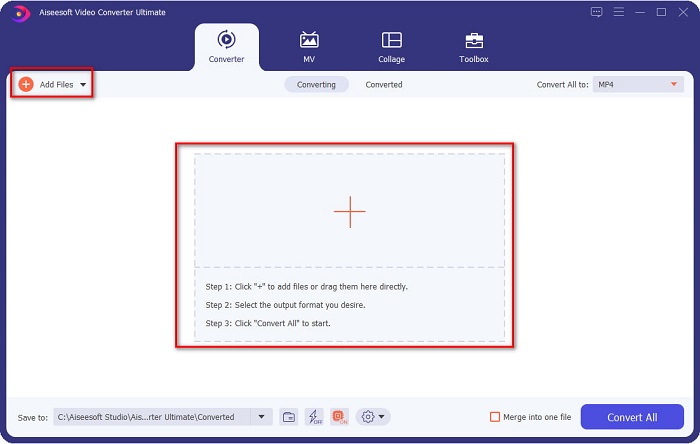
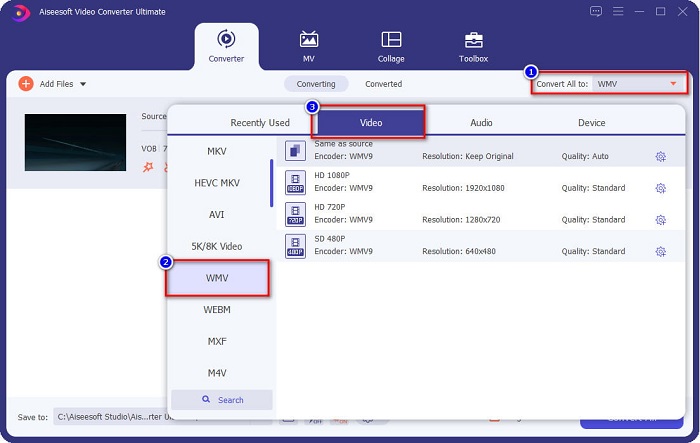
Passaggio 3. Per convertire il tuo file VOB in un file WMV, fai clic sul pulsante Convert All to situato nell’angolo in alto a destra dello schermo. Comparirà un elenco di formati; seleziona il formato WMV per convertire il file VOB nel formato WMV.
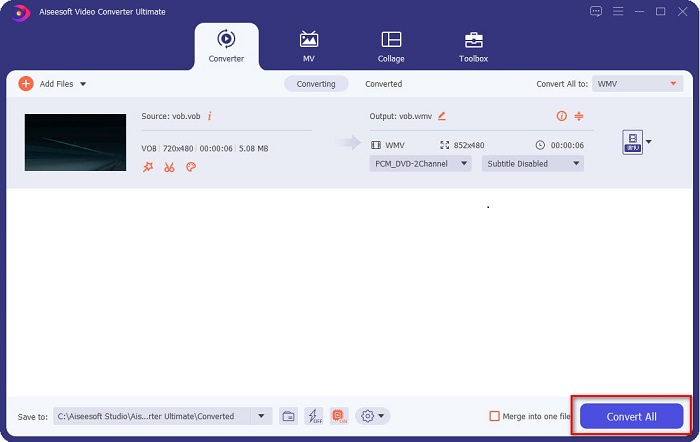
Passaggio 4. Dopo aver selezionato il formato WMV, fai clic su Convert All per convertire il tuo VOB nel formato WMV. Attendi qualche minuto, e il gioco è fatto! Seguendo questi semplici passaggi, il tuo file VOB sarà stato convertito in un file WMV.
Parte 2. Converti VOB in WMV utilizzando il convertitore gratuito VOB in WMV online
Se alcuni di voi stanno cercando un convertitore gratuito, abbiamo la soluzione! Convertio può convertire file VOB in WMV online e gratuitamente. Questo convertitore ti consente di trasformare file di grandi dimensioni direttamente online. Inoltre, supporta una grande varietà di formati video e audio che puoi convertire via web, tra cui VOB, WMV, MP4, FLV, MP3, ASF e molti altri. In più, non è necessario scaricare nulla perché si tratta di un convertitore online. Tuttavia, questo strumento dipende da Internet, ovvero la velocità di conversione del file dipende dalla rapidità della tua connessione. Nonostante ciò, offre comunque prestazioni molto valide ed è utilizzato da moltissime persone.
Ecco i passaggi per convertire VOB in WMV online:
Passaggio 1. Cerca “Convertio” nel tuo browser per essere reindirizzato alla loro pagina web.
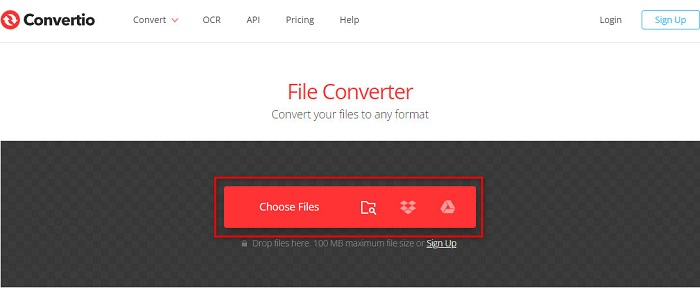
Passaggio 2. Fai clic sul pulsante Choose Files; verrai indirizzato ai file presenti sul tuo computer. Seleziona il tuo file VOB e il file apparirà nell’elenco.
Passaggio 3. Dopo aver scelto il tuo file VOB, fai clic sul pulsante drop-down accanto ai tre puntini allineati per selezionare il tipo di file in cui convertire il tuo VOB.
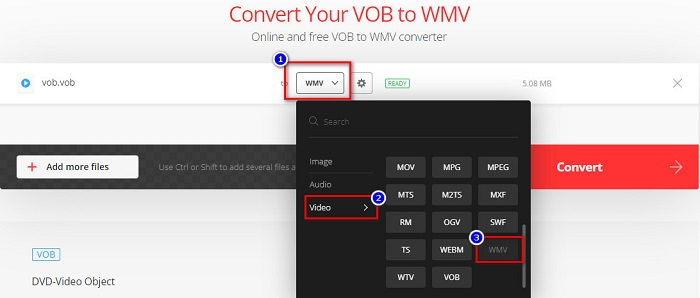
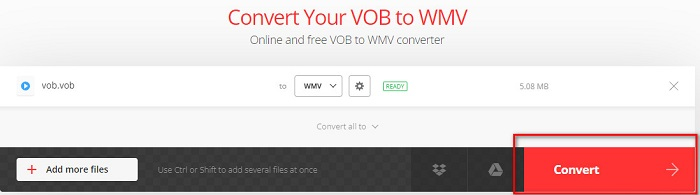
Passaggio 4. Infine, fai clic sul pulsante Convert per convertire il tuo file VOB nel formato WMV. La velocità di conversione dipende dalla rapidità della tua connessione Internet. Di conseguenza, potrebbe richiedere più tempo, trattandosi di un convertitore online.
Parte 3. Perché è necessario convertire VOB in WMV
Perché devi convertire il tuo file VOB in file WMV? In primo luogo, dobbiamo distinguere le loro differenze.
I file VOB o Video Object sono file utilizzati dai DVD. Contengono i dati, inclusi video, audio e sottotitoli. I file VOB, proprio come i DVD, dispongono di restrizioni o protezioni anticopia per evitare che vengano duplicati direttamente. Inoltre, i file VOB sono spesso crittografati per impedirne la copia. Al contrario, il formato WMV o Windows Media Video è stato sviluppato da Windows per lo streaming di video online. A differenza del formato VOB, il WMV è più accessibile grazie alla possibilità di utilizzare molti encoder. Questo tipo di file di solito viene riprodotto con software Windows. Inoltre, questo formato utilizza una compressione che fa sì che la qualità video non venga ridotta o danneggiata durante la modifica o la riproduzione sui lettori multimediali. Pertanto, se devi scegliere tra questi due formati, ti consigliamo il file WMV.
Parte 4. Domande frequenti sulla conversione di VOB in WMV
Se converto VOB in WMV, la qualità sarà ridotta?
No. Esistono molti strumenti di conversione di file che, quando si convertono i file, non ne riducono la qualità, proprio come FVC Video Converter Ultimate.
Posso convertire un file VOB in formato file MP4?
Sì. Puoi convertire i file VOB in MP4 usando gli strumenti online e offline che abbiamo consigliato sopra. Puoi consultare questo articolo VOB to MP4 – 3 Ways to Convert VOB Files to MP4 for Free in Bulk per maggiori informazioni sulla conversione dei file VOB in MP4.
Puoi riprodurre file VOB su Windows Media Player?
La riproduzione di questo tipo di file in Windows Media Player può causare problemi se i codec necessari non sono supportati. In alternativa, puoi leggere Best VOB Players per trovare altri lettori compatibili e goderti i tuoi file VOB.
Conclusione
Esistono molti modi per convertire un file VOB in un file WMV, ma sono pochi gli strumenti in grado di migliorare davvero il tuo video. Usare convertitori online ti fa risparmiare il tempo del download, ma la velocità di conversione dipende comunque dalla tua connessione Internet. Per questo consigliamo di utilizzare FVC Video Converter Ultimate. Non è difficile da scaricare e soddisferà sicuramente le tue aspettative.
-
 Che cos'è il file VOB e come trasformare un file VOB in GIF gratuitamente?
 Vuoi saperne di più sui file VOB e su come condividerli dopo essere stati copiati? o Perché hai bisogno di convertire VOB in GIF? Allora leggi attentamente questo articolo.
-
 3 utili convertitori disponibili per modificare il file VOB in formato AVI [2021]
 Hai un problema perché i file VOB non sono supportati per essere riprodotti? Quindi proviamo a convertirlo con i 3 modi presentati di seguito con passaggi dettagliati su ciascun convertitore.
-
 Metodi eccellenti da utilizzare per convertire VOB in MOV
 I download di video online sono convenienti, ma cosa succede se il video è in formato VOB e il tuo lettore'non lo supporta? Questo post ti insegnerà come convertire VOB in MOV.
