


 Video Converter Ultimate
 Screen Recorder
 Riparazione video
 Download sicuro
Registratori schermo Ultimate e gratuiti per Windows, Mac, iPhone e Android
I registratori dello schermo stanno diventando sempre più diffusi perché molte persone vogliono registrare le proprie attività sul PC. Tuttavia, trovare un registratore affidabile è piuttosto difficile, soprattutto perché alcuni programmi contengono malware e altri servono solo a scopi pubblicitari. Per questo motivo abbiamo provato alcuni dei migliori registratori dello schermo online, offline e persino applicazioni mobili, con le migliori funzionalità e completamente gratuiti. Continua a leggere questo articolo fino alla fine per scoprire i migliori registratori dello schermo gratuiti adatti a te.

Parte 1. 3 I migliori registratori di schermo online
Se desideri avere un registratore dello schermo che non è necessario scaricare, potresti cercare un registratore dello schermo online. Stai certo che i registratori dello schermo online ti forniranno comodità. Quindi, in questa parte, conoscerai i tre migliori registratori di schermo online gratuiti.
Registratore dello schermo gratuito FVC online
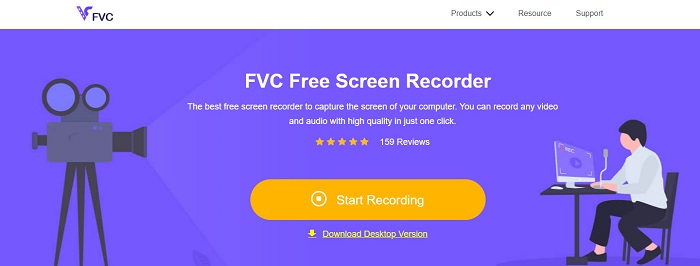
Il miglior registratore dello schermo online che troverai su Internet è FVC Free Screen Recorder Online. Questo registratore online può registrare e acquisire l’attività del tuo computer. Può registrare lo schermo con video di alta qualità. E se vuoi registrare solo una certa area dello schermo, dispone di una funzione che ti permette di regolare l’area di registrazione.
Inoltre, ha un'interfaccia utente molto semplice, che lo rende uno strumento adatto ai principianti. Inoltre, ha anche impostazioni avanzate in cui puoi regolare i tasti di scelta rapida, scegliere il formato di output video e regolare la frequenza dei fotogrammi dell'output video.
Quindi, se vuoi usare questo convertitore online, segui la semplice guida qui sotto.
Passaggio 1. Nel browser che utilizzi, cerca FVC Free Screen Recorder Online oppure fai direttamente clic su questo link per andare alla loro pagina web. Quindi avvia l’applicazione.
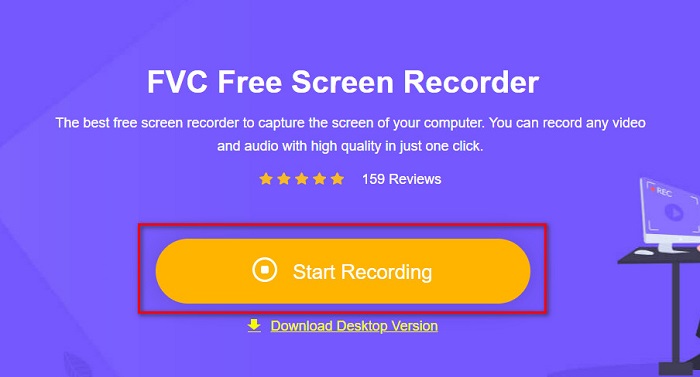
Passaggio 2. Fai clic sul pulsante Start Recording nell’interfaccia principale del software per avviare la registrazione dello schermo. A quel punto apparirà il riquadro regolabile.
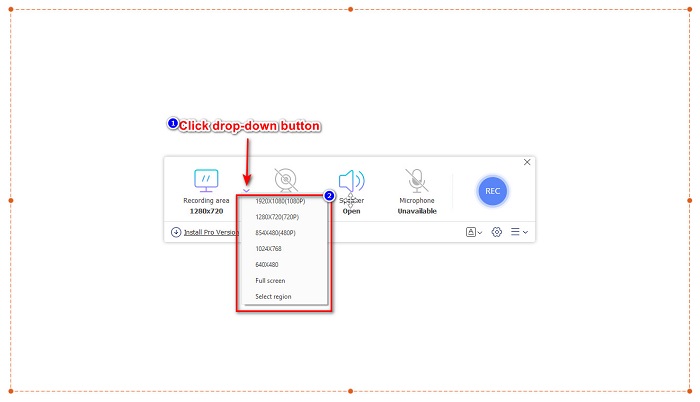
Passaggio 3. Successivamente, scegli l’area che vuoi registrare sullo schermo facendo clic sul pulsante drop-down nell’opzione Recording Area. Puoi registrare l’intero schermo oppure selezionare l’area che desideri registrare.
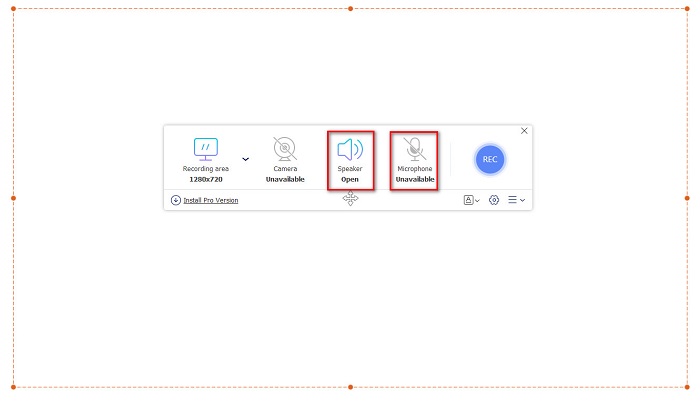
Passaggio 4. Quindi seleziona la sorgente audio che vuoi utilizzare facendo clic sull’icona speaker o microphone.
Passaggio 5. Infine, fai clic sul pulsante RECec per iniziare a registrare. Quando hai terminato, fai clic sul pulsante con il simbolo di stop e la tua registrazione verrà salvata automaticamente nell’interfaccia del software.
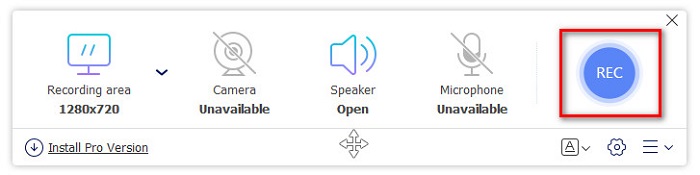
E questo è tutto! Puoi facilmente registrare l'attività dello schermo facendo la semplice guida sopra.
Professionisti
- Può registrare l'attività dello schermo con un'uscita video di alta qualità.
- Ti consente di regolare la frequenza dei fotogrammi, il codec e il formato di output del tuo video.
- Ha un'interfaccia software facile da usare.
- Accessibile in tutti i browser Web, inclusi Google, Firefox, Safari e altri.
Contro
- Devi scaricare l'app pro per accedere alle sue funzionalità avanzate.
ScreenApp.IO
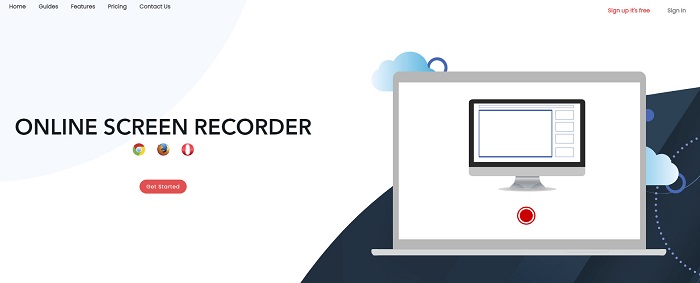
ScreenApp.IO è un registratore di schermo online gratuito che ti consente di registrare facilmente l’attività del tuo schermo. Questo registratore per computer online ha una GUI semplice, che lo rende facile da usare. Puoi anche scegliere la sorgente audio di questo strumento online. Tuttavia, questo registratore online offre solo funzionalità limitate. Nonostante ciò, molte persone lo utilizzano per la sua comodità.
Professionisti
- Ha un'interfaccia software facile da usare.
- Disponibile su quasi tutti i browser web come Google e Firefox.
- Puoi scegliere il registratore audio che desideri.
Contro
- Potresti riscontrare un processo di caricamento lento.
- Non puoi scegliere il formato del file di output che desideri.
ClipChamp
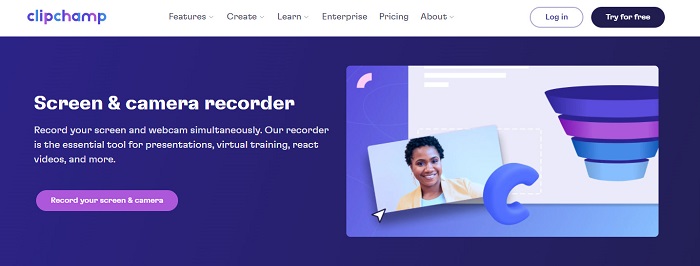
ClipChamp è uno dei registratori di schermo online più popolari disponibili su Internet. Questo strumento online ti permette di aggiungere testo alla registrazione e dispone di funzioni per regolare la dimensione del riquadro di registrazione. Sebbene la sua interfaccia non sia tra le più intuitive, resta comunque efficace per registrare presentazioni e riunioni. Inoltre utilizza i cookie, che consentono al sito di raccogliere i tuoi dati.
Professionisti
- Può registrare il tuo schermo comodamente.
- Ti consente di regolare la dimensione del fotogramma della registrazione dello schermo.
Contro
- Utilizza i cookie per il sito web.
- Quando la tua connessione Internet è lenta, potrebbe influire sulla registrazione dello schermo.
Parte 2. 2 Il miglior registratore dello schermo per il tuo desktop
Stai cercando il miglior registratore dello schermo per il tuo PC? Non preoccuparti più, perché abbiamo il miglior registratore dello schermo per il tuo desktop. Sebbene sia difficile trovare un registratore dello schermo con molte funzionalità, abbiamo trovato i registratori dello schermo più eccezionali da utilizzare offline.
Bandicam
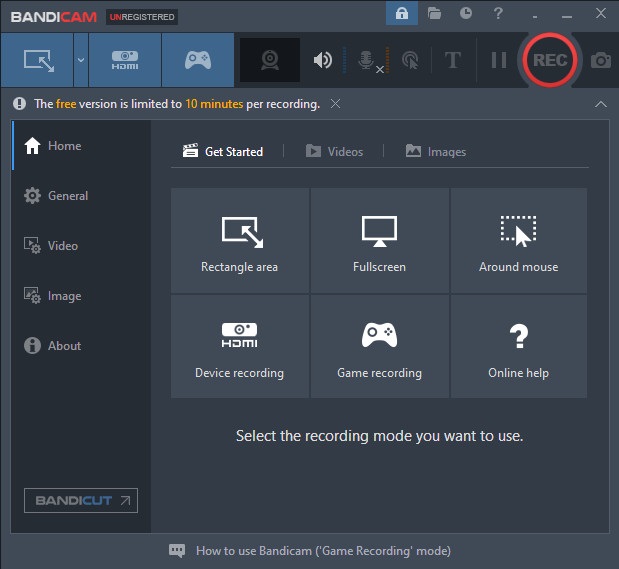
Bandicam è probabilmente il più noto registratore di schermo per desktop, con molte funzioni a disposizione. Ha funzionalità avanzate come la registrazione da dispositivo, che ti permette di registrare da sorgenti video esterne come webcam, smartphone, Xbox e altro. Puoi anche registrare le tue azioni di gioco vincenti facendo clic sull’opzione Game recording. Inoltre, con questo programma puoi catturare immagini mentre stai registrando lo schermo. Tuttavia, la sua interfaccia è piuttosto complessa, quindi gli utenti principianti potrebbero trovarlo impegnativo da usare.
Professionisti
- Ha funzionalità avanzate come la registrazione del dispositivo di più e la modalità di registrazione del gioco.
- Ti permette di catturare immagini durante la registrazione.
- Disponibile in quasi tutte le piattaforme crossmediali, inclusi Windows e Mac.
Contro
- Ha un'interfaccia software difficile da usare.
- Acquista l'app prima di poter utilizzare le sue funzioni speciali.
Screen Rec
Un altro software di registrazione dello schermo che puoi usare è ScreenRec. Questo registratore è uno strumento semplice che produce registrazioni di buona qualità. Ti permette anche di regolare la qualità della registrazione tra SD, HD e 4K. Inoltre, include una funzione per catturare screenshot e registrare la tua voce mentre registri lo schermo. Il suo svantaggio è che dispone di poche funzioni rispetto ad altri registratori per desktop.
Professionisti
- Ha una semplice interfaccia utente.
- È scaricabile gratuitamente.
- Disponibile su Windows, Mac e Linux.
Contro
- Ha alcune funzioni da utilizzare.
Parte 3. 3 migliori registratori dello schermo per iPhone e Android
Se il tuo dispositivo iPhone o Android non dispone di un registratore dello schermo integrato, è un peccato per te, soprattutto quando desideri registrare sullo schermo una riunione utilizzando il tuo telefono. Ma non è la fine per te se vuoi ancora registrare lo schermo utilizzando il tuo dispositivo iPhone o Android. Pertanto, in questa parte vedrai il miglior registratore dello schermo per iPhone e altri dispositivi Android.
Registratore schermo AZ
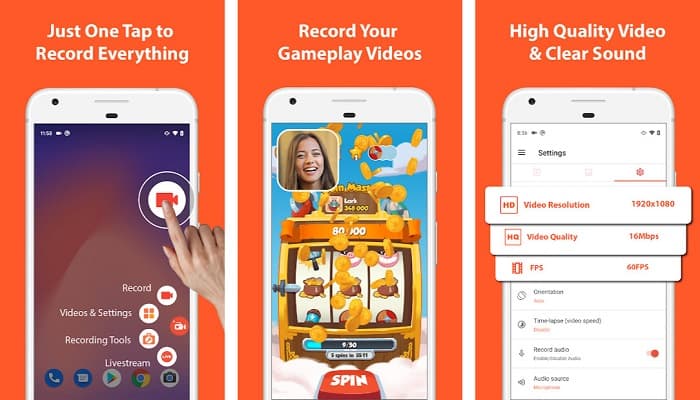
AZ Screen Recorder è considerato uno dei migliori registratori dello schermo per dispositivi iPhone e Android. Se stai cercando un registratore che possa acquisire video in time-lapse, questo strumento offre proprio questa funzione. Ti consente anche di modificare la risoluzione e il bitrate del video registrato. Inoltre, può produrre video di ottima qualità senza risultare difficile da utilizzare.
Professionisti
- Ha funzionalità avanzate come video time-lapse, correzione dello schermo verde e aggiunta di testo e logo al tuo video.
- Ha un'interfaccia utente semplice.
- Applicazione gratuita.
Contro
- A volte può verificarsi un processo di caricamento lento.
Mobizen
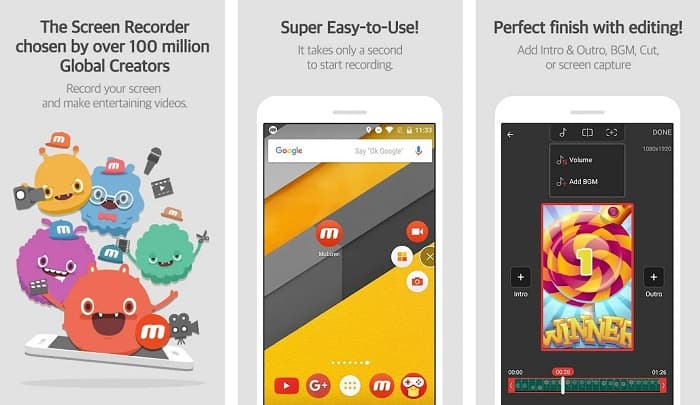
Mobizen è un registratore dello schermo disponibile per telefoni iPhone e Android. Tra i vari registratori per dispositivi mobili, si distingue per un pulsante flottante che ti permette di accedere alle sue funzioni. Inoltre, puoi regolare la qualità video, la risoluzione e i FPS (Frame Per Second) della tua registrazione. Grazie alla sua interfaccia semplice da usare, puoi registrare facilmente le attività sullo schermo.
Professionisti
- Ha un pulsante mobile per registrare facilmente lo schermo.
- Ha una funzione per aggiungere musica di sottofondo alla registrazione dello schermo.
Contro
- L'audio del tuo video a volte potrebbe presentare degli errori.
Registratore V
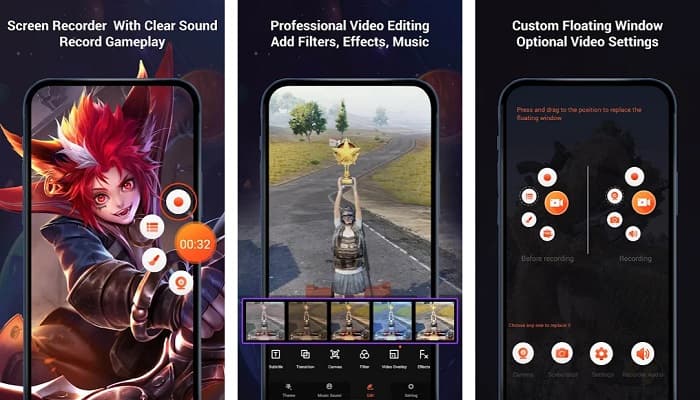
V Recorder è un’app per la registrazione dello schermo che include un editor video integrato. Questo registratore può produrre video di alta qualità. Inoltre, puoi registrare facilmente le tue sessioni di gioco mentre giochi. Se stai cercando un modo per registrare le tue reazioni durante il gioco, questo strumento offre un registratore con facecam. Tuttavia, molte recensioni degli utenti segnalano che non è in grado di registrare l’audio interno ed esterno. Se vuoi registrare l’audio sul tuo iPhone, fai clic qui per maggiori dettagli.
Professionisti
- Ha una semplice interfaccia utente.
- Ti permette di modificare la tua registrazione video.
- Disponibile su dispositivi iPhone e Android.
Contro
- A volte non registra l'audio esterno e interno.
- È necessario acquistare l'app prima di accedere alle sue funzionalità uniche.
Parte 4. Quale registratore dello schermo utilizzare
Se non sei ancora sicuro su quale registratore dello schermo utilizzare, abbiamo fornito una tabella di confronto dei migliori registratori dello schermo online, offline e app mobili di seguito. Inoltre, questa parte fornirà approfondimenti sulle caratteristiche e le caratteristiche dei registratori dello schermo sopra menzionati.
| CARATTERISTICHE | Registratore dello schermo gratuito FVC online | ScreenApp.IO | ClipChamp | Bandicam | Screen Rec | Registratore schermo AZ | Mobizen | Registratore V |
| Interfaccia software facile da usare |  | |  | | | | | |
| Libero da usare | | | | | | | | |
| Può modificare le impostazioni video | | | | | | | | |
| Sicuro da usare | | | | | | | | |
| Può registrare l'audio del dispositivo | | | | | | | A volte hanno problemi | A volte non registra audio interno ed esterno |
Parte 5. Domande frequenti sul miglior registratore dello schermo
iPhone 11 ha uno screen recorder integrato?
Tutti gli iPhone con un sistema iOS 11 hanno uno screen recorder integrato. Quindi, se sei un utente di iPhone 11, non è necessario scaricare alcuna app per la registrazione dello schermo.
Quanto tempo può registrare uno screen recorder?
Quando si tratta di registrazione dello schermo, non ci sono limiti. Dipende dalla memoria disponibile del tuo dispositivo e dalla durata della registrazione dello schermo.
QuickTime ha uno screen recorder integrato?
Sì. Il lettore multimediale nativo del Mac, QuickTime Player, dispone di un registratore dello schermo integrato. Fai clic qui per scoprire come registrare lo schermo con QuickTime Player.
Qual è il miglior formato di file per la registrazione dello schermo?
Il miglior formato di file per la registrazione dello schermo è MPEG-1. MPEG-1 è un file senza perdita di dati e molti lettori multimediali supportano questo formato di file, incluso Youtube. Quindi, se desideri caricare la registrazione dello schermo su altre piattaforme di social media, potresti prendere in considerazione la possibilità di trasformare il tuo file video in un formato di file MPEG-1.
Conclusione
Nel complesso, ci sono tonnellate di registratori dello schermo che puoi utilizzare online e offline. Ma tieni sempre presente che ogni registratore dello schermo ha caratteristiche distinte da offrire. Questo articolo ti ha fornito i migliori registratori dello schermo per il tuo PC, Mac, iPhone e dispositivo Android. Inoltre, ora è nelle tue mani quale registratore dello schermo sceglierai.
Tuttavia, se stai cercando un modo più conveniente per registrare lo schermo e avere le funzionalità necessarie per uno screen recorder, usa FVC Free Screen Recorder Online, che usano anche molte persone.
-
 Come registrare le acrobazie epiche, le frizioni o i tutorial su Minecraft [2021]
 Vuoi sapere come registrare le tue acrobazie su Minecraft? Quindi leggi questo articolo come forniamo.
-
 I 4 migliori registratori FLV per acquisire video FLV su piattaforme diverse
 Questo articolo contiene soluzioni che puoi utilizzare nella registrazione di video FLV. Scopri l'elenco dei registratori FLV in questa recensione dell'articolo.
-
 4 Software di registrazione audio più recente disponibile su Windows e Mac
 Hai bisogno di un software di registrazione audio sul tuo desktop? In tal caso, questo articolo è pieno di idee sul meglio e altro ancora. Quindi, se ne hai bisogno, leggi questo articolo.
