


 Video Converter Ultimate
 Screen Recorder
 Riparazione video
 Download sicuro
Come rimuovere la filigrana dai video esportati da Renderforest in definitiva
Renderforest è un pacchetto completo di eccellenti modelli animati per introduzioni, finali, titoli, pubblicità o simili. Puoi iniziare da zero o utilizzare i modelli disponibili qui. Anche se non sei un esperto di editing video, puoi comunque riuscire a superarlo utilizzando questa piattaforma web. Grazie al suo utilizzo e al suo vantaggio ottimale, molti utenti hanno scelto questa piattaforma per creare un design di alta qualità, efficiente, compatibile e affidabile se si avvale di un abbonamento.
Quindi, puoi scaricare gratuitamente il video che modifichi qui se ti registri, ma con una filigrana. La filigrana crea un problema per molti di noi che già esportano il video qui e per chi non può permettersi il costo dell’abbonamento di questo strumento. Più sotto elencheremo dei tutorial su come rimuovere la filigrana da Renderforest usando gli strumenti più validi che abbiamo raccolto durante la nostra ricerca. Possiamo condividerli con te se continui a leggere la parte successiva di questo articolo.

Parte 1. 3 modi efficaci su come rimuovere la filigrana dal video di Renderforest
FVC Video Converter Ultimate
FVC Video Converter Ultimate è uno straordinario strumento per rimuovere filigrane dai video che può guidarti passo dopo passo su come eliminare la filigrana di Renderforest. Puoi fare affidamento su questo strumento per rimuovere la filigrana dal tuo video senza difficoltà. Se dovessimo confrontare questo strumento “ultimate” con altri, questo ha la capacità di rimuovere la filigrana dal video con il supporto della tecnologia AI. Inoltre, è il miglior strumento per togliere la filigrana dal tuo video in qualsiasi formato tu carichi. Cosa rende questo strumento eccellente? Non hai bisogno di essere esperto di tecnologia per usarlo; con la semplice guida e i passaggi riportati di seguito, puoi rimuovere la filigrana che Renderforest applica al video.
Passaggio 1. Scarica il software sul tuo computer cliccando il pulsante di download adatto. Clicca sul file scaricato, installalo e premi Avvia Ora per lanciare immediatamente il software.
Download gratuitoPer Windows 7 o versioni successiveDownload sicuro
Download gratuitoPer MacOS 10.7 o versioni successiveDownload sicuro
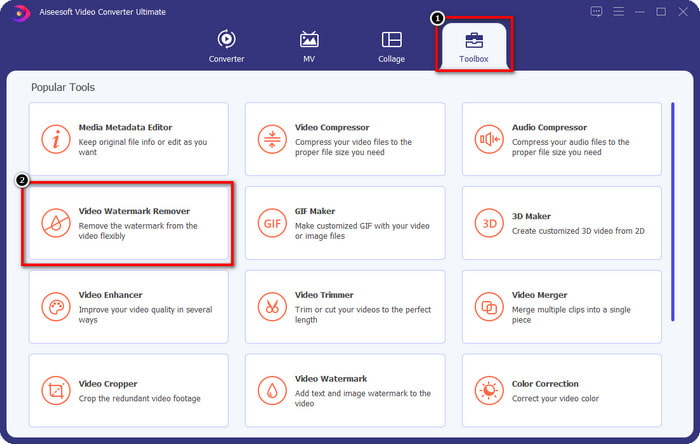
Passaggio 2. Dopo aver avviato il software, apri la Toolbox, quindi clicca su Video Watermark Remover al suo interno.
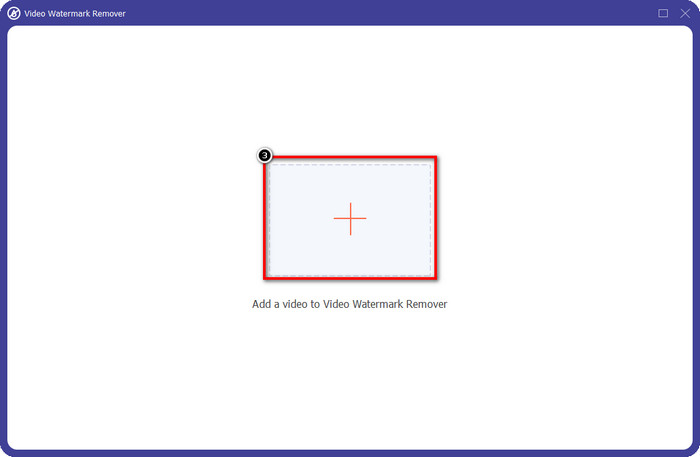
Passaggio 3. Clicca l’icona + sullo schermo per caricare il video di Renderforest che hai esportato con la filigrana.
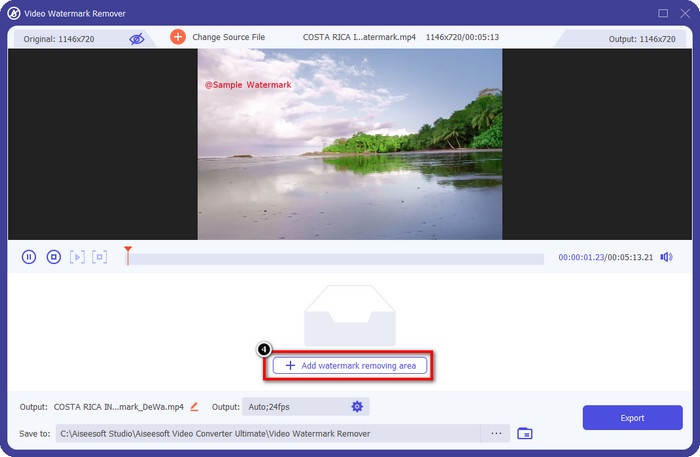
Passaggio 4. Premi Add Removing Watermark Area per iniziare a rimuovere la filigrana di Renderforest.
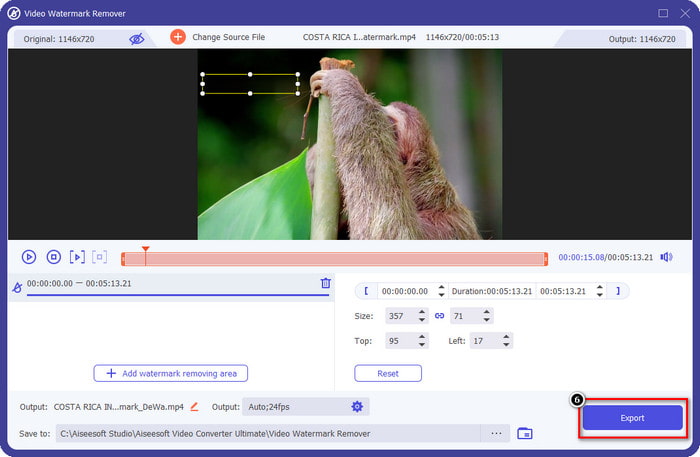
Passaggio 5. Nella nuova finestra sullo schermo, trascina il selection box e adattalo alla filigrana. Puoi regolare liberamente il riquadro di selezione, se necessario.
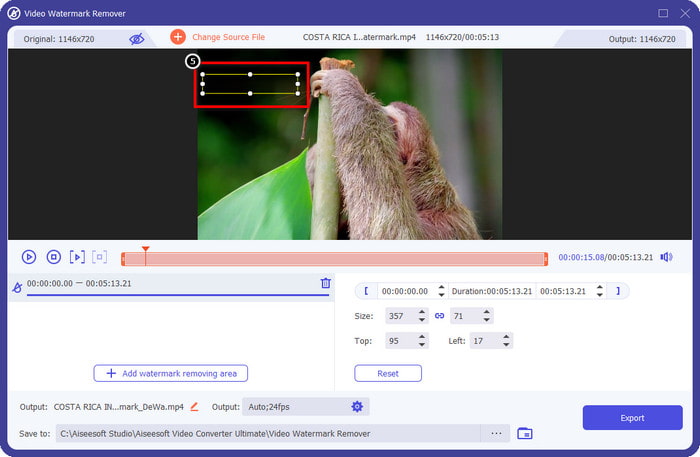
Passaggio 6. Ora che il riquadro di selezione ha rilevato la filigrana nel tuo video, clicca su Export per iniziare la rimozione e salvare il video senza filigrana. Elaborerà rapidamente il video in pochissimo tempo e potrai usare il video senza la fastidiosa filigrana.
Correlato:
Rimuovere la filigrana di DeviantArt
Rimuovere la filigrana di Video Helper
Rimuovi il logo ora
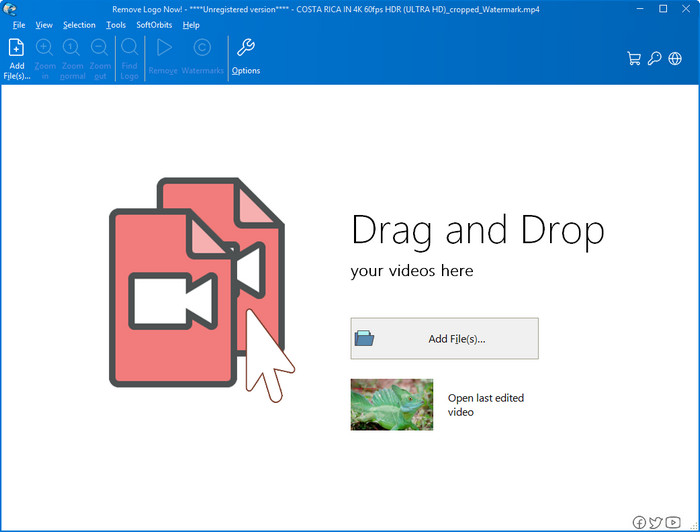
Successivo nel nostro elenco, Remove Logo Now ha costruito un’ottima reputazione per la rimozione delle filigrane sovrapposte su Windows. Con questo strumento, non avrai bisogno di alcuna competenza particolare per sapere come togliere la filigrana di Renderforest su PC. Dopo aver rimosso la filigrana, se guardi attentamente, potresti notare lievi tracce nel punto in cui la filigrana si trovava. Ma se non osservi con grande attenzione, non noterai la filigrana o i residui nel video esportato. Il tutorial seguente ti insegnerà come rimuovere la filigrana dal tuo video sui dispositivi Windows.
Passaggio 1. Scarica e installa Remove Logo Now sul tuo computer, quindi segui la procedura di installazione.
Passaggio 2. Avvia il software, quindi clicca su Add Files per caricare il video qui. Puoi anche trascinare e rilasciare il video per caricarlo in modo più efficiente.
Passaggio 3. Scegli quale strumento vuoi usare per contrassegnare la filigrana. Dopo averne selezionato uno, evidenzia la filigrana e clicca su Remove.
Passaggio 4. Clicca su Start per avviare il processo di rimozione della filigrana offerto da questo strumento.
Rimozione di filigrane video online

Non ti piace scaricare software sul computer ma vuoi comunque sapere come rimuovere la filigrana di Renderforest? Allora prova a usare Video Watermark Remover Online. Puoi usare questo strumento completamente automatico per eliminare gratuitamente la filigrana dal tuo video senza doverlo scaricare sul desktop. Proprio come gli strumenti già menzionati, anche se sei un principiante nel montaggio video o nella rimozione delle filigrane, puoi imparare a usare questo strumento in pochi minuti. Puoi seguire il tutorial qui sotto per sapere come utilizzarlo.
Passaggio 1. Apri il watermark remover online cercandolo nel tuo browser web preferito.
Passaggio 2. Clicca l’icona della nuvola di upload nella pagina principale del sito per inserire il video che hai esportato da Renderforest.
Passaggio 3. Attendi il completamento del caricamento, poiché rimuove automaticamente la filigrana dal tuo video, quindi clicca su Download per ottenere il video senza filigrana.
Parte 2. Domande frequenti su come rimuovere la filigrana Renderforst
Quanto costa l'abbonamento a Renderforest?
Renderforest supporta tre diversi tipi di prezzi di cui puoi usufruire; $ 14.99 per Lite, $24.99 per Pro e $29.99 per Business ogni mese. Questo prezzo ha uno scopo diverso l'uno dall'altro; puoi andare al suo sito Web principale per vedere quali sono gli arruolati disponibili sull'abbonamento che desideri usufruire.
È possibile rimuovere la filigrana da Renderforest Video senza uno strumento?
Sì, puoi rimuovere la filigrana nella tua Renderforest senza utilizzare uno strumento e in questo modo acquistando una tariffa mensile o annuale sul software. In modo che quando esporti il file video, non verrà aggiunta alcuna filigrana.
Qual è il miglior piano per Renderforest; Mensile o Annuale?
L'abbonamento mensile è una buona scelta se vuoi utilizzare lo strumento poche volte, ma se decidi di utilizzare il software per molto tempo è meglio avvalersi di un piano annuale perché ti costerà meno del rinnovo ogni mese. Ma prima di usufruire, puoi utilizzare Renderforest gratuitamente registrando il tuo account qui, quindi prova a utilizzare gli altri modelli che fornisce gratuitamente.
Conclusione
In effetti, questo articolo fornisce prove evidenti per rimuovere gratuitamente la filigrana Renderforest utilizzando i tre più utili per la rimozione di filigrane che puoi utilizzare. Se sei un utente Windows e desideri rimuovere la filigrana sul desktop, devi provare a utilizzare Rimuovi logo ora. Ma se non ti piace scaricare il software, devi provare a utilizzare Video Watermark Remover Online perché puoi utilizzare questo strumento per rimuovere efficacemente le filigrane.
Ma se sei un utente Windows o Mac che desidera un efficace dispositivo di rimozione della filigrana, senza dubbio il miglior dispositivo di rimozione della filigrana che puoi utilizzare è FVC Video Converter Ultimate. È l'ultimo strumento di rimozione della filigrana che puoi utilizzare per rimuovere la filigrana che infastidisce il tuo video Renderforest in modo efficiente e professionale.
-
 2 modi per rimuovere rapidamente la filigrana VSDC su Windows e Mac
 Stai cercando un modo per rimuovere la filigrana VSDC sui tuoi video? Con questo articolo, forniamo strumenti che puoi utilizzare per eliminare la filigrana.
-
 Rimuovi la filigrana Animoto sui video in modo semplice ed efficace
 Come rimuovere la filigrana Animoto sul video? Continua a leggere questo articolo poiché abbiamo fornito un tutorial completo su come farlo.
-
 Come rimuovere la filigrana dal video utilizzando Final Cut Pro [Guida completa]
 Hai un problema con la filigrana sui video? Non ha detto altro, perché abbiamo fornito un tutorial su come rimuovere la filigrana dal video utilizzando Final Cut Pro.
