


 Video Converter Ultimate
 Screen Recorder
 Riparazione video
 Download sicuro
Come rimuovere efficacemente la filigrana dal grafico di origine sul grafico
Potresti aver bisogno di usare Origin Graph per creare un modello su dati matematici o scientifici troppo complessi da descrivere a parole. Questo software ha già aiutato studenti, ricercatori, professori, professionisti del business e altri utenti che hanno bisogno di creare un proprio grafico. Grazie alla serie di modelli tra cui puoi scegliere, puoi creare un grafico visivamente accattivante in grado di catturare l’attenzione di chi lo guarda. Il problema che potresti incontrare usando la versione gratuita è che aggiunge una filigrana di testo sul risultato finale. Hai difficoltà a gestire la filigrana? Non preoccuparti più! Perché abbiamo la soluzione per te. Qui ti presenteremo alcuni suggerimenti utili su come rimuovere la filigrana da Origin Graph e poi utilizzarlo nelle tue presentazioni Word o PowerPoint.

Parte 1. Come rimuovere la filigrana dal grafico di origine con il dispositivo di rimozione della filigrana delle immagini online
FVC Free Watermark Remover Online è un eccellente strumento online per rimuovere filigrane di testo che puoi usare per eliminare la filigrana di Origin Graph. Questo strumento è tra i più efficienti nel rimuovere qualsiasi oggetto dalle immagini, così da renderle ancora più professionali una volta eliminata la filigrana. Con esso, possiamo assicurarti che si tratta di un rimuovi-filigrana dedicato su cui puoi fare affidamento quando si presenta questo problema. Ti stai chiedendo se questo strumento è facile da usare? Non temere! Perché i passaggi che riportiamo qui sotto sono quelli che puoi seguire per eliminare la filigrana di testo sull’immagine aggiunta da Origin Graph.
Passaggio 1. Puoi fare clic su questo link per aprire il servizio online di rimozione della filigrana dall’immagine; si aprirà direttamente una nuova scheda in cui potrai accedere allo strumento.
Passaggio 2. Premi Upload Image per aggiungere qui la foto con la filigrana, individua il file immagine nella cartella e fai clic su Open per caricarla correttamente.
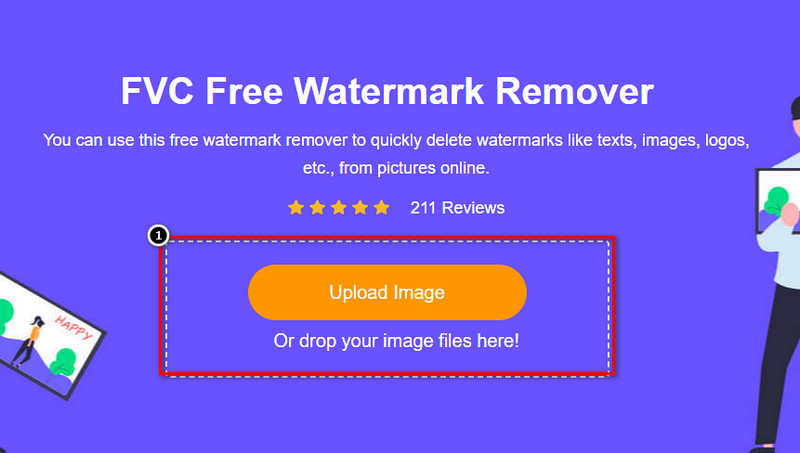
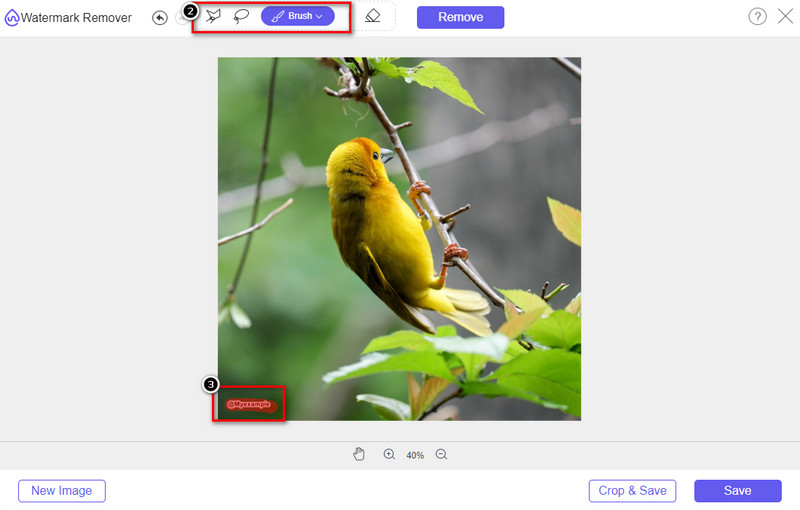
Passaggio 3. Puoi usare tre strumenti per evidenziare la filigrana; anche se funzionano in modo diverso, la loro efficacia è la stessa. Scegline uno, poi evidenzia l’area dell’immagine in cui è presente la filigrana.
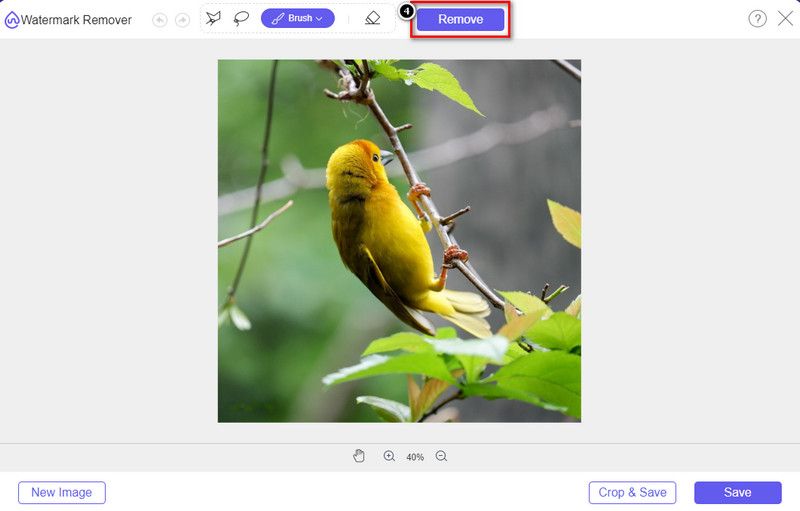
Passaggio 4. Ricordati di fare clic sull’icona Remove dopo aver evidenziato la filigrana con lo strumento. Questo passaggio è essenziale affinché, quando esporti l’immagine, tu possa ottenerla senza filigrana.
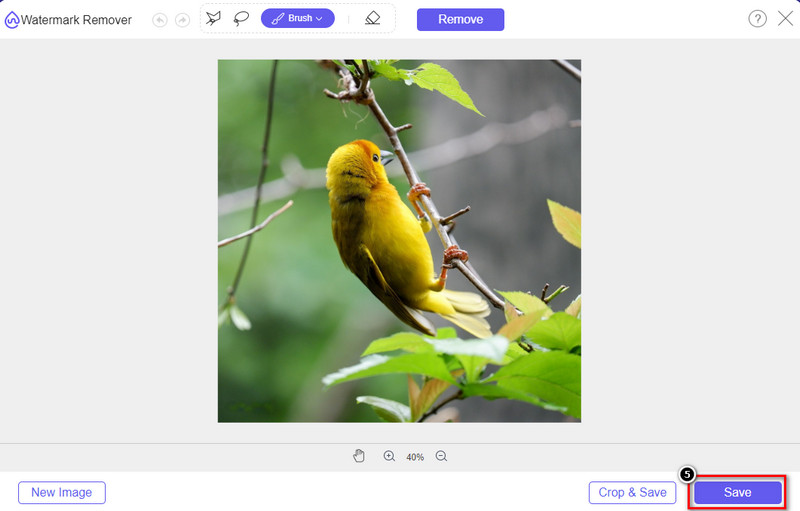
Passaggio 5. Per avviare il processo di esportazione, ora puoi fare clic sul pulsante Save. Attendi il completamento e potrai quindi controllare l’immagine senza la filigrana di Origin Graph visibile nell’area.
Professionisti
- Un dispositivo di rimozione di filigrane di immagini basato sul Web gratuito a cui puoi accedere.
- Funziona in modo efficiente sulla rimozione della filigrana con il supporto della tecnologia AI.
- Supporta un'ampia varietà di formati di immagine che potresti avere sul tuo disco locale.
- Nessuna filigrana viene aggiunta alle immagini esportate.
Contro
- Necessita di connettività Internet per funzionare.
- Il suo obiettivo è rimuovere la filigrana e nient'altro.
Parte 2. Come copiare grafici da Origin a Word o PowerPoint senza la filigrana
In questa parte dell'articolo ti forniremo la procedura che devi conoscere per aggiungere il grafico che hai creato su Origin Graph senza il watermark. Seguilo di conseguenza per aggiungere correttamente il grafico che crei su Microsoft Word e PowerPoint senza filigrana.
Dovrai liberare almeno 1,9 GB a causa delle enormi dimensioni del file. Nel file da 1,9 GB, puoi avere l'aiuto di cui hai bisogno, ma se non vuoi aiuto, puoi scaricarne la versione da 652 MB tramite .zip o .exe.
Passaggi su come creare un grafico sul grafico di origine senza la filigrana:
Passaggio 1. Per prima cosa, scarica Origin Graph sul tuo sistema operativo andando sul sito ufficiale. Apri il programma per iniziare a creare il grafico che desideri.
Passaggio 2. Dopo aver avviato il software, aggiungi i valori della tabella di cui hai bisogno. Qui puoi aggiungere più variabili e il relativo numero di grafici.
Supplemento: Puoi fare clic su Plot per vedere altri tipi di grafici che puoi usare, come Basic 2D, Bar, Statistical e altro ancora.
Passaggio 3. Fai clic su File, quindi premi Save per esportare il grafico che hai creato qui.
Passaggio 4. Puoi seguire i passaggi che abbiamo indicato nella Parte 1 e seguire il tutorial su come rimuovere la filigrana da Origin Graph con l’aiuto di FVC Free Watermark Remover Online.
Come utilizzare il grafico su Word senza filigrana:
Passaggio 1. Apri l’app Word sul desktop, quindi fai clic su Pagina vuota. Se hai già creato dei documenti Word, allora apri quel file.
Passaggio 2. Vai alla sezione Inserisci, quindi fai clic su Immagini. Cerca il file del grafico nella tua unità locale, fai clic una volta su di esso, quindi premi Apri per caricarlo in Word.
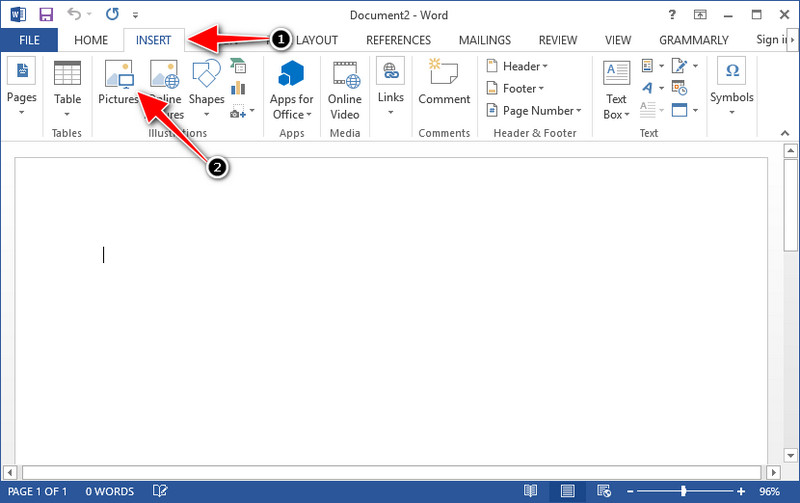
Passaggio 3. Verrà caricato automaticamente nel documento Word che hai aperto o creato; ora puoi posizionare il grafico tenendolo premuto e trascinandolo all’interno del documento.
Come utilizzare il grafico su Powerpoint senza filigrana:
Passaggio 1. Avvia PowerPoint sul computer e fai clic su Presentazione vuota. Puoi anche controllare le presentazioni recenti che hai creato sul lato sinistro. Se c’è il file in cui devi aggiungere il grafico, fai clic per aprirlo.
Passaggio 2. Premi Inserisci e fai clic su Immagine per inserire il grafico immagine che hai creato con Origin Graph.
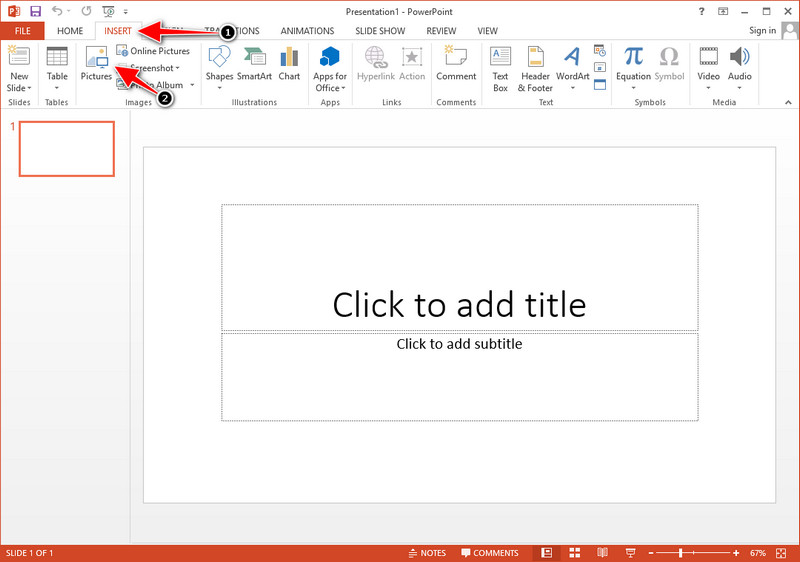
Passaggio 3. Regola l’immagine del grafico e posizionala sulla diapositiva.
Ulteriori letture:
Come rimuovere la filigrana B612 dalle tue immagini
Come rimuovere gratuitamente la filigrana di WOW Slider
Parte 3. Domande frequenti su come rimuovere la filigrana dal grafico di origine
Quanto costa Origin Pro?
Per i singoli utenti, puoi ottenere la versione premium di Origin Graph per $435 a partire. Puoi visitare il suo negozio ufficiale su Origin Lab.
Dove posso scaricare ufficialmente Origin Graph?
Visita l'Origin Lab per scaricare l'Origin Graph. Prima di poter scaricare il software sul desktop, verranno poste delle domande. Successivamente, ci saranno due opzioni per scaricare il file, se vuoi scaricarlo con l'aiuto o meno, sotto forma di .exe o zip.
Excel e Origin sono la stessa cosa?
Excel e Origin hanno una GUI simile a un foglio di calcolo per organizzare i dati, calcolare e definire le etichette. Tuttavia, Excel si concentra sul contenere molte colonne e righe che puoi utilizzare. Ma con Origin, è per disporre gli attributi che utilizzano una formula di colonna piuttosto che una formula di cella come quella supportata da Excel.
Conclusione
Ora che hai imparato a rimuovere la filigrana da Origin Graph, è il momento di utilizzare il grafico che hai creato e presentarlo in modo professionale. Se il tuo scopo è usarlo su Word o Powerpoint, puoi leggere la Parte 2 per imparare come farlo. La rimozione della filigrana con questo strumento è di gran lunga la più ricercata da chiunque desideri rimuovere la filigrana dalle immagini. Il problema è risolto con questo strumento. Se questo articolo ti ha aiutato, lascia gentilmente 5 stelle qui sotto.
-
 Come rimuovere la filigrana con Pixlr in passaggi dettagliati [Efficace]
 Vuoi sapere come rimuovere una filigrana con Pixlr? In tal caso, continua a leggere di seguito per sapere come farlo e le alternative che puoi utilizzare.
-
 Rimuovi la filigrana Animotica sui video esportati con 3 metodi comprovati
 Ti sei mai chiesto se è possibile rimuovere la filigrana Animotica sui video che hai esportato? Questo articolo fornisce una procedura.
-
 Modi gratuiti per rimuovere la filigrana di VideoShop sui video [senza sforzo]
 Per rimuovere la filigrana di VideoShop, il tuo dispositivo avrà bisogno di un dispositivo di rimozione della filigrana. Per sapere cosa sono, leggi questo articolo.
