


 Video Converter Ultimate
 Screen Recorder
 Riparazione video
Recensione imparziale di Imglarger: tutto ciò che devi sapere
L’upscaling delle immagini sta diventando sempre più comune per molte persone, soprattutto quando si ha a che fare con foto che hanno perso qualità per vari motivi. Se anche tu ti trovi in questa situazione e vuoi migliorare la risoluzione delle tue foto, oggi esistono diversi strumenti che puoi usare, tra cui Imglarger. Questo strumento è un noto editor di immagini e include una funzione specifica che permette agli utenti di effettuare l’upscaling delle proprie foto. Se vuoi saperne di più su questo tool, continua a leggere. Inoltre, non perdere l’occasione di scoprire anche un altro strumento gratuito per l’upscaling delle immagini.

Parte 1. Recensione approfondita di Imglarger
Imglarger è uno strumento online versatile e potente progettato per migliorare e ingrandire le immagini senza comprometterne la qualità. Sfruttando l'intelligenza artificiale, questo strumento di editing delle immagini consente agli utenti di ingrandire le foto di 200%, 400% e persino 800% con un solo clic. Inoltre, la tecnologia AI non solo ingrandisce le immagini, ma rimuove anche la sfocatura e migliora la nitidezza durante il processo di ridimensionamento, garantendo che le foto appaiano nitide e chiare anche a dimensioni maggiori.
Professionisti
- Esistono numerose opzioni su come gli utenti possono ingrandire le proprie immagini.
- L'intelligenza artificiale migliora e nitida automaticamente le immagini, facendo risparmiare tempo.
- È possibile elaborare più immagini contemporaneamente, semplificando la modifica in blocco.
- L'interfaccia utente è molto semplice e facile da usare.
- Le immagini vengono eliminate dopo 24 ore, per garantire la privacy.
Contro
- Le funzionalità del set gratuito sono limitate.
- Anche nella versione premium c'è un limite di file di 10 MB.
Parte 2. Piano tariffario Imglarger
Imglarger non è completamente gratuito. Pur offrendo una versione gratuita, le funzionalità e le funzionalità risultano limitate. Per questo motivo, gli utenti devono aggiornare la versione gratuita a quella premium per poter usufruire di tutte le funzionalità dello strumento. Di seguito sono riportati i piani tariffari, inclusi i rispettivi prezzi e servizi inclusi:
È fantastico che Imglarger offra diversi piani tariffari, offrendo agli utenti più opzioni per scegliere quello più adatto alle proprie esigenze e al proprio budget. Tuttavia, il piano gratuito può risultare piuttosto limitato, soprattutto per gli utenti che devono elaborare immagini ad alta risoluzione o lavorare su più file contemporaneamente. Per sfruttare appieno tutte le funzionalità senza restrizioni, si consiglia vivamente di passare a un piano a pagamento.
Parte 3. Come usare Imglarger.com per ingrandire le immagini
Ora che sai cos’è Imglarger, è il momento di imparare a usarlo per eseguire l’upscaling delle immagini. Questo ingranditore di foto ha un’interfaccia molto semplice e intuitiva, che lo rende facile da usare per tutti i tipi di utenti, inclusi i principianti. Di seguito trovi la guida passo passo su come usare Imglarger per fare l’upscaling delle immagini:
Passaggio 1. Per prima cosa, devi accedere allo strumento tramite il sito ufficiale. Per farlo, nel motore di ricerca digita Imglarger.com.
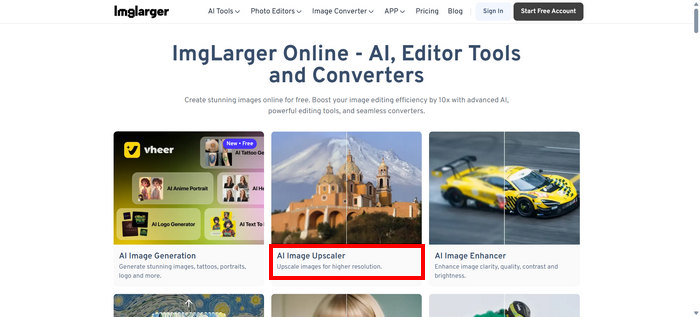
Passaggio 2. Una volta entrato nel loro sito, tra gli strumenti disponibili, scegli AI Image Upscaler.
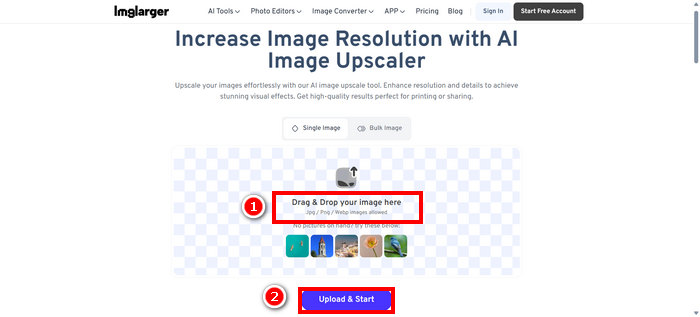
Passaggio 3. Successivamente, fai clic su Drag & Drop your image here oppure trascina semplicemente lì la tua foto. Dopo aver selezionato la foto, fai clic su Upload & Start.
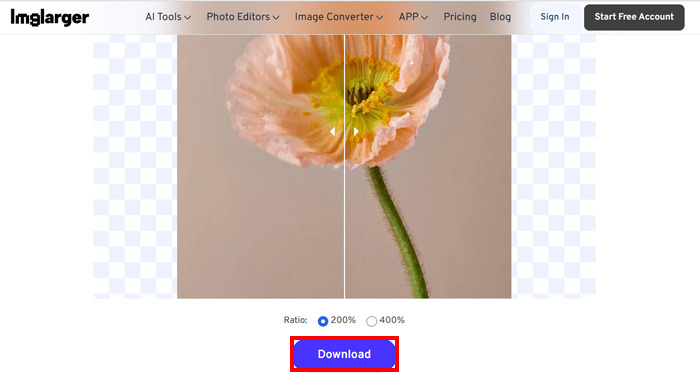
Passaggio 4. Ora puoi vedere l’anteprima della tua foto dopo l’upscaling rispetto alla qualità iniziale e, una volta soddisfatto del risultato, fai clic sul pulsante Download sottostante.
Se vuoi ingrandire un gruppo di foto, devi prima scegliere l'opzione Immagine in blocco, ma tieni presente che questa opzione è disponibile solo per le versioni premium.
Parte 4. La migliore alternativa a Imglarger: FVC Free Image Upscaler
Se stai cercando un’alternativa gratuita a Imglarger, il miglior strumento per questo è FVC Free Image Upscaler. Questo tool consente agli utenti di effettuare l’upscaling delle immagini in pochi passaggi. Grazie alla sua interfaccia semplice e intuitiva, gli utenti devono solo caricare la propria foto e questa verrà automaticamente migliorata.
Caratteristiche principali
• L'upscaling delle immagini è basato sull'intelligenza artificiale per migliorare automaticamente la qualità dell'immagine.
• Consente agli utenti di ridimensionare le immagini di 2×, 4×, 6× o 8× senza perdere la qualità.
• Corregge automaticamente le parti sfocate e ripristina i dettagli persi.
• Supporta formati popolari come JPG, JPEG, PNG e BMP.
• Nessuna filigrana sulle immagini ingrandite.
• Elaborazione rapida e anteprima dei risultati in tempo reale.
Ecco la guida passo passo su come ridimensionare un’immagine usando FVC Free Image Upscaler:
Passaggio 1. Per prima cosa, devi accedere allo strumento tramite il sito ufficiale. Per farlo, apri Chrome e, nel motore di ricerca, digita FVC Free Image Upscaler.
Passaggio 2. Una volta aperto lo strumento, fai clic su Upload a Photo per importare l’immagine che desideri ingrandire.
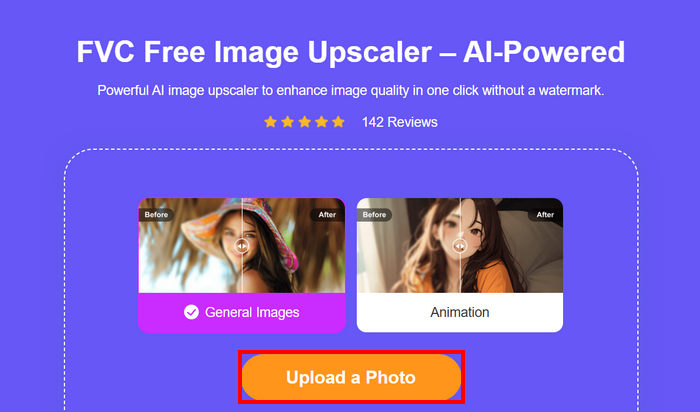
Passaggio 3. Attendi che la foto venga sottoposta a upscaling. Dopo pochi secondi potrai vedere l’anteprima della tua immagine migliorata. Inoltre, da lì puoi cambiare la modalità della foto e regolare il modo in cui desideri che venga ingrandita. Una volta finito, fai clic sul pulsante Save.
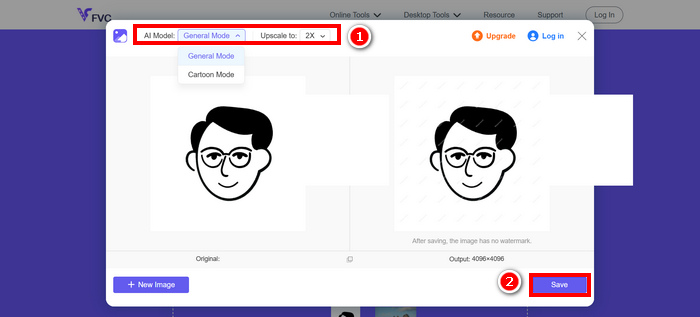
FVC Free Image Upscaler è davvero la migliore alternativa a Imglarger. Oltre a questo, è gratuito e molto facile da usare. Offre output di qualità, con immagini ingrandite e supporta un'ampia gamma di formati di output.
Parte 5. Domande frequenti sulle recensioni di Imglarger
Imglarger aggiunge una filigrana all'immagine?
No. Imglarger non aggiunge alcuna filigrana alle immagini che migliori o modifichi, nemmeno quando utilizzi la versione gratuita.
Di quanto può ingrandire un'immagine Imglarger?
Imglarger consente di ingrandire un'immagine di 200% fino a 800% rispetto alle sue dimensioni originali. La tecnologia AI che supporta questo strumento migliora la qualità delle foto durante il processo di ingrandimento.
Posso elaborare più immagini contemporaneamente con Imglarger?
Sì, puoi elaborare in batch più immagini contemporaneamente con questo image upscaler, ma questa funzione è disponibile solo per gli utenti a pagamento. Gli utenti gratuiti sono limitati all’elaborazione di una sola immagine alla volta. Passando a un piano premium si sblocca l’opzione di elaborazione in batch, particolarmente utile per chi deve modificare o migliorare diverse foto in modo rapido ed efficiente.
Conclusione
È innegabile che Imglarger sia un ottimo strumento di upscaling per le immagini. Offre funzioni valide, piani tariffari flessibili e molto altro. Tuttavia, è importante riconoscere che la versione gratuita è priva di alcune funzioni presenti in altri strumenti di upscaling gratuiti. Se stai cercando un’alternativa senza costi, dovresti provare anche lo strumento FVC Free Image Upscaler. Entrambi offrono una qualità di altissimo livello, quindi scegli semplicemente quello che si adatta meglio alle tue esigenze.
-
 Come ingrandire un'immagine per la stampa online e offline
 Se hai un'immagine a bassa risoluzione e vuoi ingrandirla, abbiamo una soluzione per te. Leggi questo articolo per sapere come ingrandire un'immagine per la stampa.
-
 7 semplici modi per aumentare la risoluzione dell'immagine in alta qualità
 Come si aumenta la risoluzione delle immagini in Photoshop? Posso aumentare la risoluzione di un'immagine JPEG? Scopri 7 metodi per aumentare la risoluzione delle immagini.
-
 I migliori riduttori di dimensioni delle immagini su dispositivi desktop e mobili
 Guarda le app elencate in alto in questo articolo per scoprire il miglior riduttore di dimensioni delle foto sul tuo dispositivo preferito. Scopri subito la migliore ottimizzazione delle dimensioni per le immagini!
