


 Video Converter Ultimate
 Screen Recorder
 Riparazione video
 Download sicuro
Fantastici modi per convertire GIF in DivX in pochi minuti
Nowadays, different file formats are used on the internet. One of the popular file formats for web graphics that we have now is the GIF, which is usually entertaining to view. However, there are some instances where a GIF file format is not supported on other devices. Sometimes, you need a file format supported by many devices like DivX. In that case, if you want to dig deeper into this post, you must read this article to get a piece of information about how to convert GIF to DivX instantly.

Parte 1: Introduzione a GIF e DivX
Graphics Interchange Format, or GIF, is a popular format for web graphics. It can be animated, often used primarily to display basic animation on your websites. GIFs also include transparent pixels, letting them blend with other colors. In addition, if you observe some pictures moving repeatedly, then there is a possibility that the image is a GIF format. DivX file is another file format recognized by other electronic consumer devices, video playback software, and DVD Players. This file is also known as the DivX-Encoded Movie File, which is classified as a video file. Other devices also support it. Therefore, read the other essential points below if you want to convert GIF to Divx.
Parte 2: programma per convertire GIF e DivX senza perdere la qualità
Suppose you are looking for a good and fantastic converter that can convert GIF to DivX without losing the quality. In that case, the best application you can use is Video Converter Ultimate. This reliable application can support different file formats, such as MKV, MOC, GIF, MTS, M2TS, MPEG, FLV, XVID, MTS, DivX, AVI, and more. In addition, aside from converting, this application has many different features and tools you can use, like a video speed controller, video watermark remover, video enhancer, GIF maker, collage maker, video reverser, video trimmer, audio compressor, video compressor, and more. Moreover, this application is free and accessible on both Windows and Mac. Lastly, Video Converter Ultimate is easy to utilize and has a simple interface, which is suitable for new users.
Key Features
L'applicazione non è solo ottima per convertire i file, ma ha anche molte funzionalità che puoi goderti.
◆ Fornisce molte opzioni per migliorare video/audio.
◆ Personalizza il tuo video.
◆ Consente di modificare il bitrate del video.
◆ Consente di modificare la risoluzione e la frequenza dei fotogrammi del video.
Professionisti
- Adatto ai principianti.
- Ha un processo di salvataggio rapido.
- La conversione è stabile e sicura.
- Nessuna filigrana applicata.
- Disponibile sia su Windows che su Mac.
- Facile da usare.
Contro
- Acquista il software per funzionalità più avanzate.
Se desideri convertire il tuo file GIF in DivX utilizzando il tuo Mac o Windows, segui questi semplici e facili passaggi di seguito.
Step 1: Download the Video Converter Ultimate on your Mac or Windows. After the process, launch the application.
Download gratuitoPer Windows 7 o versioni successiveDownload sicuro
Download gratuitoPer MacOS 10.7 o versioni successiveDownload sicuro
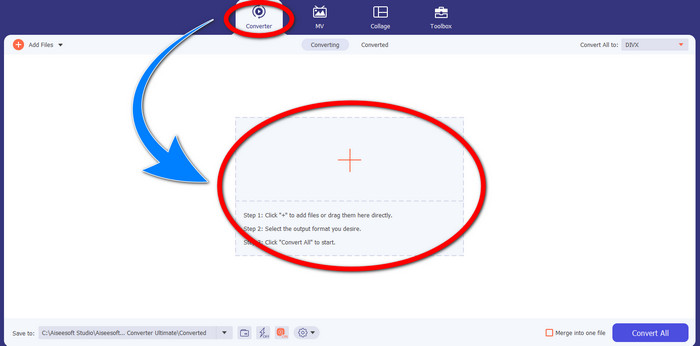
Step 2: After you open the Video Converter Ultimate, click the Converter > Plus sign button to attach the GIF file you want to convert.
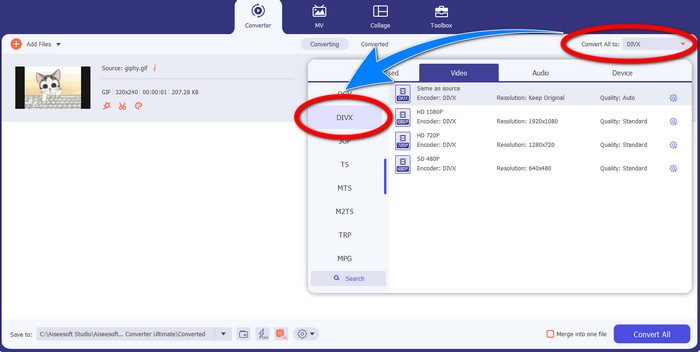
Step 3: When you have already added the GIF, click the Convert All to button, then choose the DivX file with your selected quality, such as 480p, 720p, and 1080p.
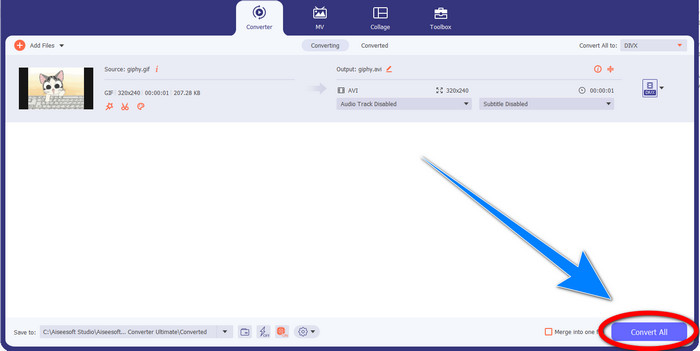
Step 4: After changing the file format from GIF to DivX, click the Convert All button to save your final output.
Parte 3: convertitore online per trasformare GIF in DivX
Convertio is an online tool you can use to convert GIFs to DivX file format. This software is capable of converting a specific file format to different formats. Moreover, it has many features, especially converting, like an audio converter, image converter, font converter, ebook converter, presentation converter, and more. In addition to that, you can utilize this software for free, and you can also purchase a subscription for more benefits. Also, you don’t need to worry about your files because it is safe and secured. The file you are converting will be automatically deleted after 24 hours. However, the free version is only limited. You can only have a few features that you can use and a limited file size that you can save. If you are interested in knowing about converting GIF to DivX, follow the given steps below.
Step 1: Proceed to the website of Convertio. Then, click the Choose Files button to attach the GIF file you want to convert.
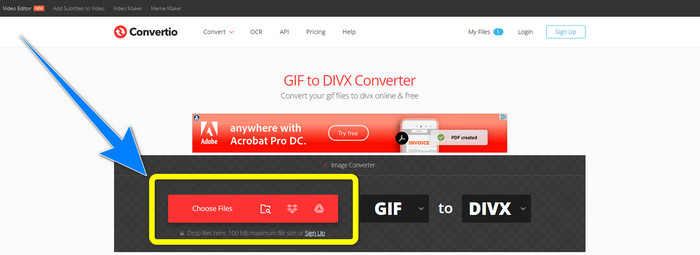
Step 2: After attaching your GIF file, you can change the format to DivX by choosing the format options.
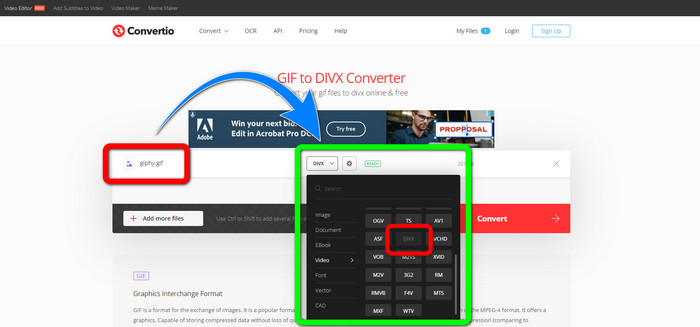
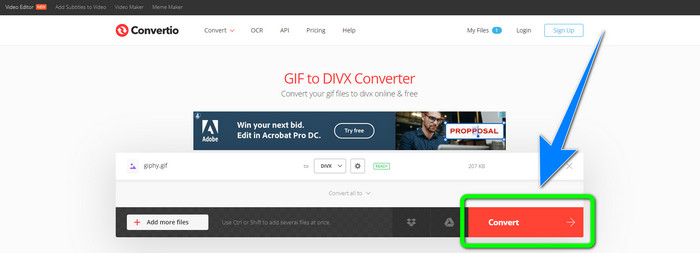
Step 3: When you are done choosing DivX on the format options, click the Convert button to convert the GIF to DivX. Then, you can already save your final output on your device.
Correlato a:
[Offline/Online] Most Used AVI to DivX Converters You Should Know
How to Convert MKV to DivX Online and Offline for Free
Parte 4: Domande frequenti sulla conversione di GIF in DivX
Perché dovrei convertire un file specifico in altri formati di file?
Uno dei motivi per cui è necessario convertire un file specifico in un altro formato di file è che ci sono file non supportati dal dispositivo, che diventeranno incompatibili e non adatti. In questo modo, un'applicazione con un convertitore è essenziale per modificare il formato del file specifico per adattarlo al dispositivo che stai utilizzando.
Posso convertire il mio audio utilizzando l'applicazione Convertio?
Sì, naturalmente. Convertio non è solo affidabile nella conversione di formati di file immagine e video. Questa applicazione può anche essere considerata un convertitore audio.
Qual è il convertitore video migliore e più affidabile che posso usare per il mio Mac?
If you are looking for a great and remarkable application with a file converter, then you must use Video Converter Ultimate. It is suitable for editing and converting your video file using your Mac.
C'è un'ottima applicazione con un convertitore video che posso usare per il mio telefono?
Si C'è! Il software con convertitore video non è accessibile solo per i computer, ma ci sono anche applicazioni che puoi trovare nel Play Store o nei browser per convertire i file utilizzando il tuo telefono come Android.
Esiste un convertitore video per il mio iOS?
Decisamente sì. C'è un convertitore video che puoi usare per il tuo iOS. La cosa buona da fare è guardare il tuo app store. Cerca il convertitore video, cerca le applicazioni che appaiono nei risultati e provale.
Conclusione
As written in the information above, you can conclude that converting a file into a different file format is important. Some formats are incompatible or unsuitable for your devices, so you must convert them to another file format. Also, this article provided two excellent and effective ways to convert GIF to DivX on Windows, Mac, and online. If you desire to convert more files, then the best software you can use is the Video Converter Ultimate. You can utilize this application quickly and convert files faster than other applications.
-
 Come convertire M4V in DivX gratuitamente su Mac [I migliori strumenti]
 Cerchi modi per convertire M4V in DivX gratuitamente? Abbiamo elencato i migliori convertitori per convertire il tuo file M4V in DivX su Mac.
-
 Convertitori da WMV a DivX gratuiti La scelta migliore dell'utente
 Ecco i migliori convertitori gratuiti da WMV a DivX che gli utenti utilizzano principalmente. Questo articolo ti fornisce i modi migliori per convertire il tuo file WMV in DivX.
-
 I 5 migliori convertitori gratuiti da MPEG a DivX per Windows e Mac
 Converti facilmente il tuo file MPEG in un file DivX utilizzando i migliori convertitori da MPEG a DivX. Leggi questo articolo per conoscere maggiori dettagli su di loro.
