


 Video Converter Ultimate
 Screen Recorder
 Riparazione video
 Download sicuro
100% Modi gratuiti per comprimere le dimensioni del file M4V da GB a MB
Il formato di file M4V, simile a MP4, è un ottimo contenitore video prodotto da Apple. Puoi riprodurre file M4V su quasi tutti i lettori più diffusi, come iTunes, QuickTime, VLC Media Player, RealPlayer e altri. Ma a volte, potresti scoprire che il tuo video M4V è troppo grande per essere archiviato o condiviso. In questa situazione, è necessario ridurre le dimensioni del file.
Se non sai come comprimere un M4V, puoi provare le opzioni qui sotto.

Parte 1. Come comprimere M4V online gratuitamente
Come accennato, potrebbe essere un po 'difficile modificare e condividere un file video di grandi dimensioni su YouTube, Facebook, Instagram o altri siti di streaming. Perché questi siti di solito hanno una rigorosa limitazione delle dimensioni del video che carichi. Inoltre, file di grandi dimensioni possono occupare molto spazio sul computer, sull'unità disco, sul telefono, sull'unità flash, sulla scheda di memoria, ecc.
Quindi, quando hai un file M4V di grandi dimensioni, è meglio ridurne le dimensioni con un compressore video professionale. Se stai cercando un programma gratuito, perché non provare FVC Free Video Compressor? È completamente gratuito. Inoltre, è uno strumento di compressione online, il che significa che puoi comprimere qualsiasi video alla dimensione desiderata senza installare pesanti software sul computer.
Puoi usarlo su qualsiasi browser tradizionale come Google Chrome, Mozilla Firefox e Microsoft Edge. E non ci sarà alcuna filigrana aggiunta al video compresso. Puoi persino goderti il video con un'elevata qualità dell'immagine.
Ecco i passaggi su come comprimere file M4V di grandi dimensioni online.
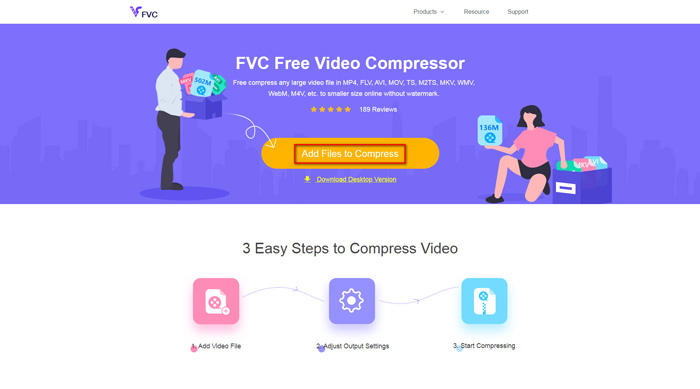
Passaggio 1. Vai al sito web di FVC Free Video Compressor nel tuo browser. Vedrai un pulsante Add Files to Compress nel banner. Cliccalo e segui le istruzioni per scaricare e installare il launcher FVC sul tuo computer.
Passaggio 2. Successivamente, devi selezionare il file M4V che vuoi comprimere. Poi puoi spostare il cursore dietro la casella Size per regolare e trovare facilmente la dimensione esatta del file che desideri. Puoi anche modificare separatamente la risoluzione e il bitrate in base alle tue esigenze.
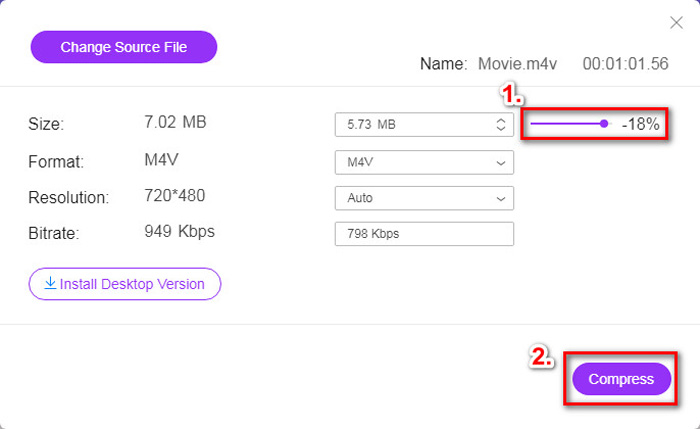
Passaggio 3. Se vuoi comprimere M4V in MP4, allora dovresti scegliere MP4 come formato di output qui. In caso contrario, puoi cliccare direttamente su Compress nell’angolo destro. Seleziona una cartella in cui salvare il video compresso e attendi qualche secondo per ottenere il video desiderato.
Parte 2. Come ridurre le dimensioni del file M4V su Mac / Windows
Poiché M4V è un formato sviluppato da Apple, puoi usare anche il lettore predefinito di Apple, QuickTime Player, per comprimere i file M4V su Mac. Inoltre, QuickTime Player offre una versione per Windows per gli utenti PC. Tuttavia, dovresti notare che l’ultima versione per Windows è QuickTime 7.7.9, rilasciata nel 2016. Quindi, se quello che vuoi è un programma più recente, puoi provare FVC Free Video Compressor, che è in grado di gestire anche i video 4K.
Ad ogni modo, segui i passaggi seguenti per ridurre la dimensione del file M4V in QuickTime.
Passaggio 1. Apri con QuickTime il file M4V da comprimere.
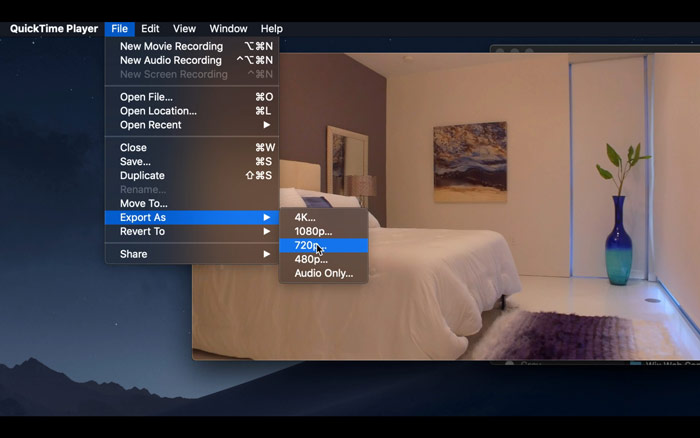
Passaggio 2. Trova il menu File nell’angolo in alto a sinistra. Cliccalo e individua l’opzione Export As dall’elenco. Poi scegli una risoluzione inferiore a quella del video originale per comprimere il video. Dopotutto, qui non vogliamo aumentare le dimensioni.
Passaggio 3. Se non vuoi cambiare il percorso di salvataggio, puoi semplicemente cliccare su Save. Attendi con pazienza l’esportazione del video.
Parte 3. Domande frequenti sulla compressione di M4V
1. Posso semplicemente rinominare M4V in MP4?
No, se con questo intendi convertire M4V in MP4 rinominando semplicemente il suffisso in .mp4. Perché la loro codifica non è la stessa. Dovresti affidarti a uno strumento più professionale per convertire M4V in MP4.
2. YouTube accetta il formato M4V?
Purtroppo, YouTube supporta solo un numero limitato di formati di file che non includono M4V. Quindi, se vuoi caricare il tuo video M4V su YouTube, dovresti convertirlo in un formato supportato da YouTube come MP4.
3. Come unire più video M4V in uno?
Se hai diversi file video M4V che devono essere uniti in uno solo, puoi provare FVC Free Online Video Merger per unire vari file video.
Conclusione
Ora hai a disposizione 2 metodi semplici e gratuiti per comprimere file M4V. Se sei un utente Mac, puoi usare QuickTime Player per ridurre le dimensioni del video. Ma se non sei soddisfatto delle risoluzioni fisse offerte da QuickTime o se utilizzi un PC Windows, puoi dare un’opportunità a FVC Free Video Compressor.
-
 Convertitore da M4V a MP3 - 4 metodi migliori per estrarre MP3 da file M4V
 Quando desideri estrarre facilmente l'audio MP3 dai video M4V, puoi saperne di più sui 4 migliori convertitori da M4V a MP3 per ottenere i file audio desiderati dall'articolo.
-
 4 modi per convertire i filmati QuickTime in MP4 gratuitamente su telefono / computer
 Leggi e ottieni 4 modi per convertire gratuitamente QuickTime in video MP4 sul tuo telefono o computer. Puoi cambiare il formato del file da MOV a MP4 su Windows / Mac / iPhone / Android / online con facilità.
-
 4 Migliori convertitori da MP4 a M4V per trasformare i video MP4 in M4V con facilità
 Quando è necessario modificare i file da MP4 a M4V, è necessario apprendere maggiori dettagli sulle differenze tra i due formati, nonché i migliori convertitori da MP4 a M4V dell'articolo.
