


 Video Converter Ultimate
 Screen Recorder
 Riparazione video
 Download sicuro
I 3 metodi principali che puoi provare a convertire WebM in 3GP
WebM is supported by almost all browsers like Google Chrome, Microsoft Edge, Mozilla Firefox, Opera, and more. However, there are times when you can’t play your WebM file on some devices like phones. To play your video on other devices, you must download online or offline converters to convert your WebM file to other formats. Fortunately, this article will introduce some most effortless ways to convert WebM to 3GP using some tested software.

Parte 1: metodi efficaci per convertire WebM in 3GP su Windows e Mac
This article is meant for you if you want a WebM to 3GP converter using your Windows and Mac. Video Converter Ultimate is the best software you can use. This application lets you convert many files, such as FLV, MKV, DIVX, XVID, MT2S, MTS, M4V, AVI, MP4, and 1000+ more. In addition, you don't have to worry about the conversion process because you can convert files 30x faster than other converters. You can also download this great application for free.
Inoltre, i metodi di conversione dei file di questa applicazione non sono complicati perché ha un'interfaccia amichevole e modi semplici, perfetti per tutti gli utenti. Oltre alla conversione, ci sono altri strumenti di cui puoi usufruire, come migliorare i tuoi video, realizzare un video musicale, creare un collage, modificare le dimensioni del file e altro ancora.
Funzioni
◆ Perfetto per creare un collage.
◆ Personalizza e personalizza le GIF.
◆ Modificare la velocità di un video.
◆ In grado di modificare le dimensioni del file di un video
◆ Può comprimere il file audio.
Professionisti
- Perfetto per utenti Windows e Mac.
- Ha un processo di conversione veloce.
- Supporta oltre 1000 formati, come MP4, M4V, DIVX, FLV, MKV, 3GP, SWF, ecc.
- Ha un'interfaccia utente amichevole, adatta ai principianti.
- Può facilmente aggiungere e rimuovere elementi non necessari come filigrane, loghi, firme, ecc.
Contro
- Paga per la versione pro per utilizzare tutte le fantastiche funzionalità.
Step 1: Download the Video Converter Ultimate using your Windows or Mac by clicking the Download button below. Install it on your device and run the software.
Download gratuitoPer Windows 7 o versioni successiveDownload sicuro
Download gratuitoPer MacOS 10.7 o versioni successiveDownload sicuro
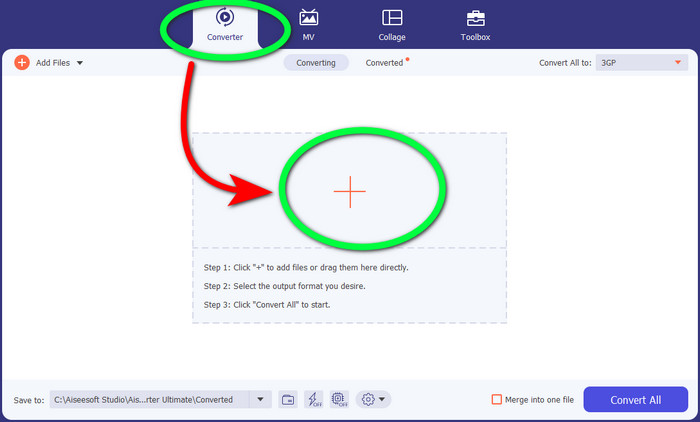
Step 2: When you see the four options on the upper part of the interface, select the Converter panel and click the + sign to upload the WebM video file.
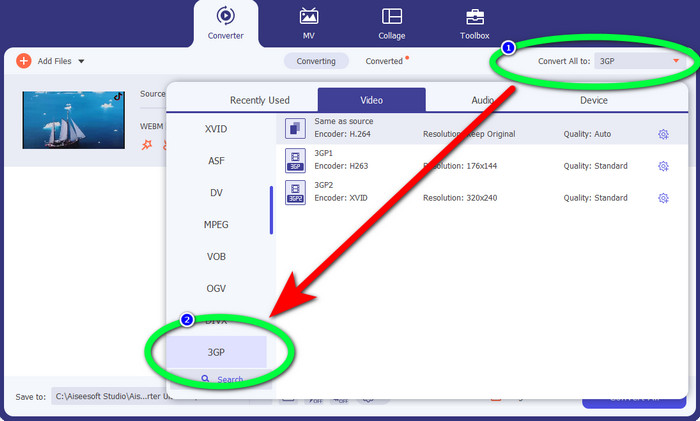
Step 3: After uploading the WebM video file, click the Convert all to option and choose the 3GP file.
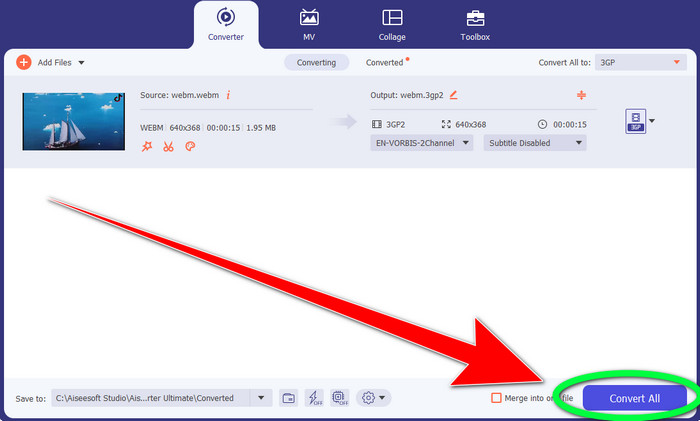
Step 4: When you are done changing the file format from WebM to 3GP, click the Convert button.
Parte 2: semplici modi per convertire WebM in 3GP online
Utilizzo di FVC Free Video Converter online
Do you want to use a free video converter online? Then, the online tool you can use for free is FVC Free Video Converter Online. This online application lets you convert WebM to 3GP easily. It only has three (3) basic steps, so you won’t get confused when converting different files. Also, this free converter is accessible on both Windows and Mac. It also converts various files, like MP4, AVI, M4V, MKV, WMA, MP3, and more. In addition, you can convert your file quickly because it has a fast conversion speed, so you don’t need to wait longer to convert another file. If you are interested in converting your WebM to 3GP using FVC Free Video Converter Online, use the simple steps below.
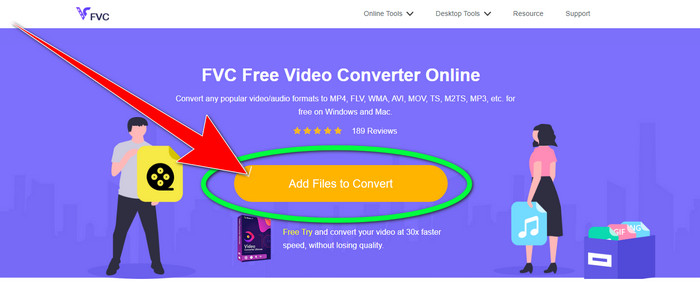
Step 1: Visit the FVC Free Video Converter Online. Click the color orange in the middle to add your WebM video file.
Step 2: Next, select the 3GP file as your chosen format. You will see the format options at the lower part of the interface.
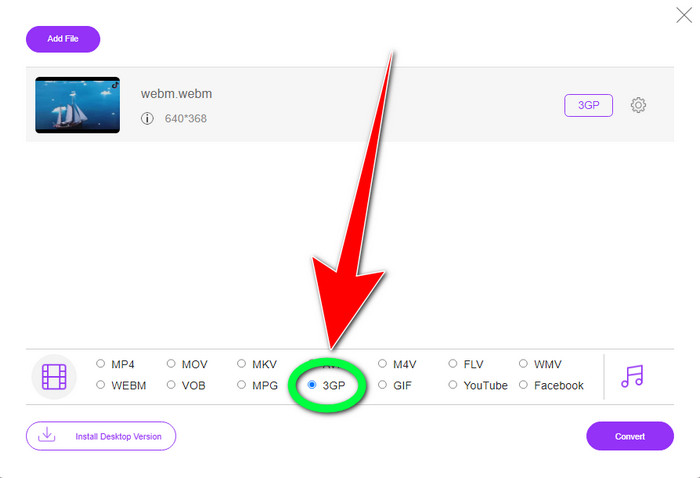
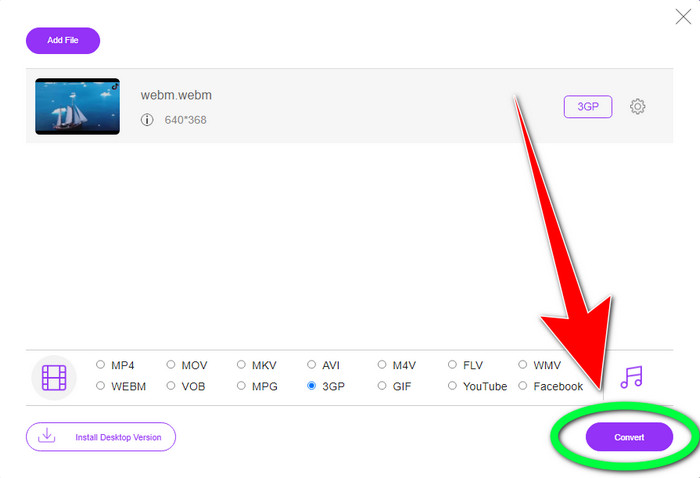
Step 3: After you choose the 3GP file format, you can already click the Convert button to save your video. This tool also enables you to convert WebM to DIVX.
Utilizzando Convertio
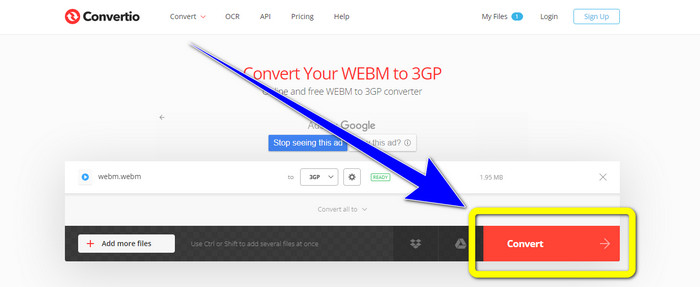
Se stai ancora cercando un altro convertitore da WebM a 3GP online, allora Convertio è lo strumento che stai cercando. Ha anche semplici passaggi per convertire i tuoi file. Inoltre, puoi convertire il tuo file in 37 diversi formati di file video, inclusi HEVC, MPG, M4V, MKV, WMV, MP4, MOV, AVI, ecc. Convertio non si limita solo alla conversione di formati video. Puoi anche convertire diversi formati audio, immagini e documenti.
Tuttavia, 100 Mb è la dimensione massima del file di questa applicazione online per l'utilizzo della versione gratuita. Devi ottenere la versione a pagamento per avere file di dimensioni illimitate e godere di più funzionalità. Ma l'acquisto di un abbonamento è costoso. Se desideri convertire il file WebM in 3GP utilizzando Convertio, procedi nel seguente modo.
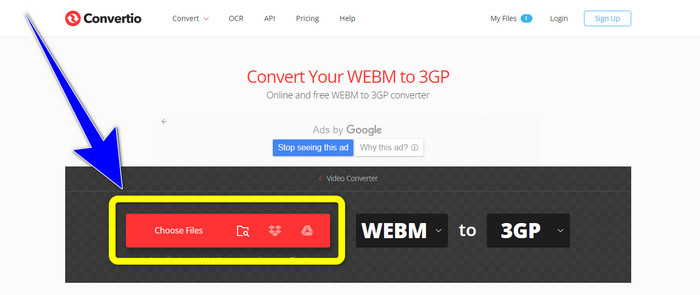
Step 1: Proceed to the Convertio website and press the Choose files button to add your WebM video file.
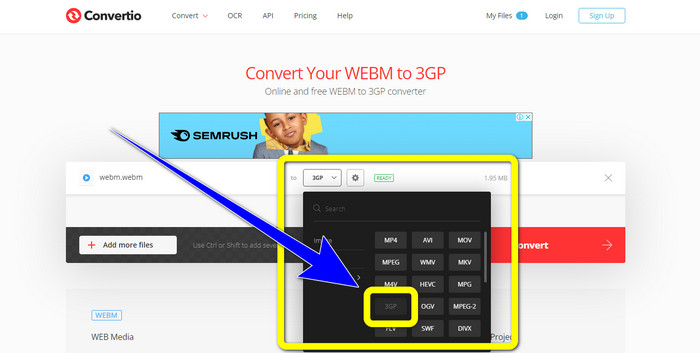
Step 2: After you have already added your WebM video file in Convertio, select the format options and the 3GP file format.
Step 3: For your last step, you can click the Convert button to convert your file. Then, save your final file on your computer for the conversion process. Click here to learn how to convert MPG to 3GP.
Parte 3: Informazioni su WebM e 3GP
WEBM
With VP8 video and Vorbis audio compression, WebM is an open media container. The WebM format is commonly used to add media to web pages and is supported by all web browsers, including Opera, Mozilla Firefox, and Google Chrome. It offers good video playing quality and data compression characteristics. WebM video embedding occurs without hiccups or mistakes on website pages. The WebM format is intended to compete with the h.264 standards. Google is the owner of the extension's copyright.
3GP
For GSM-based, or Global System for Mobile Communications phones, the Third Generation Partnership Project created the 3GP multimedia container in 1998. The container is perfect for mobile phones because it uses less data, bandwidth, and storage. It is a common container for MMS files (Multimedia Messaging Service).
Parte 4: Domande frequenti sulla conversione di WebM in 3GP
Quali sono i migliori convertitori offline e online che posso utilizzare per convertire WebM in 3GP?
Here are the tested and reliable applications to convert WebM to 3GP and different files.
1. FVC Free Video Converter Online
2. Video Converter Ultimate
3. Convertio
4. HitPaw Video Converter
5. Online Convert Free
6. AnyMP4 Video Converter Ultimate
7. OnlineConvert
Il 3GP è un buon formato video?
Quando si tratta di telefoni di rete 3G, il formato 3GP è eccellente perché è stato creato appositamente per il dispositivo. Tuttavia, in termini di streaming su lettori multimediali portatili o desktop, ci sono formati più buoni come MP4 perché può supportare video a risoluzione più elevata rispetto a 3GP.
Qual è la risoluzione di 3GP?
I video 3GP hanno due risoluzioni: la prima è 176x144 per tutti i telefoni che supportano il formato 3G. L'altra risoluzione è 320x240 per telefoni con widescreen, PSP, lettori MP4 e iPad touch.
Conclusione
In this article, we can conclude that there are many ways to convert WebM to 3GP. If you want the best way to convert video files online, use FVC Free Video Converter Online. Then, if you are looking for downloadable software, use Video Converter Ultimate. They are both reliable at converting various video formats.
-
 Il miglior convertitore da WebM a FLV gratuito sul Web e sul desktop
 Hai lo stesso problema durante la riproduzione di file WebM sui tuoi smartphone? Quindi trascorri 5 minuti a leggere questo articolo per sapere come convertire WebM in FLV.
-
 I 3 migliori convertitori da WebM a WMV da non perdere
 Cerchi un modo per convertire un file WebM in un file WMV? Oggi abbiamo provato alcuni famosi convertitori sul mercato e abbiamo scelto il migliore e il più facile da usare tra di loro.
-
 I migliori convertitori da WebM a MKV che devi utilizzare per convertire rapidamente
 Stai cercando modi per convertire file WebM in MKV? Questo articolo presenta i migliori convertitori da WebM a MKV da provare.
