


 Video Converter Ultimate
 Screen Recorder
 Riparazione video
 Download sicuro
Come convertire WebP in PNG: i modi più adatti a te
Google ha sviluppato WebP per visualizzare le immagini sul web utilizzando un eccellente sistema di compressione. Questo riduce le loro dimensioni fino a un terzo rispetto ai tradizionali formati JPEG e PNG. Inoltre mantiene una buona qualità dopo la compressione. Il problema è che alcuni editor di immagini, anche a pagamento, non supportano il formato WEBP. Ciò significa che non puoi aprire i file immagine WebP che scarichi sul desktop se vuoi riutilizzarli e modificarli. Una delle soluzioni migliori è convertire WebP in altri formati come PNG. Quasi tutti i browser e i programmi di fotoritocco supportano i file PNG. Così puoi caricare la tua immagine ovunque desideri. In questo caso, questo articolo ti propone il metodo migliore per convertire il tuo WebP in PNG. Leggi questo post mentre ti mostriamo i convertitori di immagini più affidabili che puoi usare.

Parte 1: WebP contro PNG
| Formato del file | WebP | PNG |
| Estensione del file | .webp | .png |
| Sviluppato da | Gruppo di sviluppo PNG | |
| Nome e cognome | Immagine sul sito web | Grafica di rete portatile |
| Descrizione | Le immagini sul Web possono essere compresse sia senza perdita che con perdita utilizzando il file WebP formato immagine. I web designer possono utilizzare WebP per generare grafica più ricca e compatta che velocizza il web. Rispetto ai PNG, le immagini lossless WebP hanno dimensioni inferiori di 26%. | Grafica di rete portatile o PNG è per la memorizzazione di immagini digitali e grafica web. Inoltre, ci sono immagini con sfondi trasparenti. Insieme a JPEG, TIFF, GIF ed EPS, PNG è uno dei tipi di file immagine più utilizzati. |
| Compressione | Con perdita e senza perdita | Senza perdita |
| Programmi/browser associati | Google Chrome, Internet Explorer, Microsoft Edge, Mozilla Firefox | Photoshop, Microsoft, GIMP, Paint, Visualizzatore di immagini FastStone, Google Chrome, Internet Explorer |
Parte 2: i migliori metodi per convertire WebP in PNG online
Come convertire WebP in PNG utilizzando FVC Free Image Converter
FVC Free Image Converter è uno degli straordinari strumenti online che puoi utilizzare per convertire WebP in PNG. Questo convertitore di immagini online può trasformare qualsiasi formato di file immagine in PNG. I formati immagine supportati da questo strumento includono JPG, PNG, JPEG, TIFF, BMP, WEBP, ICO e altri ancora. Offre anche un’interfaccia semplice e opzioni chiare. In questo modo, sia gli esperti sia i principianti possono convertire le foto usando questo convertitore online. Tutti i browser supportano FVC Free Image Converter, tra cui Google, Firefox, Microsoft Internet Explorer, Safari, ecc. Inoltre, FVC Free Image Converter offre la conversione di foto gratuita. A differenza di altri convertitori, non ci saranno annunci invadenti durante la conversione dei file immagine. Garantisce anche l’alta qualità della fotografia. Puoi mantenere l’aspetto dell’immagine originale anche dopo la conversione. FVC Image Converter offre anche la conversione in batch. Puoi convertire un gran numero di immagini contemporaneamente. Per convertire l’immagine in JPG, segui semplicemente le brevi istruzioni riportate di seguito.
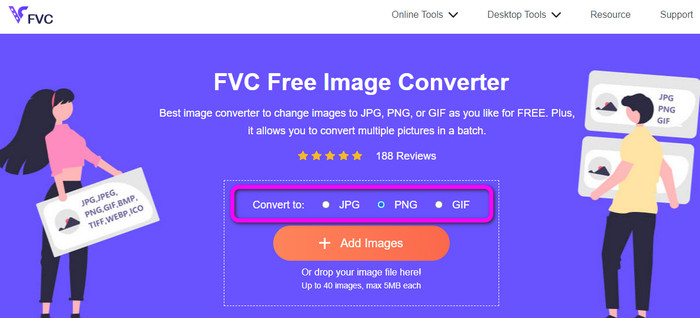
Passaggio 1: Per prima cosa, apri il browser e vai al sito ufficiale di FVC Free Image Converter. Seleziona il formato di output desiderato dall’opzione Convert to, cioè il formato PNG.
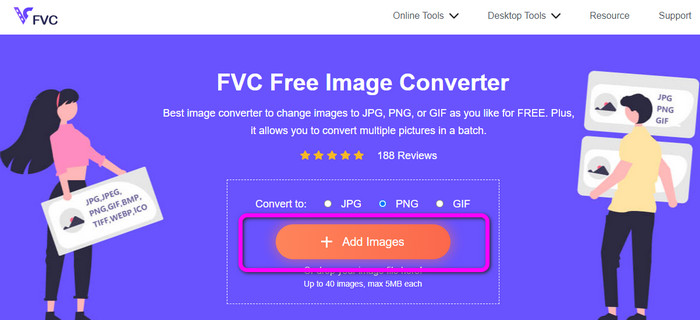
Passaggio 2: Fai clic sul pulsante Add Images per caricare l’immagine WebP che vuoi convertire. Se lo desideri, puoi caricare più immagini. Apri l’immagine dalla cartella del tuo computer. Dopo il caricamento, il processo di conversione procederà automaticamente.
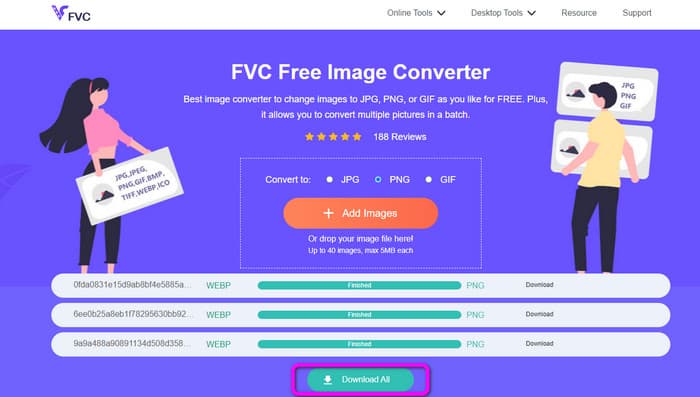
Passaggio 3: Per l’ultimo passaggio, fai clic sul pulsante Download accanto a ciascun file per salvarli uno per uno. Ma, se vuoi scaricarli tutti in un’unica operazione, fai clic sul pulsante Download All. Dopo il salvataggio, potrai già aprire le immagini convertite sul tuo computer.
Come convertire WebP in PNG usando Convertio
Un altro modo per convertire WebP in PNG è usare Convertio. Questo convertitore da WebP a PNG può trasformare i tuoi file WebP in formato PNG. Inoltre, offre un’interfaccia utente facile da capire. Pertanto, sia gli esperti sia i principianti possono usare questo convertitore. Questo strumento supporta anche la conversione in batch. Così puoi convertire molti file immagine contemporaneamente. Inoltre, il processo di conversione è più rapido rispetto ad altri convertitori. La conversione dei file è possibile senza richiedere troppo tempo. Convertio è inoltre accessibile da tutti i browser: tra questi Google, Edge, Explorer e altri. Inoltre, questo convertitore di immagini online offre funzioni extra. È possibile convertire anche video, audio, documenti e altro ancora. Tuttavia, ci sono alcune limitazioni nella versione gratuita di questo strumento. Puoi caricare file con una dimensione massima di 100 MB. Poi, se prevedi di effettuare una conversione in batch, il numero massimo di immagini che puoi caricare è due. Se vuoi caricare molte immagini con un solo clic, la soluzione migliore è acquistare un piano in abbonamento. Infine, hai bisogno di una connessione Internet per utilizzare lo strumento.
Passaggio 1: Apri il browser e cerca Convertio. Successivamente, fai clic sul pulsante Choose Files. Quando la cartella del computer appare sullo schermo, seleziona le immagini WebP che vuoi convertire e aprile.
Passaggio 2: Vai alle opzioni di formato dopo aver caricato le immagini WebP. Seleziona il file PNG come formato di output.
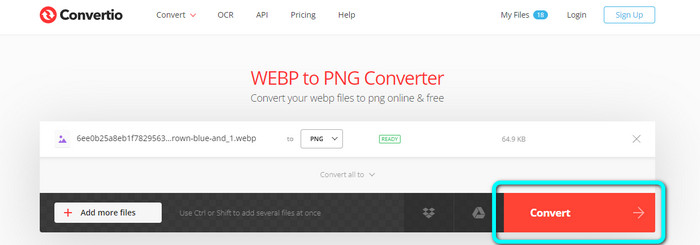
Passaggio 3: Quando hai finito di selezionare il file PNG, fai clic sul pulsante Convert. Quindi attendi il processo di conversione. Fai clic sul pulsante Download per salvare le immagini convertite sul desktop.
Come convertire WebP in PNG utilizzando la conversione online
Online-Convert è un altro convertitore di immagini online affidabile per convertire WebP in PNG. Supporta vari formati immagine, tra cui JPG, BMP, GIF, TIFF e altri. Il processo di conversione è molto semplice. Sono necessari solo tre passaggi per convertire il file immagine WebP in formato PNG. In questo modo, tutti gli utenti possono usare questo convertitore, in particolare i principianti. Inoltre, Online-Convert è disponibile in tutti i browser. Include Google, Firefox, Edge, Explorer e altri, risultando molto comodo. Offre anche la conversione in batch per trasformare più immagini contemporaneamente. Tuttavia, usando la versione gratuita, puoi caricare al massimo 3 immagini per batch. Il limite di dimensione dei file è di soli 25 MB. Inoltre, il processo di conversione è piuttosto lento, il che fa perdere tempo. In tal caso, passa alla versione a pagamento se vuoi usufruire di ottime funzionalità senza limitazioni.
Passaggio 1: Vai al sito web di Online-Convert dal tuo browser. Fai clic sul pulsante Choose File per caricare l’immagine WebP. Quando effettui una conversione in batch, puoi caricare fino a 3 immagini.
Passaggio 2: Quando il caricamento è terminato, fai clic sul pulsante Start. In questo modo inizierà il processo di conversione.
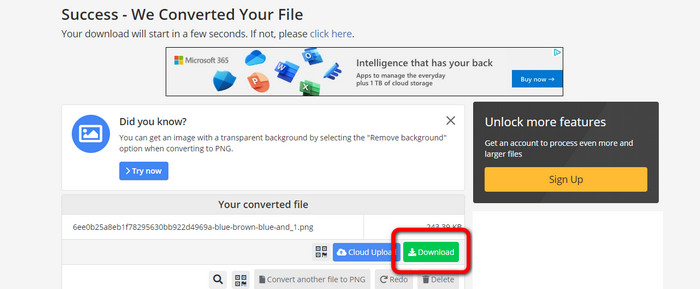
Passaggio 3: Fai clic sul pulsante Download per salvare l’immagine convertita.
Parte 3: modi pratici per convertire WebP in PNG offline
Converti WebP in PNG utilizzando Video Converter Ultimate
Puoi usare Video Converter Ultimate se preferisci convertire i tuoi file WebP in PNG offline. Può convertire i tuoi file all’istante grazie a un processo di conversione rapido. Inoltre, puoi convertire più file contemporaneamente grazie alla funzione di conversione in batch. Supporta anche vari formati di file immagine, tra cui JPG, BMP, TIFF, GIF, SVG e altri. Video Converter Ultimate offre un processo di conversione semplice, rendendolo adatto a tutti gli utenti. In questo modo, che tu sia un nuovo utente o meno, sarai perfettamente in grado di utilizzare questo convertitore. Inoltre, puoi scaricare questo convertitore offline sia su Mac che su Windows, rendendolo comodo per gli utenti. Si tratta anche di un programma scaricabile gratuitamente. Ciò significa che non devi pagare per accedere al convertitore. Uno dei grandi vantaggi di questo convertitore è che puoi salvare le immagini convertite senza alcuna filigrana indesiderata. In questo modo otterrai immagini pulite e soddisfacenti. Segui i semplici passaggi riportati di seguito per convertire in modo efficiente le immagini WebP in formato PNG.
Passaggio 1: Scarica Video Converter Ultimate sul tuo Windows o Mac. Successivamente, procedi con l’installazione e avvia il convertitore. Se vuoi accedere facilmente al convertitore, fai clic sul pulsante Download qui sotto.
Download gratuitoPer Windows 7 o versioni successiveDownload sicuro
Download gratuitoPer MacOS 10.7 o versioni successiveDownload sicuro
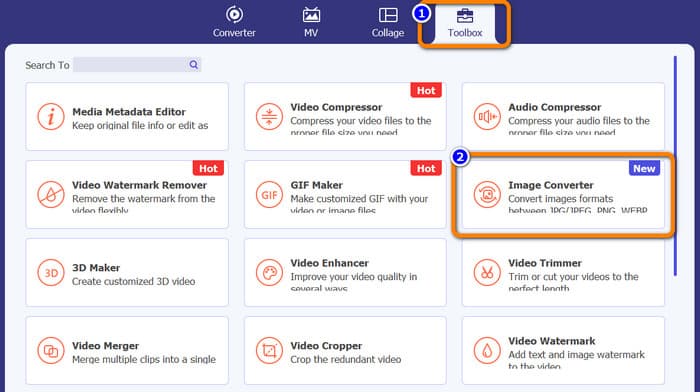
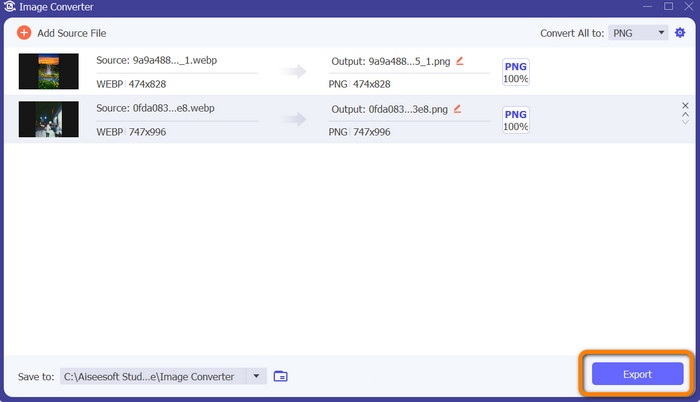
Passaggio 2: Dopo aver avviato il convertitore di immagini, vai al pannello Toolbox. Seleziona lo strumento Image Converter in basso. Dopo il clic, verrà visualizzata un’altra interfaccia.
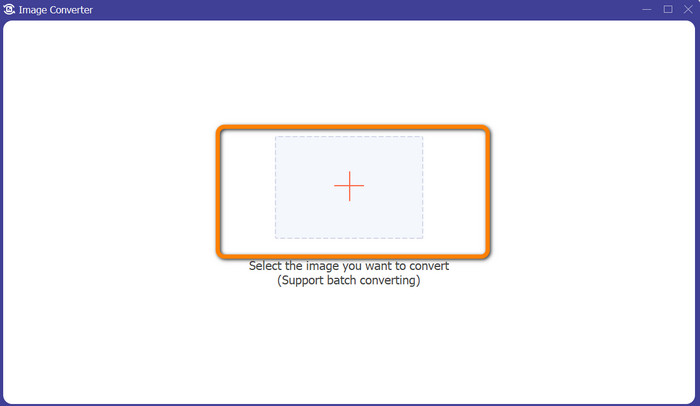
Passaggio 3: Fai clic sul pulsante con il segno Plus al centro dell’interfaccia. Quando la cartella del computer compare, seleziona le immagini WebP che vuoi convertire e aprile. Fai clic sul pulsante Add source file per aggiungere altri file immagine.
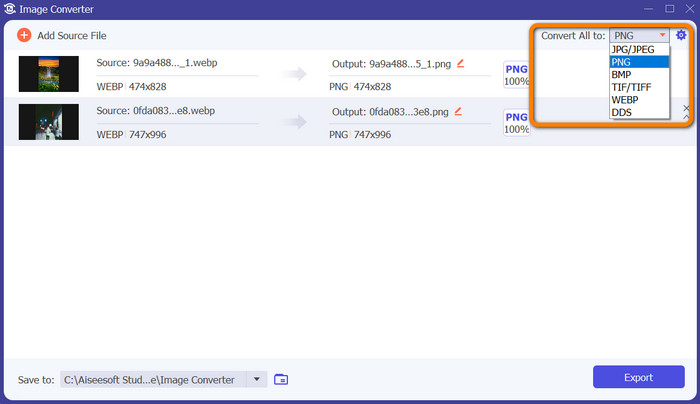
Passaggio 4: Dopo aver aggiunto i file che vuoi convertire, fai clic sull’opzione Convert All to nell’angolo in alto a destra dell’interfaccia. Quindi seleziona il formato PNG.
Passaggio 5: L’ultimo passaggio è fare clic sul pulsante Export nell’angolo in basso a destra dell’interfaccia. Quando il processo di esportazione è terminato, puoi aprire le immagini convertite dal tuo computer. Puoi usare questo software anche per convertire WebP in JPG.
Parte 4: Domande frequenti sulla conversione di WebP in PNG
1. Come convertire WebP in PNG su Microsoft Paint?
Convertire WebP in formato PNG è semplice, purché tu conosca la procedura corretta. Avvia MS Paint selezionandolo dal menu Start o digitando Paint nella casella di ricerca di Windows. Poi seleziona Paint dall’elenco dei risultati nella parte superiore della pagina. Apri Paint selezionando File > Open dal menu che appare. Scegli il file immagine WEBP che desideri convertire dal file system del tuo computer, quindi fai clic su Open. Una volta che l’immagine WEBP è stata caricata in Paint, seleziona File dal menu e fai clic su Save as. Nel menu laterale scegli JPEG picture. Quando appare la finestra Save As, digita un nome file e seleziona la cartella in cui desideri salvare l’immagine convertita. Dopo esserti assicurato che sia selezionato JPEG, fai clic su Save.
2. Come aprire le immagini WebP in GIMP?
In GIMP, apri i file immagine WebP. Gimp-web è il nome del plugin GIMP necessario per aprire un'immagine WebP. Grazie a questo plugin, il nuovo formato immagine WebP può essere utilizzato per caricare e salvare file. La buona notizia è che questo plugin è accessibile su tutti i sistemi operativi più diffusi. Include Mac, Linux e Windows.
3. Quali sono i vantaggi di WebP?
Ci sono quattro vantaggi principali di WebP. Può aumentare le prestazioni del sito Web, risparmiare più larghezza di banda, aumentare l'ottimizzazione dei motori di ricerca e mostrare immagini di alta qualità.
Conclusione
Questi sono i quattro metodi eccellenti che puoi provare per convertire i file da WebP a PNG. Tuttavia, se vuoi un convertitore di immagini gratuito con procedure semplici, usa FVC Free Image Converter.
-
 Tutorial passo passo su come convertire ICO in PNG
 Fai clic su questa guida per apprendere i metodi più semplici per convertire ICO in PNG. Scopriamo i convertitori da ICO a PNG per procedure online e offline.
-
 I metodi più semplici per convertire SVG in PNG
 Scopri come modificare il tuo file immagine da SVG a PNG utilizzando utili convertitori di immagini. Leggi questa guida per imparare tutto ciò che devi sapere sulla conversione.
-
 Modi completi per convertire JPG in PNG online e offline
 Cerchi metodi utili per convertire il formato di file JPG in PNG? Questa guida ha la risposta di cui hai bisogno. Per scoprire questi metodi, leggi l'articolo.
