


 Video Converter Ultimate
 Screen Recorder
 Riparazione video
 Download sicuro
Da MPG a MP3: una guida completa alla conversione e al miglioramento dei file audio
Il formato video MPG è spesso utilizzato per l’archiviazione di film e altri tipi di contenuti video. In alcune occasioni può essere utile estrarre la componente audio da un file in formato MPG e salvarla successivamente sotto forma di file MP3. In questo contesto, un convertitore da MPG a MP3 è uno strumento molto utile.
Utilizzando un convertitore esperto, è possibile trasformare facilmente i propri file MPG in formato MP3, consentendo loro di assaporare i propri contenuti audio preferiti su una vasta gamma di dispositivi. Esistono più convertitori, sia gratuiti che a pagamento, che possono aiutare a portare a termine questo compito. I programmi sono stati classificati per gli utenti in base alla loro preferenza per l'accesso online o offline. Si prega di trovarli elencati di seguito per il vostro riferimento.

Parte 1. Converti MPG in MP3 o MP3 in MPG con Video Converter Ultimate
La conversione da MPG a MP3 è solo una delle tante trasformazioni di formati video possibili con Video Converter Ultimate. Inoltre, il programma può convertire video in alta definizione in pochi secondi senza perdita di qualità e offre conversione in batch, gestione della cronologia e regolazione dei parametri. Quando si tratta di convertire video in altri formati, FVC Video Converter Ultimate è la soluzione migliore disponibile.
Passaggio 1. Scarica il programma
Scarica FVC Video Converter Ultimate e installalo sul tuo computer. Premi semplicemente il pulsante Download gratuito qui sotto. Avvia l’app e poi importa il file MPG usando il pulsante Aggiungi file.
Download gratuitoPer Windows 7 o versioni successiveDownload sicuro
Download gratuitoPer MacOS 10.7 o versioni successiveDownload sicuro
Passaggio 2. Seleziona il formato di output
Dal menu a discesa dell’opzione Profilo, scegli MP3 come formato di output desiderato. Se lo desideri, puoi modificare le impostazioni del file audio.
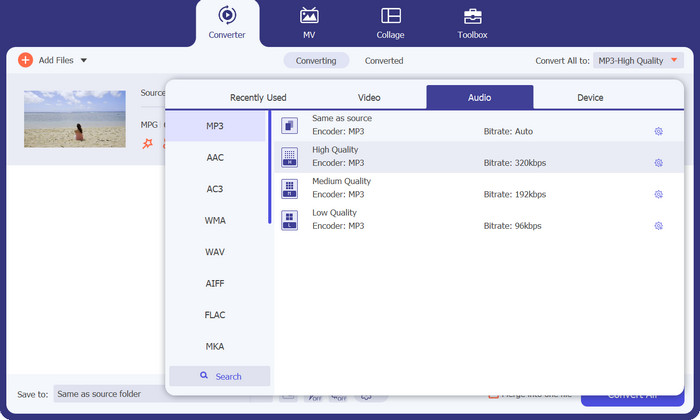
Passaggio 3. Converti in MP3
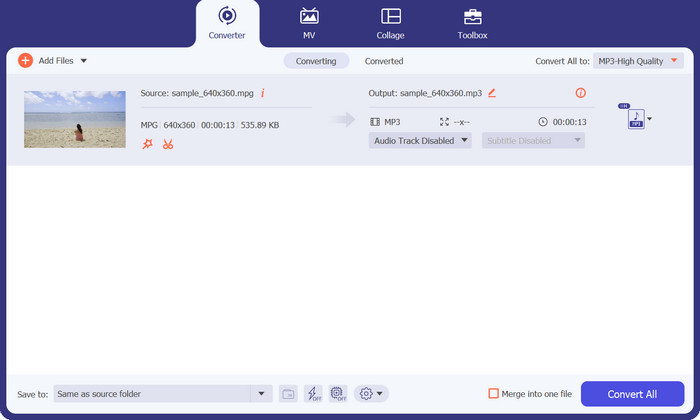
Specifica una posizione sul tuo computer in cui salvare il file convertito. Avvia il processo di conversione. Ora fai clic sul pulsante Converti tutto. Attendi gentilmente il completamento della conversione.
Professionisti
- Alta velocità di conversione mantenendo la qualità.
- Ritaglia, ritaglia, aggiungi sottotitoli e altro ancora.
- Supporta la conversione batch.
Contro
- Richiede un abbonamento a pagamento per accedere a tutte le sue funzionalità.
Parte 2. Converti MPG in MP3 o MP3 in MPG con Free MP3 Converter Online
Un’altra app convertitore da MPG a MP3 che ti aiuta a convertire MPG in MP3 o MP3 in MPG è Free MP3 Converter Online. L’app è completamente gratuita e non presenta limitazioni. Questo strumento consente agli utenti di convertire file audio in formati audio molto diffusi come MP3, AAC, AC3, WMA, WAV e altri, senza costi o tariffe nascoste. Lo strumento fornisce inoltre un output senza filigrana in numerosi formati audio tra cui scegliere e può essere veloce quanto la tua velocità di upload e download su Internet. Per convertire MPG in MP3 online gratuitamente, segui questi passaggi:
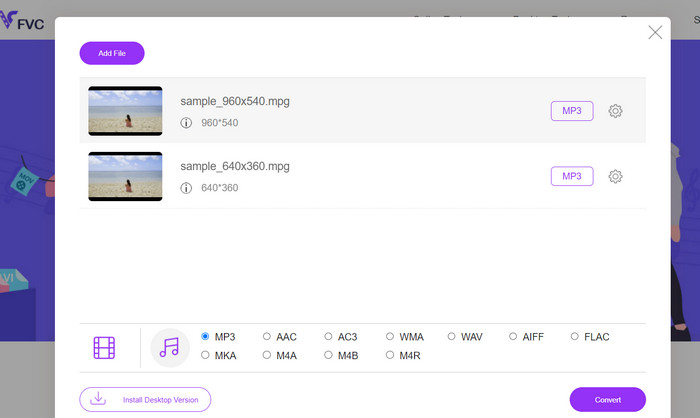
Passaggio 1. Vai al sito ufficiale di Free MP3 Converter Online utilizzando qualsiasi browser sul tuo computer. Per aggiungere il tuo file musicale, fai clic sul pulsante Aggiungi file da convertire e seleziona il file musicale desiderato.
Passaggio 2. Dopo aver caricato un file musicale, vedrai tutti i formati audio disponibili. Scegli MP3 dal menu del profilo.
Passaggio 3. Per avviare il processo di conversione, fai clic sul pulsante Converti. Attendi fino al termine della conversione.
Professionisti
- Supporta la regolazione dei parametri.
- Transcodifica audio di alta qualità senza perdere qualità.
- Nessun costo o addebito nascosto.
Contro
- Richiede una buona connessione a Internet.
- Tempi di caricamento più lenti in file audio di grandi dimensioni.
Parte 3. Converti MPG in MP3 con VLC
VLC Media Player è un lettore multimediale gratuito e open source in grado di aprire praticamente qualsiasi file audio e video esistente. È anche abbastanza versatile. D'altra parte, non solo è eccellente nella riproduzione di file multimediali, ma ha anche una funzione integrata che consente agli utenti di convertire i file multimediali da un formato all'altro.
Quando si converte un file utilizzando VLC, gli utenti hanno la possibilità di modificare una serie di impostazioni, come il bit rate, i canali e la frequenza di campionamento, al fine di ottenere la migliore qualità audio possibile. Grazie a questa versatilità, è possibile adattare l'output di un file MP3 in modo che possa essere utilizzato in una varietà di contesti.
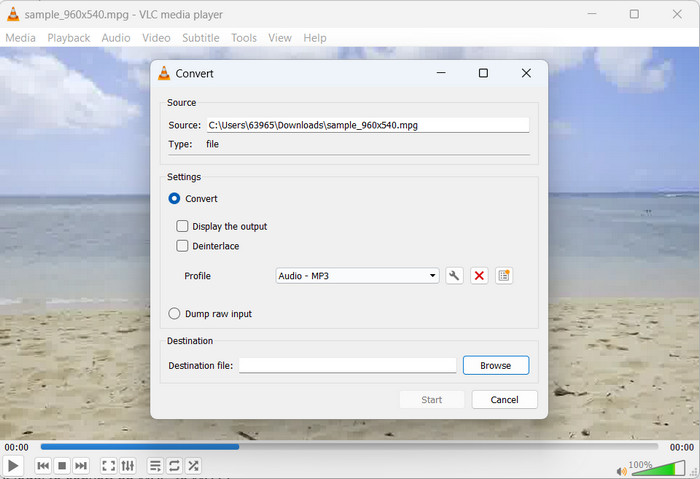
Passaggio 1. Per prima cosa, avvia il lettore multimediale VLC e fai clic su Media nell’angolo in alto a sinistra.
Passaggio 2. Quindi, seleziona Converti/Salva dal menu a discesa. Poi fai clic su Aggiungi e seleziona il file MPG che desideri convertire.
Passaggio 3. Spunta Converti/Salva nella parte inferiore della pagina. Scegli Audio-MP3 dal menu a discesa sotto la sezione Profilo. Infine, seleziona la posizione in cui desideri salvare il file convertito e fai clic su Avvia. Ecco come estrarre l’MP3 da un file MPG con VLC.
Professionisti
- È disponibile per più piattaforme.
- Utilizza codec audio e video avanzati.
- Fornisce impostazioni personalizzate.
Contro
- Supporta solo alcuni formati di output.
- Funzionalità di modifica limitate.
Approfondimenti:
3 modi migliori per convertire rapidamente MPG in MP4
Suggerimenti e trucchi su come convertire file MKV in MP3 [2023]
Parte 4. Domande frequenti sulla conversione di MP3 e MPG
È legale convertire un MPG in MP3?
Per rispondere alla tua domanda, la conversione di un file MPG in un MP3 è legale per uso non commerciale. Se desideri condividere o vendere l'audio convertito, tuttavia, avrai bisogno dei permessi o delle licenze appropriati.
Quali fattori influenzano la qualità audio del file MP3 di output?
La fedeltà uditiva del file MP3 risultante dipende da diversi fattori, inclusi ma non limitati al bit rate, alla frequenza di campionamento e alla modalità del canale. È possibile migliorare la qualità audio del file di output aumentando la frequenza di campionamento e il bit rate.
Come faccio a selezionare il bitrate corretto per il mio file MP3 convertito?
La qualità del suono e la dimensione del file di un file MP3 è determinata dalla sua velocità in bit, che è comunemente espressa in kilobit al secondo (kbps). Un aumento della velocità in bit è correlato positivamente con una migliore fedeltà audio, anche se a scapito di una dimensione del file maggiore.
Conclusione
La conversione da MPG a MP3 rappresenta una soluzione pratica per migliorare la compatibilità audio e ottenere una riproduzione senza interruzioni su vari dispositivi. Seguendo le tecniche illustrate in questo manuale, è possibile trasformare senza difficoltà i propri file MPG nel diffusissimo formato MP3.
-
 3 Semplici Modi su Come Convertire MPG in MOV sul Tuo Mac/Windows/Online
 Vuoi convertire i tuoi file MPG e successivamente trasportarli sul tuo iOS, iPod, iPad o Mac? Questo articolo ti aiuterà a capire come convertire MPG in MOV con passaggi.
-
 Come unire più file video MPG in uno su Windows e Mac
 Unire più clip MPG in un unico file potrebbe essere un problema per te. Puoi saperne di più su come unire i video MPG sul tuo computer in questo articolo.
-
 5 taglierine MP3 per tagliare facilmente qualsiasi audio [2023 aggiornato]
 Hai bisogno di un cutter MP3 per tagliare l'audio? In tal caso, leggi questo articolo perché forniamo gli strumenti su cui puoi fare affidamento che forniscono un taglio facile per l'audio.
