


 Video Converter Ultimate
 Screen Recorder
 Riparazione video
 Download sicuro
Come funziona Video Colorizer: i 3 migliori strumenti da utilizzare nel 2023
Hai ancora quei vecchi video ripresi in bianco e nero? Anche se basta una sola riproduzione per rivivere i vecchi tempi, oggi puoi trasformare i tuoi filmati in opere senza tempo colorizzandoli. Per fortuna l’era digitale ha portato molte innovazioni tecnologiche, tra cui uno strumento in grado di colorare i video in bianco e nero. In questa guida ti presenteremo i migliori programmi che sfruttano il colore e algoritmi intelligenti, regolando in modo fluido e automatico le tonalità delle tue riprese.

Parte 1. Colora video offline
Trasformare i vecchi film in versioni a colori non dovrebbe più essere un problema grazie a un potente software come Video Converter Ultimate. Sebbene questo strumento sia usato principalmente per convertire video e audio, include anche un editor video che ti permette di ridare vita ai filmati in bianco e nero. Inoltre, Video Converter Ultimate offre un pannello di anteprima in tempo reale in cui puoi vedere le modifiche apportate durante l’editing. Puoi anche ritagliare, ruotare e aggiungere innumerevoli filtri alle tue riprese per un tocco extra di creatività. Segui la semplice guida qui sotto per colorare video in bianco e nero con questo ottimo strumento.
Passaggio 1. Avvia il miglior Video Colorizer
Innanzitutto, scarica il programma di installazione di Video Converter Ultimate facendo clic sul miglior sistema operativo per il tuo dispositivo. Successivamente, esegui la procedura guidata di installazione per avviare il programma sul tuo computer.
Download gratuitoPer Windows 7 o versioni successiveDownload sicuro
Download gratuitoPer macOS 10.7 o versioni successiveDownload sicuro
Passaggio 2. Importa il file nel programma
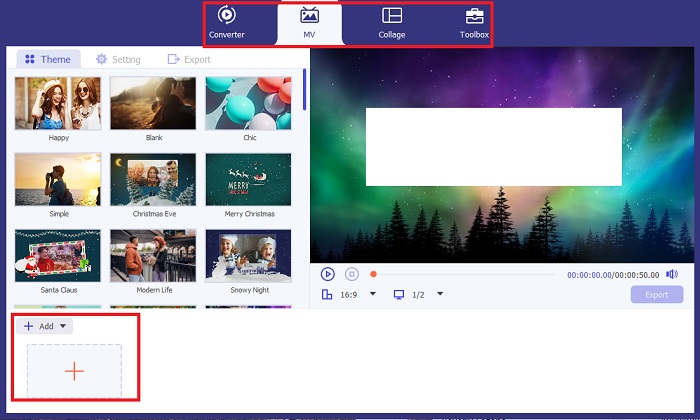
Poi vai alla sezione MV di Video Converter Ultimate per accedere all’editor video. Da lì, fai clic sul pulsante Più per importare il filmato originale e attendi che venga caricato sullo schermo.
Passaggio 3. Colora il filmato
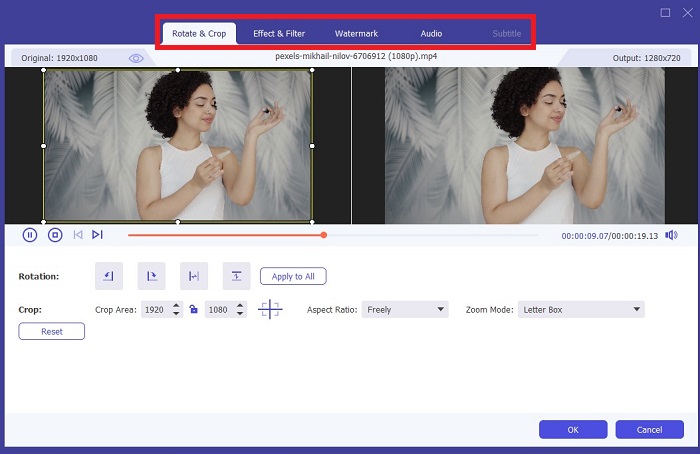
Dopo aver caricato il file, aggiungi le regolazioni del colore trascinando la freccia. Esistono anche filtri predeterminati per aggiungere un effetto istantaneo al tuo video.
Passaggio 4. Salva il risultato
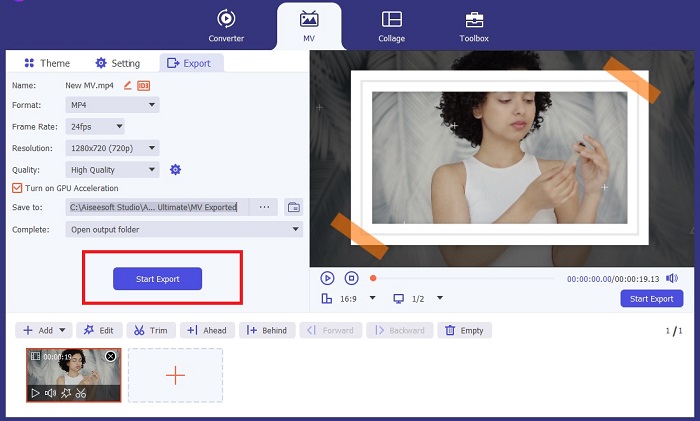
Quando sei soddisfatto del tuo video colorizzato, premi il pulsante Esporta per procedere con il processo finale. Quindi modifica fps, nome, risoluzione e formato del file e fai clic su Avvia esportazione per salvare il risultato nella memoria locale.
Parte 2. Colora video online gratuitamente
Gli strumenti online sono ottimi modi se non hai spazio di archiviazione per installare programmi offline. Utilizzando la tecnologia AI, i tuoi video o le tue foto noiose verranno riportati in vita all'istante. PickFrom è un video colorato online gratuito che aiuta gli utenti ad aggiungere tonalità al proprio filmato utilizzando un algoritmo di calibrazione del colore. Funziona sulla maggior parte dei browser Web, inclusi Opera, Chrome, Safari e Internet Explorer. Oltre a ciò, questo programma è sicuro e protetto al 100%, grazie ai canali di crittografia dei dati, per prevenire l'invasione dei dati.
Passaggio 1. Per prima cosa, apri il browser e vai sul sito PickFrom. Successivamente, vai alla sezione Video Colorizer e fai clic su Aggiungi file per caricare il tuo video originale.
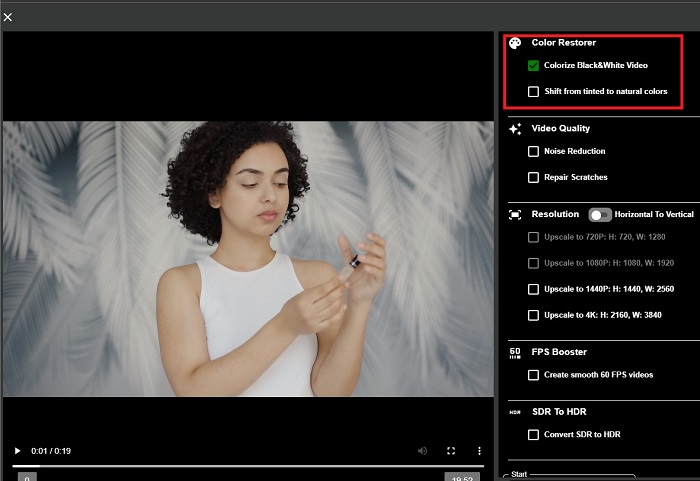
Passaggio 2. Dopo il caricamento del video, lo strumento genera automaticamente l’anteprima del video colorizzato tramite AI. Puoi anche aprire il menu Impostazioni dello strumento Colorize Video e scegliere la risoluzione del file tra 780p e 1080p.
Passaggio 3. Infine, scegli il formato di Output del file espandendo la scheda Formato. Puoi selezionare tra MP4, AVI e MKV. Quando sei soddisfatto del risultato, fai clic sul pulsante Start per scaricare il tuo video in bianco e nero colorizzato.
Parte 3. Colora video su dispositivi mobili
Trasforma in modo intelligente le tue riprese utilizzando uno strumento applicativo sviluppato da Google denominato Colorize! Come suggerisce il nome, questo programma è una scelta eccellente per gli utenti iOS e Android in termini di applicazione dei colori ai filmati stantii. Oltre a ciò, puoi massimizzare l'app di colorazione video in bianco e nero aggiungendo filtri ed effetti speciali al tuo output e personalizzando il rapporto di selezione dell'output. Ecco la guida rapida per aggiungere colore ai video in bianco e nero con questa applicazione mobile.
Passaggio 1. Fai clic sul pulsante Upload nel programma e scegli il file in bianco e nero che desideri correggere.
Passaggio 2. Durante il caricamento, lo strumento applica automaticamente il colore al tuo progetto; il tempo necessario dipenderà solo dalla lunghezza o dalle dimensioni del file.
Passaggio 3. Quando l’immagine colorizzata è pronta, puoi regolare i dettagli andando nella sezione Enhance. Puoi modificare tonalità, saturazione e vividezza della foto. Successivamente, tocca il pulsante Download per salvare il file sul tuo dispositivo.
Ulteriori letture:
Soluzioni efficaci per schiarire un video in meno di un minuto
I 5 migliori editor video per Windows con consigli per professionisti e principianti [2023]
Parte 4. Domande frequenti sul software AI Colorize Video
Come fanno le persone a colorare i vecchi video?
La colorazione di video e foto in bianco e nero ora è resa possibile tramite strumenti di manipolazione digitale, come il colorizzatore video o gli editor video. A volte, è necessario regolare manualmente le impostazioni per ottenere le proprie preferenze o utilizzare un software video AI Colorize.
È possibile colorare i video in bianco e nero?
Decisamente sì! Oggi è possibile correggere il tono visivo delle tue riprese. Come consiglio, è meglio normalizzare il colore dei tuoi video prima di modificarli.
Perché è necessario eseguire la correzione colore dei video?
La gradazione del colore è un processo essenziale che i registi devono eseguire quando finalizzano il loro output. Con questo processo, possono ottenere una tonalità di colore uniforme per aggiungere un effetto visivo eccezionale al loro pubblico.
Quanto tempo ci vuole per colorare foto e video?
Finché disponi degli strumenti giusti sul tuo dispositivo, la colorazione di vecchie foto e video può essere eseguita immediatamente. D'altra parte, considera le dimensioni e la lunghezza del tuo video.
I miei video colorati sono accurati?
Il colorizzatore video ti offre un colore quasi accurato del video. Puoi anche chiedere consiglio agli esperti per aiutarti a determinare qual è il colore originale mappando il video.
Conclusione
E questo è tutto! Ora che conosci i 3 modi principali per colorare video in bianco e nero con strumenti offline, online e per dispositivi mobili, la scelta non è più così difficile. Con un video colorizer basato su AI, lo strumento aggiungerà automaticamente il colore ai tuoi video, ma non ti permetterà di regolare le impostazioni di colore più avanzate come fanno le soluzioni offline, ad esempio Video Converter Ultimate.
-
 Metodi senza problemi per convertire le immagini in bianco e nero
 Vuoi rendere le tue foto nostalgiche? Abbiamo una risposta per te. Questo post offrirà modi notevoli per convertire un'immagine a colori in bianco e nero.
-
 Una guida dettagliata: i migliori 7 Volume Booster disponibili in tutte le piattaforme
 Vuoi conoscere gli amplificatori di volume disponibili su PC, Mac, Online, Android e iOS? Quindi leggi questo articolo con i diversi strumenti tra cui puoi scegliere.
-
 I migliori ridimensionatori video di Instagram per ottimizzare i tuoi contenuti Instagram
 Consulta la nostra guida per ridimensionare i video per Instagram. Scopri come perfezionare i tuoi contenuti e aumentare il coinvolgimento sulla piattaforma di social media più famosa al mondo.
