


 Video Converter Ultimate
 Screen Recorder
 Riparazione video
 Download sicuro
2 modi rapidi per ridurre i file OGV di grandi dimensioni [gratuito e online]
OGV files are often used for playing webpage video content using the HTML5 < video > tag. When you are going to send large OGV files to partners, clients, or friends, compressing those files becomes incredibly useful. Since there are many file size limitations of many email and file transfer platforms, compressed videos can greatly prevent the file transfer failure, at least in most cases. So, we’ll take a look at two online ways to compress your OGV files and make them smaller in this post.

Parte 1. Modo online per comprimere file OGV con un compressore OGV
Free Video Compressor is a popular and useful free online OGV compressor tool available for users. Unlike many other common free online tools, Free Video Compressor comes without restrictions on either the number or size of the files uploaded. More importantly, there will be no watermark on your exported video files. Also, it allows you to compress MP4, AVI, WMV, MOV, and many other common video files without destroying quality.
Come comprimere file OGV utilizzando Free Video Compressor
Step 1. Go to the online OGV video compressor website by entering https://www.free-videoconverter.net/free-video-compressor/.
Step 2. Locate and click Add Files to Compress button, and then download its launcher to activate the service. In the window that pops up, go and find your OGV files and hit Open to confirm.

Step 3. Next, you should define the compression settings to make the file smaller. You can set the size of your video, change the resolution, select the bitrate, and more.

Step 4. Hit on the Compress button to commence the process. After it’s finished, the file will be downloaded to your computer automatically.

Inoltre, questo compressore video gratuito può aiutarti a risolvere altri problemi di compressione video. Basta controllare i seguenti articoli:
How to Compress a Video for Email
How to Compress AVCHD Video Files for Free on Windows and Mac
Parte 2. Come comprimere e ottimizzare un file OGV con Clideo
Clideo è un toolkit video all-in-one gratuito. Funziona con tutti i formati più diffusi e si comprime velocemente e non richiede alcun download. Ti consente di comprimere un file OGV fino a 500 MB gratuitamente, ma non ha limiti di quantità. Ora puoi seguire i passaggi seguenti per ridurre le dimensioni del tuo file OGV.
Step 1. Visit https://clideo.com/compress-video and then hit on the Choose file button.
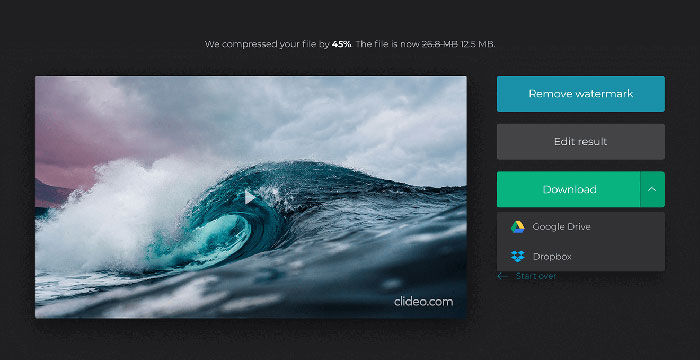
Step 2. Upload an OGV file you want to compress from your computer. You can also select the file from Dropbox or Google Drive by clicking the blue downward arrow.
Step 3. When the file is uploaded, the tool will start processing the video. The processing time depends on the size of the video.
Step 4. Once the compression is over, you can see the initial file size and the compressed one. Now, you can preview the result to make sure it looks good. If you’re satisfied with it, you can click on the Download button to save it to your device or cloud storage.
Parte 3. Domande frequenti sulla compressione dei file OGV
Cos'è un file OGV?
Un file OGV è un file video salvato nel formato contenitore Ogg Xiph.Org open source. Contiene flussi video che possono utilizzare uno o più codec diversi, come Theora, Dirac o Daala. I file OGV possono essere riprodotti utilizzando una varietà di lettori multimediali.
Come funziona la compressione OGV?
Quando si tratta di compressione di file OGV, è la compressione interframe che porta a ridurre le dimensioni del file rimuovendo le somiglianze che si verificano tra i fotogrammi video.
Come comprimo il formato MP4 in OGV?
Puoi utilizzare lo strumento sopra menzionato - Free Video Compressor per comprimere i tuoi file MP4 in OGV. Oppure puoi scegliere un'applicazione di conversione video per aiutarti a realizzarlo.
Conclusione
I metodi online sopra riportati possono aiutarti a comprimere in modo efficiente un video OGV. Quale preferisci usare? Puoi condividere i tuoi consigli nei commenti qui sotto!
-
 Da 50 MB a 5 MB - Come comprimere file MP4 in pochi secondi
 Il video MP4 è troppo grande per il caricamento? Vuoi ridurre le dimensioni del video? Ecco 3 modi efficaci per comprimere un file MP4 in dimensioni inferiori senza limiti.
-
 Tutorial - 7 modi per comprimere video gratuitamente senza perdere la qualità
 Leggi e ottieni 7 modi per comprimere video gratuitamente sul tuo computer o telefono. Puoi ridurre i video di grandi dimensioni in file di piccole dimensioni per e-mail, Twitter, Instagram, YouTube, WhatsApp e altro con facilità.
-
 Come comprimere file MOV su Windows, Mac, iPhone e Android
 Questo articolo mostra come comprimere i video QuickTime MOV sul tuo telefono o computer in dettaglio. Se il tuo video MOV è troppo grande per essere inviato, condiviso o salvato, puoi ottenere 4 soluzioni praticabili qui.
