


 Video Converter Ultimate
 Screen Recorder
 Riparazione video
 Download sicuro
Converti MP4 in WebP online con i migliori strumenti gratuiti
Un video di una durata di soli un secondo è composto da più immagini separate. Queste immagini o fotogrammi solitamente vengono visualizzati quando lavori sulla modifica del video. E se sei un blogger specializzato in cibo, un buon modo per rendere interessante il contenuto del tuo video è creare una miniatura per esso. Non solo, ma vorrai anche scegliere il fotogramma perfetto da usare come miniatura per il tuo video. Per risolvere questo problema, puoi scegliere l'immagine migliore dal tuo contenuto video come immagine di anteprima perfetta tramite conversione da video a foto. E se dovessi chiedercelo, WebP sarebbe un buon formato di immagine da provare.
Per fortuna, questo articolo ti mostrerà tre diversi modi per convertire online i file MP4 in WebP. Dai un’occhiata ai contenuti qui sotto e scopri quale metodo funziona meglio per te per ottenere immagini dai tuoi video.

Parte 1. Scopri di più su WebP
Che cosa è WebP?
WebP è un tipo di formato immagine progettato da Google. È fatto per rendere le immagini web più piccole e caricarle più velocemente. Inoltre, questo tipo di formato usa metodi di compressione avanzati che aiutano a ridurre le dimensioni del file delle immagini senza cambiarne troppo la qualità.
Questo è vantaggioso per i siti web che si caricano più velocemente, ed è anche importante per gli utenti con connessioni Internet lente o dispositivi mobili. Poiché i file WebP supportano sia la compressione lossy che lossless, ti dà anche la flessibilità di selezionare il giusto equilibrio tra dimensione del file e qualità. Sapevi che puoi convertire il tuo MP4 in WebP online? Questo è consigliabile solo se vuoi migliorare la tua esperienza di navigazione web rendendo le immagini più efficienti e in grado di caricarsi mantenendo una qualità decente dai file video che hai attualmente. Detto questo, passiamo ai buoni convertitori video-immagine, il cui processo di conversione è presentato di seguito.
Parte 2. 3 modi migliori per convertire MP4 in WebP online
1. MP4.to
Se vuoi sbloccare il potenziale del tuo video MP4 per essere un'immagine web, allora il primo convertitore che devi provare è questo MP4.to. È uno strumento di conversione file online specificamente progettato per convertire vari tipi di file multimediali in formato MP4. Con questo straordinario strumento, puoi convertire MP4 in WebP online e in altri formati diversi come GIF, MOV, WAV, AVI, MP3, MPEG e altro ancora. D'altra parte, puoi caricare vari tipi di file, come video, clip audio e persino immagini, e convertirli in formato MP4. Questo può essere utile per preparare video per lo streaming online e garantire la compatibilità tra diversi dispositivi e piattaforme che supportano il formato MP4. Nel frattempo, di seguito sono riportati i semplici passaggi che puoi seguire per utilizzare MP4.to per convertire i tuoi video in WebP.
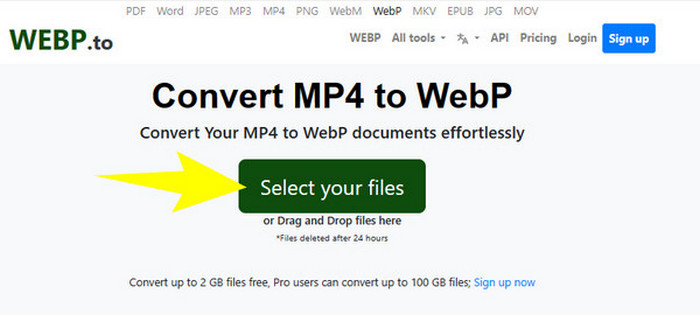
Passaggio 1. Sul sito dello strumento, fai clic sul pulsante Select your files per caricare i tuoi file MP4.
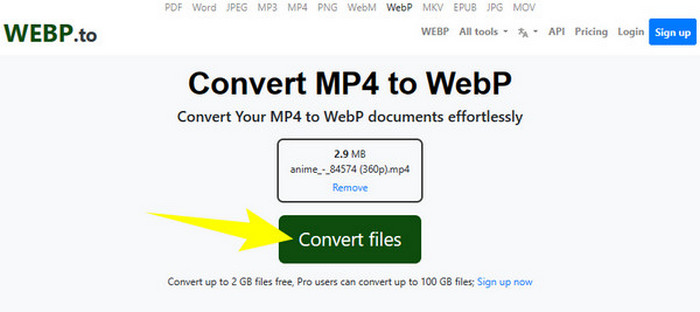
Passaggio 2. Una volta caricato il file MP4, lo strumento ti mostrerà il pulsante Convert Files, che dovrai cliccare per avviare la conversione.
Passaggio 3. Attendi il completamento del processo. Successivamente, scarica il file convertito ed esportalo sul tuo computer.
2. Convertitore
Il successivo convertitore online da MP4 a WebP o da WebP a MP4 gratuito che devi assolutamente provare è MConvert. Questo convertitore online offre una soluzione pratica per chi ha bisogno di trasformare i file in formati diversi, poiché supporta anche vari tipi di formati per video, audio e immagini. Inoltre, questo convertitore online offre un’interfaccia intuitiva e di solito non richiede l’installazione di software, risultando accessibile a chiunque disponga di una connessione internet. Tuttavia, come accade per molti strumenti online, anche MConverter presenta annunci nella sua interfaccia. Quindi, se questo per te non è un problema, procedi con i semplici passaggi che abbiamo preparato qui sotto.
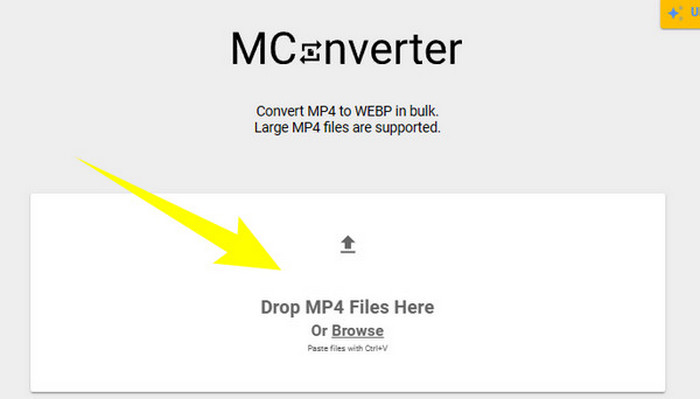
Passaggio 1. Una volta arrivato sul sito del convertitore, puoi trascinare e rilasciare lì i file MP4 che desideri convertire.
Passaggio 2. Dopo aver rilasciato il file, fai clic su WebP tra le opzioni nella sezione gialla come formato di uscita.
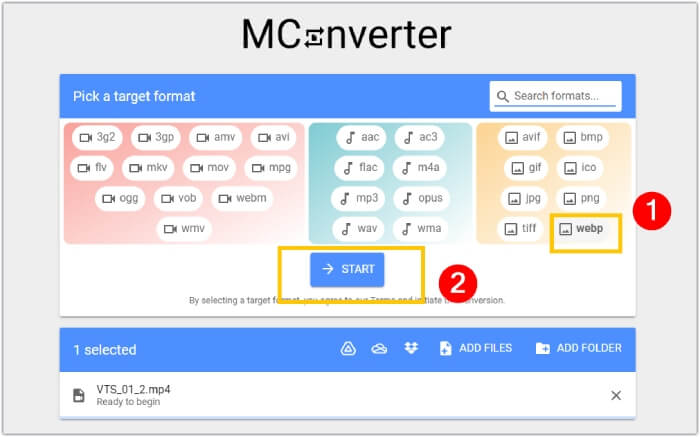
Passaggio 3. Poi, fai clic sul pulsante START per avviare il processo di conversione.
3. Ezgif.com
Con lo strumento Video to WebP di Ezgif puoi convertire facilmente e gratuitamente i tuoi file MP4 in formato WebP. Inoltre, con questo strumento online puoi eseguire operazioni come ridimensionare, ottimizzare, ritagliare e aggiungere effetti ai tuoi file multimediali. Questo software di conversione da MP4 a WebP è inoltre apprezzato per la sua semplicità e facilità d’uso. È una soluzione pratica per chi desidera modificare o convertire file multimediali senza dover ricorrere a software complessi o competenze tecniche. Può quindi essere anche il tuo convertitore multimediale, editor e creatore di GIF, tutto in uno! Nel frattempo, concentrandoci sul nostro obiettivo, ecco i passaggi per trasformare un file video in un’immagine con Ezgif.
Passaggio 1. Nella pagina principale dello strumento, scegli la scheda Video to WebP tra gli strumenti disponibili. Carica il file MP4 tramite il pulsante Upload File.
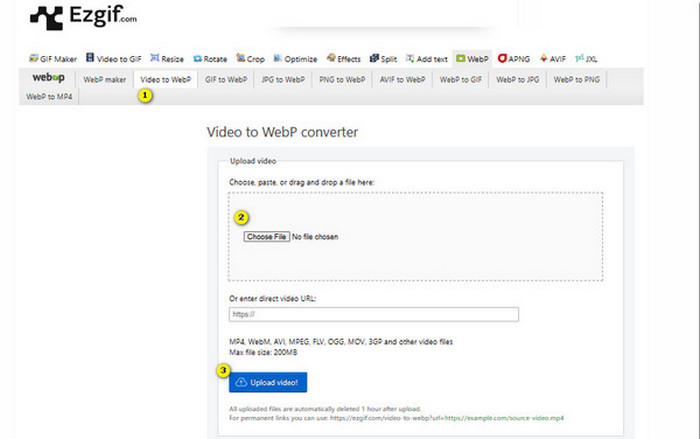
Passaggio 2. Successivamente, fai clic sul pulsante Upload Video per procedere.
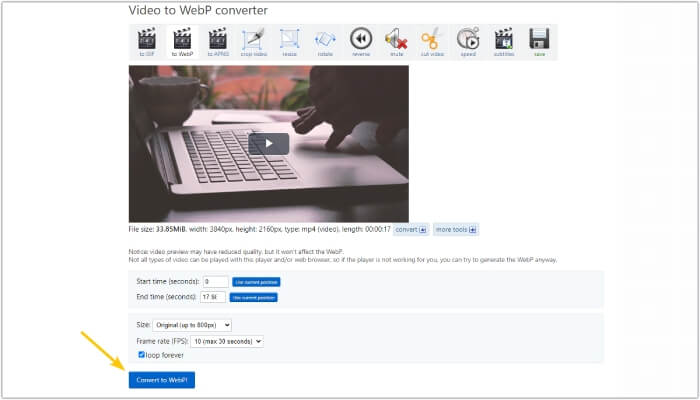
Passaggio 3. Quando il file è stato caricato, fai clic sul pulsante Convert to WebP e attendi il termine del processo.
Parte 3. Suggerimento bonus: il modo migliore per convertire MP4 in vari formati video e audio
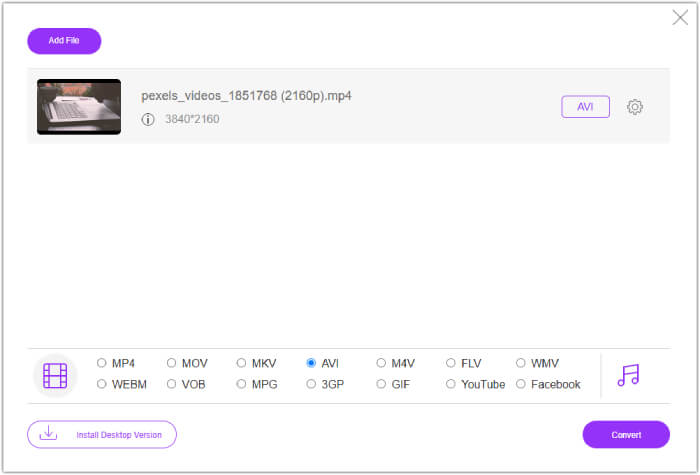
Ora che hai conosciuto i tre convertitori da MP4 a WebP sopra citati, siamo lieti di offrirti una parte bonus in cui scoprirai il modo migliore per convertire i tuoi MP4 in formati video o audio. FVC Free Video Converter Online è anch’esso uno strumento via web, che offre un metodo eccellente per convertire in un attimo grandi quantità di file. Sì, a differenza dei convertitori online precedenti, questo convertitore video offre una conversione ultrarapida, permettendoti di svolgere la procedura in modo fulmineo. Inoltre, non dovrai scaricare manualmente i tuoi file convertiti, poiché funziona esportandoli automaticamente subito dopo la conversione. Un altro aspetto interessante è l’assenza di pubblicità e filigrane, che rende l’esperienza ancora più semplice e confortevole.
Parte 4. Domande frequenti sulla conversione MP4 e WebP
Posso davvero convertire un MP4 in un'immagine come WebP?
La conversione di un video in un'immagine non può essere fatta direttamente. Invece, viene fatta tramite l'estrazione di frame.
Quali vantaggi ottengo convertendo un video in WebP?
Rispetto ai formati tradizionali come JPEG e PNG, convertire i video in formato WebP offre diversi vantaggi. Tra questi vi sono dimensioni dei file più ridotte, che possono contribuire a migliorare i tempi di caricamento dei siti web.
Posso utilizzare tutti i WebP in tutti i browser web?
Il formato WebP non è completamente supportato in alcuni vecchi browser. Tuttavia, la maggior parte dei browser web moderni supporta le immagini WebP, inclusi Google Chrome, Opera, Firefox ed Edge.
Conclusione
Questo articolo è un’introduzione a tre efficaci convertitori da MP4 a WebP che puoi usare online. Inoltre, abbiamo incluso anche un convertitore online da video a video/audio che sicuramente migliorerà il tuo processo di conversione multimediale. Condividilo quindi con i tuoi amici e ottenete tutti la stessa conversione di livello professionale!
-
 Scopri gli approcci più semplici per convertire rapidamente WebP in JPG
 Scopri gli approcci più semplici per convertire rapidamente WebP in JPG
-
 Metodi perfetti per convertire WebP in PNG senza sforzo
 Informati sugli straordinari metodi di conversione di WebP in PNG. Questa guida ti fornirà i convertitori di immagini più utili che puoi provare.
-
 Recensione dei migliori convertitori MP4 online e offline
 Massimizza la portata e l'impatto dei tuoi contenuti video con il miglior MP4
