


 Video Converter Ultimate
 Screen Recorder
 Riparazione video
Come ingrandire le emoji su iPhone, Android e online
È davvero possibile ingrandire le emoji? Probabilmente qualcuno di voi ci ha già pensato, e la risposta è sì. Le emoji possono apparire più grandi perché vengono trattate come immagini o caratteri che possono essere ridimensionati a seconda di come vengono utilizzate.
Le emoji sono un modo divertente per esprimere emozioni, ma a volte possono apparire troppo piccole, soprattutto nelle chat o nei post in cui vuoi che risaltino. Per fortuna, ci sono diversi modi per ingrandire le emoji, sia che tu stia scrivendo con il tuo iPhone o Android, sia che tu ne stia creando una online. Impararlo sarà sicuramente semplice e divertente, quindi iniziamo scoprendo come puoi rendere le emoji più grandi direttamente dal tuo dispositivo.

Parte 1. Come ingrandire le emoji online
Poiché è possibile ingrandire le emoji, ecco il primo metodo che puoi utilizzare per crearle facilmente. Esistono diversi strumenti online che consentono di ingrandire le immagini. Le emoji vengono trattate come immagini, quindi con questo strumento, gli utenti possono ingrandire le proprie emoji in pochi clic.
FVC Free Image Upscaler, come suggerisce il nome, è uno strumento online per l’upscaling delle immagini che consente agli utenti di ingrandire le proprie foto. Questo include rendere le emoji più grandi delle loro dimensioni abituali.
Caratteristiche principali:
• Tecnologia di risoluzione AI avanzata per l'upscaling delle immagini.
• Riconoscimento automatico e miglioramento delle sezioni di immagini sfocate.
• Ripristino preciso di pixel, colori, texture e dettagli più fini persi.
• Eccellente riconoscimento e ripristino naturale delle caratteristiche del ritratto.
• Versatilità nelle opzioni di ingrandimento delle immagini: 2×, 4× o 8× con alta qualità.
• Interfaccia online intuitiva per un miglioramento e un ingrandimento delle immagini senza soluzione di continuità.
Passaggi per ingrandire le emoji con FVC Free Image Upscaler:
Passaggio 1. Inizia visitando il sito ufficiale di FVC Free Image Upscaler.
Passaggio 2. Ora fai clic sul pulsante Upload Photo per selezionare l’immagine che desideri migliorare.
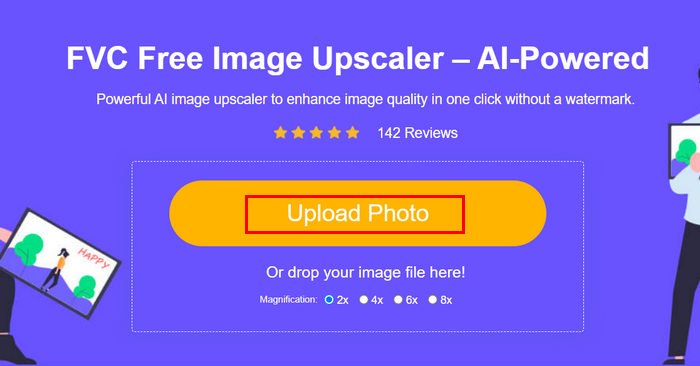
Passaggio 3. Dopo il caricamento, lo strumento mostrerà un’anteprima della tua immagine. Per esaminare da vicino i dettagli, utilizza l’opzione Magnifier.
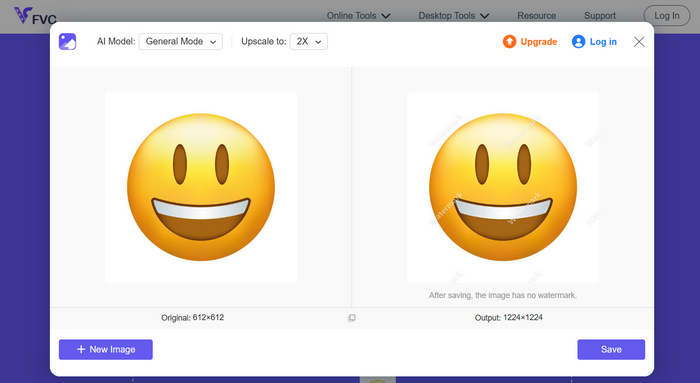
Passaggio 4. Una volta soddisfatto dell’anteprima, fai clic sul pulsante Save per scaricare l’immagine migliorata.
Con FVC Image Upscaler, in pochi clic puoi ingrandire facilmente le tue emoji. Inoltre, la sua semplicità e l'interfaccia intuitiva lo rendono uno strumento ideale per qualsiasi tipo di utente.
Fai clic qui per scoprire come rimuovere le emoji da una foto, se ti interessa.
Parte 2. Come ingrandire le emoji su iPhone
Se preferisci non utilizzare app di terze parti, puoi ingrandire le tue emoji direttamente dalle impostazioni del tuo iPhone. Questo metodo aumenta leggermente le dimensioni complessive dello schermo, ingrandendo anche testo ed emoji nei tuoi messaggi e nelle tue app.
Come ingrandire le emoji su iPhone:
Passaggio 1. Apri l’app Impostazioni sul tuo iPhone. Da qui puoi personalizzare tutte le opzioni di schermo e accessibilità.
Passaggio 2. Scorri verso il basso e tocca Schermo e luminosità per accedere alle impostazioni di visualizzazione del telefono.
Passaggio 3. In questa sezione, cerca Zoom schermo e toccalo. Questa funzione ti permette di modificare il modo in cui i contenuti vengono visualizzati sullo schermo.
Passaggio 4. Seleziona l’opzione Testo più grande o Vista zoom. In questo modo tutto ciò che appare sullo schermo, comprese le emoji, risulterà più grande.
Passaggio 5. Tocca Fine per applicare le modifiche. Una volta fatto, il tuo iPhone si riavvierà brevemente e noterai che emoji, testi e icone appaiono ora più grandi e più facili da vedere.
Sebbene questo metodo ingrandisca le emoji, ingrandisce anche tutto il resto sullo schermo, comprese le icone delle app e il testo. Quindi, se vuoi solo ingrandire le emoji senza modificare la visualizzazione complessiva, questa opzione potrebbe non essere l'ideale.
Parte 3. Come ingrandire le emoji su Android
Se utilizzi un dispositivo Android e vuoi ingrandire le tue emoji, puoi usare PicWish AI Photo Editor. Questa app ti permette di ingrandire facilmente le emoji senza perderne la qualità. Puoi caricare qualsiasi emoji o anche uno screenshot, quindi utilizzare lo strumento di ridimensionamento o ingrandimento per ingrandirle mantenendole nitide e dettagliate.
Passaggi per ingrandire le emoji su Android:
Passaggio 1. Sul tuo telefono Android, cerca PicWish AI Photo Editor nel tuo app store e scaricalo.
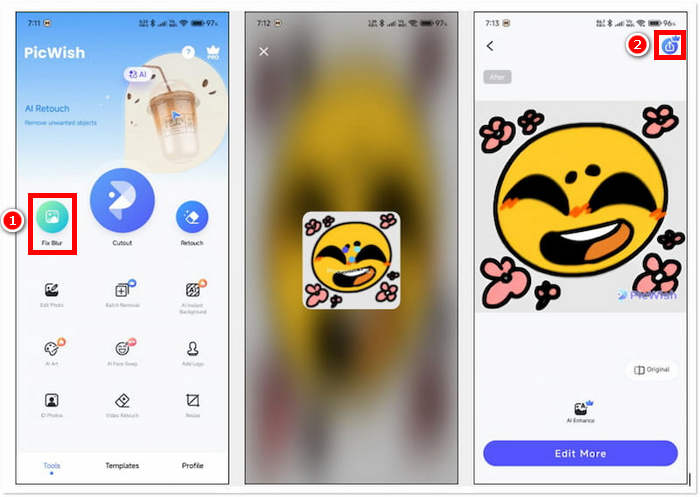
Passaggio 2. Quindi apri l’app e, nella schermata principale, cerca l’opzione Fix Blur e toccala per procedere.
Passaggio 3. Successivamente, seleziona l’emoji che desideri ingrandire scegliendola dalla galleria del tuo dispositivo.
Passaggio 4. Dopo il processo di ingrandimento, fai clic sul pulsante Salva per salvare l’emoji ingrandita nella galleria del tuo dispositivo.
Dopo che l’app avrà analizzato l’emoji, noterai che non sono disponibili opzioni per regolare l’upscaling. Per questo motivo non puoi fare altro che salvare direttamente l’emoji ingrandita. Se da un lato questo rende il processo rapido e semplice, dall’altro può essere uno svantaggio se desideri avere un controllo maggiore sulla dimensione finale o sulla qualità. Tuttavia, PicWish rimane un’opzione comoda per ingrandire immediatamente le emoji sul tuo iPhone senza bisogno di competenze avanzate di editing.
Parte 4. Domande frequenti su come ingrandire le emoji
Perché gli emoji appaiono più grandi quando vengono inviati da soli nei messaggi?
Quando invii un'emoji da sola in app di messaggistica come iMessage, WhatsApp o Messenger, l'app la ingrandisce automaticamente per renderla più visibile ed enfatizzata. Questa funzione è integrata per rendere l'emoji più espressiva e visibile, ma funziona solo quando l'emoji non è accompagnata da testo o altre emoji.
Posso ingrandire le emoji senza modificare l'intera schermata?
Sì. Puoi utilizzare strumenti online o app come FVC Free Image Upscaler e PicWish per ingrandire solo le emoji, invece di dover modificare le impostazioni del display del telefono.
Posso copiare e incollare emoji più grandi nelle mie chat?
Sì. Dopo aver ingrandito un'emoji utilizzando uno strumento online o un'app, puoi salvarla come immagine e poi copiarla o inserirla nei tuoi messaggi o post sui social media.
Perché alcuni emoji sembrano piccoli anche sugli schermi più grandi?
La dimensione delle emoji dipende dall'app e dal font utilizzato dal dispositivo. Alcune piattaforme ridimensionano automaticamente le emoji in base al testo, quindi anche su schermi più grandi potrebbero apparire piccole, a meno che non si regoli la visualizzazione o si utilizzi uno strumento di ingrandimento delle immagini.
Conclusione
Come vedi, è possibile e semplice rendere le emoji più grandi. Ora che sai come farlo, non ti resta che provare il metodo che trovi più comodo per te. Che sia tramite le impostazioni del tuo telefono, un’app o uno strumento online, ogni opzione ti permette di esprimerti in modo più divertente e creativo. Ricorda solo che alcuni metodi possono avere piccole limitazioni, ma in generale imparare come ingrandire le emoji è un semplice trucco che può rendere le tue conversazioni ancora più d’impatto.
-
 3 modi per comprimere le immagini per Discord Emoji [Guida]
 Se stai cercando un metodo per comprimere le immagini per gli emoji Discord a causa delle rigide restrizioni sulle dimensioni dei file, leggi questo articolo e lasciati guidare da 3 semplici metodi.
-
 Guide dettagliate su come rimuovere gli emoji dal video
 Ti senti infastidito dagli emoji sui tuoi video? Questo post ti fornirà le migliori procedure per rimuovere istantaneamente gli emoji dai tuoi video utilizzando ottimi strumenti.
-
 Come rimuovere facilmente le filigrane dai video in After Effects
 Questo articolo ti aiuterà a rimuovere le filigrane dal video usando After Effects. Inoltre, fornirà le migliori alternative per eliminare gli oggetti che disturbano.
