


 Video Converter Ultimate
 Screen Recorder
 Riparazione video
 Download sicuro
Come convertire M2TS in MKV senza perdere la qualità
"Sto cercando un buon convertitore. Ne ho bisogno per convertire i miei file m2ts in MKV ma voglio mantenere le opzioni dei sottotitoli e le opzioni audio. Questi file sono circa 40 GB e voglio convertirli in file più piccoli ma nessuna perdita di qualità. C'è un convertitore consigliato? "
I file M2TS occupano solitamente molto spazio, quindi potresti voler convertire M2TS in MKV per riprodurli su alcuni lettori multimediali. In questo articolo ti mostreremo i modi più semplici per convertire file M2TS in MKV senza perdita di qualità su Windows e Mac.

Parte 1. Il modo migliore per convertire M2TS in MKV gratuitamente
Anche se sul mercato ci sono molti convertitori, è difficile trovare dei veri convertitori M2TS in MKV gratuiti che funzionino bene. Puoi però dare un’occhiata a questo FVC Free M2TS Converter. È un convertitore ed editor M2TS tutto‑in‑uno che ti consente di convertire file M2TS in MKV, MP4, AVI, MOV, MP3, ecc. per la riproduzione su alcuni popolari lettori multimediali.

Convertitore M2TS gratuito
112.345+ download- Converti M2TS in MKV, MP4, AVI, TS, VOB, WMV, FLV, SWF, ecc.
- Converti file M2TS in formati di file supportati da dispositivi e media.
- Modifica il file M2TS come unisci, comprimi, aggiungi temi e abilita gli effetti 3D.
- Pienamente compatibile con Windows 10/8/7 / Vista / XP (SP2 o successivo).
Download gratuitoPer Windows 7 o versioni successiveDownload sicuro
Download gratuitoPer MacOS 10.7 o versioni successiveDownload sicuro
Passaggio 1. Aggiungi il file M2TS
Dopo aver scaricato questo convertitore M2TS gratuito, installalo e avvialo sul tuo computer Windows. Fare clic sul pulsante "Aggiungi file" per importare i file M2TS. Se hai più file M2TS da unire, puoi spuntare l'opzione "Unisci in un file" in basso.

Passaggio 2. Modifica il file M2TS
Fai clic sul pulsante "Modifica" nella parte superiore dell'interfaccia e sarai in grado di aggiungere tema, modificare titolo, autore, ora e fornitore all'inizio e alla fine.

Passaggio 3. Converti M2TS in MKV
Fare clic sul pulsante a discesa sotto "Formato di output" per selezionare MKV come formato di output. È inoltre possibile impostare la cartella di destinazione. Successivamente, fai clic sul pulsante "Converti" per avviare gratuitamente la conversione da M2TS a MKV.

Parte 2. Esporta MKV da M2TS online gratuitamente
Vuoi trovare uno strumento online gratuito per convertire rapidamente M2TS in MKV? FVC Free Online Video Converter offre una piattaforma gratuita per convertire facilmente file M2TS in MKV. Inoltre, puoi convertire in blocco più file M2TS in formato MKV. Controlla i passaggi dettagliati per convertire online gratuitamente i file M2TS in MKV.
Passaggio 1. Vai al sito web cliccando il link qui sopra. Trova Add Files to Convert e scarica il FVC launcher.

Passaggio 2. Dopo l’installazione e l’aggiornamento, aggiungi il video e seleziona il formato da Convert.

Passaggio 3. Digita o apri la cartella in cui desideri salvare il video. Attendi qualche istante e avrai il tuo video MKV.
Parte 3. Trasforma M2TS in MKV con FreeConvert.com
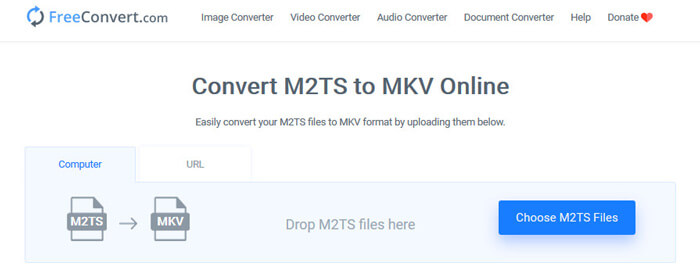
Oppure puoi semplicemente provare FreeConvert.com, uno strumento di conversione di file online gratuito per convertire i tuoi file (immagine, video, documento e musica) da un formato all'altro.
Passaggio 1. Trascina e rilascia il file M2TS nell’area di caricamento. Puoi anche cliccare il pulsante “Choose M2TS Files” per importare il file M2TS.
Passaggio 2. In Impostazioni avanzate puoi regolare codec video, dimensione dello schermo, proporzioni, frame rate, orientamento video, codec audio, bitrate.
Passaggio 3. Clicca il pulsante “Convert To MKV” per convertire M2TS in MKV. L’operazione richiede solo pochi secondi. Poi clicca il pulsante “DOWNLOAD MKV” per salvare il file MKV sul computer.
Parte 4. Converti M2TS in MKV con HandBrake
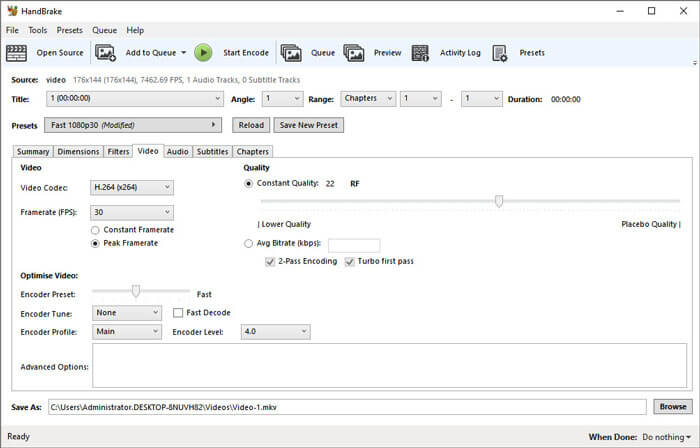
HandBrake è un convertitore da M2TS a MKV gratuito e open source che converte video da quasi tutti i formati video. Supporta molti sistemi operativi come Windows, macOS e Linux OS. Segui la nostra guida passo passo per convertire il file M2TS in MKV con HandBrake.
Passaggio 1. Scarica HandBrake sul tuo computer. Clicca il pulsante “Open Source” per caricare il file M2TS nel programma.
Passaggio 2. Nella scheda Summary seleziona “MKV” come formato di output. Puoi regolare filtri video, codec, qualità, bitrate, sottotitoli e altro nelle altre schede come Dimensions, Filters, Video, Audio, Subtitles, Chapters.
Passaggio 3. Clicca il pulsante “Start Encode” per iniziare a convertire i file M2TS in MKV.
Parte 5. Cambia M2TS in MKV con MakeMKV
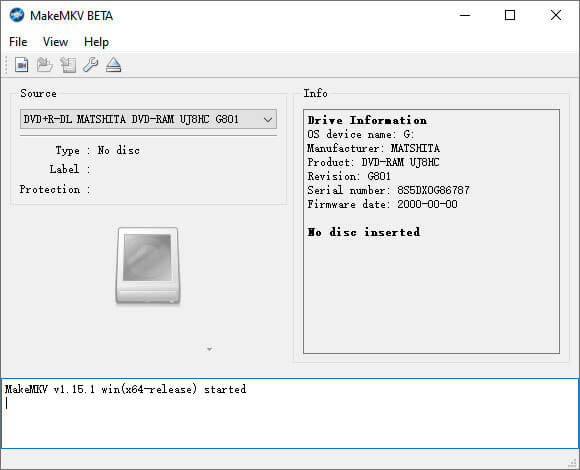
MakeMKV è la soluzione con un clic per convertire M2TS in MKV gratuitamente. Puoi usare MakeMKV per convertire M2TS in MKV su Windows 10 e Mac.
Passaggio 1. Apri MakeMKV sul tuo computer. Seleziona “Open Files” dal menu “File” per aggiungere il file M2TS al programma.
Passaggio 2. Seleziona il file M2TS che hai aggiunto e clicca l’icona Cartella per scegliere la cartella di destinazione.
Passaggio 3. Clicca il pulsante “Make MKV” per iniziare a convertire gratuitamente il file M2TS in MKV.
Parte 6. Domande frequenti sulla conversione da M2TS a MKV
Cos'è il video in formato M2TS?
M2TS è l'abbreviazione di BDAV (Blu-ray Disc Audio-Video) MPEG-2 Transport Stream. È un formato di file contenitore di file per Blu-ray e AVCHD (Advanced Video Coding High Definition), che contiene video, audio e altri flussi.
Plex può riprodurre file M2TS?
No. Plex Media Server non può riprodurre file M2TS poiché ha un supporto codec esterno molto limitato. Se desideri riprodurre file M2TS con Plex, puoi convertire il file M2TS in un formato supportato da Plex con FVC Free M2TS Converter.
YouTube supporta M2TS e MTS?
No. YouTube non supporta i file M2TS o MTS. Devi convertire il file M2TS o MTS nel formato di file supportato come MP4, quindi caricarli su YouTube.
Conclusione
Queste sono tutte le soluzioni che abbiamo per convertire M2TS in MKV su Windows e Mac. FVC Free Video Converter garantisce un output MKV senza perdita di qualità. Puoi convertire facilmente i video M2TS da tutte le videocamere HD in altri formati video senza perdita di qualità. È il momento di provarlo.
-
 Che cos'è un file MTS e come convertire / riprodurre file MTS
 Che cos'è un file MTS e come posso riprodurlo? Questo post fornisce un'istruzione di base del file MTS. Inoltre, puoi ottenere 3 semplici modi per convertire file MTS in MP4, MOV, AVI, MPEG, MTS, MKV o altri formati con alta qualità.
-
 2 semplici modi per convertire gratuitamente MTS in MP3
 Hai la necessità di estrarre l'audio MP3 dal file MTS ma non sai come fare? Qual è il miglior convertitore da MTS a MP3? Questo post condivide 2 semplici modi per aiutarti a convertire MTS / M2TS in MP3 con alta qualità audio.
-
 La recensione di Snagit e la sua migliore alternativa
 Qual è la migliore alternativa a Snagit? Esiste uno strumento di cattura dello schermo come Snagit? Questo post esaminerà Snagit e condividerà la migliore alternativa a Snagit per acquisire lo schermo.
