


 Video Converter Ultimate
 Screen Recorder
 Riparazione video
 Download sicuro
Come aumentare il volume degli MP3 per una migliore qualità del suono
Quando si ascolta un file MP3, è importante avere un volume sufficientemente alto per sentire tutto con chiarezza. Questo aspetto diventa fondamentale per permetterci di vivere il contenuto così come è stato pensato, senza doverci sforzare per cogliere le parole o le sfumature musicali. Un volume troppo basso può ridurre il piacere di ascoltare musica, podcast, audiolibri o qualsiasi altro contenuto audio. Ma niente paura! Esistono diversi metodi efficaci per aumentare il volume degli MP3 mantenendo, o addirittura migliorando, la qualità del suono. Questa guida completa ti illustrerà 4 metodi per ottenere un suono migliore dai tuoi MP3. Cominciamo!

Parte 1: Aumenta il volume degli MP3 senza perdite con un Sound Booster professionale
Se cerchi un potenziamento audio professionale che ti permetta di aumentare il volume degli MP3 senza perdita di qualità, il miglior strumento per te è il FVC-selezionato Video Converter Ultimate. Questo strumento non è un semplice convertitore, perché integra diverse funzioni, tra cui la capacità di aumentare professionalmente il volume degli MP3. Questo amplificatore di volume è molto facile da usare: ti basta importare il file audio e poi, con un semplice cursore, puoi modificare facilmente il volume del tuo file audio.
Passaggio 1. Scarica e installa Video Converter Ultimate sul tuo dispositivo.
Download gratuitoPer Windows 7 o versioni successiveDownload sicuro
Download gratuitoPer MacOS 10.7 o versioni successiveDownload sicuro
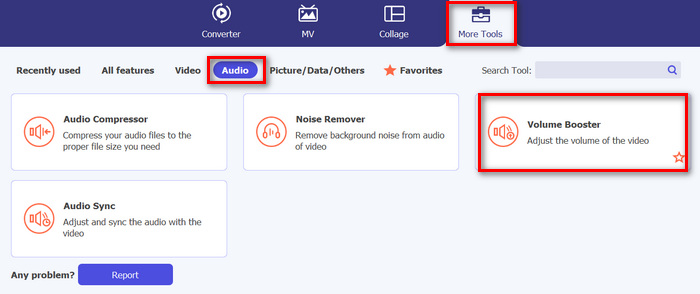
Una volta fatto, avvialo e vai alla scheda Toolbox; da lì, cerca Volume Booster e cliccaci sopra.
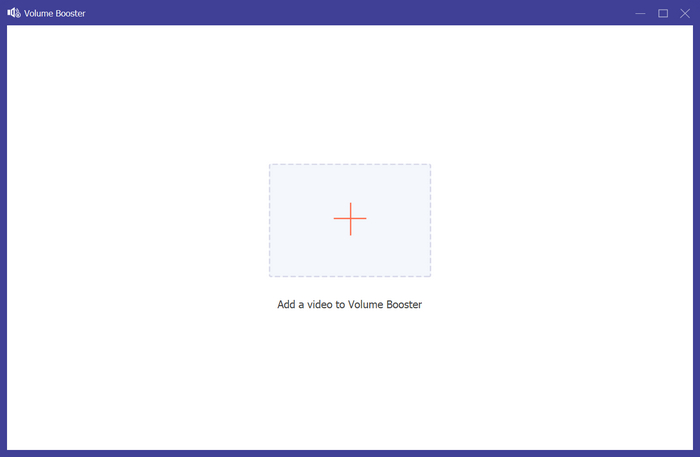
Passaggio 2. Clicca sul pulsante Add a Video to Volume Booster per importare il file MP3.
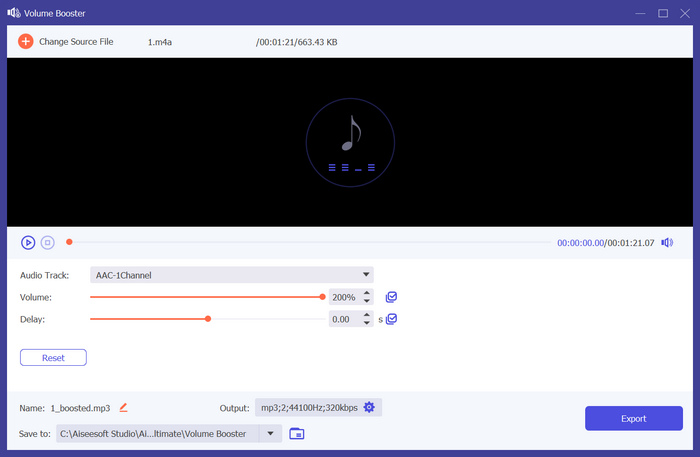
Passaggio 3. Successivamente, per aumentare il volume MP3 del tuo file audio, sposta il cursore della sezione volume verso destra oppure inserisci manualmente la percentuale del volume desiderato. Questo strumento può incrementare il volume dell’audio fino al 200%.
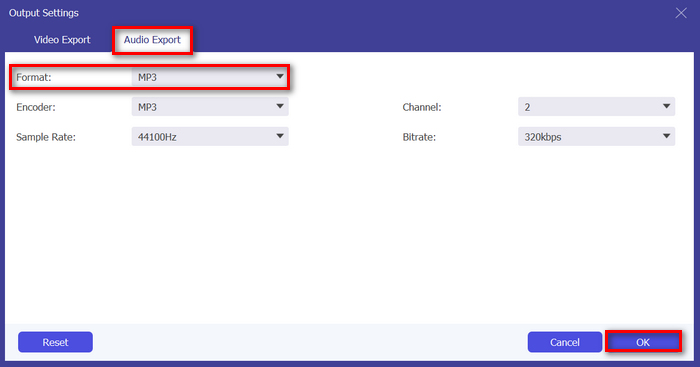
Passaggio 4. Quando hai finito, clicca sull’icona a forma di Ingranaggio in basso per accedere alle Impostazioni di output. Seleziona la scheda Formato audio e, nel menu dei formati, scegli quello che preferisci, quindi clicca su OK.
Passaggio 5. Al termine, salva l’audio cliccando sul pulsante Export.
Se desideri anche modificare i metadati dell’MP3, puoi passare alla Toolbox per farlo.
Video Converter Ultimate è davvero il sogno di tutti. Chi avrebbe mai pensato di avere uno strumento tutto in uno per le tue esigenze video e audio? Con il supporto per vari formati audio, è perfetto per gestire diversi file multimediali. La sua interfaccia intuitiva e di facile utilizzo lo rende accessibile e facile per i principianti, e la sua capacità di aumentare il volume MP3 senza perdita di qualità assicura risultati di livello professionale. Nel complesso, questo strumento è l'ideale se stai cercando un output professionale e senza perdite per aumentare il volume dei tuoi file MP3.
Parte 2: Aumentare il volume MP3 in Premiere Pro
Se stai utilizzando Adobe Premiere Pro sul tuo dispositivo o sai come usarlo? La buona notizia è che, oltre alle sue potenti funzionalità di editing video, puoi usare questa app software per aumentare facilmente il volume degli MP3.
Per fare ciò, seguire i passaggi seguenti:
Passaggio 1. Per prima cosa, utilizza lo Strumento di selezione per selezionare la clip audio di cui vuoi aumentare il volume.
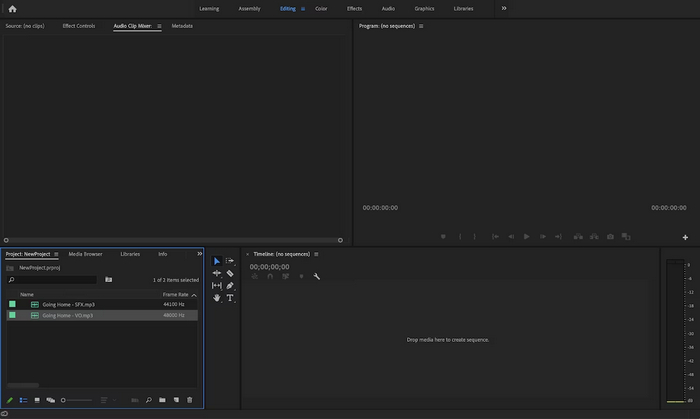
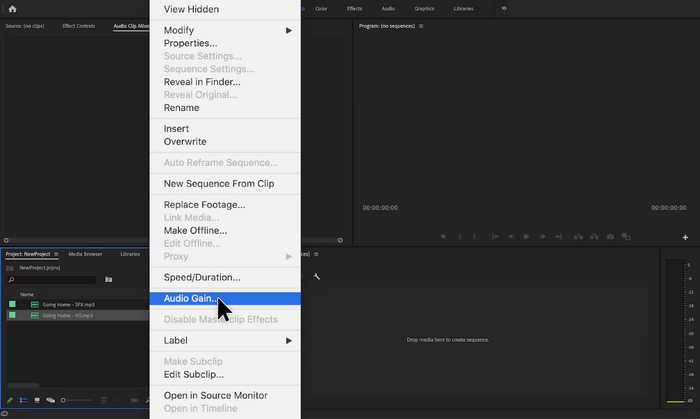
Passaggio 2. Clicca con il tasto destro sulla traccia audio e, nel menu a comparsa, scegli l’opzione Audio Gain.
Passaggio 3. Ora, per aumentare il volume dell’audio, regola i dB inserendo un numero positivo nella finestra Audio Gain.
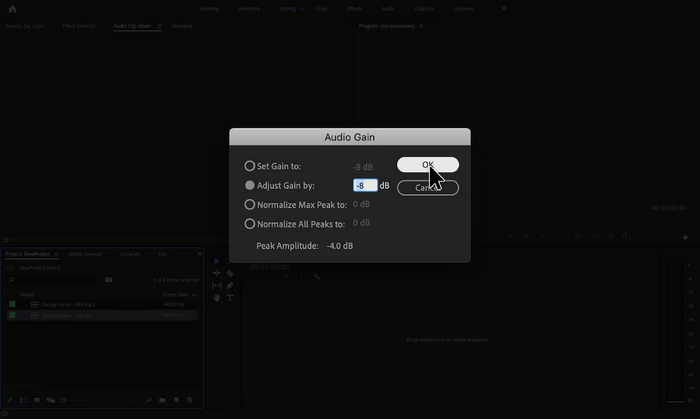
Passaggio 4. Quando hai finito, clicca semplicemente su OK.
Adobe Premiere Pro è davvero uno strumento potente perché, oltre all'editing, può essere incredibilmente utile per gli utenti che lo utilizzano per aumentare facilmente il volume degli MP3. Il processo è semplice e veloce, consentendo agli utenti di regolare i livelli del volume con pochi clic e il software garantisce regolazioni di alta qualità, mantenendo la chiarezza originale dell'audio. Inoltre, per coloro che utilizzano già Premiere Pro per l'editing video, è comodo gestire l'audio all'interno della stessa piattaforma. Tuttavia, ci sono alcuni svantaggi. Il software può essere opprimente e può imporre curve di apprendimento per i principianti, rendendolo meno intuitivo per loro. Richiede anche un abbonamento, che può essere costoso per coloro che ne hanno bisogno solo per attività semplici.
Parte 3: Aumentare il volume MP3 con Audacity
Audacity è un software audio multipiattaforma gratuito che consente agli utenti di registrare, modificare e manipolare file audio, incluso l'aumento del volume dei file MP3. Questa funzionalità è particolarmente utile per migliorare la chiarezza audio e garantire livelli sonori coerenti su diversi media.
Per utilizzare questo strumento, attenersi alla seguente procedura:
Passaggio 1. Nell’interfaccia principale dello strumento, vai su File e scegli Audio per importare il file MP3 di cui vuoi aumentare il volume.
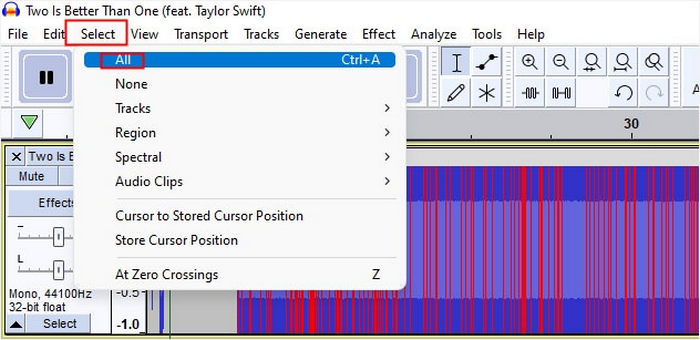
Passaggio 2. Successivamente, vai alla scheda Select e clicca su All per selezionare l’audio che desideri modificare.
Passaggio 3. Ora, per modificare il volume, vai al menu Effect e seleziona l’effetto Amplify or Normalize. Dopodiché regola le impostazioni dell’effetto: da qui puoi aumentare il volume inserendo o modificando il valore in decibel con un numero positivo.
Se hai più tracce audio da gestire e vuoi combinare più file audio, ti basta collocarle nella timeline per ulteriori modifiche.
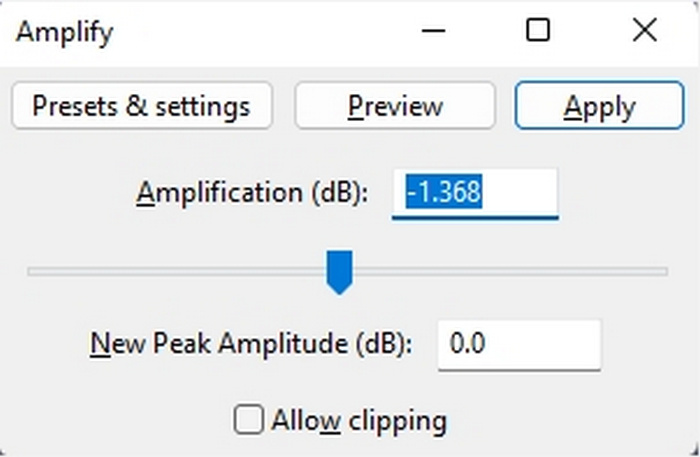
Passaggio 4. Se vuoi sentire le modifiche per verificare se il volume è aumentato, puoi riprodurre l’anteprima e, quando il risultato ti soddisfa, clicca su OK.
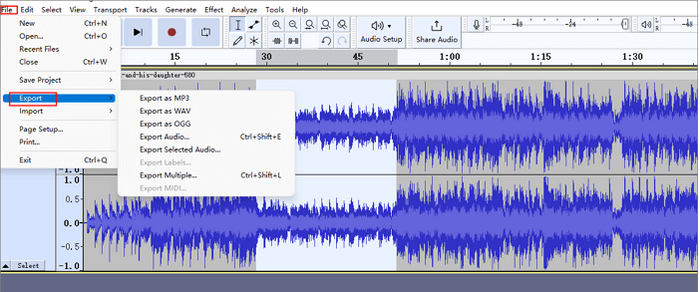
Passaggio 5. Infine, per salvare il file, vai su Export ed esporta il file in formato MP3.
In sintesi, Audacity è una soluzione eccellente e conveniente per aumentare il volume MP3 ed eseguire varie attività di editing audio. Tuttavia, ci sono alcune limitazioni da considerare, come la sua interfaccia che potrebbe imporre delle sfide ai nuovi utenti, specialmente nella navigazione di tutte le funzionalità. Inoltre, non ha alcune funzionalità e capacità avanzate presenti nei software di editing audio professionali. Nonostante ciò, questo strumento rimane uno strumento potente e prezioso per molte esigenze di editing audio.
Parte 4: Aumentare il volume degli MP3 online
MP3Louder è uno strumento online gratuito che consente agli utenti di aumentare il volume degli MP3 direttamente sul web. Offre la possibilità di regolare i livelli del volume dei file MP3, amplificandoli efficacemente per renderli più forti.
Per utilizzare questo strumento, attenersi alla seguente procedura:
Passaggio 1. Nell’interfaccia web di MP3Louder, clicca su Browser per importare il file audio di cui vuoi aumentare il volume.
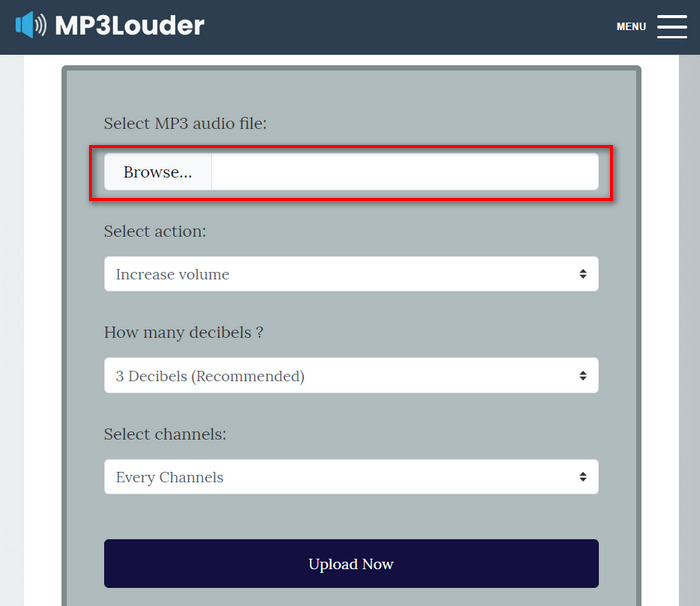
Passaggio 2. Successivamente, scegli Increase Volume nel menu Select Action.
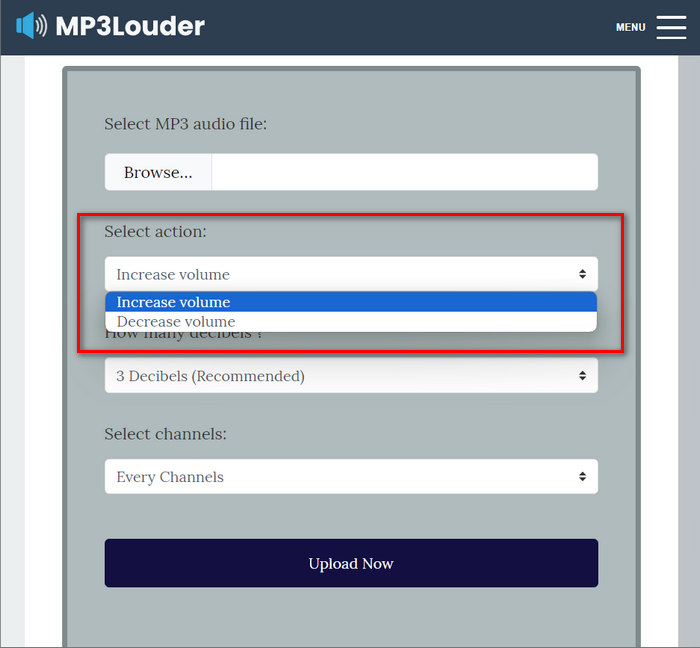
Passaggio 3. Sempre nel menu How Many Decibel, scegli il valore di cui hai bisogno. Puoi selezionare da 1 a 50 decibel.
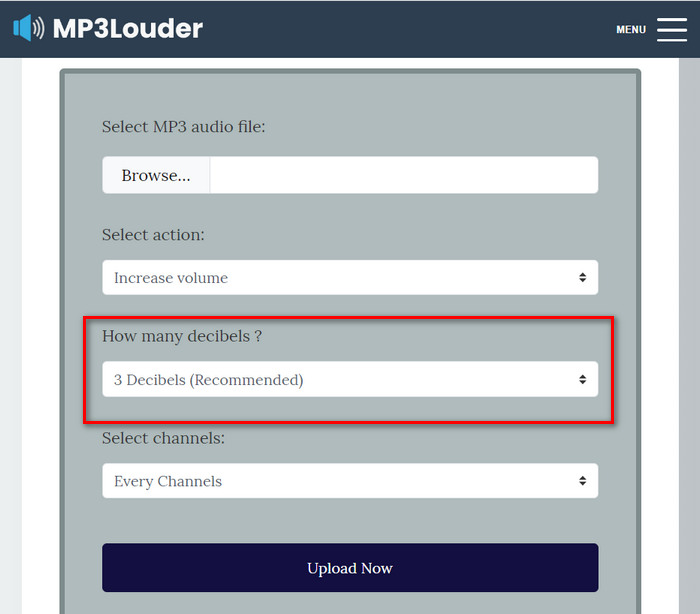
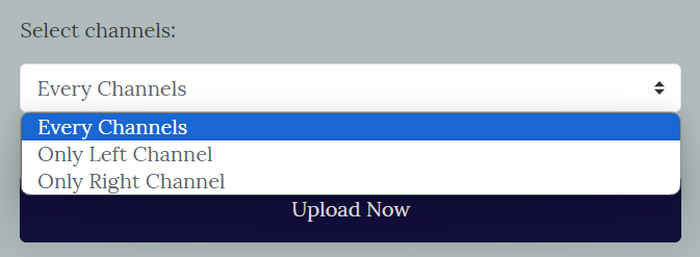
Passaggio 4. Nel menu Select Channel, scegli l’opzione che preferisci. Puoi selezionare Every channel, Left channel o Right channel.
Passaggio 5. Infine, clicca su Upload now per avviare il processo. Al termine, potrai scaricare il file.
MP3Louder emerge come una comoda soluzione online per gli utenti che cercano di aumentare il volume dei loro file audio MP3 senza sforzo. La sua interfaccia semplice consente di importare facilmente file audio e l'opzione di regolare i livelli del volume con incrementi di decibel personalizzabili fornisce flessibilità. Tuttavia, questo strumento potrebbe non avere le funzionalità avanzate e la precisione che si trovano nei software di editing audio professionali. Tuttavia, MP3Louder funge da strumento pratico per aumentare facilmente il volume MP3, specialmente per gli utenti che cercano una soluzione online gratuita e accessibile.
Parte 5: Confronto dei 4 metodi per aumentare il volume MP3
| Amplificatore di volume MP3 | Sistema operativo supportato (SO) | Qualità del suono | Facilità d'uso | Caratteristiche aggiuntive |
| Video Converter Ultimate | Windows e MacOS | Alto | Facile | Impostazioni di output personalizzabili, grazie alle quali gli utenti possono modificare il formato audio, il bitrate e la frequenza di campionamento. |
| Primo professionista | Windows e MacOS | Alto | Moderare | Controllo fader e mixer clip. |
| Audacia | Windows, MacOS e Linux | Alto | Moderare | Riduzione del rumore. |
| MP3Più forte | Basato sul Web | Moderare | Facile | Nessun'altra funzionalità. |
Parte 6: Domande frequenti sull'aumento del volume MP3
Qual è il miglior amplificatore di volume?
Il miglior amplificatore di volume dipende dalle tue esigenze e preferenze specifiche. Uno strumento come Video Converter Ultimate offre vari miglioramenti audio oltre all'aumento del volume. È il migliore per il suo modo diretto di aumentare il volume MP3, la sua compatibilità con vari formati e le sue impostazioni di output personalizzabili.
Posso ottenere il volume 200% su VLC?
Sì. VLC media player consente agli utenti di aumentare il volume fino a 200%. Basta semplicemente regolare il cursore del volume in VLC o utilizzare i controlli del volume sul dispositivo per aumentare il volume.
Qual è il limite del volume di un lettore MP3?
Il limite massimo di volume predefinito su un lettore MP3 è di 85 decibel.
Conclusione
In sintesi, la necessità di aumentare il volume degli MP3 dipende dalle diverse esigenze dell’utente. In ogni caso, esistono vari strumenti e metodi per risolvere questo problema. Che tu cerchi facilità d’uso, compatibilità con diversi formati o impostazioni di output personalizzabili, scegli lo strumento che meglio si adatta alle tue preferenze. Con opzioni come Video Converter Ultimate, Premier Pro, Audacity e MP3Louder a disposizione, trovare la soluzione ideale è questione di un clic. Aumenta subito il volume dei tuoi MP3 e goditi un audio più chiaro e potente.
-
 Guida su come aggiungere copertine di album a MP3 senza sforzo su Breze
 Vuoi sapere come aggiungere le copertine degli album agli MP3? In tal caso, leggi i dettagli completi e un tutorial sulla modifica della copertina dell'album sul tuo file.
-
 5 taglierine MP3 per tagliare facilmente qualsiasi audio [aggiornato al 2025]
 Hai bisogno di un taglierino MP3 per tagliare l'audio? In tal caso, leggi questo articolo perché forniamo gli strumenti su cui fare affidamento per un facile taglio dell'audio.
-
 Tutorial pratico su come convertire i video in formato MP3
 Hai problemi a convertire i video in MP3? Quindi, devi fare affidamento su questo articolo mentre esaminiamo quale convertitore fornisce la migliore conversione.
